
PayPal Reserve: Why Funds Are Held and How to Get Them Back

Last reviewed: November 25, 2026. This guide is based on PayPal’s US account-reserve documentation, its US help centre and the US User Agreement. Reserve terms are set case by case, so the figures below are PayPal’s own examples — not a rate you are guaranteed. For your release date, check the reserve notice and the balance on hold in your PayPal Business account. A rolling reserve releases funds on its own schedule. A minimum reserve can stay in place after a review.
What is a PayPal reserve?
A PayPal reserve is money that PayPal sets aside inside your account to cover potential reversals — chargebacks, claims and bank reversals — if no other money is available. The money is still yours, but you cannot use or withdraw it while the reserve is in place.
A reserve is not a fee. The processing fee on those payments was already charged when the payment was processed. A reserve changes when you can access the money, not how much the transaction cost.
Reserves apply to business accounts. They are placed by PayPal, not requested by the seller, and the terms — the percentage, the amount and the duration — are set for your account specifically.
The types of PayPal reserve
PayPal’s US User Agreement describes two categories of reserve, and says one or both may be applied at the same time. PayPal’s business resource article also describes a third label, the jumpstart reserve, which is money moved out of your available balance straight away.
| Type | How it works | PayPal’s own example |
|---|---|---|
| Rolling reserve | A percentage of each day’s receipts is held, then released on a rolling schedule | 10% held for a 90-day rolling period: money received on day 1 is released on day 91, day 2 on day 92, and so on |
| Minimum reserve | A set amount is kept in reserve — either built up as a percentage until it reaches a target, or taken once (an upfront reserve) | 5% of daily volume held until a balance of $5,000 is reached, or $5,000 taken once from the available balance |
| Jumpstart reserve | Funds are moved from your available balance immediately | $10,000 taken from a $20,000 available balance straight away |
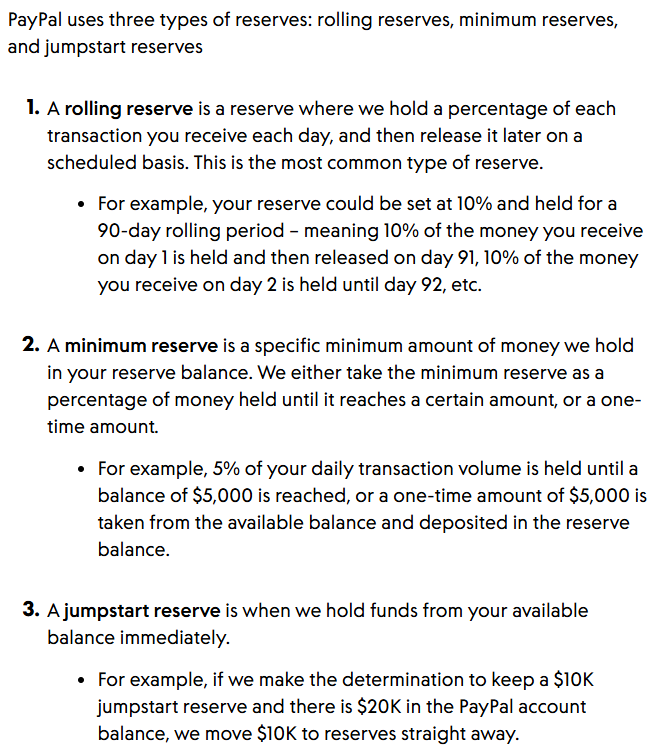
Rolling reserves are the most common type. A minimum reserve is different in nature: it is a floor that must stay available rather than a deduction from each payment.
Why PayPal places a reserve
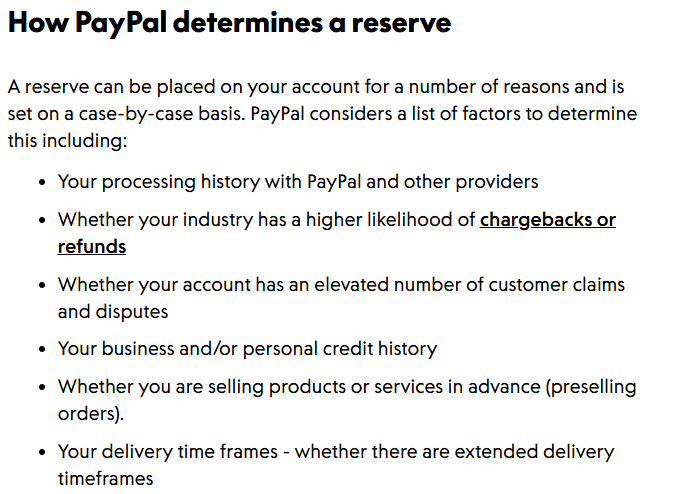
PayPal sets a reserve on a case-by-case basis and lists the factors it considers. From its US documentation:
- Your processing history with PayPal and with other providers
- Whether your industry has a higher likelihood of chargebacks or refunds
- Whether your account has an elevated number of customer claims and disputes
- Your business and/or personal credit history
- Whether you are selling products or services in advance (preselling orders)
- Your delivery timeframes — whether deliveries take longer than usual
The User Agreement adds an important limitation: PayPal’s decision about holds, limitations and reserves may be based on confidential criteria that are essential to its risk management. In practice that means you may not be told the exact reason a reserve was applied, only the terms.
When do you get the money back?
It depends on the type. When a reserve is placed, PayPal sends a communication setting out the terms, and the same terms appear in your account.
- Rolling reserve: funds are released on a rolling schedule. PayPal releases at the time of the original payment — a payment received and held at 9am on day 1 is released at 9am on day 91 in a 90-day reserve.
- Minimum reserve: PayPal reviews it within every 180 days and may adjust or remove it if your business performance improves.
- Jumpstart reserve: governed by the terms shown in your account and the notice you receive.
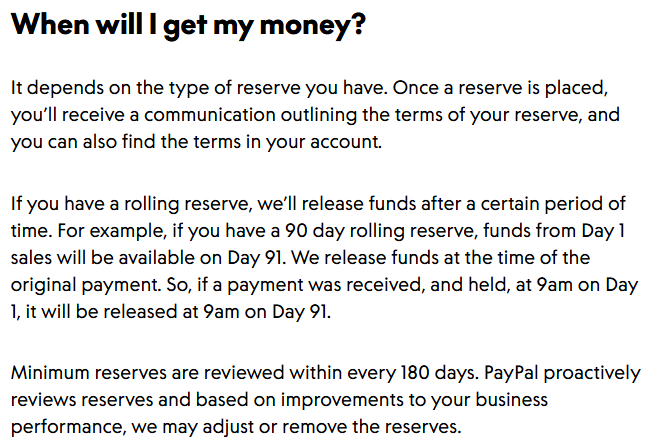
PayPal reviews reserve placement and amounts periodically, within every 180 days. A reserve may be reduced or removed after positive changes in performance, industry risk or claims volume.
One caveat from the User Agreement: where a hold, reserve or limitation is applied because of a court order, legal requirement or other legal process, it may remain in place longer than 180 days.
What a rolling reserve does to your cash flow
A rolling reserve is easy to underestimate because each individual deduction looks small. The effect compounds: every day adds a new slice to the reserve while the oldest slice is only just being released.
Take a seller receiving $1,000 a day on a 10% rolling reserve held for 90 days — the structure PayPal uses as its illustration:
| What happens | Amount |
|---|---|
| Held from each day’s $1,000 | $100 |
| First release | Day 91, returning the $100 held on day 1 |
| Reserve once the schedule is fully running | About $9,000 (90 days × $100) |
In steady state, roughly nine days of receipts are sitting in reserve. That money is yours, but it is not working capital until it is released — which is why a reserve is a cash-flow event as much as a risk-control measure.
The same logic applies at any scale. If your volume is $500 a day at 10%, the reserve levels out at about $4,500; at $5,000 a day it levels out at about $45,000. The percentage sets how hard the reserve bites, and the length of the rolling period sets how much of your money is tied up at once.
How to see your reserve in your account
- Log in to your PayPal Business account.
- Open your balance and look at the amount shown as on hold or in reserve.
- Check how much is in reserve and when PayPal plans to release it.
- For the formal terms, read the notice PayPal sent when the reserve was applied — the account view and the notice should agree.
If you need information about a specific limitation, hold or reserve, PayPal directs you to the Resolution Center or to the instructions in its email notice.
Reserve vs hold vs limitation
These three are often confused, and they behave differently. A reserve is an ongoing arrangement; a hold is usually attached to specific payments; a limitation restricts what the account can do.
| PayPal reserve | Payment hold | Account limitation | |
|---|---|---|---|
| What it affects | A portion of your balance | Specific payments | Account functions |
| Typical trigger | Risk assessment of the account | Order risk, new seller, delayed delivery | Information needed, compliance or security review |
| Can you still sell? | Usually yes | Usually yes | Depends on the restriction |
| When it ends | Per the reserve terms, reviewed within 180 days | When the condition clears | When PayPal’s request is resolved |
For the other two, see our guides to pending versus on hold payments and what to do when a PayPal account is limited.
What to do if a reserve is placed
A reserve is not usually something you can argue away in one message, but the response is the same either way: reduce the risk signals and keep the account in good standing.
- Read the notice and confirm the terms. Check that the percentage, amount and duration in the notice match what you see in your account.
- Respond to any information request. If PayPal asks for business details, supplier invoices or tracking, provide them in the Resolution Center rather than by email.
- Answer open disputes quickly. Open claims and chargebacks are one of the factors PayPal lists. See how a PayPal dispute works.
- Keep delivery evidence. Valid tracking uploaded to PayPal supports Seller Protection and reduces the reversals a reserve exists to cover.
- Plan cash flow around it. Treat reserved money as unavailable. If it creates a shortfall, the withdrawal fee calculator helps you work out what a transfer of the remaining balance actually delivers.
- Avoid a negative balance. If reversals exceed your available funds, the account can go negative — see PayPal negative balance.
How to reduce the chance of a reserve
PayPal is explicit that reserves may be a normal part of the relationship and that preventing one is not always possible. Its own seller best practices are still the practical levers:
- Ship promptly and give customers valid tracking through PayPal, so they know when to expect delivery.
- Communicate early about changes, delays and anything else that affects the order.
- Monitor your buyer complaint rate and try to keep it below 1% of sales.
- Avoid long refund times, which generate complaints.
These reduce the likelihood of a reserve. They do not guarantee one will never be applied, and they do not override a reserve that is already in place.
Can a reserve be removed?
Yes. PayPal states that if your business improves, it may lower or remove your reserve, and it reviews reserve placement and amounts within every 180 days. Improvement is judged on the same factors used to place the reserve: processing history, claims and dispute volume, industry risk and delivery performance.
There is no published form that removes a reserve on request. The practical route is to keep the account clean, resolve disputes, supply tracking, and let the scheduled review happen.
What a reserve does not change
- Your fee rates. A reserve is not a charge. The processing fee on each payment was applied when the payment was processed — see PayPal business fees for sellers.
- Whether the payment was received. The money arrived and belongs to you; only access is delayed. Because the payment was received, a reserve does not by itself reduce gross payment volume for reporting purposes — check your own tax position with a professional, and see our guide to Form 1099-K.
- Protection outcomes. A reserve is a risk control, not a decision on a specific claim. Buyer and seller protection are decided on their own rules — see Buyer Protection and Seller Protection.
Frequently asked questions
Why is my PayPal money in reserve?
PayPal has set aside part of your balance to cover potential chargebacks, claims or bank reversals. It decides case by case, considering your processing history, your industry’s chargeback risk, your claims and dispute volume, your credit history, whether you presell, and your delivery timeframes.
Is a PayPal reserve a fee?
No. The money remains yours and is released according to the reserve terms. The transaction fee was already charged when each payment was processed. A reserve affects access to the money, not the cost of the transaction.
How long does a PayPal reserve last?
It depends on the type and the terms on your account. A rolling reserve releases funds on a rolling schedule — PayPal’s example is a 90-day reserve where day 1 money is released on day 91. Minimum reserves are reviewed within every 180 days. Where a reserve results from a court order or legal requirement, it may remain in place longer than 180 days.
What percentage does PayPal hold in reserve?
There is no single published percentage. PayPal’s documentation uses 10% over a 90-day rolling period and a $5,000 minimum reserve purely as illustrations. The percentage and amount on your account are set for your account and shown in the notice you receive.
Can I withdraw money that is in reserve?
No. Reserved funds cannot be used or withdrawn while the reserve is in place. They are released on the schedule that applies to your reserve, or when PayPal adjusts or removes the reserve.
Does a reserve mean my account is limited?
Not necessarily. A reserve restricts part of your balance; a limitation restricts account functions such as sending, receiving or withdrawing. They can occur together, but they are different actions. See PayPal account limited for the limitation process.
Will a reserve affect my 1099-K?
A reserve does not change the fact that the payments were received, so it does not by itself remove them from gross payment volume. Reporting rules depend on the tax year, the payment type and your own circumstances — confirm with a tax professional rather than relying on this page.
Sources and review
This page was checked on November 25, 2026 against three official PayPal sources:
- PayPal Account Reserves — the three reserve labels, the worked examples, the factors PayPal considers, release timing and the seller best practices.
- What are reserves? — the definition, the deduction order, the upfront reserve and the statement that a reserve may be lowered or removed if the business improves.
- PayPal US User Agreement — the two reserve categories, the confidential-criteria statement, the Resolution Center route and the longer-than-180-days provision for legal process.
Where the sources differ on terminology, this page says so rather than picking one silently: the User Agreement groups reserves into two categories, while PayPal’s business resource article also describes a jumpstart reserve.
PayFeeCalc is an independent guide and calculator website. It is not affiliated with, endorsed by or sponsored by PayPal. Reserve terms are set by PayPal for each account, and the terms in your account and the notice you receive take precedence over this page. This is not financial, tax, accounting or legal advice.