
PayPal Pending vs On Hold describes two different payment problems. A Pending status usually means the transaction has not fully completed, cleared, been accepted, or been captured. On Hold usually means PayPal has temporarily made money unavailable while a review, dispute, security check, or seller-funds process is completed.
Neither label has one universal meaning. A Pending eCheck, an unclaimed payment, a merchant authorization, a pending refund, and a payment under review require different actions. The same applies to seller-payment holds, dispute holds, security holds, and business reserves. Open the transaction in PayPal Activity and read its details before trying to cancel, ship an order, or contact support.
Last verified: October 19, 2026.
PayPal Pending vs On Hold at a glance
| Question | Pending | On Hold |
|---|---|---|
| What does it usually mean? | The payment, authorization, refund, or bank transfer has not finished processing | Money is temporarily unavailable during a review, dispute, security check, or seller-funds process |
| Is the transaction complete? | Often not, but the exact answer depends on the transaction type | The payment may exist, but the funds may not yet be available to use or withdraw |
| Who has the money? | It may still be with the bank, reserved by a card issuer, moving through an eCheck, or awaiting recipient acceptance | PayPal may be restricting access to the funds, or a bank or card issuer may be maintaining an authorization hold |
| Can it be canceled? | Sometimes, when a Cancel option appears or the merchant can void an authorization | Usually not by canceling the status itself; the solution may involve a refund, release, verification, or dispute resolution |
| Should a seller ship? | Not when an incoming eCheck has not cleared or the payment exists only in an email | Only after confirming the genuine transaction in Activity and following the instructions shown for that payment |
| Best next step | Identify the Pending subtype and who controls the next action | Read the hold reason and use the available release, tracking, verification, or Resolution Center option |
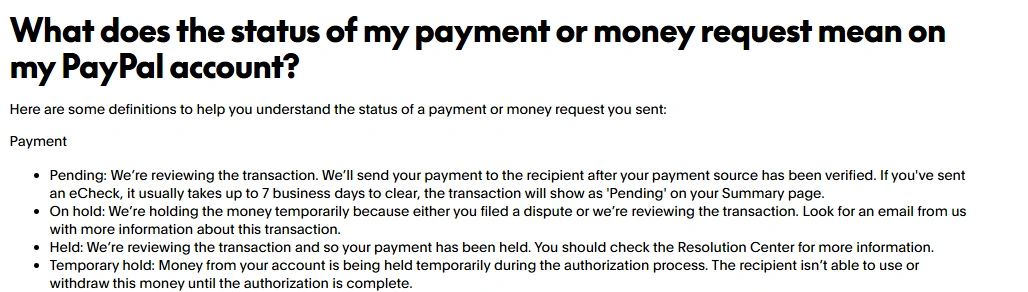
Check the exact transaction before taking action
The status word alone is not enough to diagnose a PayPal payment. Start with the transaction record inside your account rather than an email, buyer screenshot, bank alert, or merchant message.
- Log in directly through PayPal’s website or official app.
- Open Activity and select the transaction.
- Read the payment type, status explanation, expected date, and available actions.
- Look for options such as Cancel, Accept, Confirm receipt, Get your money, Add tracking, or a Resolution Center notice.
- Confirm whether the next action belongs to you, the recipient, the merchant, PayPal, your bank, or your card issuer.
PayPal’s official instructions for checking a payment begin in Activity and the individual transaction details.
What does Pending mean on PayPal?
Pending means that some part of the transaction has not reached its final state. The reason may involve funding, recipient acceptance, merchant capture, a refund, or a PayPal review.
Pending eCheck
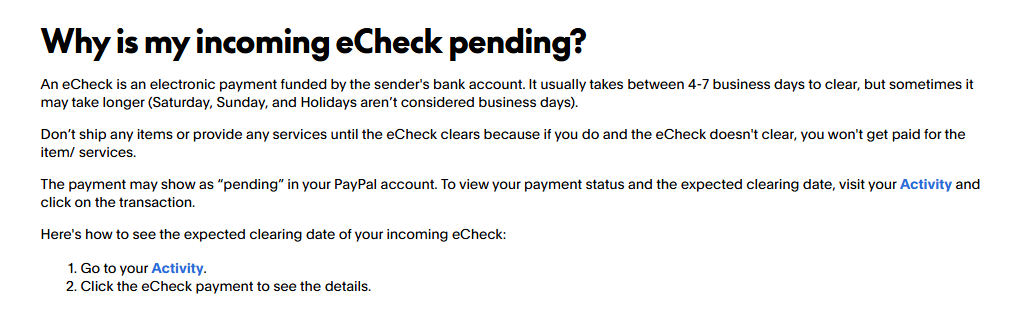
An eCheck is a bank-funded electronic transfer that must clear before the recipient can use the money. PayPal’s current U.S. guidance says an eCheck usually takes 4–7 business days, although it can take longer, and weekends and holidays are not counted as business days.
Recipients should not ship products or provide services until the incoming eCheck clears. PayPal specifically warns that an uncleared eCheck may fail, leaving the seller unpaid. Check the expected clearing date inside Activity and review PayPal’s incoming eCheck guidance.
Pending or unclaimed payment
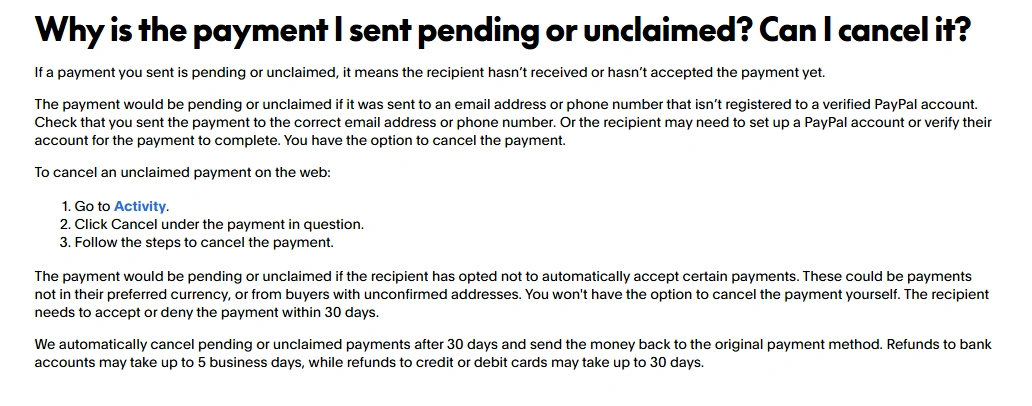
A payment may remain Pending or Unclaimed because it was sent to an email address or phone number that is not connected to a verified PayPal account, or because the recipient must accept the currency or payment manually.
If a Cancel option appears in Activity, the sender can cancel the payment. Some unclaimed payments cannot be canceled by the sender because the recipient must accept or deny them. Under PayPal’s current U.S. guidance, unclaimed payments are automatically canceled after 30 days if they remain unresolved. See PayPal’s instructions for Pending and Unclaimed payments.
Pending order or authorization
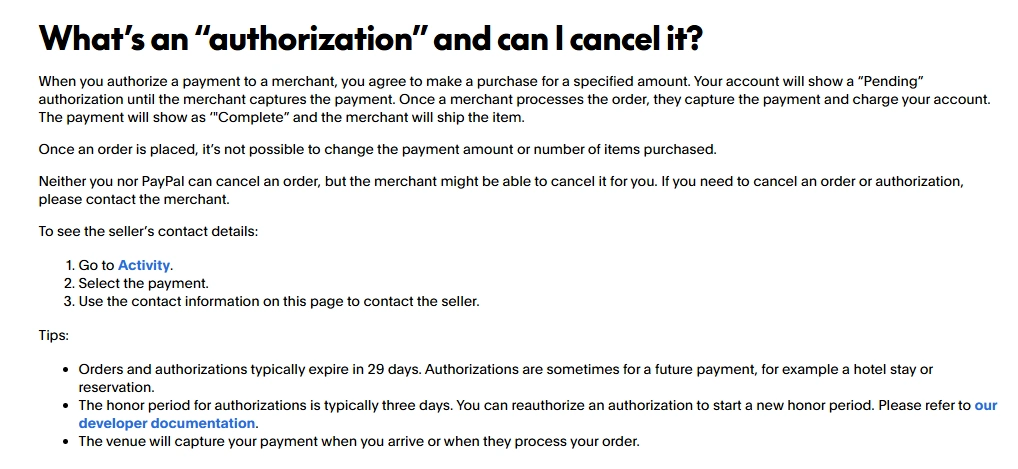
A Pending authorization means the merchant has received permission to charge the payment method but has not yet captured the money. Hotels, rental companies, fuel stations, and online retailers commonly use authorizations.
The buyer and PayPal generally cannot cancel this type of order directly. The merchant may be able to void it. PayPal’s U.S. documentation says authorizations typically expire in 29 days, while an order can display as Pending for up to 30 days before it is completed, voided, or expired. Contact the merchant when you want an authorization canceled. PayPal explains this process in its authorization guidance.
Pending refund
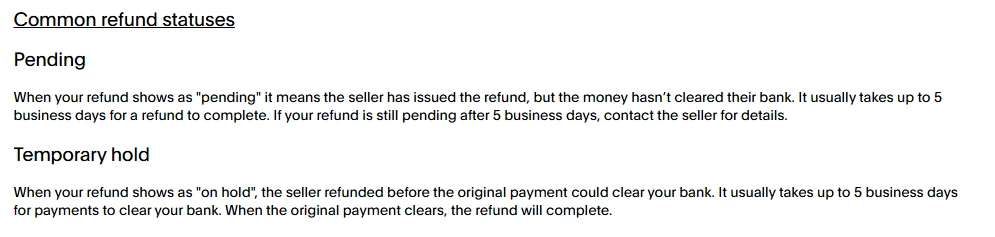
A Pending refund can mean that the seller issued the refund but the money has not cleared the seller’s bank. PayPal’s U.S. Help Center says this usually takes up to five business days. Refund delivery may take longer after PayPal sends it because the buyer’s bank or card issuer also processes the credit.
Open the original payment and use the Refund Tracker when available. If the refund remains Pending beyond the stated clearing period, contact the seller first. PayPal provides payment-method-specific details in its refund status guide.
What does On Hold mean on PayPal?
On Hold means that access to money is temporarily restricted. The hold may affect a seller’s proceeds, money sent by a payer, a disputed amount, a refund, or funds reserved against business risk.
Seller payment on hold
PayPal may hold seller funds when an account is new, selling has recently resumed, activity changes unexpectedly, customers report problems, higher-risk items are sold, or identity verification is incomplete.
A genuine payment can appear in Activity while the proceeds remain unavailable for withdrawal or spending. PayPal’s U.S. guidance says initial payments for new or returning sellers may be held for up to 21 days. The exact reason and possible release steps appear under the balance or transaction details. Review PayPal’s explanation of payments on hold or unavailable.
Security hold on money you sent
PayPal may temporarily hold a payment sent to another person while confirming that the activity is authorized. Its current U.S. Help Center describes a possible 24-hour security hold when, for example, the sender has not sent money recently or is paying someone new.
The sender normally does not need to take action during this review. If no problem is found, the payment completes; if PayPal determines that it was unauthorized, the transaction is reversed. This is different from a seller-funds hold. See PayPal’s page explaining why sent money may be held.

Dispute or claim hold
When a buyer opens a dispute, PayPal may place the disputed amount on hold while the parties communicate or while PayPal reviews a claim. The seller should respond through the Resolution Center and provide the requested transaction, delivery, or fulfilment evidence.
This type of hold is resolved through the case process, not by adding tracking to an unrelated transaction or asking the buyer to send another payment.
Business reserve
A reserve is not the same as one payment being On Hold. PayPal may keep part of a Business account’s funds available to cover potential chargebacks, disputes, or other financial losses. The reserve terms, amount, release schedule, and review process are account-specific.
Business users should read the reserve notice in their account and PayPal’s current reserve guidance rather than applying a standard 21-day seller-hold timeline.
Who has the money while the status is Pending or On Hold?
| Transaction type | Where the money may be | Can the recipient use it? |
|---|---|---|
| Pending eCheck | Moving from the sender’s bank through the clearing process | No, not until it clears |
| Unclaimed payment | Allocated to the payment but not accepted by the recipient | No, until the recipient accepts it |
| Pending merchant authorization | Reserved by the bank, card issuer, or PayPal for possible merchant capture | The merchant has not collected it yet |
| Seller payment On Hold | Recorded in PayPal but temporarily unavailable to the seller | Not until PayPal releases it |
| Disputed payment | The disputed amount is restricted during the case | Not while the hold remains |
| Pending refund | Clearing from the seller or processing through PayPal, the bank, or card issuer | Not until the refund completes |
A bank debit or card authorization does not prove that the recipient can already use the money. The funding source, PayPal transaction, and recipient balance can update at different stages.
Can you cancel a Pending or On Hold PayPal payment?
You can cancel some Pending payments, but you generally cannot cancel a payment simply because it says On Hold. The available action depends on the underlying transaction.
| Situation | Can it be canceled? | What to do |
|---|---|---|
| Unclaimed payment with a Cancel option | Usually yes | Open Activity, select the payment, and choose Cancel |
| Unclaimed payment awaiting recipient acceptance | Not always by the sender | Ask the recipient to accept or deny it; unresolved payments may expire automatically |
| Pending merchant authorization | Not by the buyer or PayPal in most cases | Ask the merchant to void or cancel the order |
| Pending eCheck | Only the sender can cancel it while it is pending | The sender must contact their bank to cancel a pending eCheck. Once it clears, it cannot be canceled; the sender can request a refund. See PayPal’s eCheck cancellation guidance. |
| Completed payment with funds On Hold | Not through a Cancel button | The recipient may issue a refund, or the hold must be released through the applicable process |
| Dispute hold | Not as a normal cancellation | Resolve or respond to the case in the Resolution Center |
| Pending refund | A refund generally cannot be canceled after it is issued | Wait for processing or contact the seller if the expected period passes |
How long can Pending or On Hold last?
There is no single PayPal Pending or On Hold timeline. The following are current examples from PayPal’s U.S. Help Center; other countries, products, banks, and account-specific reviews may use different periods.
| Situation | Current U.S. guidance | Important condition |
|---|---|---|
| eCheck Pending | Usually 4–7 business days | It may take longer; weekends and holidays are not business days |
| Unclaimed payment | Automatically canceled after 30 days if unresolved | The sender may be able to cancel earlier when a Cancel option appears |
| Order or authorization | Orders may remain Pending for up to 30 days; authorizations typically expire in 29 days | The merchant may complete or void the transaction earlier |
| Pending bank-funded refund | Usually up to 5 business days to clear | The bank or card issuer may need additional time after PayPal sends the refund |
| Security hold on sent money | Up to 24 hours in the documented U.S. scenario | The payment may complete or be reversed after review |
| New-seller payment hold | Up to 21 days | Some eligible payments may be released earlier |
| Eligible tracked shipment | Approximately 24 hours after the carrier confirms delivery | Only for qualifying transactions and supported tracking |
| Eligible service or digital item | Seven days after the seller marks the order Completed | PayPal may still hold it for up to 21 days in unusual cases |
These durations are not guarantees. Use the date and explanation shown inside the specific transaction, and consult the PayPal Help Center for your account country.
Should a seller ship when a PayPal payment is Pending?
Do not ship when an incoming eCheck is still Pending or when the supposed payment appears only in an email, message, or screenshot.
- Pending eCheck: Wait until the status shows that it cleared.
- Payment missing from Activity: Do not ship or provide the service.
- Unclaimed payment: Wait until the recipient account accepts the payment and the transaction updates.
- Merchant authorization: The merchant should capture the payment according to the order process before treating it as completed.
- Completed sale with proceeds On Hold: Confirm that the real transaction appears in Activity, read its Seller Protection and fulfilment details, and use only the actions PayPal provides for that payment.
A buyer’s screenshot or an email claiming that tracking will “unlock” money is not proof of payment. Verify the transaction directly inside PayPal Activity.
How can a seller release an eligible payment On Hold?
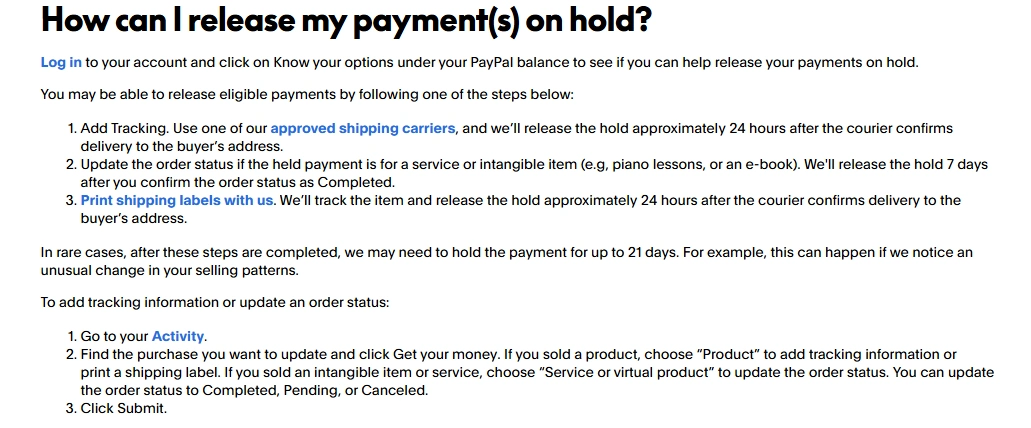
Some seller payments can be released earlier by supplying valid fulfilment information, but not every hold has an early-release option.
- Log in and select Know your options under the PayPal balance, if shown.
- Open the held transaction in Activity.
- Select Get your money when that option is available.
- For a physical product, add accurate tracking from a supported carrier or print an eligible PayPal shipping label.
- For a service or digital product, update the order status to Completed when fulfilment is genuinely complete.
- Complete any requested identity verification or account-limitation steps.
- Respond promptly if the hold relates to a dispute or claim.
PayPal’s current U.S. instructions say eligible tracked payments may be released approximately 24 hours after the carrier confirms delivery, while qualifying services or intangible goods may be released seven days after the seller marks the order Completed. These are conditional processes, not guaranteed release dates. Follow PayPal’s official guide to releasing payments on hold.
A buyer may see a Confirm receipt option for an eligible purchase. PayPal’s current U.S. guidance says the button becomes available 48 hours after the payment date, and confirming receipt makes the payment available to the seller. The option is not available for every transaction, and a seller should not pressure a buyer to confirm before the order is received and checked.
What should the sender or buyer do?
- Open Activity and identify whether the payment is an eCheck, unclaimed transfer, authorization, order, refund, or security review.
- Use the Cancel option only when PayPal displays it for that transaction.
- Confirm that the recipient’s email address or phone number is correct.
- Contact the merchant when a Pending authorization or order needs to be voided.
- Contact the seller when a bank-funded refund remains Pending beyond PayPal’s stated clearing period.
- Contact the bank or card issuer when PayPal shows that a refund or released authorization has already been sent to that institution.
- Use the Resolution Center for eligible purchase problems, unauthorized activity, or an existing dispute.
Check for a fake Pending or On Hold message
Scammers often use fake payment confirmations, invented account-upgrade fees, overpayment stories, and false hold notices to make sellers ship products or send money.
- Log in by typing PayPal’s address yourself or opening the official app.
- Confirm that the transaction appears in Activity.
- Do not click links, download attachments, or call phone numbers inside a suspicious message.
- Do not pay a fee, buy gift cards, refund an alleged overpayment, or send money to “release” an incoming payment.
- Do not ship because a buyer claims tracking is required when no transaction appears in your account.
- Forward suspicious PayPal emails to [email protected] and delete the message.
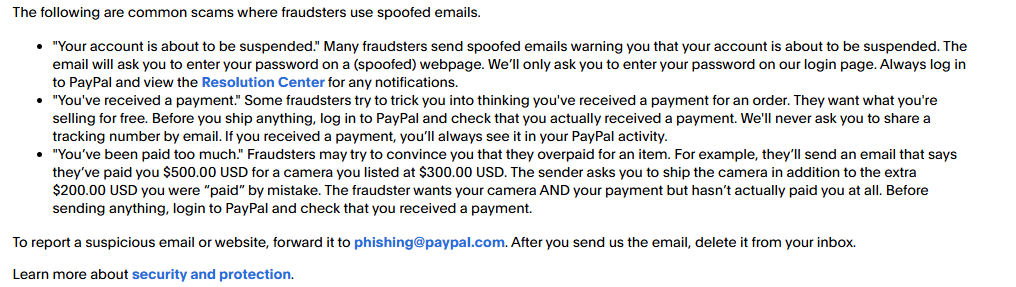
PayPal’s Security Center advises users not to click suspicious links, call listed phone numbers, or open attachments. Review its official instructions for reporting suspicious messages.
When should you contact PayPal, the merchant, or your bank?
| Contact | Use this route when |
|---|---|
| PayPal | The stated timeframe has passed, the account is limited, an action cannot be completed, the transaction details conflict, or fraud is suspected |
| Merchant | A Pending order or authorization needs to be captured, canceled, or voided |
| Recipient | An unclaimed payment requires acceptance, denial, or a refund after completion |
| Seller | A Pending refund has not cleared or a purchase issue may be resolved directly |
| Bank or card issuer | PayPal has already released or sent the funds, but the authorization or refund still appears at the financial institution |
| Resolution Center | A purchase was not received, was significantly different, appears unauthorized, or already has an open dispute or claim |
Use PayPal’s logged-in Help Center, Message Center, or Resolution Center. Avoid unverified support numbers found in emails, invoice notes, comments, or search advertisements.
Frequently asked questions
Does Pending mean a PayPal payment went through?
Not necessarily. Pending can mean the payment is still clearing, awaiting recipient acceptance, waiting for merchant capture, being reviewed, or processing as a refund. Open the transaction to identify the exact subtype.
Does On Hold mean the recipient received the money?
Sometimes the payment exists in the recipient’s account but is temporarily unavailable. In other cases, such as a security hold on sent money or a temporary authorization hold, the transaction has not reached normal completion. The transaction details provide the controlling explanation.
Why is my payment Pending after the money left my bank?
The bank debit can occur before PayPal finishes clearing, reviewing, or delivering the payment. An eCheck, bank-funded transaction, or authorization may therefore remain Pending even though your available bank balance has changed.
Can PayPal Support release every hold manually?
No. Some holds require delivery confirmation, a completed service period, identity verification, a dispute decision, a security review, or an account-specific reserve process. Support cannot guarantee that every hold can be bypassed.
Will adding tracking release my PayPal money immediately?
Not always. Eligible U.S. payments may be released approximately 24 hours after an approved carrier confirms delivery, but eligibility, carrier support, account review, and transaction risk can affect the result.
What if the payment is not visible in PayPal Activity?
Do not ship, provide a service, pay a release fee, or rely on the sender’s screenshot. Log in directly, verify the recipient email address, and report suspicious messages through PayPal’s official Security Center.
Sources checked
- PayPal Payment and Money Request Status Guide
- PayPal Pending and Unclaimed Payment Guidance
- PayPal eCheck Clearing Guidance
- PayPal Authorization and Cancellation Guidance
- PayPal Refund Status and Processing Guide
- PayPal Payment Hold and Availability Guidance
- PayPal Guidance for Releasing Eligible Held Payments
- PayPal Security Center: Report Suspicious Messages