
A PayPal eCheck is a payment funded from the sender’s bank account that must clear before PayPal pays the recipient. It is not a paper check or an instant payment. PayPal’s U.S. User Agreement distinguishes this process from bank-funded payments where PayPal pays the recipient before collecting the money from the bank.
According to PayPal’s U.S. eCheck clearing guidance, a payment usually takes 4–7 business days, although it can take longer. Open the transaction in Activity to check its expected clearing date. If you are receiving payment for an order, do not ship or provide the service before the eCheck clears, as PayPal warns in its incoming eCheck instructions.
The operational rules below use U.S. PayPal documentation as the reference. Check your local guidance for account-specific differences; PayPal also uses the spelling eCheque in the United Kingdom.
Last verified: October 20, 2026.
How does a PayPal eCheck work?
The payment moves from the sender’s linked bank account through PayPal to the recipient’s PayPal account. The important difference is that PayPal waits for the bank-funded transaction to process rather than paying the recipient in advance.
This explains why two payments funded from a bank account can behave differently. PayPal’s payment-method terms describe both advance-funded bank payments and eChecks. Selecting a bank account does not, by itself, mean every payment will become an eCheck.
In U.S. banking, electronic checks generally use the Automated Clearing House, or ACH, network to move funds electronically. However, PayPal’s general electronic-check overview is broader than the specific eCheck status in your account. Use the PayPal payment’s own instructions for its timing and next steps.
An eCheck payment is also separate from PayPal’s Cash a Check feature, which involves photographing a physical check. You do not need to upload a check image to complete a bank-funded PayPal eCheck.
Why was your payment sent as an eCheck?
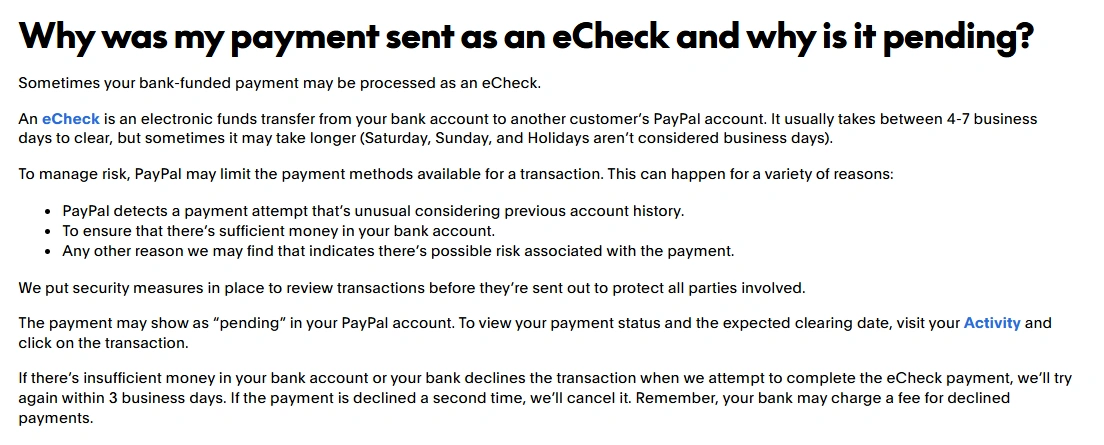
PayPal may restrict the payment methods available for a transaction as part of its risk checks. Its explanation of unexpected eCheck payments identifies unusual payment activity, checking whether sufficient bank funds are available, and other payment-related risks.
The label does not prove that your bank balance is too low or that you did anything wrong. It also does not establish that a missing backup card is the cause. Read the transaction details rather than assuming one explanation applies to every account.
How long does a PayPal eCheck take to clear?
The normal clearing range is an estimate, not a guaranteed completion date. PayPal’s outgoing eCheck guidance excludes Saturdays, Sundays, and holidays from business days and acknowledges that some payments take longer.
For example, do not count Saturday and Sunday as two processing days when planning around a Friday payment. A holiday can extend the calendar wait further. Use the expected date shown for your transaction rather than calculating a firm delivery promise from the day you clicked Send.
Why is it still pending after the money left your bank?
A debit showing in your bank account is not the same as PayPal confirming that the recipient has been paid. Under the eCheck payment terms, payment to the recipient depends on the bank transaction being processed. Check both records before treating the payment as complete.
What should you do when the expected date passes?
Reopen the transaction and check for an updated estimate, a decline, or a request for action. If the explanation remains unclear, contact PayPal through its official support channels. Have the transaction ID, amount, payment date, and expected clearing date ready. The sender should also ask their bank about any declined debit shown there.
How to check the payment and choose your next step
Start inside PayPal, not with the other person’s screenshot. PayPal’s payment-status instructions direct you to Activity, where you can search for a transaction or filter the results.
- Sign in directly through PayPal’s website or official app and open Activity.
- Select the relevant payment and read the transaction details, rather than relying only on the word Pending.
- Check whether it is identified as an eCheck, note the expected clearing date, and read any instructions attached to that payment.
PayPal uses Pending for more than one situation, including eChecks and other payments awaiting processing. Its payment-status guide explains why the underlying transaction matters more than the label alone.
If you sent the eCheck
Keep the payment amount available in the linked bank account and check for bank-decline notices. Tell the recipient that the transaction is still clearing rather than presenting it as completed. Do not send another payment simply because the first one has not finished; establish what happened to the original transaction first.
An unexpected funding method is different from an unauthorized payment. If you genuinely did not authorize the transaction, follow PayPal’s unauthorized-activity reporting instructions promptly instead of waiting for normal clearing.
If you received the eCheck
Keep the order awaiting payment until the eCheck clears. PayPal’s recipient guidance warns that delivering first can leave you unpaid if the bank-funded payment fails. Apply that caution to physical shipments, digital products, and services.
Once it clears, check the transaction for any remaining instructions. Seller Protection is conditional: PayPal’s protection requirements include relevant delivery evidence, timely responses, and, for physical goods, shipping to the address shown in the transaction. Clearance is not a guarantee against every later claim or reversal.
Is an eCheck the same as a payment on hold?
No. An uncleared eCheck concerns the bank-funded payment process. A seller-payment hold concerns restrictions on access to money, potentially because of account history, selling activity, or verification. PayPal describes those separately in its payment-hold guidance.
Do not assume instructions for releasing seller funds will accelerate bank clearing. Adding tracking or marking an order complete is not a substitute for waiting for an incoming eCheck to clear. Identify the actual restriction before attempting to resolve it.
Can you cancel a PayPal eCheck?
PayPal’s U.S. eCheck guidance directs the sender to contact their bank to cancel a pending eCheck. Its eCheck-specific cancellation page says that only the sender can cancel it this way. Once the payment has cleared, cancellation is no longer available; the sender can request a refund.
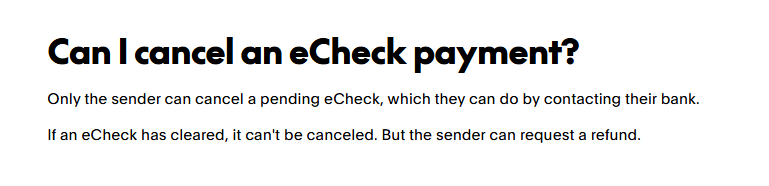
Contact the bank promptly and ask whether the debit can still be stopped, what charges may apply, and how to confirm the result. Do not assume that asking a seller to cancel an order automatically stops the bank payment.
The Cancel button described in PayPal’s unclaimed-payment instructions applies to particular unclaimed transactions. It is not a universal cancellation method for every payment marked Pending.
Unlinking the bank account is not a reliable workaround either. PayPal’s payment-method authorization terms state that unlinking does not remove its authority to process a transaction already authorized.
What happens if the eCheck fails?
A bank decline does not necessarily mean the transaction has been canceled immediately. PayPal’s U.S. eCheck guidance describes retrying a declined bank payment and warns that the bank may charge a fee. Insufficient funds are one possible reason for a decline.
The sender should check with the bank and monitor PayPal for the final outcome. The recipient should leave the order unfulfilled while payment remains unresolved. Arrange a replacement only after confirming whether the original payment was canceled, failed permanently, or completed; otherwise, both payments could eventually reach the recipient.
What are the PayPal eCheck fees?
There is no single fee that describes every sender, recipient, country, and transaction. Separate the cost of making a payment from the cost of receiving a commercial payment.
For buyers: PayPal’s U.S. consumer fee schedule says paying for a purchase has no PayPal fee when no currency conversion is involved. Personal transfers follow their own domestic or international rules, so that purchase rule should not be generalized to every transfer.
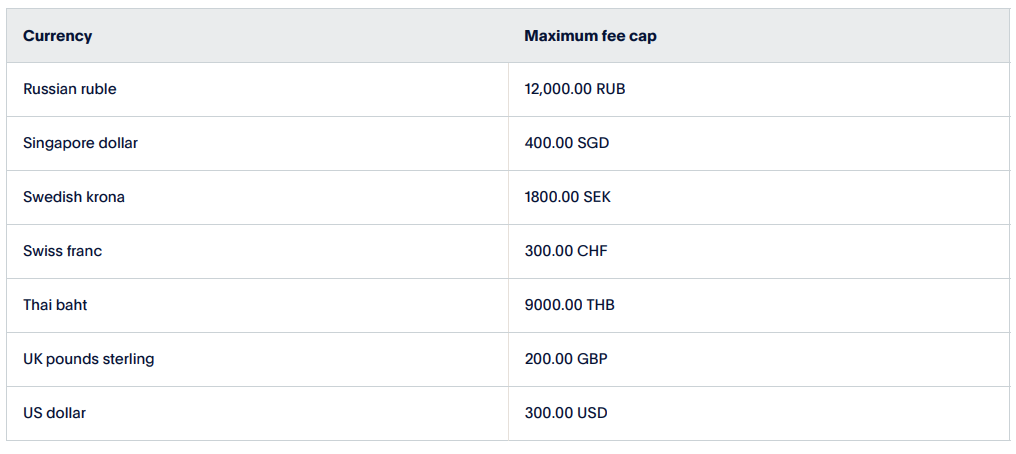
For sellers: the U.S. merchant fee schedule includes a dedicated E-check Fees section. It applies the agreed commercial receiving fee, subject to a currency-specific maximum. For payments received in USD, the listed cap is $300. That is a maximum receiving fee under the stated rules—not a flat charge or a maximum payment amount.
Do not substitute a Pay by Bank or ACH Services rate for an eCheck-funded payment without confirming the product. Those appear as separate pricing categories. Check the applicable receiving rate, currency conversion, and any bank charges before describing an eCheck as free or cheaper.
Can you speed up an eCheck or avoid one next time?
Do not plan around an expedited option for an eCheck already processing. PayPal’s published instructions focus on clearing and checking the expected date. Its payment-method guidance also says you cannot change the funding method after sending a payment, even when it remains pending.
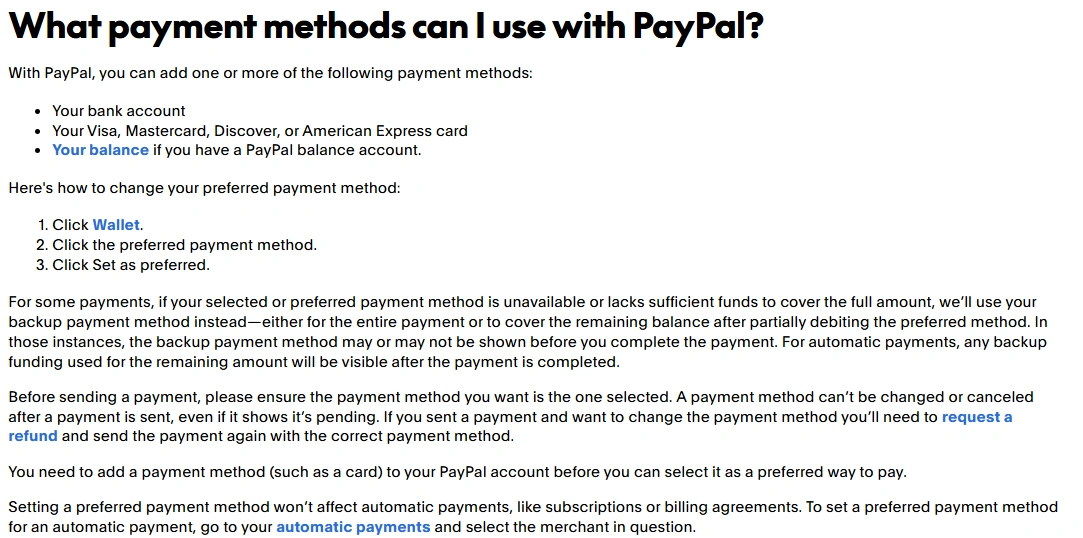
For future payments, review the funding method before confirming and select an eligible alternative when PayPal offers one. A linked card or available PayPal balance may provide a different payment choice, but available options can vary. Adding a card does not guarantee that PayPal will offer it for every transaction.
To set a card as your usual preference, open Wallet, select the card, and choose Set as preferred. PayPal’s preferred-card instructions note that this does not change existing automatic-payment settings. Review subscriptions separately rather than assuming the new preference applies to them.
How can you recognize a fake eCheck notification?
Check two things separately: whether the transaction exists and whether it has cleared. PayPal’s marketplace safety guidance says even pending or held payments are visible in Activity. A genuine-looking email or buyer screenshot is not enough.
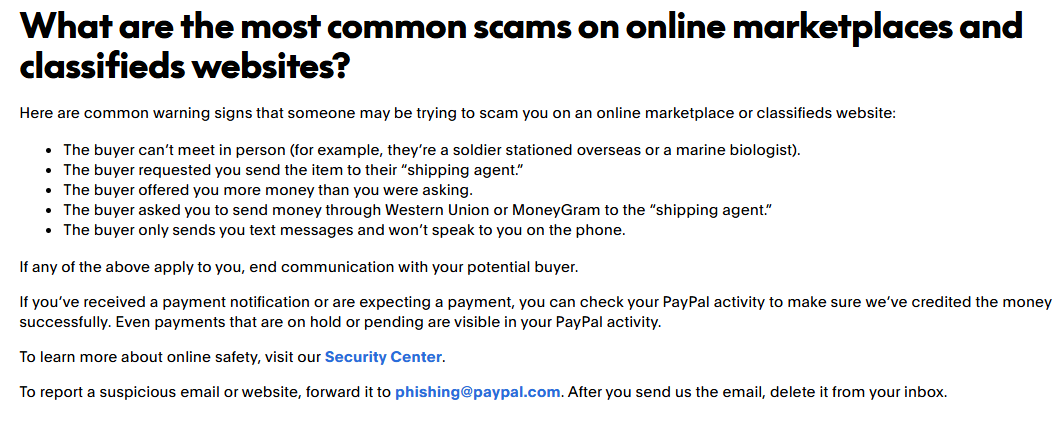
Do not pay a supposed release fee, buy gift cards, share banking credentials, or send a separate payment to return an alleged overpayment. PayPal’s scam guidance warns about advance-fee requests and overpayment schemes, including cases where a payment later proves unauthorized.
Open PayPal directly rather than following a suspicious message. Use official support channels and forward suspicious PayPal emails to [email protected]. Do not use a phone number supplied in an alarming email or invoice note.
Why is an eCheck refund still pending?
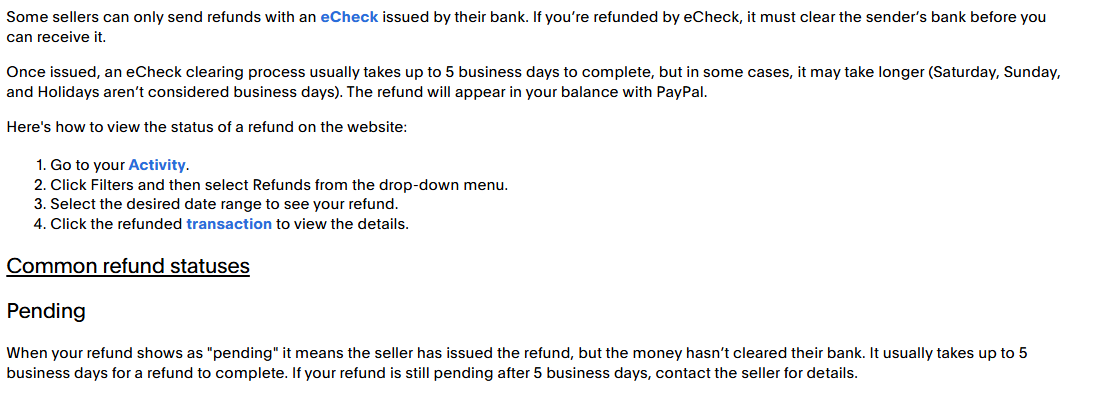
A refund funded by the seller’s eCheck must clear the seller’s bank before you receive it. PayPal’s U.S. refund guide gives a refund-specific estimate of up to five business days, sometimes longer, and says an eCheck-funded refund appears in your PayPal balance.
That estimate describes a refund, not the ordinary outgoing-payment timeline explained earlier. Open the refunded transaction in Activity to see its details. PayPal advises contacting the seller when a refund remains Pending after five business days.
Sources checked
Core references include PayPal’s U.S. User Agreement, eCheck processing guidance, recipient instructions, cancellation guidance, and merchant fee schedule. Additional official sources are linked beside the relevant explanations.