
Yes, PayPal is generally a reasonably safe way to pay, send, and receive money when you secure your account and use the correct payment type. It uses data encryption, secure TLS/HTTPS connections, fraud monitoring, passkeys, and two-step verification. However, those controls cannot prove that a seller, buyer, or payment request is legitimate, and PayPal does not guarantee reimbursement for every scam or disputed transaction.
Your actual risk depends on what you are doing, who is on the other side of the transaction, how the payment is classified, which funding method you use, and whether the transaction qualifies for protection.
International note: PayPal features, personal-payment options, protection programs, dispute deadlines, privacy rights, and arrangements for balances vary by country. This guide explains broadly applicable principles and clearly labels U.S.-specific examples. Always check the legal agreements for the country registered on your account.
| Situation | Practical safety assessment |
|---|---|
| Paying an established merchant | Generally reasonable when you use the genuine PayPal checkout and review the merchant, amount, currency, and funding source. |
| Buying from an unfamiliar seller | Use the applicable purchase or Goods and Services payment type, preserve evidence, and check protection eligibility before paying. |
| Sending a personal payment | The payment connection may be secure, but personal payments are not a safe substitute for a protected purchase payment. |
| Receiving money from a stranger | Verify the transaction and its status inside your own PayPal account before delivering anything or sending a refund. |
| Keeping money in PayPal | Do not assume the balance has the same legal or deposit protection as money in a bank account. The answer depends on the country and account setup. |
Last verified: October 23, 2026.
How PayPal protects accounts and payments
PayPal documents several technical and operational safeguards on its security technology page.
- Data encryption: PayPal says it encrypts digital information and transaction data.
- Secure connections: PayPal uses TLS and HTTPS to transfer sensitive information to an authentic PayPal server.
- Key pinning: Its mobile security controls help devices establish a TLS connection with a verified PayPal server.
- Fraud monitoring: PayPal says its fraud-detection technology monitors activity continuously to help identify suspicious transactions.
- Security standards: PayPal states that it follows PCI-DSS requirements and undergoes reviews under relevant industry programs and controls.
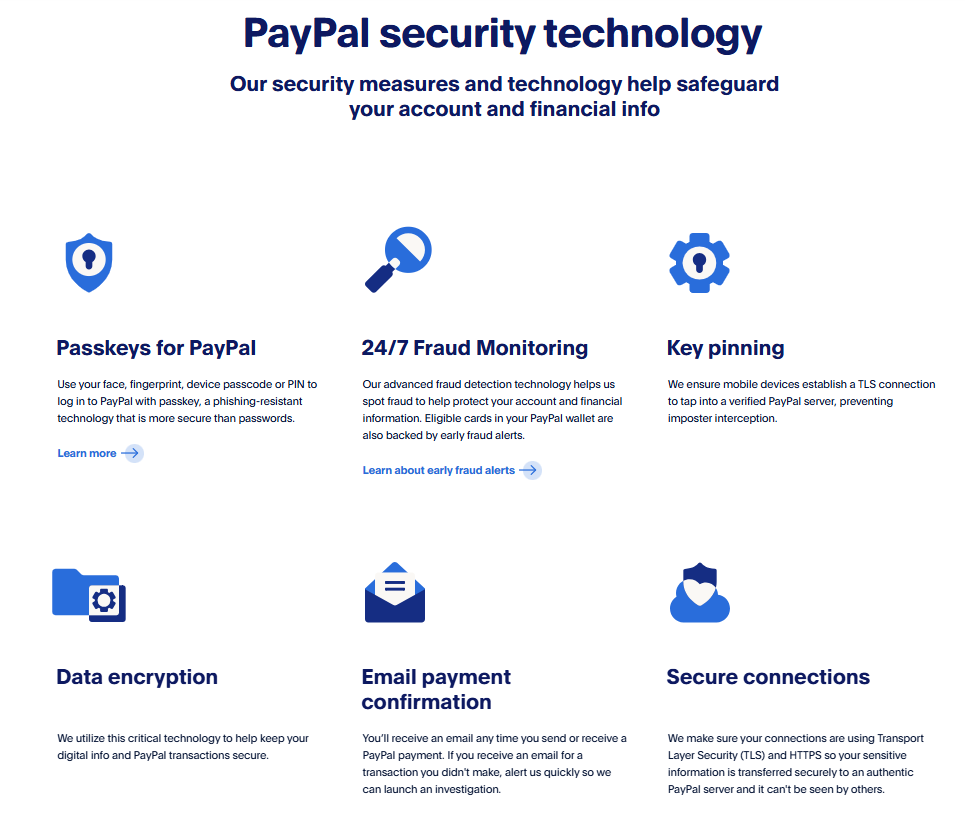
PayPal also supports passkeys for eligible accounts and devices. A passkey lets you sign in using the face, fingerprint, PIN, or password used to unlock your device. PayPal states that biometric data used by the device is not shared with PayPal and does not leave the device.
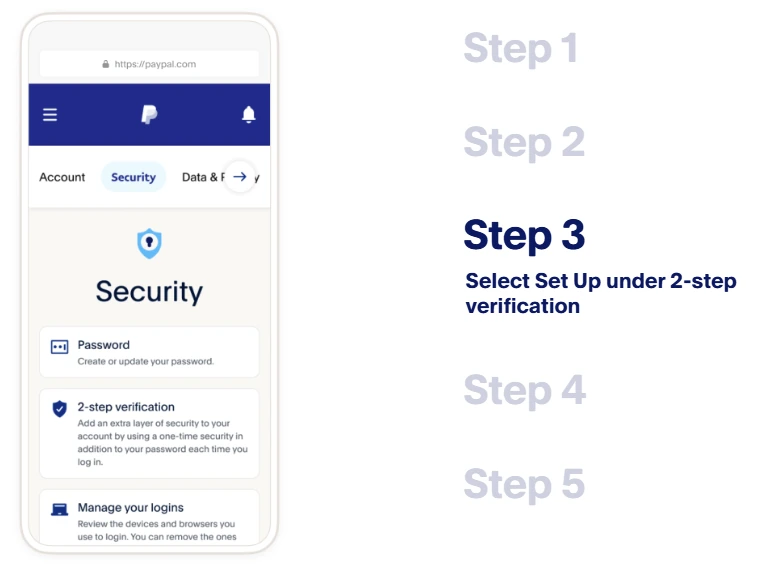
You can also enable two-step verification to require an additional login code. Where available, a passkey or authenticator app can reduce the risk created by a stolen or reused password.
What these safeguards cannot guarantee
Secure payment processing is not the same as a guaranteed safe transaction. PayPal’s technology cannot independently guarantee that:
- An unfamiliar seller will deliver what was promised.
- A buyer is using legitimately obtained funds.
- A payment request or invoice represents a real debt.
- An email or screenshot proves that usable funds have arrived.
- A transaction qualifies for Purchase Protection or Seller Protection.
- A payment you authorize after being deceived will be refunded.
- Your email account, phone, browser, or computer is free from compromise.
No payment service is unhackable. Strong platform controls reduce risk, but users still need to protect their login, verify counterparties, and choose the correct transaction type.
Fraud and scams are not the same
This distinction is essential when deciding whether PayPal will protect a loss.
- Unauthorized fraud generally means someone accessed your account or used a payment method without your permission.
- A scam can mean that you personally authorized the payment because a criminal deceived you about the recipient, product, investment, emergency, or reason for paying.
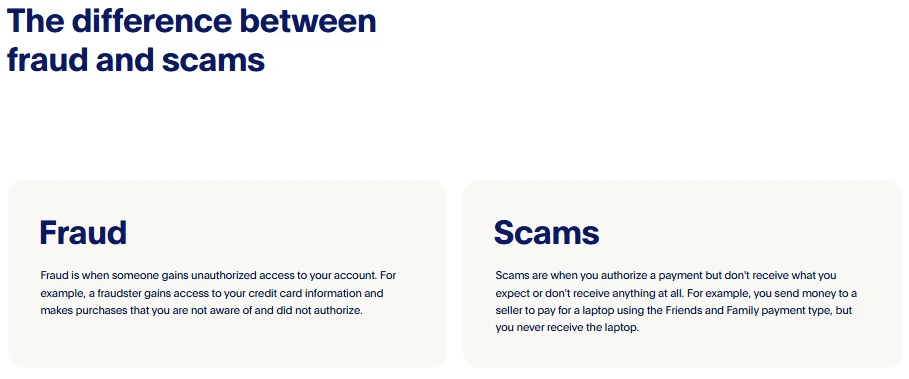
PayPal makes this distinction in its official fraud and scam guidance. It matters because unauthorized activity, a purchase that never arrives, and a payment you voluntarily sent to a scammer may require different reporting routes and have different protection rules.
Does PayPal refund money if you are scammed? Not automatically. An eligible purchase may qualify for protection if it meets the applicable terms, while a personal payment or another excluded transaction may not. Never falsely report a payment you authorized as an unauthorized transaction. Describe what happened accurately so the correct type of case can be assessed.
Is PayPal safe for buyers?
PayPal can be a useful safety layer for buyers, but the protection depends on the transaction. Paying through PayPal does not make every seller trustworthy or every purchase refundable.
Use the correct payment type
Use the purchase or Goods and Services option when paying for an item or service, where that option is available. Personal payments, including Friends and Family payments, are intended for genuine transfers between people who know and trust each other.
Do not use Friends and Family for a purchase because a seller promises a discount or says it is required. Under the current U.S. Purchase Protection terms, personal payments are ineligible for Purchase Protection.
Purchase Protection has conditions and exclusions
For eligible U.S. transactions, PayPal’s Purchase Protection program may cover two main types of problem:
- Item Not Received: the purchased item was not delivered.
- Significantly Not as Described: the item was materially different from the seller’s description.
Protection is not automatic merely because a payment was labeled Goods and Services. Eligibility can depend on the item, delivery method, payment type, evidence, timing, and compliance with PayPal’s requests.
Current U.S. exclusions include personal payments and various categories such as real estate, most vehicles, cash-equivalent items, financial products, investments, donations, and certain in-person or collected purchases. Return shipping may also be the buyer’s responsibility when PayPal requires a return.
Deadlines matter. Under the current U.S. terms, an Item Not Received dispute generally must be opened within 180 days of payment. A Significantly Not as Described dispute must generally be opened within 30 days of delivery or 180 days from payment, whichever is sooner. A dispute that is not resolved must generally be escalated to a claim within 20 days after it is opened. These are U.S. rules; check your local terms rather than assuming the same deadlines apply elsewhere.
Is PayPal safer than paying directly by card?
There is no universal answer. Using a PayPal account at checkout can reduce the number of merchants where you directly enter your funding details. However, the merchant still receives information needed to process and fulfill the transaction, and PayPal adds another account that must be protected.
A card issuer may provide separate dispute or chargeback rights. PayPal’s U.S. Purchase Protection terms explicitly state that applicable card chargeback rights may be broader than PayPal’s own protection. The rights available to you depend on the card, issuer, country, transaction, and applicable law.
For a higher-risk purchase, compare the merchant’s reputation, PayPal eligibility, and your card issuer’s dispute rights before paying. Do not assume that using PayPal and a card guarantees two refunds for the same transaction.
Is PayPal safe for sellers and people receiving money?
Receiving money through PayPal can be reasonably safe when you verify the transaction inside your own account and follow the applicable Seller Protection requirements. The greatest practical mistake is treating an email, screenshot, invoice, or message from the payer as proof that payment is complete.
- Open PayPal directly. Use the official app or type the address yourself instead of following a link from the buyer.
- Check Activity or Transaction Details. Confirm that the payment exists and review whether it is completed, pending, held, reversed, or subject to another restriction.
- Check protection eligibility. Do not assume that every commercial payment is covered.
- Use the address in the transaction. For an eligible physical sale, follow the applicable shipping-address and tracking requirements.
- Preserve evidence. Keep the listing, messages, invoice, tracking, proof of delivery, and records showing that digital goods or services were provided.
- Refund through the original transaction. Do not send a new payment to return an alleged overpayment unless you have independently confirmed what happened and the correct official process.
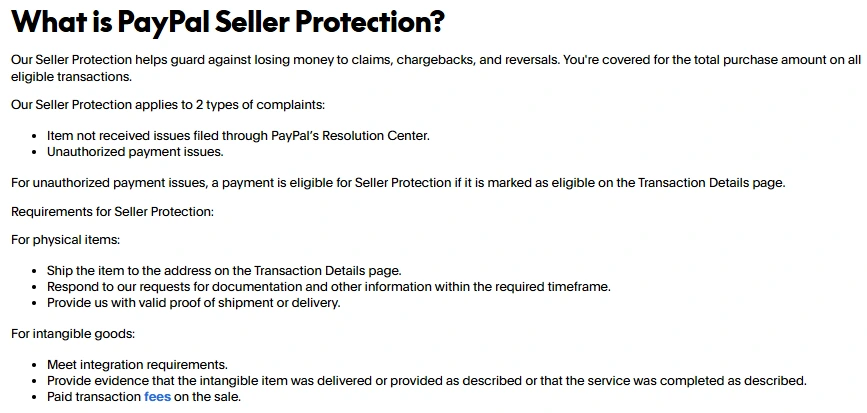
Under the current U.S. Seller Protection terms, eligible protection may apply to certain unauthorized-transaction and Item Not Received complaints. Requirements can include a qualifying transaction, timely responses, shipping to the address in Transaction Details, and valid proof of shipment or delivery.
Seller Protection does not cover every dispute. The U.S. program excludes Significantly Not as Described claims and Item Not Received chargebacks filed directly with a card issuer, among other excluded items and transactions.
Never pay an “account upgrade,” “release,” “verification,” or “insurance” fee to receive a payment. Do not hand over an item merely because the buyer shows you a payment screenshot. A money request or invoice is also not proof that the other person has paid you.
Is it safe to link a bank account, debit card, or credit card?
Linking a supported payment method is a normal part of using PayPal, but no funding source is risk-free. A compromised PayPal account could potentially be used to initiate transactions against available linked methods, subject to PayPal’s controls and the method’s own authorization rules.
| Funding method | Important safety tradeoff |
|---|---|
| Bank account | Payments can affect money held directly in the account. Review PayPal’s authorization terms and the electronic-transfer protections available in your country. |
| Debit card | A disputed transaction can temporarily affect money needed for everyday expenses because the card draws from a deposit account. Issuer protections and refund timing vary. |
| Credit card | The payment generally uses a credit line rather than immediately removing deposit funds, and separate card-dispute rights may exist. Those rights vary by country, issuer, and the role PayPal plays in the transaction. |
PayPal’s U.S. User Agreement specifically tells users to review the different rights and remedies available under U.S. electronic-fund-transfer and credit-billing laws before linking a bank account. That comparison cannot be generalized to every country.
Whichever source you use, review automatic payments and backup funding methods. A general preferred payment method may not replace the funding source assigned to an existing subscription, and PayPal may use an eligible backup method under the authorization you previously gave.
PayPal security is not the same as PayPal privacy
PayPal is not an anonymous payment service. Its current U.S. Privacy Statement describes the collection of categories including identity and contact details, bank and card information, transaction and purchase history, device and network information, location data, browsing activity, and inferred information. Certain biometric information may also be processed with consent for specific authentication or account actions.
Information visible to another user depends on the transaction and account settings. The U.S. statement says that information disclosed to help complete transactions may include a username, profile image, name, email address, city, or phone number. Merchants and their service providers may also receive contact, address, and transaction information needed to process and deliver a purchase.
Business profiles can expose additional public-facing information. Review the Data and Privacy, profile, and PayPal.Me settings available in your account, and avoid placing sensitive information in a public profile or transaction note.
Once information is shared with a merchant or another participating company, that party’s own privacy policy may govern its subsequent handling. Using PayPal can change how payment credentials are processed, but it does not make a purchase private or prevent all transaction-related data sharing.
Is it safe to keep money in PayPal?
Do not automatically treat a PayPal balance as equivalent to a deposit at a bank. The legal structure and protections depend on your country, product, and account configuration.
For U.S. accounts, the current User Agreement states that PayPal is not a bank, does not take deposits, and is not itself FDIC-insured. It also states that some U.S. dollar Balance funds may be placed at participating Program Banks and become eligible for pass-through FDIC insurance when specified conditions are met, such as certain PayPal Debit Card, Direct Deposit, or cryptocurrency-related account activity.
That coverage is conditional. The agreement states that FDIC insurance protects against the failure of a Program Bank, not the failure of PayPal. Other balance funds may represent unsecured claims against PayPal and may not qualify for pass-through insurance.
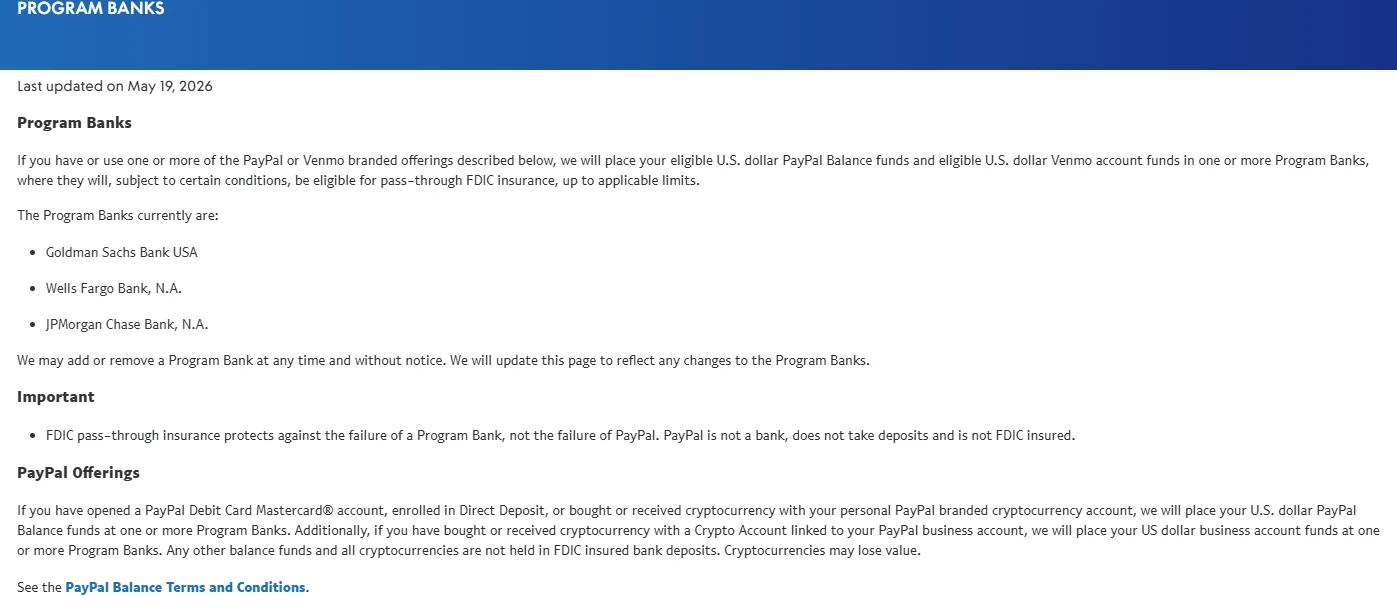
Outside the United States, do not apply FDIC terminology. Check the local user agreement for safeguarding, deposit protection, insolvency treatment, and withdrawal rules.
Account limitations, payment holds, reserves, investigations, and withdrawal reviews can also delay access to funds even when no theft has occurred. Consider keeping only the amount needed for your expected PayPal activity unless you have reviewed and accepted the protections that apply to your balance.
Common PayPal scams and the safest response
| Red flag | Safer response |
|---|---|
| An unexpected invoice contains a phone number and warns of an urgent charge | Do not call the number. Open PayPal directly, inspect Activity, and ignore or report an unrecognized request. |
| A message says your account will be closed unless you use its link | Do not click. Type PayPal’s address yourself or open the official app to check the account. |
| A “support agent” requests a password, one-time code, remote access, software installation, or test payment | End the conversation. Contact PayPal only through its official Help Center. |
| A seller asks you to use Friends and Family for a purchase | Decline and use the appropriate purchase payment type or another method with suitable protection. |
| A buyer claims to have overpaid and asks you to send the difference elsewhere | Verify the transaction in your account. Do not send a separate refund to another person or payment method. |
| An email says you must pay a fee or provide tracking before money appears | Do not pay. Confirm the transaction and any legitimate hold directly inside PayPal. |
PayPal’s fake-message guidance warns that HTTPS and a padlock symbol do not prove a website is legitimate because fraudulent sites can also use encrypted connections.
If an email or text appears to impersonate PayPal, do not click its links, call its listed numbers, or open attachments. PayPal’s current reporting instructions say to forward the message to [email protected] and then delete it.
Has PayPal had security incidents?
Yes. PayPal, like other large financial and technology platforms, has experienced security and privacy incidents. They should be evaluated by date, affected product, cause, and scope rather than used to claim that every PayPal account is either unsafe or immune from compromise.
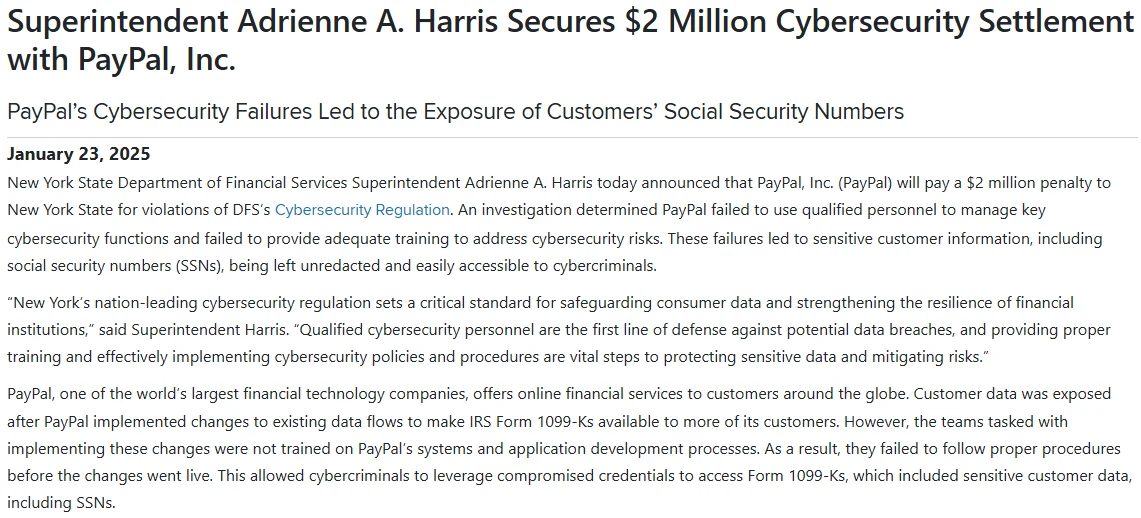
In January 2025, New York’s Department of Financial Services announced a $2 million penalty over cybersecurity failures connected to an incident that occurred in 2022. According to Reuters’ report on the order, attackers used credential stuffing to access tax-form information after a change to PayPal’s data flows. The 2025 regulatory announcement should not be misrepresented as a new breach occurring in 2025.
In its February 10, 2026 customer notice filed with Massachusetts, PayPal described a coding error in its PayPal Working Capital loan application. The notice says information from a small number of customers was exposed to unauthorized individuals from July 1 to December 13, 2025. PayPal identified the issue on December 12 and rolled back the code change. The notice does not specify a total customer count.
These incidents show why absolute claims such as “PayPal cannot be hacked” are inaccurate. They also show why a limited product incident, phishing campaign, credential list, or old regulatory case should not automatically be described as an ongoing breach of all PayPal accounts.
How to use PayPal more safely
- Use a unique password. Do not reuse the password from your email, bank, shopping, or social-media accounts.
- Use a reputable password manager to generate and store unique credentials.
- Create a passkey on an eligible personal device, or enable two-step verification with an authenticator app where available.
- Secure the connected email account. An attacker who controls your email may be able to intercept alerts or attempt password recovery.
- Never share a password, PIN, passkey approval, or one-time code. A legitimate support representative should not ask you for those credentials.
- Open PayPal directly. Do not use a message link to resolve an unexpected account warning.
- Verify the recipient and payment purpose before confirming a transfer.
- Use a purchase payment type for purchases. Do not misclassify a purchase as a personal transfer to avoid a fee.
- Check Activity rather than trusting a message. This is especially important before shipping goods, handing over an item, or sending a refund.
- Review automatic payments and linked methods periodically and remove arrangements you no longer use.
- Enable account and funding-source alerts where available, and review bank and card statements for unfamiliar activity.
- Keep devices, browsers, and the PayPal app updated and avoid signing in on an untrusted device.
- Preserve transaction evidence and check dispute deadlines as soon as a purchase problem appears.
What to do if your PayPal account may be compromised
- Open PayPal through the official app or a manually entered address. Do not continue through the suspicious message.
- Review Activity and automatic payments. Confirm that an unfamiliar charge was not a subscription or another legitimate payment you previously authorized.
- Report unauthorized activity immediately. Use PayPal’s official Resolution Center instructions and choose the transaction you did not authorize.
- Change the PayPal password if it may be known to someone else, and secure the connected email account with a new unique password.
- Add or review stronger login protection. Create a passkey or enable two-step verification, and remove an unrecognized passkey if the account offers that control.
- Review linked cards, banks, and recurring agreements. Contact the relevant bank or card issuer promptly if its account information or funds may also be at risk.
- Report phishing and check the device. Forward the suspicious message to PayPal, delete it, and run an updated security scan if you opened an attachment, installed software, or entered credentials on another site.
- Preserve evidence. Keep copies of messages, transaction details, URLs, and other records. Follow the identity-theft procedure applicable to your country if sensitive identity information was exposed.
If you authorized a payment because of a scam, report the facts accurately and use the dispute or support route appropriate to that transaction. Do not classify it as unauthorized merely because you later discovered the deception.
Final verdict: Is PayPal safe?
PayPal is generally safe enough for ordinary payments when the account is strongly secured, the counterparty is checked, and the correct payment type is used. Its encryption, secure connections, monitoring, passkeys, and two-step verification reduce important technical risks. Purchase and Seller Protection can also help in eligible cases.
It is not completely safe. PayPal cannot prevent every phishing attack, dishonest seller, fraudulent buyer, authorized scam payment, device compromise, payment reversal, account limitation, or excluded transaction. Protection is conditional, privacy is not anonymity, and a PayPal balance does not automatically receive the same protection as a bank deposit.
The safest approach is to treat PayPal as a payment tool rather than proof that a transaction is trustworthy: protect the login, verify activity inside the account, use purchase payments for purchases, preserve evidence, understand local protection rules, and act immediately when something looks wrong.