
Published: November 8, 2026. Last updated: November 22, 2026.
If you notice a payment you did not make or authorize, report it to PayPal immediately. Sign in to your account, open the PayPal Resolution Center, select Report a problem, choose the suspicious transaction, and select I want to report unauthorized activity. Follow the instructions to submit your report.
PayPal will investigate the reported activity and send an email within 10 days. The time needed to complete an investigation or return money can vary. You should also secure your account and contact your bank or card issuer if its funds or payment details may have been compromised.
This guide explains how to report an unauthorized PayPal transaction using the website or app, what to do if you cannot find the payment or access your account, and how PayPal handles reports and possible refunds.
The instructions and financial protections discussed here are based on PayPal’s U.S. Help Center and User Agreement, last updated November 4, 2026. Rules for accounts registered outside the United States may differ.
How to report an unauthorized PayPal transaction on the website
PayPal’s Resolution Center lets account holders report payments they believe were made without their permission. The process is available for eligible transactions associated with U.S. Personal and Business accounts.
- Sign in to PayPal. Open PayPal’s official website directly in your browser.
- Open the Resolution Center. Visit paypal.com/disputes while signed in.
- Click Report a problem. This opens the process for reporting an issue with a transaction.
- Select the suspicious payment. Choose the transaction you did not authorize and click Continue.
- Choose the unauthorized activity reason. Select I want to report unauthorized activity.
- Submit your report. Follow the remaining instructions and provide the information PayPal requests about the transaction.
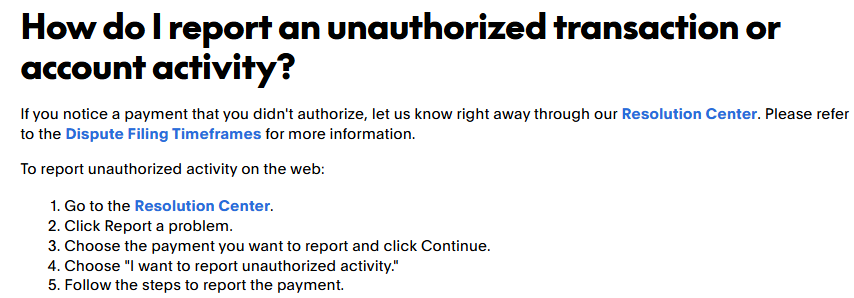
After submitting your report, check your email and the Resolution Center for updates. PayPal may request additional information as part of its investigation.
These steps follow PayPal’s official unauthorized transaction reporting instructions.
If you received a suspicious email or text about the payment, do not use its links or telephone numbers to access your account. Open PayPal independently through its official website or app.
How to report unauthorized PayPal activity on the mobile app
You can also report suspicious transactions through the PayPal mobile app when the reporting option is available for the payment.
- Open the official PayPal app and sign in.
- Tap Activity to review your transactions.
- Select the payment you believe was unauthorized.
- Tap Report a Problem, if that option appears.
- Select the unauthorized activity reason and follow the prompts to submit your report.
Available app options can vary by transaction and app version. If you cannot find the reporting option, open the Resolution Center in your phone’s browser and follow the website procedure.
Do not delay reporting a genuinely suspicious transaction simply because an expected button is missing from the mobile app.
What should you do immediately after discovering unauthorized activity?
Reporting the payment is the first step toward resolving a PayPal unauthorized transaction. If someone may have accessed your account, taking additional security measures can help prevent further activity.
- Report the suspicious transaction promptly. Use PayPal’s Resolution Center rather than relying on a message sent by an unknown person.
- Change your PayPal password. Create a strong, unique password that you do not use on other websites.
- Secure your email account. Change its password if you suspect unauthorized access, since email can be used for password resets and account notifications.
- Enable two-step verification. Add another layer of protection to your PayPal account.
- Review linked payment methods. Check for unfamiliar cards or bank accounts and report suspicious changes to PayPal.
- Check account details. Review your email address, phone number, and recent transactions for changes you did not authorize.
- Contact affected financial institutions. If your debit card, credit card, or bank account may be compromised, notify the institution’s fraud department.
PayPal’s account security guidance recommends changing compromised credentials immediately and never sharing passwords or authentication codes with anyone claiming to represent support.
How to enable PayPal two-step verification
Two-step verification requires another authentication step when signing in, making unauthorized account access more difficult.
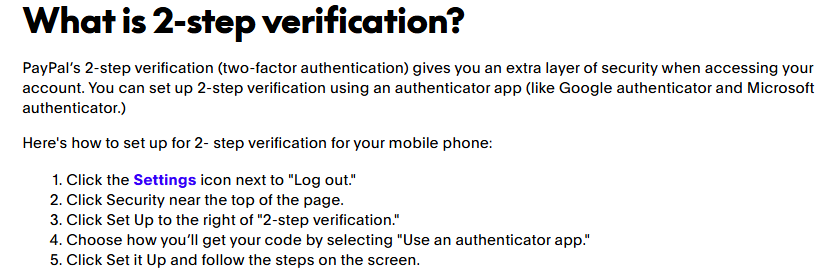
- Sign in to PayPal using a web browser.
- Open Settings and select Security.
- Find 2-step verification and select Set Up.
- Choose an available verification method, such as an authenticator app.
- Follow the instructions to complete the setup.
See PayPal’s two-step verification instructions for further information. Never disclose one-time login codes to someone contacting you unexpectedly.
Is the PayPal transaction unauthorized or simply unfamiliar?
Not every unfamiliar charge is an unauthorized transaction. A payment may be legitimate even when the merchant name, billing description, or payment date is not immediately recognizable.
PayPal’s U.S. User Agreement generally defines an Unauthorized Transaction as money sent from your PayPal account without your authorization and without benefiting you.
The correct reporting method depends on what actually happened.
| Situation | Appropriate action |
|---|---|
| A payment was made from your PayPal account without your permission. | Report unauthorized activity through the Resolution Center immediately. |
| An unfamiliar charge comes from a subscription you previously authorized. | Review the automatic payment agreement and contact the merchant about billing or refunds. |
| You paid for an item that never arrived. | Use the appropriate purchase dispute process, not an unauthorized transaction report solely because delivery failed. |
| You were charged twice for the same purchase. | Report a billing error or duplicate charge using the relevant dispute option. |
| You received a suspicious invoice but have not paid it. | Do not pay it; report the suspicious invoice or money request. |
| You deliberately sent money after being deceived by a scammer. | Report the fraud and ask PayPal about applicable options; an authorized payment may not meet the Unauthorized Transaction definition. |
PayPal’s dispute guidance distinguishes unauthorized account activity from purchase disputes and billing errors. Choosing the reason that accurately describes the problem helps route the case correctly.
How to check automatic payments and subscriptions
If the charge appears unfamiliar but may belong to a recurring service, review your automatic payment agreements.
- Sign in to PayPal and open Settings.
- Select Payments.
- Open Subscriptions and saved businesses or Automatic Payments.
- Select the merchant associated with the charge.
- Review the payment agreement and the available options for managing it.
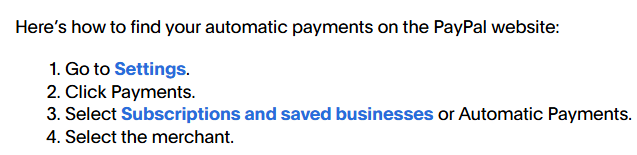
You can cancel an automatic payment agreement from the relevant merchant’s settings when that option is available. Canceling the agreement prevents applicable future payments but does not automatically reverse charges already completed.
If a completed subscription payment was authorized but you want a refund, contact the merchant and use the appropriate billing or purchase dispute process when necessary.
If you confirm that a payment was genuinely unauthorized, report it promptly rather than waiting for the merchant to investigate.
What if the unauthorized charge is missing from PayPal Activity?
Sometimes a bank or card statement contains a PayPal-related charge that does not appear in the user’s PayPal transaction history.
One possible explanation is guest checkout. This happens when PayPal processes a card payment for a merchant even though the buyer was not signed in to a PayPal account.
A missing transaction can also involve a different PayPal account, an authorized merchant agreement, or unauthorized use of payment card details outside your usual PayPal account.
If you see an unfamiliar PayPal charge on your bank or card statement:
- Check your PayPal Activity and search for the amount and approximate transaction date.
- Review any other PayPal account you legitimately own and check whether the payment was made through guest checkout.
- If you cannot identify the payment, contact PayPal customer support through its official website.
- Notify your bank or card issuer promptly if you believe your payment details were used without permission.
PayPal explains guest transactions in its missing transaction guidance.
Keep the charge amount, statement date, and merchant description available when contacting support. Do not share your full card number, password, or one-time login codes through unsolicited messages.
What if your PayPal account was hacked and you cannot log in?
If you suspect someone changed your password or account contact information, you may be unable to access the Resolution Center normally.
In that situation, contact PayPal using a verified support channel as soon as possible. The official PayPal Contact Us page provides help for login problems and unauthorized account access.
PayPal’s U.S. User Agreement also lists (888) 221-1161 for reporting suspected unauthorized transfers or compromised login information.
If you still control the email address associated with your account, you may be able to use PayPal’s official password recovery process. Secure the email account as well, especially if you suspect someone accessed both accounts.
Do not use account recovery websites or telephone numbers supplied through suspicious emails, search advertisements, or unsolicited messages. Obtain support information from PayPal’s official website.
How long do you have to report an unauthorized PayPal transaction?
Report suspected unauthorized activity as soon as you discover it. PayPal’s U.S. User Agreement instructs customers to notify PayPal immediately when they believe someone has transferred funds from their account without permission.
The agreement also includes important 60-day statement notification provisions.
If your PayPal statement shows transfers you did not make and you fail to report them within 60 days after PayPal provided the statement, you may be responsible for additional losses occurring after that period if PayPal can establish that timely notice would have prevented those losses.
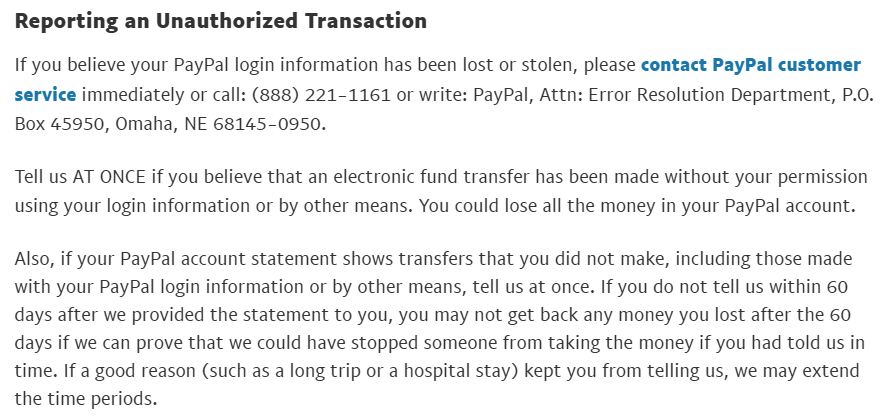
The agreement allows extensions in certain circumstances when a valid reason prevented timely notification.
The error-resolution provisions separately state that PayPal generally must receive notice of a statement or transfer error within 60 days after sending the first statement showing that error.
These rules should not be confused with the 180-day window for certain Item Not Received purchase disputes. That purchase-related deadline does not replace the requirement to report unauthorized transfers promptly.
For certain unauthorized or excessive debits made using a U.S. PayPal Business account’s assigned account and routing numbers, the agreement contains a shorter notification cutoff: 8:00 p.m. Pacific Time on the business day following the business day when the debit posts.
Review the PayPal U.S. User Agreement for the specific rules applicable to your account and transaction.
What happens after you report unauthorized activity to PayPal?
After you submit an unauthorized transaction report, PayPal reviews the available account and payment information to determine what happened and whether the transaction qualifies as unauthorized activity under the applicable rules.
PayPal’s Help Center states that you will receive an email within 10 days after filing an unauthorized transaction report. This does not mean every case is guaranteed to be resolved or refunded within 10 days.
How long does PayPal take to investigate?
Under the error-resolution provisions of PayPal’s U.S. User Agreement, PayPal generally determines whether an error occurred within 10 business days after receiving the report.
If PayPal needs additional time, the agreement permits an investigation lasting up to 45 days for applicable cases. For certain errors involving new accounts, point-of-sale transactions, or foreign-initiated transactions, the investigation period may extend to 90 days.
When PayPal extends an investigation under these provisions, it generally provides provisional credit within 10 business days so that the funds are available during the review, subject to the agreement’s conditions. For certain new accounts, the provisional-credit period may be up to 20 business days.
PayPal may require a written report after receiving an oral complaint. Failure to provide that written report within the applicable 10-business-day period can affect provisional credit.
PayPal states that it will communicate the results of an applicable error investigation within three business days of completion. If it concludes that no error occurred, it will provide a written explanation, and the customer may request copies of the documents used in the investigation.
These are contractual error-resolution procedures, not a promise that every unauthorized activity report follows the same timeline or results in reimbursement.
Will PayPal refund an unauthorized transaction?
PayPal’s U.S. User Agreement provides protection against qualifying unauthorized transactions. When that protection applies and the account holder cooperates with PayPal and follows the required reporting procedures, PayPal states that it covers the full amount of the unauthorized activity.
However, reporting a transaction does not guarantee that PayPal will classify it as unauthorized. The decision depends on the circumstances, the applicable agreement, and the information gathered during the investigation.
A transaction the account holder knowingly authorized, even after being deceived by a scammer, may be evaluated differently from a payment made by someone who gained access to the account without permission.
How to check the status of your unauthorized transaction report
You can monitor reported transactions and related cases through PayPal’s Resolution Center.
- Sign in to PayPal and open the Resolution Center.
- Find the relevant case among your open cases.
- Open the case to review available updates and information requests.
- If PayPal has completed its review, check Closed Cases and select the case ID for more details.
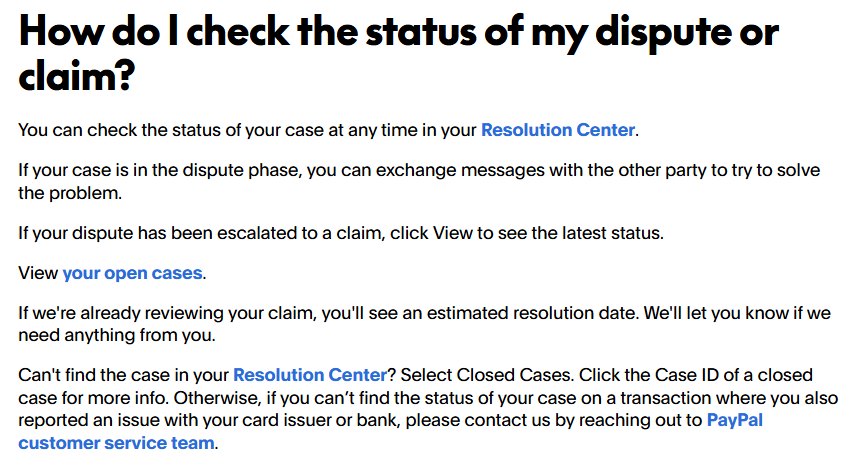
When PayPal is reviewing a claim, the case may display an estimated resolution date. PayPal will notify you if additional information is needed.
If the case is missing from the Resolution Center, particularly when the same transaction was also reported to a bank or card issuer, contact PayPal support to clarify its status.
See PayPal’s instructions for checking dispute and claim status.
What if PayPal denies your unauthorized transaction claim?
If PayPal determines that the reported payment was authorized or that the claim does not qualify under its protection rules, review the explanation before deciding what to do next.
PayPal states that claim decisions are generally final, although an appeal may be considered when new information is available.
For buyers wishing to discuss an unfavorable claim outcome, PayPal directs them to customer support.
You can take the following steps:
- Open the closed case in the Resolution Center and review PayPal’s explanation.
- Check whether the transaction was categorized as unauthorized activity, a billing issue, or a purchase dispute.
- Collect any new information relevant to the transaction, such as evidence of account compromise or previously unavailable payment details.
- Contact PayPal customer support to discuss the decision and available review options.
- If a bank account or card funded the disputed payment, ask the financial institution about its applicable dispute procedures and deadlines.
PayPal’s claim appeal guidance explains that merely disagreeing with a decision, without new information, is generally insufficient for an appeal.
Contacting PayPal or a financial institution does not guarantee that the case will be reopened or that the payment will be refunded.
What if the unauthorized payment involved your bank or credit card?
If a suspicious PayPal transaction used money from a linked bank account or credit card, contact the relevant financial institution’s fraud department when appropriate. It may need to protect the payment method, investigate unauthorized use, or issue a replacement card.
PayPal explains that reporting an unauthorized activity or billing error to a bank or card issuer does not automatically count as notifying PayPal about the error.
PayPal allows customers who have already filed with their financial institution to contact PayPal about an unauthorized activity or billing error. If a transaction was funded partly from a PayPal balance and partly through a financial institution, a separate PayPal report may be necessary for the balance-funded portion.
This is different from certain Purchase Protection disputes. PayPal states that customers who pursue a purchase-related dispute with their card issuer cannot subsequently pursue the same purchase dispute or claim through PayPal.
For details, see PayPal’s guidance on reporting an error after contacting a financial institution.
Unauthorized charges on PayPal-branded cards
The correct reporting procedure can differ when the suspicious charge is associated with a specific PayPal credit or debit card product rather than an ordinary payment made from your PayPal account.
- PayPal Personal or Business account: Report unauthorized account transactions through PayPal’s Resolution Center.
- PayPal Credit: Contact the PayPal Credit customer service team using the fraud reporting information provided by PayPal.
- PayPal Debit Card: If the card is lost or stolen, you can lock it through the PayPal app and report the loss using the available card management options.
- PayPal Cashback Mastercard or Business Debit Mastercard: Use the applicable card-specific fraud reporting channel.
PayPal maintains the relevant contact details on its official fraud and unauthorized activity reporting page.
How to report a fake PayPal email or fraudulent invoice
Not every suspicious PayPal message represents an actual withdrawal from your account. Fraudsters may send fake payment confirmations, account security warnings, invoices, or money requests to trick recipients into sharing information or sending money.
A fraudulent invoice may contain a telephone number claiming to be PayPal support. The message may warn that an expensive payment is about to be processed unless you call immediately.
Receiving an invoice or money request does not, by itself, mean you have paid it.
To report suspicious messages:
- Do not click links, open attachments, or call telephone numbers in the suspicious message.
- Forward suspicious emails to [email protected].
- Forward suspicious text messages to the same PayPal phishing address using your phone’s forwarding options.
- Sign in to the real PayPal website or app to check whether the invoice or payment appears in your account.
- Report unwanted invoices or money requests through the available PayPal reporting options without paying them.
If you discover that money was actually sent from your account without authorization, report the completed transaction through the Resolution Center as well.
PayPal provides additional instructions for reporting phishing messages and avoiding fraudulent invoices and money requests.
Frequently asked questions
Can PayPal reverse an unauthorized transaction?
PayPal provides protection for qualifying unauthorized activity under its U.S. User Agreement. If an investigation determines that the transaction qualifies and the reporting requirements have been met, PayPal may reverse the unauthorized payment or reimburse the account holder. Not every reported transaction is automatically approved.
How long does PayPal take to refund unauthorized activity?
PayPal states that it will email customers within 10 days after an unauthorized transaction is reported. Applicable error-resolution investigations may take longer, including up to 45 days in some cases and up to 90 days for certain exceptions. Provisional credit may apply under the User Agreement, but final reimbursement depends on the outcome and applicable protections.
Can I report an unauthorized PayPal transaction after 60 days?
You should report suspected unauthorized activity immediately, even if you discovered it late. PayPal’s U.S. agreement includes 60-day statement notification provisions that can affect liability and error-resolution rights. The consequences depend on when the statement was provided, the nature of the loss, and the applicable conditions. Contact PayPal rather than assuming that an older transaction cannot be reported.
What if someone used my PayPal account without permission?
Report any unauthorized payments through the Resolution Center, change your password, secure your email account, review linked payment methods, and enable two-step verification. If you cannot sign in, contact PayPal through its official support channels immediately.
Is an unauthorized transaction the same as a PayPal Purchase Protection claim?
No. Unauthorized transaction reporting concerns payments made without the account holder’s authorization. Purchase Protection generally addresses eligible purchases that do not arrive or are significantly different from their description. They have different requirements, reporting procedures, and deadlines.
Can I report an unauthorized transaction without logging in?
If you cannot access your PayPal account, contact PayPal customer service through its official website or the support number listed in its U.S. User Agreement. Explain that you suspect unauthorized activity and cannot access the Resolution Center. PayPal can provide information about the appropriate reporting and account recovery process.
Protecting your account after an unauthorized payment
The most important action after discovering a PayPal payment you did not authorize is to report it promptly through an official PayPal channel. You do not need to determine exactly how the payment occurred before notifying PayPal of genuine suspected unauthorized activity.
Once the report is submitted, secure your account, check the payment methods connected to it, and monitor the case in the Resolution Center. Respond to requests for information and keep records of your communication with PayPal and any affected financial institution.
For current reporting procedures and protections, consult PayPal’s unauthorized activity instructions, fraud reporting guidance, and U.S. User Agreement.