
Choose Standard Transfer when you can wait; choose Instant Transfer when faster access is worth the displayed fee. For U.S. personal accounts, the main PayPal Instant vs Standard Transfer trade-off is a no-fee standard withdrawal versus a paid, faster withdrawal. Your destination must support the option, and neither method guarantees a particular arrival time.
This guide compares moving available PayPal funds to your own linked bank account or eligible debit card. It does not cover sending another person a payment, adding money to PayPal, or funding a purchase. Unless stated otherwise, the figures below apply to U.S. personal accounts withdrawing U.S. dollars without currency conversion.
Last verified: October 20, 2026.
PayPal Instant vs Standard Transfer at a glance
| Comparison | Instant Transfer | Standard Transfer |
|---|---|---|
| Typical bank-account arrival | Within minutes, subject to bank processing and review | 1–3 business days |
| Typical eligible debit-card arrival | Usually around 30 minutes; bank processing can take longer | Approximately 48 hours |
| U.S. personal-account withdrawal fee | 1.75%, with a $0.25 minimum and $25 maximum | No fee when no currency conversion is involved |
| Destination | An eligible linked bank account or debit card shown in the transfer flow | A linked bank account or eligible debit card; availability varies |
| Best fit | A time-sensitive withdrawal when the fee is acceptable | A routine withdrawal when preserving the full amount matters more than speed |
The baseline fees and timing come from PayPal’s U.S. PayPal Balance terms and debit-card withdrawal guidance. These are normal processing estimates, not delivery guarantees.

How much does Instant Transfer cost?
For a U.S. personal account withdrawing USD, calculate 1.75% of the withdrawal amount, then apply the $0.25 minimum and $25 maximum. The minimum and maximum bound the fee; they are not extra charges added to the percentage. Standard withdrawals to eligible destinations have no PayPal withdrawal fee when no currency conversion is involved, according to the U.S. consumer fee schedule.
Examples: the fee and the amount you receive
These are illustrative calculations for eligible U.S. personal-account withdrawals, not actual transfers. PayPal’s withdrawal instructions state that applicable fees are deducted from the withdrawal amount. The examples exclude currency conversion and any separate bank charges.
| Withdrawal amount | Standard fee | Instant fee | Amount received with Instant |
|---|---|---|---|
| $10.00 | $0.00 | $0.25 | $9.75 |
| $100.00 | $0.00 | $1.75 | $98.25 |
| $1,000.00 | $0.00 | $17.50 | $982.50 |
| $2,000.00 | $0.00 | $25.00 | $1,975.00 |
The $10 example hits the minimum fee, while the $2,000 example hits the maximum. Under the same assumptions, Standard Transfer delivers the full selected amount. If you need a specific amount in your bank account, check the net amount after fees, not just the amount leaving PayPal.
U.S. Business accounts use different pricing
The U.S. merchant fee schedule lists Instant withdrawals to eligible banks and debit cards at 1.50%, with a $0.50 minimum. Its withdrawal table does not list a maximum fee. Do not apply the personal account’s $25 cap to a Business account.
Applying the published Business rate to $2,000 produces a $30 fee, compared with the $25 personal-account cap. A lower percentage therefore does not always produce a lower total fee. Standard Business withdrawals remain fee-free when no currency conversion is involved.
Currency conversion and country can change the comparison
A free withdrawal does not necessarily mean a cost-free currency conversion. The U.S. User Agreement requires withdrawals in USD; a balance held in another currency must be converted, using PayPal’s exchange rate including its conversion spread. Compare the final converted amount separately from the withdrawal fee.
The U.S. speed premium is not universal. PayPal’s U.K. withdrawal guide labels both Instant and Standard options as free. However, destination-specific exceptions and conversion costs still matter under the U.K. fee schedule. Use the pricing for your account’s country, not a U.S. table simply because your balance contains dollars.
How should you interpret the transfer time?
Plan around when the receiving bank makes the money available, not merely when PayPal sends it. A transfer notification and a spendable bank balance are different milestones.
Standard bank transfers use business-day timing
Do not treat 1–3 business days as 24–72 continuous hours. PayPal’s U.S. withdrawal timing guide says Standard transfers submitted after 7:00 p.m. Eastern Time, on weekends, or on holidays may need an additional day. It also notes that a bank transfer may finish within one business day, although the broader estimate remains 1–3 business days.
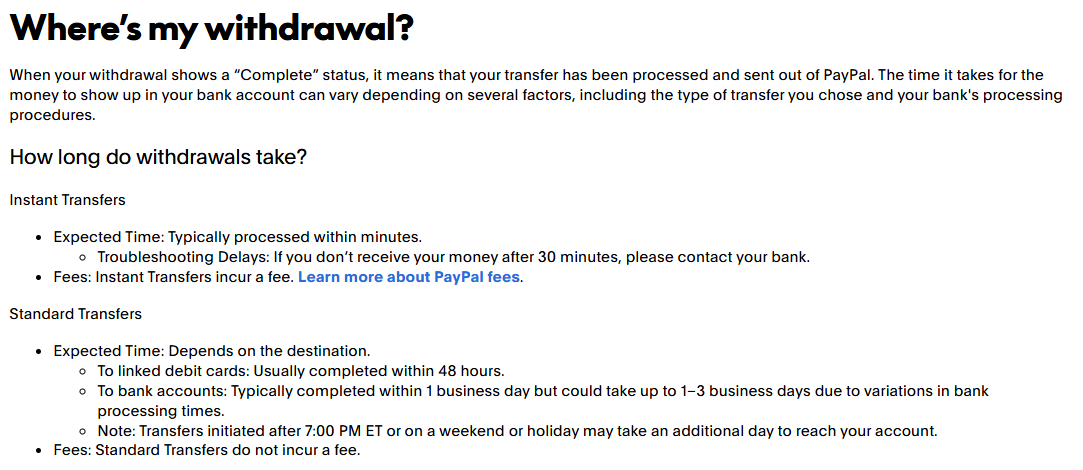
For example, when planning a Friday withdrawal, do not assume Saturday counts as the next processing day. Leave room for the weekend, the submission time, and any bank holiday rather than treating an estimated range as a promised date.
Instant does not guarantee immediate bank availability
Instant Transfer is designed for faster delivery, but the receiving institution still matters. PayPal’s debit-card guidance warns that some banks may need 1–3 business days for final settlement, despite the usual faster transfer estimate.
For an urgent weekend payment, use the estimate displayed for your destination and leave a backup margin. Do not assume the Instant label overrides bank delays or security reviews.
Which banks and cards are eligible, and what are the limits?
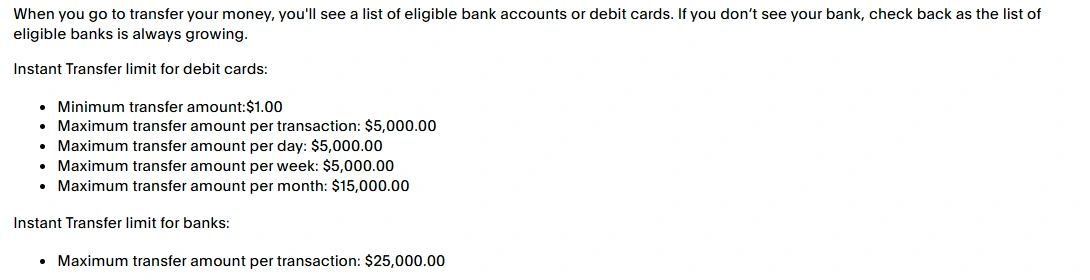
The available destinations shown during the withdrawal process are the practical eligibility check. PayPal’s Instant Transfer eligibility guide says eligible banks and debit cards appear when you initiate a transfer. Having an account or card linked in Wallet does not guarantee that every withdrawal method is supported.
A linked credit card is not interchangeable with an eligible debit-card withdrawal destination. Likewise, receiving funds through your external debit card is different from spending your PayPal balance with a PayPal-issued card. For Standard card withdrawals, PayPal’s U.S. debit-card guide specifies eligible Visa debit cards.
The following are published U.S. maximums, not guaranteed limits for every account. Card limits apply to both Standard and Instant withdrawals.
| Withdrawal limit | Personal account | Business account |
|---|---|---|
| Instant to bank: per transaction | Up to $25,000 | Up to $25,000 |
| To debit card: per transaction | Up to $5,000 | Up to $50,000 |
| To debit card: per day | Up to $5,000 | Up to $100,000 |
| To debit card: per week | Up to $5,000 | Up to $250,000 |
| To debit card: per month | Up to $15,000 | Up to $500,000 |
These figures come from the consumer and merchant withdrawal schedules. The eligibility guide separately lists a $1 minimum for Instant debit-card transfers. That minimum transfer amount is different from the minimum fee.
Do not interpret the absence of a Standard bank limit in this table as unlimited withdrawals. Check the amount your account permits, complete requested verification, and resolve any limitation before attempting another transfer.
When is Instant Transfer worth paying for?
For routine withdrawals, Standard is usually the more economical choice. When you are moving money for next week’s expenses rather than an immediate need, paying for speed may add no practical benefit. Planning withdrawals earlier can remove the need for an expedited fee.
For urgent access, compare the dollar fee with the value of receiving the money sooner. Use the net amount in the confirmation screen and check that it covers your intended expense. Faster access is useful only if the eligible destination, quoted estimate, and remaining amount meet your needs.
For small amounts, pay attention to the minimum fee. For larger amounts, check whether your account type has a cap. Do not change account types or restructure withdrawals merely to chase a headline percentage, and never split transfers to bypass limits or reviews.
How to choose Instant or Standard in PayPal
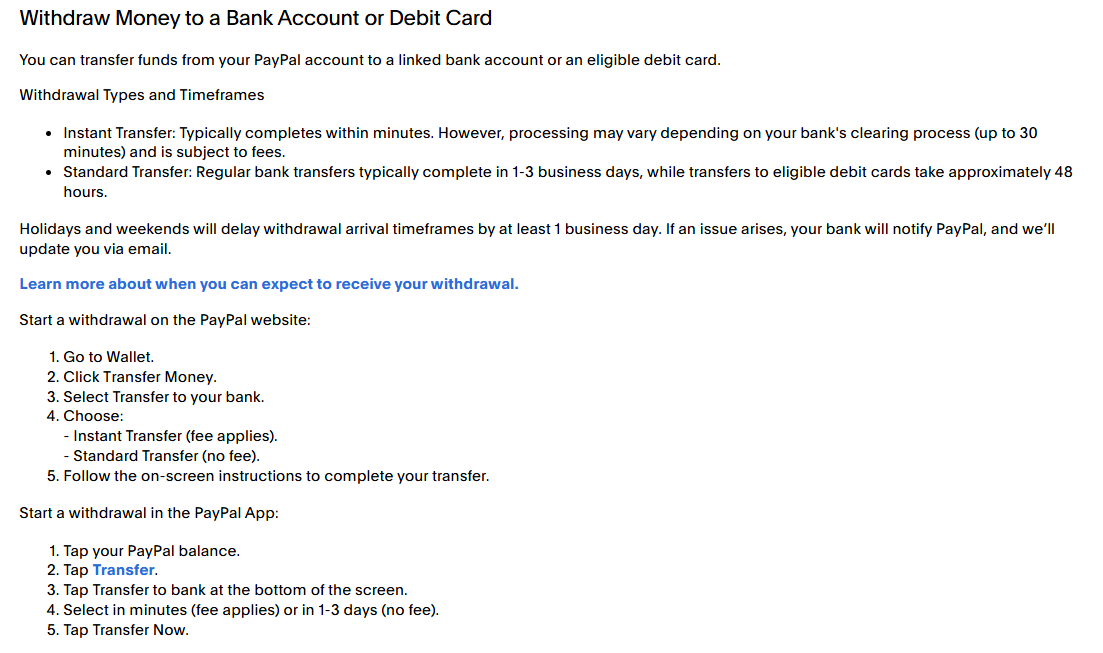
Choose the method before submitting the withdrawal. PayPal’s website withdrawal instructions begin in Wallet:
- Open Wallet, select Transfer Money, then choose Transfer to your bank.
- Select Instant or Standard and an eligible destination from the available options.
- Enter the amount you want to withdraw.
- Review the destination, fee, net amount, currency conversion, and arrival estimate before confirming.
In the app, PayPal’s guidance starts with your balance, followed by Transfer and Transfer to bank. Follow the labels shown in your account; screens can differ. Check the destination’s identifying details carefully before submitting.
Can you cancel a withdrawal or change Standard to Instant?
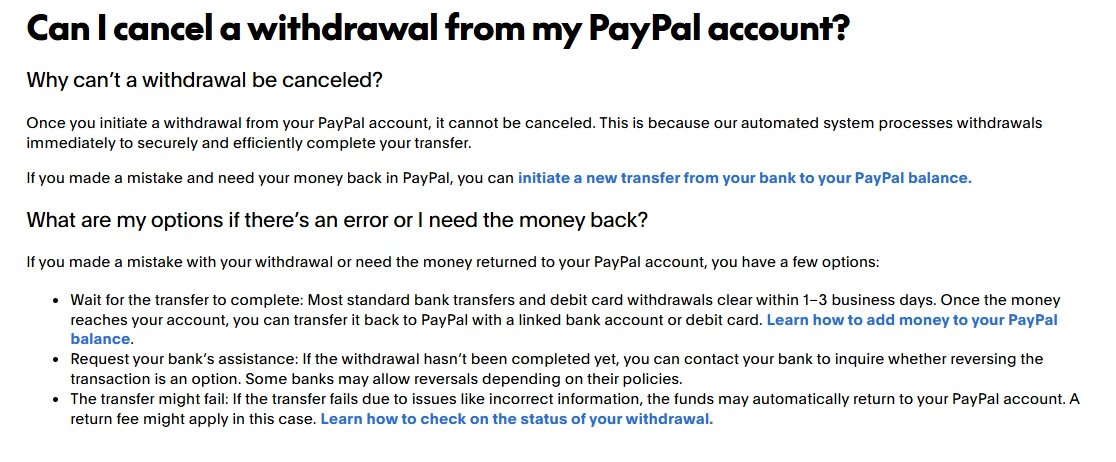
You cannot cancel a withdrawal through PayPal once it has been initiated. PayPal’s withdrawal cancellation policy does not provide a way to stop a submitted Standard withdrawal and restart it as Instant.
PayPal notes that a bank may sometimes assist with a reversal, but that depends on the bank and is not guaranteed. Moving completed funds back into PayPal would be a separate transfer, not cancellation of the original withdrawal. Contact PayPal and the receiving bank promptly if you selected incorrect details; do not submit a duplicate withdrawal to try to fix one already processing.
What to do when a transfer is unavailable or delayed
First determine whether the withdrawal failed to start, is awaiting PayPal review, or has already been sent to the receiving institution. These situations need different responses.
Instant Transfer is missing or an error prevents submission
Check destination eligibility, your remaining transfer allowance, account limitations, and whether your linked details match the bank’s records. PayPal’s transfer error guide identifies these as possible causes. Use another eligible destination or Standard Transfer when offered, rather than repeatedly retrying an unsupported option.
The withdrawal is Pending or under review
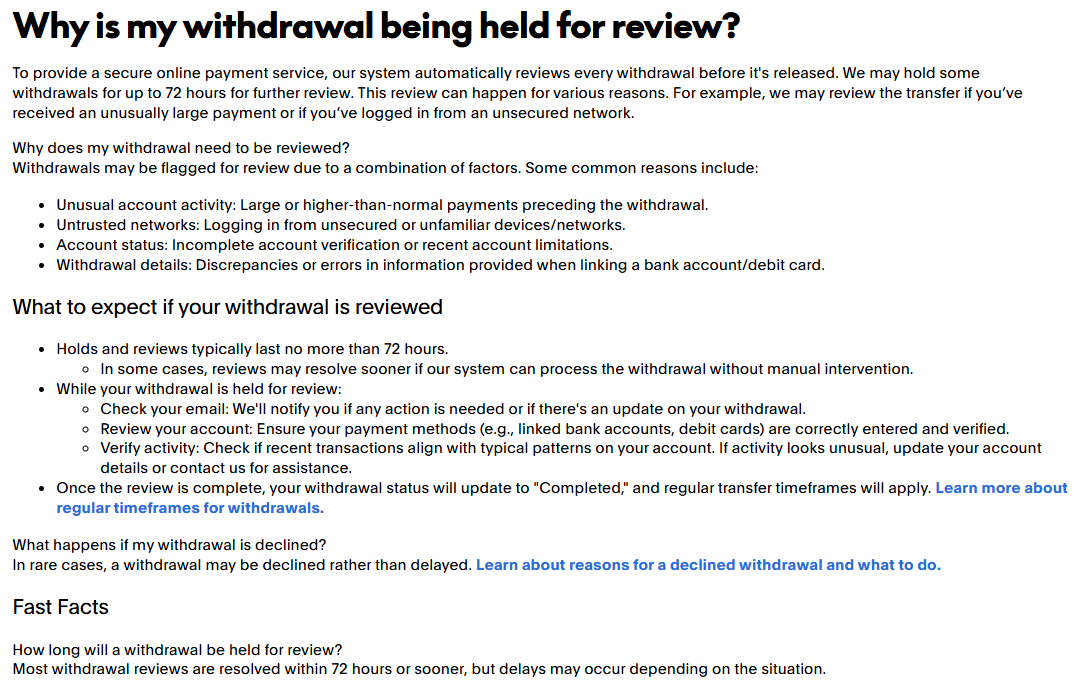
A withdrawal review happens before PayPal releases the transfer. Its review guidance says most reviews finish within 72 hours or sooner, although some cases take longer. Regular transfer processing applies after the review, so the review can add time rather than replace the normal estimate.
Check Activity and any account notice for requested action. Contact PayPal when the stated review period has passed without an update or a required step cannot be completed. Paying for Instant Transfer does not bypass this review.
Also distinguish a submitted withdrawal from money that is not yet available to withdraw. A seller-payment hold or account restriction must be addressed through its own process; choosing a faster withdrawal method does not release those funds. PayPal explains these restrictions in its Balance account hold and limitation terms.
PayPal shows Completed, but the money is missing
Completed means PayPal has processed and sent the withdrawal, not necessarily that the bank has posted it. PayPal’s withdrawal status guide directs users to contact their bank if an Instant Transfer has not arrived after 30 minutes. Have the amount, destination, date, and transaction details ready.
If a withdrawal fails because of incorrect or incomplete information, that guide says the money should return to PayPal within one week. Monitor the transaction and contact PayPal if the return does not appear.
Will PayPal refund the Instant Transfer fee if it is late?
Do not assume an automatic refund. The official withdrawal guidance cited here gives expected timing but does not establish a blanket fee-refund promise for every delay. Ask PayPal through its logged-in help channels to review the fee and the circumstances of your transaction. A late withdrawal and a failed withdrawal are not necessarily handled identically.
Before you confirm
Make the choice using four details: the available destination, the expected arrival time, the fee, and the net amount you will receive. Standard is the sensible starting point when its estimate fits your schedule. Choose Instant when the potential time saving justifies its actual cost, without treating it as a guaranteed solution to a deadline.
Sources checked
Core references: U.S. consumer fees, U.S. merchant fees, PayPal Balance terms, withdrawal instructions, and withdrawal timing and status. Additional official guidance is linked beside the relevant explanation.