
Published: October 22, 2026. Last updated: November 22, 2026.
A PayPal dispute lets a buyer and seller try to resolve a purchase problem through PayPal’s Resolution Center. If they cannot agree, either party can escalate it to a claim, asking PayPal to investigate and decide. Opening a dispute does not automatically trigger a refund or a decision. PayPal explains these stages in its dispute and claim guidance.
To begin, sign in and open the PayPal Resolution Center. Before submitting anything, identify the correct issue and check its deadline below. An unresolved purchase dispute must be escalated within 20 days after opening; otherwise, it closes automatically.
This guide covers U.S. PayPal policies and website instructions. Eligibility, deadlines, and procedures can differ for accounts registered elsewhere.
Go to: Deadlines · Opening a dispute · Evidence · Escalation · Closed or denied cases · Seller responses
Choose the right issue before you file
The Resolution Center handles several problems, but they do not all follow the same rules. Its functions include reporting purchase problems, unauthorized transactions, duplicate charges, and incorrect amounts. Use the route matching what happened, as outlined in PayPal’s Resolution Center overview.
Your order did not arrive
For an Item Not Received problem, check the delivery information and contact the seller about the missing order. Keep the expected delivery date and any response. If the seller cannot resolve the issue, PayPal’s missing-order guidance directs you to the dispute process. Do not let repeated promises push you beyond the filing deadline.
The item is materially different from its description
A used item advertised as new, an entirely different product, or undisclosed missing major features can support a Significantly Not as Described claim. A disclosed defect, changed preference, or disappointment with an accurately described item generally does not. These distinctions appear in the U.S. Purchase Protection terms.
You did not authorize the payment
Report genuinely unauthorized activity promptly through the separate unauthorized-transaction process. First check whether the charge relates to a subscription or someone you allowed to use the account. Describe who initiated and authorized the payment accurately; a delivery problem does not become unauthorized activity simply because the seller has let you down.
You were billed incorrectly or want an ordinary refund
A duplicate charge or incorrect amount belongs under the relevant billing issue. An unfamiliar subscription should also be checked against your automatic payments before you report it as unauthorized. For an ordinary refund on a completed payment, contact the seller, as PayPal explains in its payment-reporting guidance.
Does your payment qualify for Purchase Protection?
Goods and Services is not a blanket refund guarantee. PayPal covers eligible purchases, while personal payments sent through Friends and Family are not covered by Purchase Protection. See PayPal’s explanation of personal payments versus purchases.
Your account must be in good standing, and you must follow the applicable filing rules. Important exclusions include prepaid cards, items intended for resale, and Significantly Not as Described claims involving wholly or partly custom-made items. PayPal’s coverage guidance lists further exclusions.
The program terms also require payment from your PayPal account and an attempt to resolve the problem with the seller before a claim. Keep that attempt documented.
Exclusion from purchase coverage is different from reporting a payment you did not authorize. Do not select an inaccurate reason to try to bypass an eligibility restriction.
PayPal dispute deadlines: when the clock starts
There is no single deadline covering every PayPal complaint. In particular, “you have 180 days” is incomplete advice for an item that arrived but was significantly different from its description.
| Issue or stage | U.S. timeframe | Starting point |
|---|---|---|
| Item Not Received | Open the dispute within 180 days. | The date you sent the payment. |
| Significantly Not as Described | Open within 30 days of delivery or fulfillment, or within 180 days of payment, whichever deadline comes first. | Compare both dates; use the earlier deadline. |
| Escalating an unresolved purchase dispute | Escalate within 20 days to prevent automatic closure. | The date the dispute was opened. |
| Other errors, excluding unauthorized transactions | Notify PayPal promptly, no later than 60 days after it sent the first statement showing the error. | The first affected statement—not the delivery date. |
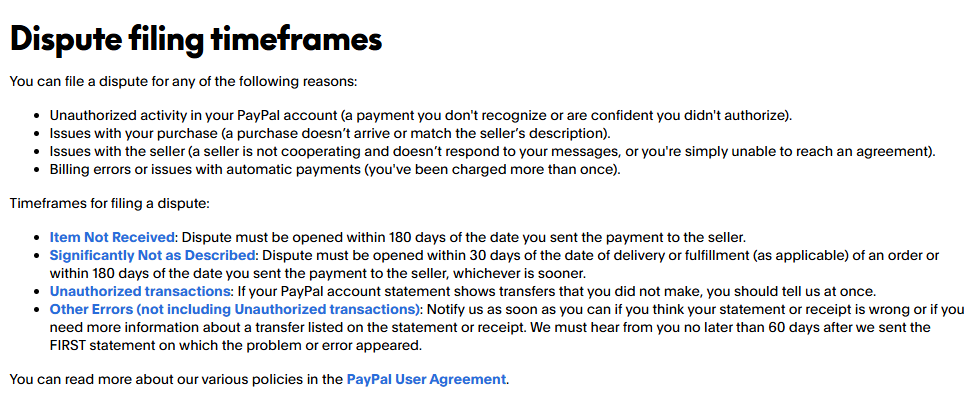
For unauthorized activity, PayPal says to notify it immediately. Do not treat the purchase-dispute windows as permission to delay reporting account misuse.
Keep separate records of the payment date, delivery date, dispute-opening date, and any deadline shown in the case. Set a reminder before the next required action. The deadlines above are stated in days, not business days; do not extend them by excluding weekends.
How to open a PayPal dispute
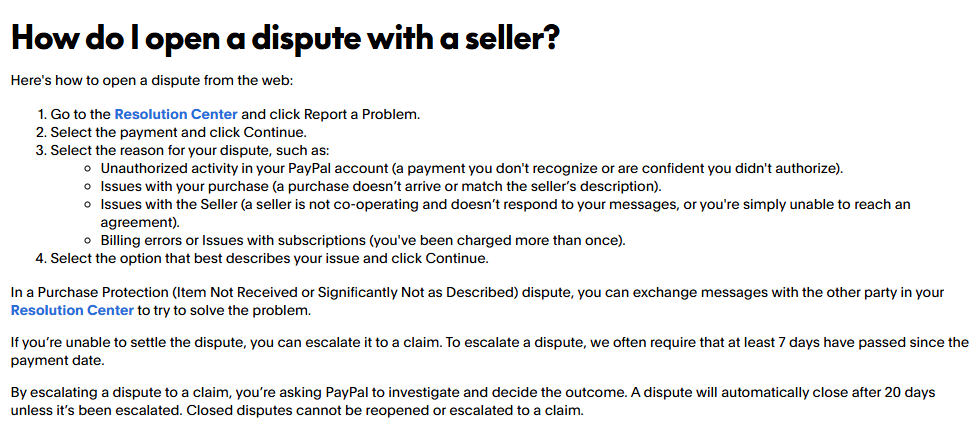
Use a web browser for these steps, which follow PayPal’s published website instructions:
- Sign in to PayPal and open the Resolution Center.
- Choose Report a Problem, select the relevant payment, and click Continue.
- Select the reason that accurately matches your issue, such as a purchase problem or billing error.
- Choose the most appropriate description, continue, and complete the information requested on screen.
Make your explanation easy to verify: identify the order, state what went wrong, give the relevant dates, and describe what you have already asked the seller to do. Specify the resolution you are seeking without adding unsupported accusations.
After submitting, save the case reference and check that the issue appears in your Resolution Center. Use the case conversation for further exchanges so the discussion remains connected to the transaction. Record any agreement precisely, including whether it involves a refund, replacement, or return.
What evidence should you provide?
Organize your records around the disputed fact rather than uploading everything you have. The following is a practical preparation checklist, not a universal list of documents PayPal requires:
- Identify the purchase: Keep the transaction reference, order confirmation, amount, and relevant product listing together.
- Explain the mismatch: For a missing order, record the promised delivery and available tracking. For a description problem, match each important difference to the original listing and a clear photograph or other supporting record.
- Show attempts to resolve it: Preserve dated messages, the seller’s replies, and any proposed refund or return arrangement.
- Document later developments: Keep return receipts, tracking updates, or refund records, and explain what changed rather than submitting contradictory accounts.
For example, when the issue is an item sold as new but received used, place the listing’s condition description beside photographs showing the condition you actually received. Explain what each photograph demonstrates. That is more useful than repeating “the item is wrong” without identifying the difference.
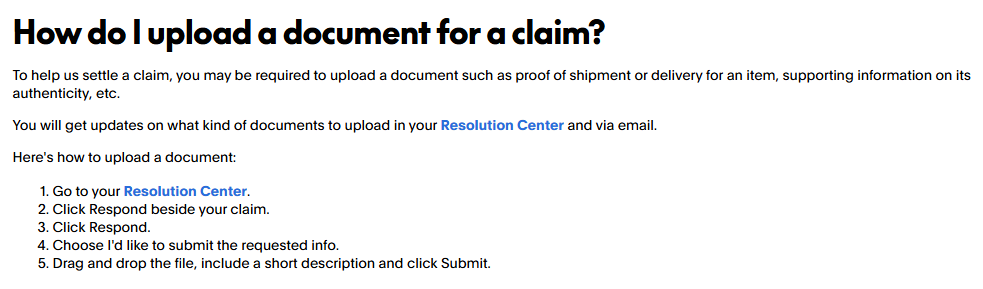
PayPal communicates document requests through the Resolution Center and email. Its claim-upload instructions direct you to respond to the claim, select the option for submitting requested information, attach the file with a short description, and submit it. Follow the request and deadline attached to your case.
Keep copies of what you submit. Do not alter evidence or omit context to create a misleading account. Avoid including unrelated sensitive information, and never publish passwords, full card numbers, or security codes in a public request for help.
When and how to escalate a dispute to a claim
Escalation is appropriate when you cannot reach a satisfactory resolution and need PayPal to decide. Do not wait for the negotiation period to expire. An unresolved dispute does not automatically become a claim.
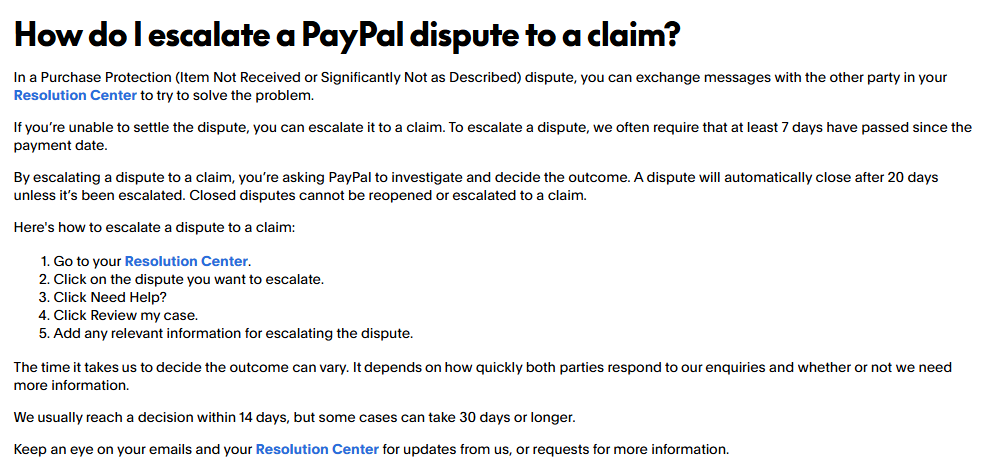
PayPal says it often requires at least 7 days since the payment date before escalation. That is not seven days after you opened the dispute, and it is not an instruction to postpone reporting the problem. The published escalation procedure is:
- Open the relevant dispute in the Resolution Center.
- Select Need Help?, then Review my case.
- Provide the relevant information explaining why the dispute remains unresolved, then complete the on-screen process.
Check the resulting status rather than assuming that sending another message escalated the case. If the escalation option is missing or not working and a deadline is approaching, use PayPal’s official support promptly.
If the seller does not respond: preserve your unanswered messages and continue with the required escalation process. Do not assume that silence alone has already produced a refund or that you can leave the dispute unattended.
How long does PayPal take to resolve a claim?
PayPal’s buyer-facing guidance says it usually reaches a decision within 14 days, while some cases take 30 days or longer. The time depends on the information needed and how quickly the parties respond. This is an estimate, not a guaranteed completion date, according to PayPal’s resolution-time guidance.
While the claim is under review, check its status and any requests for action. If you contact support, ask a specific question: is PayPal waiting for information from you, the seller, or another party? Include the case reference and the date of your last response.
A favorable decision and a posted refund are separate events. Once a refund is issued, its arrival depends on the payment method. On the website, use Activity → Filters → Refunds to locate the transaction and inspect its details. PayPal explains the destinations and processing windows in its refund-tracking guidance.
What if PayPal asks you to return the item?
Before shipping anything, confirm the return instructions, address, deadline, and tracking requirements in the case. PayPal’s return-resolution guidance describes a process in which the seller provides an address through PayPal and the buyer supplies valid tracking after accepting the return offer.
PayPal says it usually gives buyers 10 days to return the item and provide tracking, and missing the requirement may lead to closure. Follow the actual instruction in your case. Its return-tracking page explains how to submit the tracking through the claim and states that the buyer is responsible for return shipping.
A seller may provide a prepaid label, but do not assume one will be supplied. Keep the shipping receipt and delivery record. If an address conflicts with the case instructions or you cannot meet the deadline, ask PayPal for clarification before the deadline rather than sending the item somewhere unverified.
Closing a dispute, automatic closure, and denied claims
The seller asks you to close the dispute before refunding
Do not close a case in exchange for a promise. PayPal’s closure guidance says to be satisfied that the issue is resolved and to verify receipt of a promised refund before closing. Once you close the case, you cannot reopen it or escalate that dispute.
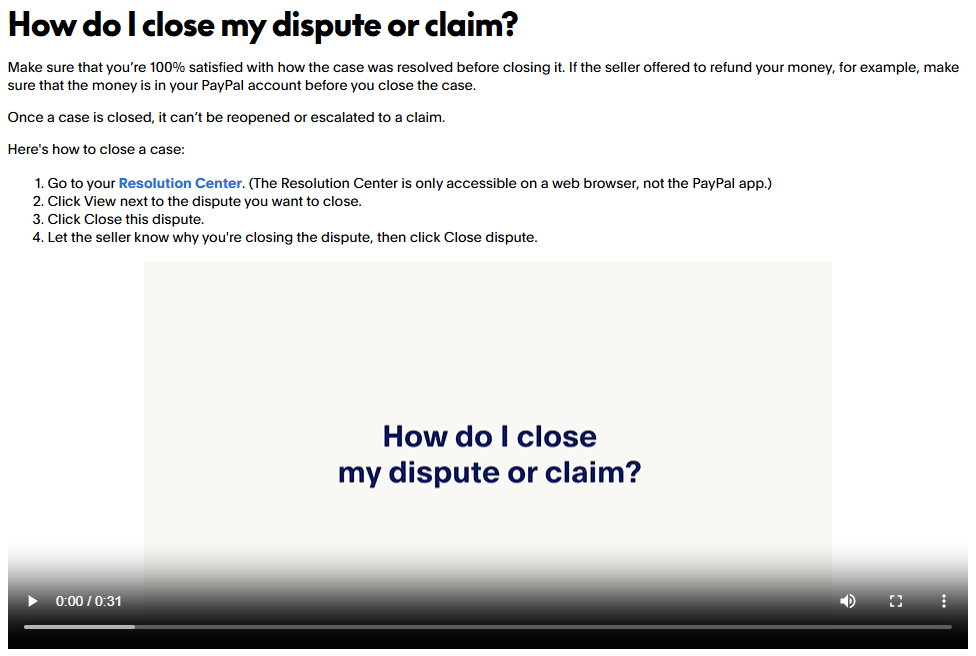
Verify the result in your own account rather than relying solely on a screenshot or message from the seller. If the proposed settlement requires you to surrender the case first, ask PayPal how to proceed.
The dispute closed because it was not escalated
A dispute that expires without escalation cannot simply be reopened as a claim. This is different from challenging a decision PayPal made after reviewing a claim. Review the closure notice and contact support about any remaining options, but do not assume that an appeal restores a missed escalation deadline.
PayPal denied your claim
Read the reason before preparing an appeal. The Purchase Protection terms recognize new or compelling information, or a decision-making error, as potential grounds for review.
For buyers, PayPal’s appeal instructions direct you to customer support to discuss the available options. Explain what information is new or what specific mistake you believe occurred. Simply disagreeing with the result is not the same as providing grounds for an appeal.
The same help page gives sellers a separate Resolution Center appeal route within 10 days of case closure. Do not assume that this seller procedure or deadline is also the buyer’s procedure.
PayPal dispute or credit-card chargeback?
A chargeback is pursued through your card issuer rather than the PayPal purchase-dispute process. The Consumer Financial Protection Bureau’s purchase-refund guidance explains that you can ask your credit-card company whether a charge is disputable when the seller has not resolved the problem.
Under PayPal’s U.S. rules, you cannot pursue Purchase Protection and a card-issuer dispute simultaneously for the same transaction. Starting a card dispute while the PayPal case is open causes PayPal to close its case. Pursuing the card route first also prevents a later PayPal claim. After an unfavorable PayPal decision, you may still seek a card dispute, subject to the issuer’s requirements.
Ask the issuer promptly about applicable deadlines and notice requirements; do not assume PayPal’s timeline extends them. For credit-card billing errors, the CFPB explains the written-notice requirement and 60-calendar-day window tied to the statement. Different dispute situations can follow different procedures.
Tell the relevant provider about any refund already received. PayPal’s user agreement prohibits seeking duplicate recovery for the same transaction.
For sellers: how to respond to a PayPal dispute
Open the case in your Resolution Center, read the complaint, and respond to the specific issue. For Item Not Received and Significantly Not as Described disputes, PayPal’s U.S. seller instructions require a response within the first 10 days after dispute creation. They state that missing that response can result in a buyer-favor decision if the buyer escalates.
That initial response requirement is not the same as the 20-day escalation window. Check the case for later document requests and their deadlines rather than applying one number to every stage.
Provide records relevant to the complaint: shipping or delivery evidence for a missing order, product records addressing a description dispute, proof of an issued refund, or fulfillment records for a digital purchase. Keep communicating through the case and make any settlement offer clear.
Do not assume that Seller Protection covers every transaction or guarantees rejection of the buyer’s claim. Eligibility is determined under the applicable program, as explained in the U.S. user agreement. A useful response addresses the buyer’s facts and the evidence PayPal requested—not a generic statement that all sales are final.
This is an independent informational guide, not PayPal customer support or individualized legal advice. For an account-specific decision, deadline, or technical problem, use the details in your Resolution Center and PayPal’s official support channels.