
Published: November 20, 2026. Last updated: November 22, 2026.
If your PayPal account is limited, PayPal has restricted certain account functions because it needs to review activity, verify information, or address a security, compliance, or financial risk concern. Depending on the restriction, you may be unable to send payments, withdraw funds, or use certain account services.
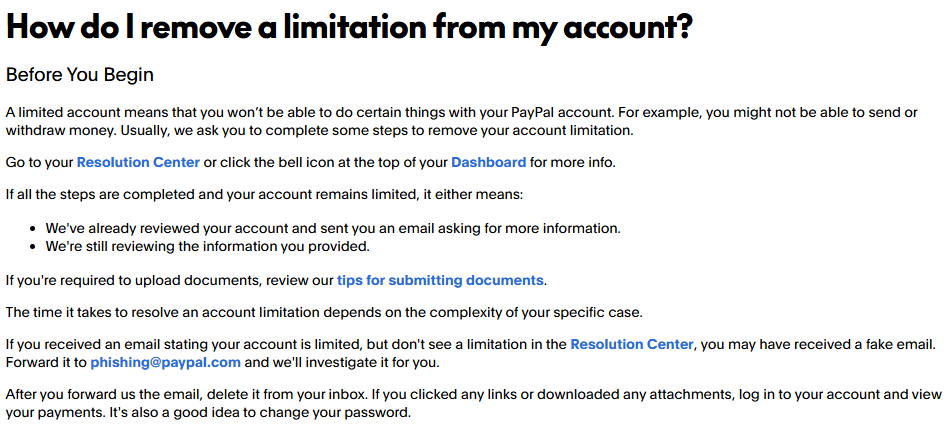
The first step is to sign in directly to PayPal and open the Resolution Center. You can also check the notification bell on your account dashboard. PayPal will normally show the limitation details and any actions required to resolve it.
Some limitations can be removed after you complete the requested steps and PayPal finishes its review. Others may be permanent. The available options depend on the reason for the restriction and the decision communicated to your account.
What to do first when your PayPal account is limited
If you have received an account limitation notice, start by verifying that the restriction is genuine and identifying exactly what PayPal wants you to do.
- Open PayPal directly. Visit paypal.com or use the official PayPal app instead of following links in an unexpected email.
- Sign in to your account. Use your normal login method and review any account security notifications.
- Open the Resolution Center. Look for an active account limitation and read the explanation provided.
- Check your dashboard notifications. PayPal may also display required actions through the notification bell.
- Review the requested steps. Determine whether PayPal needs identity verification, business information, security changes, or another action.
- Complete each applicable requirement. Follow the instructions shown within your own account and submit only the information requested.
- Monitor the review. Check your account and email for additional requests or the final decision.
Completing the requested steps does not automatically mean the account has been restored. PayPal may need to review the information before lifting the limitation.
PayPal explains this process in its official account limitation removal instructions.
What does a limited PayPal account mean?
A PayPal account limitation is a restriction on some of the activities normally available through an account. PayPal uses limitations to address unusual activity, regulatory obligations, suspected unauthorized access, or financial risks.
The restriction may affect sending money, making payments, withdrawing funds, or receiving payments. However, not every limited account has the same restrictions.
For example, one account might need additional identification before withdrawals are restored. Another account might be restricted because PayPal is reviewing potentially unauthorized activity. A business account could be limited while PayPal reviews transaction risks or compliance concerns.
A limitation is also different from an ordinary payment hold or business reserve.
| Account status | What it means | What to check |
|---|---|---|
| Account limitation | PayPal has restricted one or more account functions. | Resolution Center and account notifications |
| Payment hold | Money from a particular payment is temporarily unavailable. | Transaction details and hold information |
| Business reserve | PayPal retains a portion of business funds under a risk-management arrangement. | Reserve terms and business account notices |
| Identity verification request | PayPal needs additional information to confirm account details. | Verification instructions and required documents |
| Permanent limitation | PayPal has imposed an ongoing restriction on account use. | Permanent limitation notice and official support options |
The distinction matters because the process for resolving a payment hold is not necessarily the process for removing an account limitation.
Why is my PayPal account limited?
PayPal identifies several reasons for limiting accounts. A limitation does not automatically mean the account holder has committed fraud or violated a policy. Some restrictions are preventive or arise from routine verification requirements.
1. Identity verification or regulatory requirements
PayPal may need additional information to comply with financial regulations or confirm who owns an account.
For example, using certain financial products or accessing particular account features can require additional verification. PayPal may limit account functions while obtaining or reviewing the necessary information.
Its US User Agreement also explains that failing to provide requested taxpayer identification or tax documentation may result in account holds or limitations.
If the limitation concerns verification, check the exact documents or information listed in your Resolution Center.
2. Unusual or potentially unauthorized activity
PayPal may restrict an account if it suspects someone is accessing or using it without the account holder’s permission.
This can happen when PayPal identifies potentially unauthorized activity or receives relevant reports from a bank or card issuer.
In this situation, the limitation may help protect the account while PayPal investigates. The required steps may involve changing your password, updating security questions, or completing additional identity checks.
3. Acceptable Use Policy concerns
PayPal can restrict accounts when it believes their activity violates the applicable User Agreement or Acceptable Use Policy.
The policy contains restrictions on certain goods, services, and transaction activities. Some categories are prohibited, while others require prior approval.
If PayPal identifies a policy-related concern, the account notice may explain the restriction or provide the available next steps. Not every policy-related decision can be resolved by uploading identification documents.
4. Higher-risk business activity
PayPal may limit a business account when its transaction activity or seller performance indicates increased financial risk.
PayPal identifies examples such as an unusually high number of claims or chargebacks, a substantial increase in sales volume, or a shift toward new or more expensive products.
These events are not necessarily violations by themselves. However, they may cause PayPal to review the business and request additional information.
5. Account inactivity
PayPal also identifies limited account activity after registration as a possible reason for restricting an account.
For certain inactivity-related restrictions, PayPal directs users to sign in and provide proof of identity through their account notifications.
The correct action depends on the limitation shown in your account. Do not assume every inactive account requires the same verification process.
These reasons are described in PayPal’s official explanation of account limitations.
How to remove a PayPal account limitation
For a limitation that PayPal allows you to resolve, the required actions normally appear in the Resolution Center or account notifications.
The process depends on the issue. Some restrictions require documents, while others may be resolved after security changes or additional account information is provided.
Step 1: Review the limitation details
Sign in to PayPal and open the Resolution Center. Review any active account limitation and its required actions.
You can also select the notification bell on your PayPal dashboard to look for account-related requests.
Read the entire notice before taking action. A request to verify your identity is different from a request to secure your account or explain business activity.
Step 2: Complete the requested actions
PayPal may ask you to provide personal information, verify your identity, update security settings, or submit business-related records.
Follow the specific instructions displayed in your account. Do not submit unrelated documents simply because another PayPal user was asked to provide them.
Step 3: Upload the required documents
If documents are requested, use the upload process provided in your Resolution Center or the relevant official PayPal notification.
Ensure that each document is complete, readable, valid, and consistent with your account information.
PayPal may reject partial, expired, obscured, or mismatched documents. If your legal name has changed, additional evidence may be needed to establish the change.
Step 4: Check for additional requirements
After completing the initial tasks, return to the Resolution Center and confirm whether PayPal is requesting anything else.
If all required items have been submitted, your account may remain limited while PayPal reviews the information. Continue monitoring your account and email for the result.
What documents does PayPal accept for account limitations?
PayPal may request documentation to verify your identity, residential address, legal name change, or business information.
The exact documents required are shown in your Resolution Center. Not every account holder needs to provide every document category.
Proof of identity
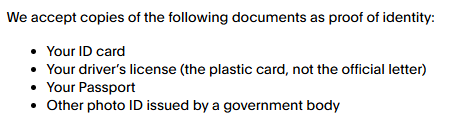
PayPal’s US documentation lists the following accepted examples of identity documents:
- Government-issued identification card
- Driver’s license
- Passport
- Other government-issued photo identification
The document must display the necessary identifying information, including your name, date of birth, document number, and relevant issue or expiration dates.
PayPal does not accept expired or obscured identification documents, and its US guidance excludes state medical cards as proof of identity.
Proof of address
PayPal accepts several types of documents as proof of address, including:
- Utility bills dated within the previous 12 months
- Cell phone or landline bills dated within the previous 12 months
- Bank or credit card statements dated within the previous 12 months
- Motor vehicle registration dated within the previous 12 months
- 401(k) or brokerage statements dated within the previous 12 months
- Residential lease agreements or property grant deeds
- A current identity card or driver’s license displaying your physical address
PayPal does not accept envelopes, invoices, receipts, or shipping waybills as proof of address under this US guidance.
Document quality requirements
Before submitting documents, check that they meet PayPal’s stated quality requirements.
- The document is clearly readable.
- All four corners of the page or document are visible.
- Required information is not blocked, blacked out, or obscured.
- The information matches the relevant details on your PayPal account.
- The document is valid and has not expired where an expiration date applies.
If your name has legally changed and no longer matches your PayPal account, PayPal may ask for supporting name-change documentation.
For the complete list and submission requirements, see PayPal’s document requirements for account limitations.
How long does PayPal take to remove a limitation?
PayPal states that, after you complete the required steps, an account limitation review usually takes three business days. PayPal contacts the account holder by email after the review is completed.
However, three business days is a typical review period, not a guaranteed deadline for removing every restriction.
Some limitations may be lifted automatically after you complete certain actions, such as updating your password and security questions. Other cases require further investigation or documentation.
The total time depends on the complexity of the case and whether PayPal needs more information.
You can verify the current guidance in PayPal’s limitation review timeline.
Why is my PayPal account still limited after submitting documents?
Completing the requested actions is not necessarily the final step. PayPal may still need to review the information before deciding whether the limitation can be removed.
According to PayPal’s official guidance, an account may remain limited because the review is still in progress or because PayPal has requested additional information.
| Situation | What it means | Next step |
|---|---|---|
| Review still pending | PayPal has not finished reviewing the submitted information. | Monitor the account and email for a decision. |
| More information requested | The initial submission did not satisfy every requirement. | Review the new request and provide the specified information. |
| Document rejected | A submitted document may not meet the verification requirements. | Review the reason and follow the instructions for providing acceptable evidence. |
| No tasks visible but restriction remains | Review may still be in progress, or clarification may be required. | Check notifications and contact official support if needed. |
| Permanent limitation notice | PayPal has made a different account decision from an ordinary pending verification review. | Read the decision and check the available official contact options. |
If you have completed every visible requirement and received no update, check your PayPal notifications and email before contacting support.
Do not repeatedly upload the same documents unless PayPal requests another submission. Providing unnecessary or inconsistent information does not guarantee a faster review.
See PayPal’s guidance for accounts that remain limited after completing the steps.
Temporary vs. permanent PayPal account limitations
One of the most important distinctions is whether PayPal is requesting information to resolve a limitation or has issued a permanent restriction.
| Feature | Temporary limitation | Permanent limitation |
|---|---|---|
| Purpose | Restricts account functions while a concern is being addressed or reviewed | Restricts continued account use under PayPal’s decision |
| Required steps | May include verification, security changes, or other account-specific actions | May not provide the ordinary document-based removal process |
| Possibility of removal | May be removed after requirements and review are satisfied | No automatic or guaranteed reversal |
| Account activity | Some functions may be temporarily unavailable | Account use may remain restricted indefinitely |
| Funds | Availability depends on the specific restriction | Withdrawal may remain restricted under applicable holding and account terms |
PayPal’s US User Agreement distinguishes permanent limitations from restrictions that can potentially be removed after the account holder supplies the requested information.
Even when documents have been submitted successfully, PayPal may maintain restrictions if it concludes that a continuing risk exists.
What happens if PayPal permanently limits your account?
A permanent PayPal limitation is a more serious account restriction than a routine verification request. It can prevent continued use of the account and related services.
If you receive a permanent limitation notice, read the complete decision through the official PayPal website or app. Pay particular attention to any information about restricted functions, available funds, outstanding obligations, and further contact options.
Submitting ordinary identity documents does not automatically reverse a permanent limitation.
If the notice offers a review or clarification process, follow that process. If no such process is displayed, you can contact PayPal through its official support channels to ask about the decision and your account’s remaining options.
PayPal does not publish a universal procedure guaranteeing that permanent limitation decisions can be overturned.
You should not create replacement accounts, alter identifying information, or use another person’s account to bypass a restriction. These actions can lead to additional account problems and may violate PayPal’s terms.
Can you withdraw money from a limited PayPal account?
Whether you can withdraw funds depends on the type of limitation, the availability of the balance, and PayPal’s applicable account restrictions.
Some limitations restrict withdrawals while PayPal reviews the account. Other situations involve payment holds, business reserves, or funds restricted for risk or legal reasons.
A visible balance does not necessarily mean the entire amount is available for immediate withdrawal.
PayPal’s US User Agreement states that when an account is closed or PayPal terminates access to its services, unrestricted funds are made available for withdrawal. Funds subject to applicable holds or other restrictions are treated separately.
If your account is limited, check the official notice for information about the balance and withdrawal availability.
For permanent limitations, PayPal may communicate additional information about when and how eligible funds may become available. Do not assume that submitting documents immediately restores withdrawal access.
Does PayPal hold money for 180 days after an account limitation?
Not every limited PayPal account is subject to a 180-day hold. The 180-day period relates to certain financial risk and liability provisions in PayPal’s User Agreement, not the ordinary review timeline for every account limitation.
Under its US User Agreement, PayPal may hold certain account funds for up to 180 days when reasonably necessary to protect against the risk of liability or when the account holder has violated its Acceptable Use Policy.
The agreement also allows restrictions lasting longer than 180 days in circumstances involving court orders, regulatory requirements, or other legal processes.
Three important distinctions apply:
- Review time is different from a funds hold. PayPal’s typical three-business-day limitation review does not mean all account funds must remain restricted for 180 days.
- The 180-day period is not a universal release date. The applicable restriction and account obligations determine whether funds can become available.
- Not every balance restriction has identical rules. Payment holds, business reserves, permanent limitations, and legal restrictions may have different conditions.
If your funds are unavailable, check the account-specific notice and the relevant provisions of the PayPal US User Agreement. Contact official support if the notice does not explain the applicable restriction or withdrawal options.
PayPal Business account limited: What sellers should check
Business accounts may be limited for some of the same reasons as personal accounts, including identity verification, suspected unauthorized activity, or regulatory concerns. Sellers can also face restrictions related to transaction activity and merchant risk.
PayPal identifies unusually high dispute or chargeback activity, significant changes in sales volume, and new or higher-priced product categories as examples of activity that may trigger review.
If your PayPal Business account is limited, review the specific request before preparing supporting information.
Depending on the account and the issue, PayPal may require business identity information or additional documents. It may also request relevant transaction details or other financial records under the applicable agreement.
Provide the information PayPal actually requests. Business registration documents, invoices, and shipping information are not interchangeable, and submitting unnecessary records does not guarantee the removal of a restriction.
Continue responding appropriately to legitimate customer disputes and account obligations while the limitation is under review, to the extent that your account permits those actions.
How to tell if a PayPal account limitation email is fake
Scammers sometimes send emails that imitate official PayPal account limitation notices. These messages may claim your account will be suspended unless you immediately follow a link or submit personal information.
The safest verification method is to visit PayPal directly and check your account notifications and Resolution Center.
Warning signs of a suspicious message include:
- Generic greetings instead of your name or business name
- Unusual pressure to act immediately
- Links leading to unfamiliar or misleading website addresses
- Unexpected attachments
- Requests to enter your PayPal password on an unfamiliar page
- Requests for identity documents through unofficial channels
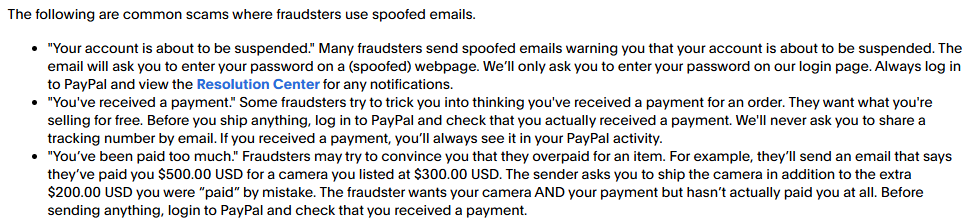
If you receive an email claiming your PayPal account is limited but cannot find a corresponding notice in your account, it may be fraudulent.
PayPal instructs users to forward suspicious emails to [email protected] and then delete the email.
If you clicked a suspicious link or entered your credentials, open PayPal directly, change your password, review recent transactions, and report any potentially unauthorized activity through the official account process.
For more information, see PayPal’s phishing identification guide and fraud reporting instructions.
How to contact PayPal about an account limitation
If you cannot complete the required actions, cannot access the limitation details, or need clarification about the status of your funds, use PayPal’s official customer support channels.
Start with the PayPal Help Center. Depending on your account and the issue, you may be able to access the Message Center or other available contact options.
When contacting support, explain the specific problem clearly. Useful information can include the date you received the limitation notice, the actions you completed, and whether your account shows a pending review or an additional information request.
Do not send passwords, full card information, or identity documents to unofficial contacts.
PayPal’s US limitation guidance states that customer service generally cannot remove an account limitation simply over the phone. Support may clarify available steps, but it cannot guarantee account restoration or override every restriction.
How to reduce avoidable PayPal account limitations
Not every PayPal limitation can be prevented, but accurate account information and responsible account management can reduce certain avoidable verification and security problems.
- Keep your legal name, business details, address, and contact information accurate.
- Complete required identity and account verification procedures.
- Use a strong password and maintain appropriate account security settings.
- Use the correct payment type for personal and commercial transactions.
- Review the PayPal User Agreement and Acceptable Use Policy for activities relevant to your account.
- Respond promptly to official verification and account information requests.
- For business accounts, keep accurate transaction, fulfillment, and customer-service records.
These practices support accurate account information and better security. They do not guarantee that PayPal will never conduct a review or impose a limitation.
Frequently asked questions about limited PayPal accounts
Can PayPal limit my account without permanently closing it?
Yes. PayPal may temporarily limit account functions while requesting information or reviewing a concern. Some limitations can be removed after the account holder completes the required steps and PayPal finishes its review.
Does submitting an ID automatically remove a PayPal limitation?
No. Identification may be one requirement, but PayPal can request additional information or continue reviewing the account after documents are submitted. Completing verification does not guarantee the limitation will be lifted.
Can a permanently limited PayPal account be restored?
PayPal does not guarantee that permanent limitations can be reversed. If your account notice offers an official review or clarification option, follow that process. Otherwise, contact PayPal support to ask what options, if any, are available for your particular case.
Will PayPal release my money after 180 days?
Not necessarily. PayPal’s US User Agreement permits certain holds lasting up to 180 days and longer restrictions under specified legal circumstances. The actual release of funds depends on the restriction, account obligations, and PayPal’s applicable terms and notices.
What if I cannot access the Resolution Center?
Use the official PayPal Help Center to find the available support options. If you can sign in, also review dashboard notifications. Do not use third-party account recovery websites or provide sensitive information through unverified channels.
Official PayPal account limitation resources
This guide reflects PayPal’s US Help Center documentation and User Agreement. PayPal’s US User Agreement was last updated on November 4, 2026. Account-specific notices and applicable terms determine the available steps and restrictions.
- Why Is My PayPal Account Limited? — official reasons for account limitations and account notifications.
- How Do I Remove a Limitation? — official instructions for completing the required account actions.
- Documents Accepted for Account Verification — identity and address documentation requirements.
- PayPal Limitation Review Times — typical review timing after required steps are completed.
- Account Still Limited After Submission — guidance for reviews that remain pending.
- PayPal US User Agreement — permanent limitations, account restrictions, holds, reserves, and fund availability.
- PayPal Acceptable Use Policy — prohibited activities and activities requiring approval.
- PayPal Phishing Protection — recognizing fraudulent limitation notices and reporting suspicious messages.
If PayPal has limited your account, the most useful next action is to review the official limitation notice and complete the specific requirements shown there. Temporary limitations may be resolved after verification or review, while permanent restrictions and fund holds require careful attention to PayPal’s actual decision and applicable account terms.