
Published: November 13, 2026. Last updated: November 22, 2026.
Do you have to pay taxes on money received through PayPal? It depends on why you received the payment. Money earned from freelance work, business sales, or other taxable activities generally must be reported to the IRS, even if PayPal never sends you a tax form. Genuine personal gifts and reimbursements for shared expenses generally are not taxable income.
PayPal may issue Form 1099-K when you receive payments for goods or services. Under the current federal reporting rule for third-party payment networks, mandatory reporting generally applies when gross reportable payments exceed $20,000 and the number of reportable transactions exceeds 200 during the same calendar year. Both conditions must be met, but state requirements and other reporting exceptions can result in a form being issued at lower amounts.
This US guide explains PayPal taxes, Form 1099-K reporting thresholds, personal versus business payments, selling used items, and how to download, review, or correct your tax documents.
What Is PayPal Form 1099-K?
Form 1099-K, officially called Payment Card and Third Party Network Transactions, is an IRS information return that reports certain payments received through payment cards, payment apps, and online marketplaces.
Payment settlement entities, including qualifying third-party settlement organizations (TPSOs), use the form to report eligible transactions to the IRS and provide a copy to the recipient.
PayPal can issue Form 1099-K to individuals or businesses that receive reportable payments for selling products or providing services. The form helps the IRS match payment information with the income reported on tax returns.
Form 1099-K is not a tax bill. It reports gross payments, not necessarily your profit or taxable income. You must review the reported amounts alongside your business records, refunds, expenses, and the actual nature of each transaction.
The IRS explains these distinctions in Understanding Your Form 1099-K.
What Is the PayPal 1099-K Reporting Threshold?
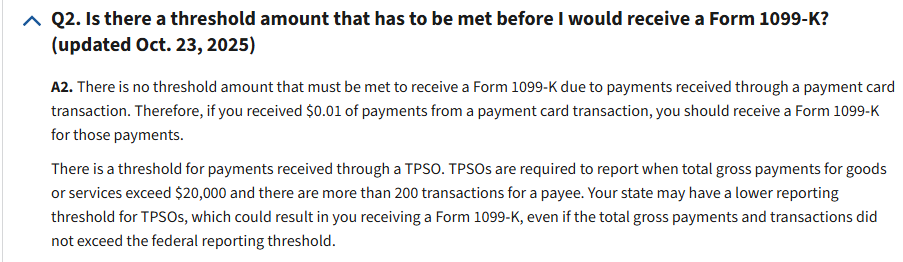
For federal reporting of third-party network transactions, the mandatory threshold is based on two conditions:
- More than $20,000 in gross reportable payments for goods or services during a calendar year.
- More than 200 reportable transactions during that same calendar year.
Both conditions must be exceeded. Reaching exactly $20,000 or exactly 200 transactions does not satisfy the mandatory federal TPSO threshold by itself.
| Annual reportable payments | Transactions | Exceeds both federal TPSO thresholds? |
|---|---|---|
| $25,000 | 250 | Yes |
| $25,000 | 100 | No |
| $10,000 | 300 | No |
| $20,000 | 200 | No |
| $20,001 | 201 | Yes |
These examples address the mandatory federal threshold for third-party network payments only. A form may still be issued below the threshold because of state reporting requirements, voluntary reporting, or backup withholding.
Payment-card transactions also have different information-reporting rules and do not have the same federal minimum threshold. The applicable reporting treatment depends on the type of payment and the entity responsible for reporting it.
The IRS confirmed the restored threshold following federal legislation enacted in 2025. See the IRS Form 1099-K general information FAQs and PayPal’s reporting-threshold explanation.
Is the Old $600 Reporting Threshold Still in Effect?
The earlier federal $600 threshold is no longer the mandatory reporting standard for third-party settlement organizations. The American Rescue Plan Act of 2021 introduced that lower threshold, but the 2025 One Big Beautiful Bill Act restored the previous federal rule of more than $20,000 and more than 200 transactions.
The restored rule applies to qualifying third-party network reporting for tax year 2025 and subsequent years under the federal reporting rules in effect as of November 22, 2026.
However, a state may require a Form 1099-K at a lower reporting amount. Receiving a form below the federal threshold does not necessarily mean PayPal made an error.
Do You Pay Taxes on Every PayPal Payment?
No. The tax treatment depends on the underlying transaction, not merely on receiving money through PayPal.
For example, getting paid for freelance graphic design is generally business income. Receiving reimbursement from a friend for their share of dinner is generally not taxable income.
| Payment received | General US federal tax treatment |
|---|---|
| Freelance or consulting payment | Generally taxable business income |
| Payment for products sold as a business | Generally included in business gross receipts |
| Birthday gift from a family member | Generally not taxable income to the recipient |
| Reimbursement for a shared meal or bill | Generally not taxable income |
| Sale of a personal item below its cost basis | Generally no taxable gain; personal-use loss is not deductible |
| Sale of a personal item at a gain | Gain is generally taxable |
| Rental or other income-producing activity | Tax treatment depends on the activity and applicable rules |
A payment’s actual purpose matters more than the label assigned inside PayPal. Receiving payment for commercial work through Friends & Family does not make that income nontaxable. Conversely, a personal reimbursement mistakenly classified as Goods & Services does not automatically become taxable income.
Are PayPal Friends and Family Payments Taxable?
Genuine personal payments, such as gifts, shared travel costs, or repayment of ordinary household expenses, generally are not taxable income to the recipient. These transactions normally should not be included in Form 1099-K reporting for goods and services.
But if someone pays you for work or products and the payment is labeled Friends & Family, the classification does not override federal tax law. Taxable income must still be reported as required.
Are PayPal Goods and Services Payments Always Taxable?
No. Goods & Services payments may be reportable by PayPal without every dollar being taxable to you. For example, you may have sold a personal item at a loss, issued customer refunds, or received a payment incorrectly classified as commercial.
PayPal may include a transaction identified by the sender as Goods & Services on Form 1099-K, even if the payment was actually personal. Your tax records and the true purpose of the transaction determine how it should be treated on your return.
Do You Owe Taxes When Selling Used Items Through PayPal?
If you sell personal belongings, the key question is whether you sold them for a gain or a loss. The amount received is not automatically your taxable profit.
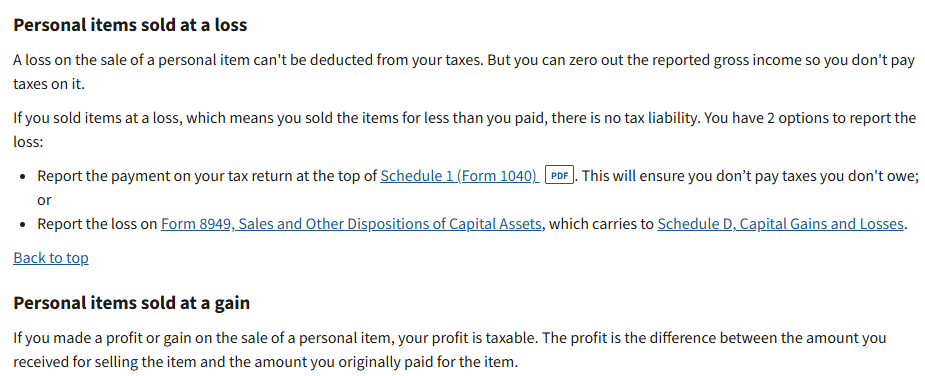
Selling a Personal Item at a Loss
Suppose you bought a laptop for $1,000 for personal use and later sold it for $450 through PayPal. Ignoring other basis adjustments, you have a $550 personal-use loss.
That loss generally is not deductible, but the $450 proceeds do not create a taxable gain. If you receive Form 1099-K for the sale, you still need to reconcile the reported payment correctly on your tax return.
For tax year 2025, IRS instructions provide a special entry at the top of Schedule 1 (Form 1040) for amounts reported on Form 1099-K from personal items sold at a loss. The IRS also describes an alternative method using Form 8949 and Schedule D with an adjustment for the nondeductible personal loss.
The correct reporting method depends on the tax year and the transactions involved. See the IRS guidance on what to do with Form 1099-K.
Selling a Personal Item at a Gain
Suppose you purchased a collectible for $500 and later sold it for $900. Ignoring selling costs and other basis adjustments, the transaction produces a $400 gain.
That gain is generally taxable. The IRS directs taxpayers to report gains from sales of personal-use property on Form 8949 and Schedule D.
Keep purchase receipts, selling records, and information supporting the item’s adjusted basis. These records help establish whether a reported payment represents a taxable gain, a nondeductible personal loss, or business income.
Selling possessions occasionally is different from operating an ongoing resale business. If you regularly purchase inventory to resell for profit, business reporting rules may apply instead.
Why Your PayPal 1099-K Amount May Be Higher Than Your Income
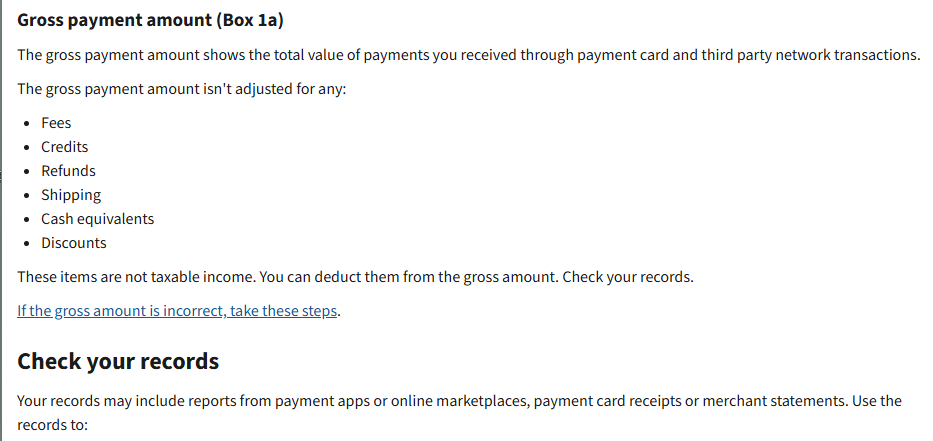
Form 1099-K reports gross payment amounts. Box 1a shows gross reportable payments before adjustments for items such as processing fees, refunds, credits, shipping, and discounts.
For a business, the amount shown can be substantially larger than the profit remaining after refunds, costs, and deductible expenses.
Example: Reconciling Gross PayPal Payments With Business Profit
Consider a hypothetical small online seller with the following transactions and expenses during the year:
| Item | Amount |
|---|---|
| Gross customer payments | $12,000 |
| Customer refunds | −$1,000 |
| PayPal processing fees | −$450 |
| Cost of goods sold | −$4,000 |
| Other deductible business expenses | −$1,500 |
| Estimated business profit | $5,050 |
Although the business received $12,000 in gross payments, the simplified example results in $5,050 of estimated business profit after the listed adjustments and expenses.
The example assumes that the amounts are correctly classified, the expenses qualify for deduction, and no other income, costs, or adjustments apply. It does not calculate the seller’s federal income tax or self-employment tax.
For accurate tax reporting, reconcile the gross payment information with accounting records rather than simply treating the Form 1099-K total as profit. The IRS provides additional instructions in its Form 1099-K FAQs.
How to Download Your PayPal Form 1099-K
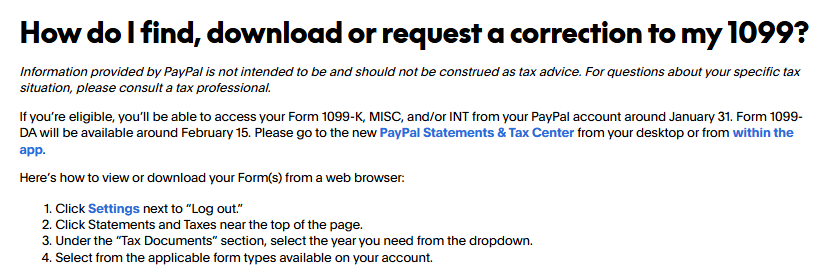
PayPal provides eligible tax documents through its Statements & Tax Center. If you qualify for a Form 1099-K, it is generally available around January 31 following the relevant tax year.
To find your tax form using a web browser:
- Sign in to your account at PayPal.com.
- Click Settings near the sign-out controls.
- Select Statements and Taxes near the top of the page.
- Find the Tax Documents section.
- Select the relevant tax year from the dropdown menu.
- Choose Form 1099-K if it is available, then download or print the document.
PayPal also provides access to tax documents from supported app interfaces. Business account holders may find their documents through a separate Tax Statement page.
For example, qualifying payments received during calendar year 2025 are reported on a 2025 Form 1099-K generally made available in early 2026. A Form 1099-K for qualifying 2026 transactions would ordinarily become available in early 2027.
If your account does not have a Form 1099-K listed, that may mean you did not meet the applicable reporting conditions. If you believe a required form is missing, contact PayPal.
See PayPal’s instructions for downloading and correcting tax forms.
How to Review and Reconcile Your PayPal Form 1099-K
Before using Form 1099-K to prepare your tax return, review the information carefully and compare it with your PayPal transaction records.
Check the following details:
- Tax year: Confirm that the form covers the correct calendar year.
- Payee information: Check your name, address, and taxpayer identification information.
- Box 1a: Compare gross payment amounts with your records of reportable transactions.
- Refunds and fees: Identify adjustments that affect your financial records but do not reduce the gross amount reported on the form.
- Personal transactions: Check whether any genuine reimbursements or gifts were incorrectly categorized as commercial payments.
- Backup withholding: Review any federal income tax withheld and ensure it is properly accounted for when filing.
PayPal offers a Reconciliation Report for Form 1099-K that identifies transactions included in its calculation of gross sales. You can request this report from the tax documents area of your account.
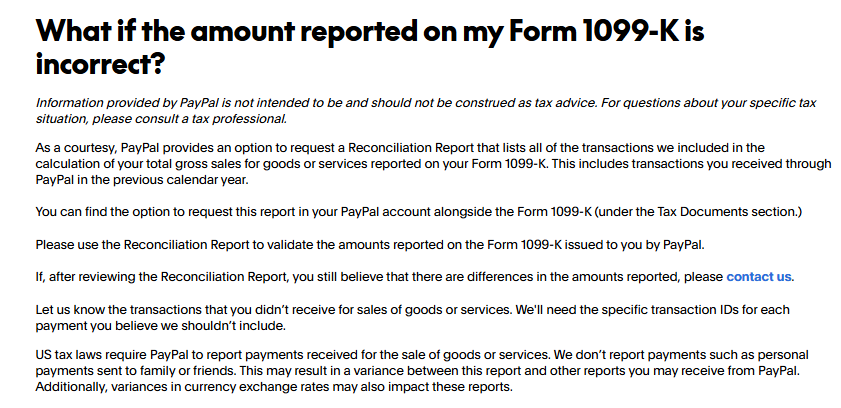
Use it to compare transaction identifiers, customer payments, refunds, and any payments you believe should not have been included. Currency conversion can also explain differences between PayPal reports.
The official process is described in PayPal’s guidance on incorrect Form 1099-K amounts.
How to Report PayPal Income on Your US Tax Return
Form 1099-K provides information, but it does not replace your federal income tax return. Where you report payments depends on the kind of activity that generated them.
| Type of income or transaction | Common reporting treatment |
|---|---|
| Sole proprietor or freelance business | Schedule C (Form 1040) |
| Self-employment earnings subject to SE tax | Schedule SE, generally using Schedule C net earnings |
| Personal-use property sold at a gain | Form 8949 and Schedule D |
| Personal-use property sold at a loss and reported on Form 1099-K | Special Schedule 1 entry or Form 8949 adjustment, as applicable |
| Rental activity | Schedule E or Schedule C, depending on the activity |
| Other nonbusiness income | Appropriate income reporting schedule based on the activity |
Not everyone receiving Form 1099-K must file Schedule C. A business owner, a person selling their own belongings, and someone collecting rental income can have different reporting obligations.
If you are a sole proprietor or independent contractor, you generally report business receipts and allowable business expenses on Schedule C. Your business profit may then affect your income tax and self-employment tax calculations.
Do PayPal Earnings Count Toward Self-Employment Tax?
Yes, eligible net earnings from self-employment count regardless of whether customers paid through PayPal, cash, bank transfers, or another payment method.
Generally, individuals with net earnings from self-employment of $400 or more must file Schedule SE and determine their self-employment tax obligation, subject to applicable exceptions.
The $400 self-employment threshold is completely separate from the Form 1099-K reporting threshold. A freelancer can have a tax filing obligation even when PayPal does not issue a Form 1099-K.
Self-employed taxpayers may also need to make estimated tax payments during the year. See the IRS self-employment tax guide for the applicable rules.
What If PayPal Doesn’t Send You a Form 1099-K?
Not receiving Form 1099-K does not mean that your PayPal earnings are tax-free.
For example, if you earned $5,000 from freelance projects and received all payments through PayPal, the income generally remains reportable even if the amount and transaction count fall below the mandatory federal Form 1099-K threshold.
Keep records of your payments, invoices, refunds, and legitimate business expenses throughout the year. You need those records to determine the correct income to report, whether or not PayPal issues an information return.
What If Your PayPal 1099-K Is Incorrect?
If your Form 1099-K includes transactions you believe are incorrect, begin by comparing the reported amounts with the corresponding PayPal transaction records.
To request a correction through PayPal:
- Sign in to PayPal and open Settings.
- Select Statements and Taxes.
- Under Tax Documents, choose the applicable tax year.
- Open the relevant Form 1099-K section.
- Click Need to change your 1099-K? and follow the instructions.
If the problem concerns specific transactions, gather their transaction IDs and explain the discrepancy. PayPal may ask for additional information before making a correction.
PayPal cannot change the original Friends & Family or Goods & Services classification after a payment has been processed. A transaction incorrectly labeled Goods & Services may therefore remain reportable on the form even when the actual payment was a nontaxable personal reimbursement.
If a corrected form is not available before filing, the IRS provides reporting procedures for amounts included in error. For tax year 2025, the instructions describe using the special entry at the top of Schedule 1 for certain erroneous Form 1099-K amounts.
Do not ignore an incorrect form or assume that the gross total must be reported as taxable income. Follow the IRS guidance for common Form 1099-K situations, and consult a qualified tax professional for complicated discrepancies.
Can You Receive More Than One Form 1099-K?
Yes. If you receive payments through several payment platforms or payment settlement entities, you may receive multiple Forms 1099-K.
You may also receive another information return, such as Form 1099-NEC or Form 1099-MISC, for certain income. The forms are not necessarily errors, but the same payment should not be counted twice as income simply because it appears in multiple reports.
For example, if a client pays an invoice through PayPal and that transaction is included on both a PayPal Form 1099-K and another tax document, compare the transaction records to determine whether the underlying payment has been reported more than once.
Reconcile all payment forms against your invoices, sales records, and accounting records before preparing the return.
Do State Form 1099-K Thresholds Differ?
Yes. Some states require Form 1099-K reporting at lower amounts than the federal third-party network threshold.
For example, PayPal identifies Maryland, Massachusetts, Vermont, and Virginia as states with a $600 gross payment reporting threshold for qualifying goods-and-services payments, regardless of transaction count. It also identifies Illinois as requiring reporting when gross payments exceed $1,000 and there are at least four separate transactions.
The Massachusetts Department of Revenue and Illinois Department of Revenue publish their respective reporting requirements.
These rules concern information reporting, not an automatic determination that the amount is taxable. Other states may have separate thresholds or requirements, and the applicable rules can depend on the reporting year and payment provider.
Why Does PayPal Ask for Your SSN or Tax ID?
PayPal may request taxpayer identification information to comply with US tax reporting and verification requirements.
Depending on the account and taxpayer, this may include a Social Security Number (SSN), Individual Taxpayer Identification Number (ITIN), or Employer Identification Number (EIN). PayPal may also request Form W-9 information or other tax-status documentation where applicable.
If required taxpayer information is missing or cannot be verified, PayPal may apply account limitations or backup withholding. The current federal backup withholding rate is 24% for payments subject to that requirement.
Backup withholding is not the same as your final income-tax rate. Amounts properly withheld may be credited against your federal tax liability when you file your return, and any excess may be refundable depending on your circumstances.
PayPal may also issue Form 1099-K when backup withholding applies, even if your goods-and-services payments are below the ordinary federal reporting threshold.
For account-specific requirements, see PayPal’s taxpayer identification guidance. Enter sensitive tax information only through PayPal’s authenticated account interface or another verified, authorized channel.
Frequently Asked Questions About PayPal Taxes
How Much Can You Make on PayPal Before Paying Taxes?
There is no universal PayPal earnings amount below which all taxable income becomes tax-free. Your tax obligation depends on the source of the money, your overall income, your filing requirements, and other applicable tax rules. The Form 1099-K reporting threshold does not establish an income-tax exemption.
Does PayPal Automatically Deduct Income Tax?
PayPal does not generally calculate and deduct your individual federal income tax from every payment. However, backup withholding may apply to certain reportable payments if required taxpayer identification information is missing or invalid. Business owners and self-employed users remain responsible for determining their actual filing and payment obligations.
Are PayPal Processing Fees Tax-Deductible?
PayPal processing fees incurred for a qualifying business activity are generally deductible as ordinary and necessary business expenses. However, the correct treatment depends on the nature of the transaction, how the income is reported, and applicable tax rules. Personal expenses do not automatically qualify for business deductions.
What If I Receive a Form 1099-K Below $20,000?
That can happen because of state reporting rules, voluntary reporting, payment-card reporting, or backup withholding. Receiving the form below the federal TPSO threshold does not automatically indicate an error. Review the transactions and use the form with your records to determine the correct tax treatment.
Do I Need to Report PayPal Income If I Never Get a 1099-K?
Yes, if the payments represent taxable income that you are required to report. The IRS generally requires taxpayers to report taxable income regardless of whether they receive an information return from the payment provider.
Is Form 1099-K the Same as Form 1099-NEC?
No. Form 1099-K reports certain payment-card and third-party network transactions. Form 1099-NEC reports certain nonemployee compensation. They serve different information-reporting purposes, and receiving both does not mean the same income should automatically be reported twice.
Keeping Accurate Records of PayPal Income
Accurate records make it easier to identify taxable income, document business expenses, reconcile Form 1099-K, and resolve reporting errors. Keep payment histories, invoices, purchase receipts, refund records, processing-fee statements, and documentation for personal transactions where relevant.
For federal reporting requirements, consult IRS Form 1099-K guidance. For PayPal-specific tax documents, use the PayPal Tax Information Help Center.
When your situation involves mixed personal and business payments, multiple tax forms, significant adjustments, or uncertainty about filing requirements, a qualified US tax professional can help determine the correct treatment for your circumstances.