
Published: November 21, 2026. Last updated: November 22, 2026.
The PayPal Debit Card is a Mastercard debit card that lets eligible US PayPal users spend money directly from their PayPal Balance account. You can use it for online purchases, in-store payments, and cash withdrawals at compatible ATMs. It has no monthly maintenance fee, and withdrawals from MoneyPass ATMs in the United States are free of PayPal ATM withdrawal fees.
Withdrawals from domestic ATMs outside the MoneyPass network cost $2.50 per transaction, plus any ATM operator surcharge. The standard daily ATM withdrawal limit is $400. The card also offers 5% back in PayPal Rewards Points on eligible spending in a category you select each month, subject to a $1,000 monthly spending cap.
Here’s how the consumer PayPal Debit Card works, what it costs, how to get and activate one, and how to avoid unnecessary ATM fees.
PayPal Debit Card Fees at a Glance
The PayPal Debit Card does not charge a monthly fee or require a minimum balance. However, ATM withdrawals, international transactions, and some methods of adding money can involve charges.
| Transaction or service | PayPal Debit Card fee |
|---|---|
| Card application and monthly maintenance | $0 |
| Minimum balance requirement | None |
| Purchases within the United States | $0 |
| MoneyPass ATM withdrawal in the US | $0 |
| Non-MoneyPass ATM withdrawal in the US | $2.50, plus any ATM operator fee |
| ATM withdrawal outside the US | $2.50, plus a 2.5% international transaction fee and any ATM operator fee |
| Purchase from a merchant outside the US | 2.5% international transaction fee |
| Retail cash reload by swiping the card | $2.00–$3.95, depending on the store |
These charges are listed in the PayPal Debit Mastercard Cardholder Agreement, last updated November 4, 2026. The agreement also explains that an ATM operator may charge its own fee, including for certain balance inquiries even when you do not complete a withdrawal.
For example, withdrawing $100 from a qualifying US MoneyPass ATM generally results in no PayPal withdrawal fee. At a domestic non-MoneyPass ATM, the same withdrawal costs $2.50 in PayPal fees, plus any separate surcharge displayed by the ATM.
How Does the PayPal Debit Card Work?
The PayPal Debit Card uses money available in your PayPal Balance account. When you make an eligible purchase or ATM withdrawal, the transaction amount and applicable fees are deducted from that balance.
The card is issued by The Bancorp Bank, N.A., under a license from Mastercard. PayPal provides the associated digital wallet and balance services. The card is intended for personal, family, and household use rather than business activity.
Unlike a credit card, it does not provide a revolving credit line. You generally need enough available balance to cover purchases and fees. Simply linking a bank account to PayPal does not mean every debit card purchase will automatically draw money from that bank.
PayPal offers an optional automatic reload feature, but it is separate from individual card authorizations. If a transaction exceeds your available balance, it may be declined rather than triggering an immediate bank transfer.
How to Get a PayPal Debit Card
You can apply for the consumer PayPal Debit Card through the PayPal app or its official website. You need an eligible personal account and must satisfy PayPal’s identity and account requirements.
PayPal Debit Card Requirements
PayPal’s US eligibility requirements include:
- An active personal PayPal account in good standing.
- An eligible PayPal Balance account.
- A confirmed physical US street address.
- Your date of birth and Social Security Number for verification.
- Compliance with the card’s age, residency, and other identity requirements.
PayPal also states that only one PayPal account may be associated with your Social Security Number for card approval. If you have multiple PayPal accounts associated with the same SSN, this can affect eligibility.
There is no credit check to apply, but approval is not guaranteed. If you do not already have a PayPal Balance account, PayPal can establish one as part of the eligible card enrollment process.
Apply for the Card
- Visit the official PayPal Debit Card page or open the PayPal app.
- Sign in to your personal PayPal account.
- Select Get the Card or the available debit card application option.
- Provide the requested identity and account information.
- Review the applicable terms and complete the application.
Once approved, you can access a digital PayPal Debit Card and use it for supported purchases. You may also request a physical card at no additional issuance cost.
Digital vs. Physical PayPal Debit Card
The digital card is useful for online payments and supported mobile wallet purchases. The physical card provides an additional way to pay in stores and is the standard option for withdrawing cash at compatible ATMs using a PIN.
To request a physical PayPal Debit Card in the app:
- Open the PayPal app and sign in.
- Tap your PayPal balance.
- Select your PayPal Debit Card.
- Tap Request a physical card.
- Follow the instructions to confirm your delivery details.
On PayPal.com, select the PayPal Debit Card under your balance and choose the option to request a physical card. You can find the current instructions in PayPal’s card eligibility and application guide.
How to Activate Your PayPal Debit Card and Set a PIN
The digital card becomes available after approval. A physical card must be activated before use, and a four-digit PIN is required for ATM withdrawals.
Activate the Physical Card
To activate it through the PayPal app:
- Open the app and tap PayPal Balance.
- Select your PayPal Debit Card.
- Tap Activate Card.
- Follow the identity and card activation prompts.
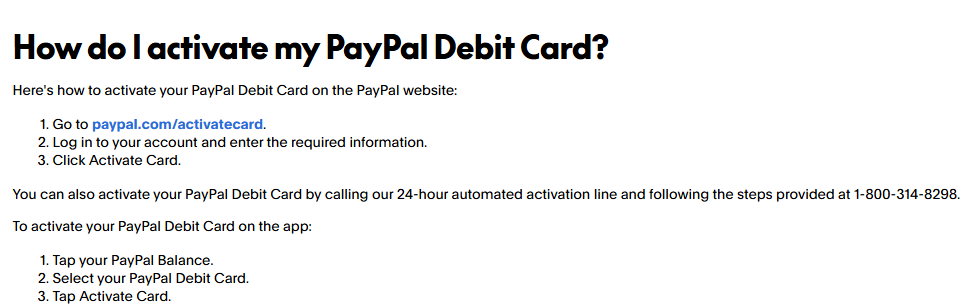
You can also activate the physical card at paypal.com/activatecard after signing in. PayPal also provides an official automated activation option, described in its card activation instructions.
Set or Change Your Four-Digit PIN
To manage your PIN through the PayPal app:
- Tap Accounts and select PayPal Balance.
- Choose your PayPal Debit Card.
- Open Manage card.
- Tap Change PIN.
- Enter and confirm your new four-digit PIN.
On the PayPal website, open your card from the Dashboard, select Manage Card, and click Edit in the PIN section. PayPal says your new PIN takes effect immediately. See its PIN management guide.
How to Use Your PayPal Debit Card at an ATM
You can use the physical PayPal Debit Card to withdraw cash at compatible ATMs displaying Mastercard, Cirrus, PULSE, or MoneyPass acceptance marks.
To withdraw cash:
- Check your balance. Make sure you have enough available money to cover the withdrawal and any applicable fees.
- Find a compatible ATM. For a fee-free PayPal withdrawal in the US, choose an eligible MoneyPass ATM.
- Insert your card. Follow the ATM’s instructions.
- Enter your PIN. Use the four-digit PIN associated with your PayPal Debit Card.
- Choose Checking. Select this account type if the ATM asks which account to use.
- Enter the withdrawal amount. Stay within your available balance and applicable withdrawal limits.
- Review any charges. Check whether the ATM displays an operator surcharge before confirming.
- Complete the withdrawal. Confirm the transaction and collect your cash, card, and receipt as applicable.
The PayPal Debit Card has a standard $400 daily ATM withdrawal limit. An individual ATM may impose a lower transaction limit or have less cash available.
You can find the supported ATM requirements in PayPal’s ATM withdrawal instructions.
How to Find a Free MoneyPass ATM
PayPal provides access to a nationwide network of more than 30,000 MoneyPass ATMs. You can locate nearby machines through the PayPal app.
- Open the PayPal app.
- Tap PayPal balance.
- Select your debit card.
- Tap Find an ATM.
- Use the map or search feature to locate a compatible ATM.
You can also use the MoneyPass ATM locator. Confirm that the ATM participates in the network before withdrawing. Fee-free MoneyPass withdrawals under PayPal’s consumer card terms apply to eligible withdrawals in the United States, not automatically to MoneyPass-branded locations abroad.
PayPal Debit Card Daily Spending and Withdrawal Limits
The standard daily limits differ depending on whether you’re making a purchase, withdrawing cash from an ATM, or requesting an over-the-counter cash withdrawal.
| Transaction type | Standard daily limit |
|---|---|
| Card purchases | $3,000 |
| ATM cash withdrawals | $400 |
| Over-the-counter cash withdrawals | $5,000 |
Over-the-counter withdrawals may be available at participating Mastercard member financial institutions. Participation must be confirmed with the institution.
These are PayPal’s published standard limits, not guaranteed transaction approvals. Your available balance, account activity, and individual institution limits may restrict a transaction further. Purchases using the card as a funding source at PayPal Checkout can also be subject to PayPal’s separate transaction limits.
To check the published daily limits in the app, go to Accounts → PayPal Balance → PayPal Debit Card → Manage card → Daily limits. PayPal states that this section displays standard limits and does not dynamically show your remaining allowance after daily transactions.
See the official daily spending and withdrawal limits.
PayPal Debit Card International Fees
The PayPal Debit Card can be used at eligible Mastercard merchants and compatible ATMs outside the United States. However, international transactions can involve multiple charges.
According to the Cardholder Agreement:
- International purchases: A 2.5% international transaction fee applies to eligible transactions with merchants outside the US.
- International ATM withdrawals: A $2.50 fee applies to withdrawals at non-US ATMs.
- Additional international transaction fee: A 2.5% fee also applies to withdrawals at non-US ATMs.
- ATM operator surcharges: The overseas ATM may charge its own separate fee.
These fees can apply even when no currency conversion is needed. When a conversion is necessary, the applicable exchange rate can also affect the amount deducted from your PayPal balance.
For example, a foreign ATM withdrawal equivalent to $100 before fees could incur $2.50 as the fixed PayPal ATM charge and $2.50 as the percentage-based international transaction fee, plus any ATM operator charge or exchange-rate difference.
PayPal Checkout transactions may use a different currency conversion mechanism from purchases processed directly over the Mastercard network. Review the relevant transaction details and the official Cardholder Agreement before using the card abroad.
How PayPal Debit Card Rewards Work
Eligible PayPal Debit Card holders can earn 5% back in PayPal Rewards Points on purchases in a category they choose for the month.
The program applies to up to $1,000 in eligible spending per calendar month in the selected category. At the full spending cap, that represents up to $50 in rewards value in points, subject to the program terms.
Available categories include groceries, restaurants, fuel, apparel, and rideshare and public transit. Categories can change, and eligibility depends on how participating merchants and transactions are classified.
How to Activate Your Monthly Rewards Category
In the PayPal app:
- Tap Me.
- Open Rewards.
- Tap Choose your category.
- Select the category you want for the current month.
- Tap Confirm Category, review the details, and select Done.
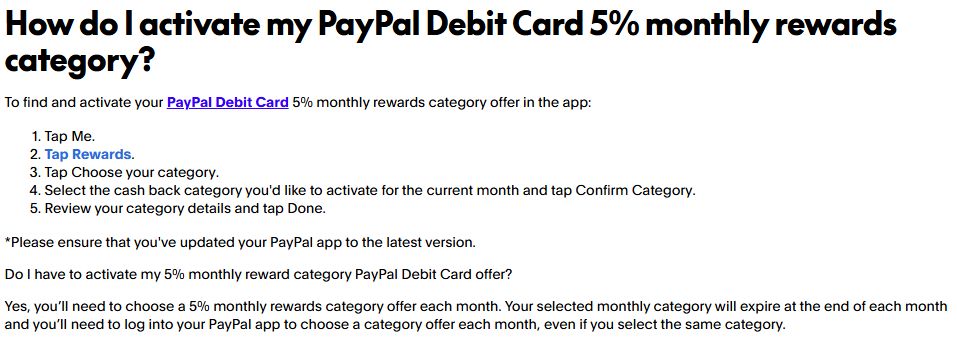
You must select a category each month, even if you want to keep the same one. The previous month’s selection expires at the end of the month.
Rewards are awarded as points rather than automatically deposited as cash after each purchase. Points can be redeemed for cash or other available options under PayPal Rewards terms. Some merchant offers may be combined with eligible category rewards.
See PayPal’s monthly rewards activation guide.
How to Add Money to Your PayPal Debit Card
You do not load money onto the debit card as a separate stored balance. Instead, you add funds to the linked PayPal Balance account, which the card uses for eligible transactions.
Available funding methods include:
- Receiving PayPal payments: Eligible payments received into your available PayPal balance can be spent using the card.
- Bank transfers: Move money from an eligible linked bank account. Standard transfers can take several business days.
- Linked debit card: Add money using an eligible card, with faster transfer options when available.
- Direct Deposit: Receive eligible payroll or government payments through PayPal’s direct deposit service.
- Automatic reload: Schedule transfers or configure balance-based reloads using eligible funding methods.
- Cash at participating stores: Add cash using an available PayPal barcode or by swiping the debit card, subject to retail service fees.
To add money through the PayPal website, open Wallet → Transfer Money → Add money from your bank or debit card. Enter the amount and choose one of the available transfer methods.
Eligible debit card transfers may be completed in seconds, while standard bank transfers generally take several business days. Retail cash reloads have separate fees, and supported check-cashing services may also charge for faster access to funds.
You can find instructions in PayPal’s guide to adding money for debit card purchases.
What Happens if Your PayPal Debit Card Is Declined?
A declined transaction does not always mean your card has been canceled. Start by checking the available balance, card status, PIN, and the amount of the transaction.
- Insufficient balance: Add money to PayPal and make sure the transfer is complete before trying again. The available amount must also cover any applicable fees.
- Physical card not activated: Complete the activation process before attempting a transaction.
- Incorrect PIN: Reset the PIN through the card management settings.
- Daily limit reached: Check the applicable purchase or cash withdrawal limit.
- Expired, closed, or locked card: Review your card status in PayPal and request a replacement or unlock the card when appropriate.
- Merchant authorization hold: Fuel pumps, hotels, and rental businesses may temporarily authorize more than the final purchase amount. This can reduce your available balance and cause a decline.
At a gas station, paying a specific amount inside may help avoid a larger pay-at-the-pump authorization. For an ATM withdrawal, make sure your available balance covers both the cash amount and applicable ATM fees.
If the problem continues, review PayPal’s debit card decline troubleshooting or use the official support options associated with your account.
How to Lock or Replace a Lost PayPal Debit Card
If you temporarily cannot find your card, you can lock it in the PayPal app to prevent new card payments, although some previously authorized automatic payments may still be processed.
To lock your card:
- Open Accounts in the PayPal app.
- Select PayPal Balance and then your PayPal Debit Card.
- Open Manage card.
- Turn on the Lock card setting.
If the card is lost or stolen, use Report lost, stolen, or damaged card in the card management area. PayPal permanently closes cards reported lost or stolen and initiates the replacement process.
Review the official lost or stolen card instructions and report any unauthorized transactions promptly.
Is the PayPal Debit Card FDIC Insured?
PayPal is a financial technology company, not an FDIC-insured bank. However, eligible US-dollar PayPal Balance funds associated with a PayPal Debit Card account may be placed at designated Program Banks and qualify for pass-through FDIC insurance, subject to applicable conditions and coverage limits.
Pass-through insurance protects eligible deposits against the failure of a participating Program Bank, not the failure of PayPal itself. It is not general insurance against unauthorized transactions, market losses, or every loss involving a PayPal account.
PayPal describes the participating institutions and applicable limitations in its Program Banks terms.
Is the PayPal Debit Card Worth Getting?
The consumer PayPal Debit Card may be useful if you regularly keep money in PayPal, want to spend that balance without first transferring it to another account, and have access to convenient MoneyPass ATMs in the United States.
Its lack of monthly fees and the ability to earn category-based rewards can be appealing. On the other hand, the $400 daily ATM withdrawal limit, out-of-network withdrawal fees, international transaction charges, and reliance on available PayPal Balance funds may make it less suitable for someone who needs frequent cash withdrawals or a traditional checking account with broader banking services.
The card is also separate from the PayPal Business Debit Mastercard, which has its own eligibility rules, cash-back structure, and fees. Business users should evaluate the business product rather than assuming the consumer card is intended for commercial spending.
Frequently Asked Questions
Does Applying for a PayPal Debit Card Require a Credit Check?
No. PayPal states that applying for the consumer PayPal Debit Card does not require a credit check. However, identity verification and other eligibility requirements still apply, and approval is not guaranteed.
Can I Withdraw Cash Using Only the Digital PayPal Debit Card?
The documented PayPal ATM withdrawal process uses a physical card and PIN. The digital card supports eligible online and mobile wallet payments, but it should not be assumed to work at every ATM. Request a physical card if you need ordinary ATM cash access.
Does the PayPal Debit Card Offer Overdraft Protection?
The card does not provide a traditional overdraft credit facility. Transactions that exceed your available PayPal Balance and applicable limits are generally declined. Merchant authorizations and other processing circumstances can still create amounts that you may need to repay under the Cardholder Agreement.
Can I Use the PayPal Debit Card With Apple Pay or Google Pay?
Yes. PayPal supports adding the consumer debit card to Apple Pay, Google Pay, and Samsung Pay for eligible purchases. Merchant acceptance and device compatibility still apply.