
Published: November 16, 2026. Last updated: November 22, 2026.
You can cash a check with PayPal using the Cash a Check feature in the PayPal mobile app. If you’re eligible, you can photograph the front and back of a paper check, submit it for approval, and have the proceeds added to your PayPal Balance account. You can choose expedited funding for a fee or wait 10 days without a check-cashing fee, provided the check is approved and not returned unpaid.
For expedited funding, PayPal charges 2% for eligible payroll and government checks with a preprinted signature, or 5% for other accepted checks. Both categories have a $6 minimum fee. The service is available to eligible US customers, but not to customers in New York.
Here’s how to check your eligibility, submit a check correctly, calculate the fees, and understand when your money will become available.
Can you cash a check with PayPal?
Yes. PayPal’s Cash a Check service allows eligible customers to submit paper checks through the mobile app and receive approved proceeds in their PayPal Balance account.
The service is provided by Sunrise Banks, N.A., with support from Ingo Money, Inc. Ingo Money reviews submitted checks for approval, while Sunrise Banks handles the funding process.
This differs from depositing a check at a traditional bank. Instead of visiting a branch or depositing the check into a checking account, you use your phone to submit images for review and select an available funding option.
Cash a Check does not provide physical cash immediately. The proceeds are credited to your PayPal balance, which you can then use through eligible PayPal services or transfer using an available withdrawal method.
Who is eligible to cash a check with PayPal?
PayPal Cash a Check requires an eligible US PayPal account with access to a PayPal Balance account. The service is not automatically available to everyone who has a PayPal login.
PayPal’s published eligibility requirements include the following:
- US residency: You must meet the service’s US residency requirements and live in a supported location.
- Age requirement: You must be at least 18 or meet the higher age-of-majority requirement applicable in your jurisdiction.
- PayPal Balance: An eligible PayPal Balance account is required.
- Account type: The feature supports eligible personal accounts and individual or sole proprietor business accounts with a PayPal Business Debit Mastercard.
- Identity verification: You may need to complete PayPal and Ingo Money’s applicable identification and enrollment requirements.
- Account standing: Account restrictions, funding limits, or a negative balance can prevent access to the service.
New York residents are not eligible for PayPal Cash a Check. PayPal also states that the feature is unavailable to business-account customers with a negative balance, while its Balance terms prohibit remote check capture when the Balance account has a negative balance.
Meeting the account requirements does not guarantee that an individual check will be approved. Each submitted check is evaluated separately.
Full eligibility information is available in the PayPal Cash a Check Help Center and the PayPal-specific Ingo Money terms.
How to cash a check with PayPal step by step
You can complete the Cash a Check process using the PayPal mobile app. Keep the original paper check available throughout the process because you may need to photograph it again after approval.
- Open the PayPal app. Sign in to the account associated with your eligible PayPal Balance.
- Open your balance. Tap Me, select Accounts, and then tap PayPal balance.
- Select Cash a Check. Find the feature under More Options. If enrollment or acceptance of service terms is required, follow the instructions displayed.
- Enter the check amount. Type the amount shown on the check and make sure the numbers match the written amount.
- Endorse the check. Sign the back according to the instructions. The endorsement must match the name of the person to whom the check is payable.
- Photograph both sides. Use your phone to take clear pictures of the front and back of the endorsed check. Tap Next to continue.
- Choose a funding speed. Select the available expedited funding option or the no-fee 10-day option. Review any applicable fee and the amount that will be credited.
- Confirm your submission. Tap Confirm and follow any additional review instructions.
- Wait for the approval decision. If the check is approved, PayPal will instruct you to write VOID across the front and upload another photo showing the voided check.
- Review the confirmation. Once the process is finalized, the app displays the credit amount and when the money is expected to become available.
Never write VOID on the check before PayPal instructs you to do so. PayPal requires this step only after the check has received the necessary approval.
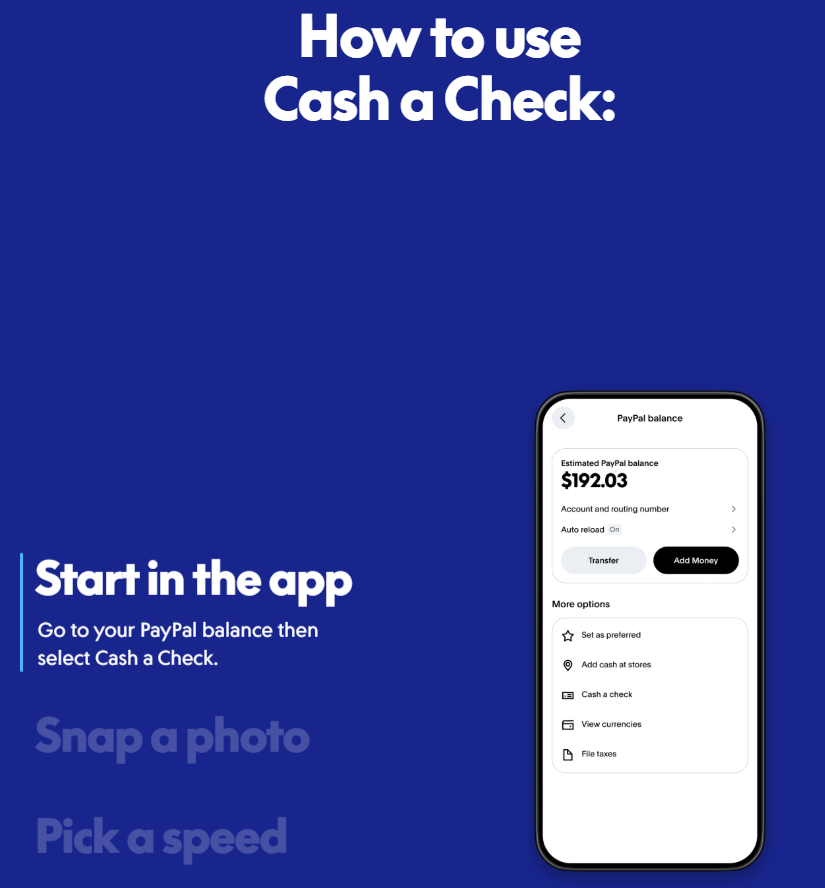
The current navigation and submission sequence are described in PayPal’s official instructions. The appearance of individual screens may differ across app versions.
PayPal Cash a Check fees
PayPal’s check-cashing fees depend on the type of check and how quickly you want the proceeds added to your balance.
| Check type | Money in Minutes fee | Money in 10 Days fee |
|---|---|---|
| Payroll checks with a preprinted signature | 2% of check amount; $6 minimum | $0 |
| Government checks with a preprinted signature | 2% of check amount; $6 minimum | $0 |
| Accepted personal checks | 5% of check amount; $6 minimum | $0 |
| Accepted payroll or government checks with handwritten signatures | 5% of check amount; $6 minimum | $0 |
| Other accepted checks | 5% of check amount; $6 minimum | $0 |

The free 10-day option is conditional on the check being approved and not returned unpaid during the waiting period. Expedited funding is also subject to approval.
The $6 minimum is especially important for smaller checks. If the percentage calculation produces less than $6, the minimum fee applies.
These rates are confirmed in both the PayPal Cash a Check service page and the Ingo Money terms for PayPal.
How much does PayPal charge to cash a $100, $500, or $1,000 check?
The following examples show the expedited fee and expected net amount for approved checks under the published rates. They assume no additional account-specific charges.
| Check amount | 2% category fee | Net at 2% | 5% category fee | Net at 5% |
|---|---|---|---|---|
| $100 | $6.00 | $94.00 | $6.00 | $94.00 |
| $250 | $6.00 | $244.00 | $12.50 | $237.50 |
| $500 | $10.00 | $490.00 | $25.00 | $475.00 |
| $1,000 | $20.00 | $980.00 | $50.00 | $950.00 |
For example, a $250 payroll check with a qualifying preprinted signature has a percentage fee of $5.00, but the $6 minimum applies. The amount credited would therefore be $244.00.
For a $250 accepted personal check, the 5% fee is $12.50, leaving $237.50.
When the free 10-day option is available and the check successfully meets its conditions, the full face value is credited without an Ingo check-cashing fee.
Are fees charged when PayPal declines a check?
Under the PayPal-specific Ingo Money terms, if a check is declined for funding, the transaction is terminated without a check-cashing fee.
For approved expedited transactions, the applicable fee is deducted from the proceeds. Ingo also provides a fee breakdown through the app or email. Your PayPal transaction history may show only the net credited amount rather than displaying the Ingo fee as a separate transaction.
How long does PayPal take to cash a check?
The total time depends on how long the check takes to be reviewed and which funding speed you select.
PayPal states that a check review often takes only a few seconds, although it can take three to five minutes and, in rare cases, up to an hour.
Once approved, the two funding options work differently.
| Funding option | Expected availability | Fee | Conditions |
|---|---|---|---|
| Money in Minutes | Usually within minutes after approval; the Ingo terms describe funding within 30 minutes | 2% or 5%, with a $6 minimum | Check must be approved; technical delays can occur |
| Money in 10 Days | On the 10th day after submission under the service terms | No check-cashing fee | Check must be approved and not returned unpaid within the 10-day period |
Money in Minutes
If you choose expedited funding, Ingo Money reviews the check and decides whether it qualifies. For an approved check, Sunrise Banks initiates the credit to your PayPal account after the required steps are completed.
Funds are usually available within minutes after approval. The PayPal-specific Ingo terms describe a funding period of less than 30 minutes, although outages and processing problems can cause delays.
The expedited fee is deducted from the check amount before the proceeds are credited.
Money in 10 Days
If you do not need the proceeds immediately, you can select the 10-day option without paying an Ingo check-cashing fee.
The check must first be approved. If it is not returned unpaid within the required 10-day period, the full amount is credited on the 10th day after submission under the service terms.
If the check is returned unpaid before that period ends, the credit will not be completed, and the transaction is terminated without a check-cashing fee.
The 10-day waiting period is different from the initial review period. A check may be approved quickly while the funds remain unavailable until the scheduled funding date.
What types of checks can you cash with PayPal?
PayPal’s check-cashing partner accepts many types of US-dollar checks for review, but every check is subject to approval.
Common check categories that may qualify include payroll checks, government checks, personal checks, and other eligible business or financial checks.
| Check category | General eligibility |
|---|---|
| Payroll checks | Generally accepted for review when they meet the service requirements |
| Government checks | Generally accepted for review when eligible |
| Personal checks | May be accepted following verification |
| Other qualifying checks | Subject to check details and Ingo Money approval |
| Traveler’s checks | Generally not accepted |
| Credit card checks | Generally not accepted |
| Starter checks without preprinted issuer information | Generally not accepted |
| US Savings Bonds | Generally not accepted |
| Checks drawn on accounts outside the United States | Not generally accepted |
| Checks payable in currencies other than USD | Not generally accepted |
Requirements for an eligible check
Under the PayPal-specific Ingo terms, a submitted check must generally meet these requirements:
- It must be payable to you, using a name that matches your PayPal account.
- The check writer’s name and address must be preprinted on the check.
- The check must be dated on or before the submission date.
- The written and numerical amounts must match.
- The check must be signed by the issuer.
- You must endorse the check, and the endorsement must match the payee’s name.
- The check must meet the applicable US-dollar and financial institution requirements.
- The check must not already have been deposited or cashed elsewhere.
Checks you write to yourself may or may not be accepted, depending on Ingo Money’s decision. Meeting the general requirements does not guarantee funding approval.
What are the PayPal Cash a Check limits?
Cash a Check transactions are subject to check-amount limits, cumulative funding limits, and account-specific restrictions.
The published PayPal-specific Ingo Money agreement lists a $5 minimum check amount, but its summary and detailed provisions contain different maximum-limit figures.
The summary describes a maximum of $2,500 per check, $5,000 per week, and $15,000 per month. A later detailed provision describes checks up to $5,000, with a combined limit of $5,000 per day and $15,000 per month.
Because these provisions differ, do not assume that every PayPal account can cash a $5,000 check. The applicable limit may also be reduced by account-specific funding restrictions, balance limits, or other eligibility factors.
For a large check, review the current limits in the Cash a Check service or contact PayPal and Ingo Money before submitting it. The limits applicable to your account and transaction determine whether funding is available.
Why would PayPal decline a check?
Ingo Money and Sunrise Banks review submitted checks and may decline funding based on the information available about the check, the account, or the transaction.
Common issues to check include:
| Possible issue | What to check |
|---|---|
| Payee name mismatch | Confirm that the check is payable to the name on your PayPal account |
| Incorrect endorsement | Verify that the check was signed as required and matches the payee |
| Unclear check images | Make sure the entire front and back are clearly visible |
| Unsupported check type | Review the list of accepted and excluded checks |
| Amount exceeds a limit | Check the applicable individual and cumulative transaction limits |
| Account restriction | Review your PayPal Balance eligibility and any account limitations |
| Check already submitted elsewhere | Do not attempt to fund the same check through multiple services |
| Verification or risk review | Follow the official decision notice and support instructions |
A declined check does not necessarily mean that the check is fraudulent or that the person who wrote it lacks funds. Ingo Money may decline a transaction based on its overall assessment, and it does not guarantee that every decision will include a detailed explanation.
What happens when a check is rejected?
If Ingo Money formally declines your check, the funding transaction is terminated without an Ingo check-cashing fee. Once the decline is confirmed and the transaction is no longer pending, you may attempt to cash or deposit the original check elsewhere.
If the expedited option is declined, you may sometimes be offered the opportunity to request review under the 10-day funding option.
Do not resubmit or deposit the same check elsewhere while the original transaction is still under review. Confirm the final status first.
What if Cash a Check is not showing in PayPal?
If you cannot find Cash a Check in the PayPal app, the first step is to determine whether your account qualifies for the service.
- Check your location. The feature is unavailable to customers in New York and is subject to other geographic eligibility restrictions.
- Review your PayPal Balance account. Cash a Check requires an eligible Balance account, not merely a basic PayPal login.
- Confirm your account type. The feature supports eligible personal accounts and specified individual or sole proprietor business accounts.
- Check identity verification. Incomplete verification or enrollment can prevent access to funding features.
- Review account limitations. A negative balance or other account restrictions may affect eligibility.
- Update the app. Install the current official PayPal version and check the documented navigation under Me, Accounts, and PayPal balance.
If your account appears eligible but the option is still missing, contact PayPal using its official Help Center. Updating the app may resolve an interface problem, but it does not override account or location restrictions.
What should you do with the original check?
Proper handling of the original check is an essential part of the Cash a Check process.
Before approval: Keep the check intact after submitting it. Do not write VOID on it until PayPal specifically instructs you to do so.
After approval: Follow the prompt to write VOID across the front and take another photograph of the voided check. Complete any additional instructions shown in the app.

After the funds are credited: The Ingo Money terms require you to destroy the original check. Never attempt to deposit or cash it again.
After a confirmed decline: If the funding request has been formally declined and terminated without funding, you may attempt to deposit or cash the check elsewhere.
Attempting to obtain funds from more than one institution using the same check can create duplicate transactions and serious financial or legal consequences.
Can you cash a check with PayPal without a bank account?
Yes. An eligible customer can use PayPal Cash a Check without first opening a traditional checking account. The check proceeds are credited to the customer’s PayPal Balance account rather than deposited into a conventional bank account.
Once the money becomes available in PayPal, you can use eligible balance features. Depending on your account and available services, you may be able to make purchases, transfer money, or access funds using a PayPal Debit Card.
If you choose to transfer the money to an external bank account or eligible debit card, that is a separate transaction.
PayPal’s standard US bank transfers generally take one to three business days without a PayPal transfer fee, while eligible Instant Transfers typically complete within minutes and carry a fee. Actual availability and processing times may vary.
For details, see PayPal’s withdrawal instructions.
Alternatives if you can’t cash a check with PayPal
If Cash a Check is unavailable or your check is formally declined, you may have other legitimate options for depositing or cashing it.
- Bank mobile deposit: Many banks allow eligible customers to deposit paper checks by taking photographs in a mobile banking app. Processing times and availability rules vary.
- Credit union deposit: Credit unions may provide mobile or in-person check deposit services for members.
- Issuing bank: The bank named on the check may offer a check-cashing service to eligible recipients, potentially with identification requirements or fees.
- Retail check-cashing service: Certain retailers offer check cashing for approved check types and amounts, subject to store policies and charges.
- Other mobile check-cashing services: Some financial applications provide similar features, but acceptance requirements, fees, and funding limits can differ.
- Direct deposit: For future payroll or government payments, setting up eligible direct deposit may eliminate the need to cash a paper check.
Before using another service, make sure the check has not already been funded and is not awaiting a decision from PayPal or Ingo Money.
Frequently asked questions about PayPal check cashing
Does PayPal cash personal checks?
Yes, eligible personal checks may be accepted after review. For approved personal checks using expedited funding, the published fee is 5% of the check amount, with a $6 minimum. Approval is not guaranteed.
Is it free to cash a check with PayPal?
PayPal offers a no-fee 10-day funding option when the check is approved and is not returned unpaid during the required period. Expedited funding carries a percentage-based fee with a $6 minimum.
Can PayPal cash a government check?
Eligible government checks can be submitted for review. Government checks with a preprinted signature qualify for the published 2% expedited fee category, subject to the $6 minimum. Hand-signed government checks fall under the 5% expedited fee category.
Can you cash a check with PayPal in New York?
No. PayPal’s official Cash a Check Help Center states that the feature is unavailable to customers in New York.
Can PayPal cash a check issued outside the United States?
The PayPal-specific Ingo Money terms generally exclude checks drawn on accounts outside the United States or payable in currencies other than US dollars.
Does PayPal require you to write VOID on the check?
Yes, for an approved Cash a Check submission, PayPal instructs you to write VOID across the front and provide another photograph. You must wait for that instruction. Do not void the check before approval.
Official PayPal Cash a Check information
Fees, eligibility, funding options, and check requirements were checked against official PayPal and Ingo Money documentation.
- PayPal Cash a Check — service overview, funding speeds, and published check-cashing fees.
- PayPal Cash a Check Help Center — mobile app steps, eligibility, approval process, and VOID instructions.
- Ingo Money Terms for PayPal — applicable check requirements, funding rules, fees, restrictions, limits, and declined-check handling.
- PayPal Balance Terms and Conditions — account eligibility, funding restrictions, and balance services.
- PayPal Withdrawal Help — methods for accessing money after it has been credited to PayPal.
For eligible users, PayPal Cash a Check provides a way to turn an approved paper check into a usable PayPal balance without visiting a bank branch. The main decision is whether faster access justifies the expedited fee or whether the no-fee 10-day option meets your needs. In either case, confirm the applicable limits, follow the in-app instructions carefully, and wait for the final funding decision before treating the check as completed.