
Published: November 15, 2026. Last updated: November 22, 2026.
PayPal Direct Deposit lets eligible U.S. users receive their paychecks, certain government benefits, and tax refunds directly into their PayPal Balance account. To get started, open PayPal, select Direct Deposit, and either find your employer through the setup process or give your assigned routing and account numbers to your payroll provider.
Once enrolled, Direct Deposit usually takes up to two pay cycles to begin. Eligible users may receive their pay up to two days early, depending on when PayPal receives the payment instructions. Early access is not guaranteed, and there is no single posting time for every deposit.
This guide explains how to activate Direct Deposit using the PayPal app or website, find the correct banking details, receive government payments, and resolve missing or rejected deposits.
Information is based on PayPal’s U.S. Direct Deposit documentation and PayPal Balance Terms and Conditions, last updated November 4, 2026.
How to set up PayPal Direct Deposit
PayPal offers two ways to establish Direct Deposit: connect through a supported employer or payroll provider, or provide your assigned account and routing numbers manually.
The automatic setup process can simplify enrollment when your employer is supported. Manual setup is useful when your employer is not listed or requires you to complete its own payroll authorization form.
Set up Direct Deposit in the PayPal app
To start using the PayPal mobile app:
- Open PayPal. Sign in to your personal account.
- Tap your PayPal balance. Open the section showing your available balance.
- Select Direct Deposit. Tap Set Up Direct Deposit. Some app versions present a simplified setup option.
- Find your employer. Select Find your employer and search for the business, government agency, or payroll provider that pays you.
- Confirm your identity. Follow the prompts required to connect with the payer and verify your information.
- Choose the deposit arrangement. Where supported, select whether to receive your entire paycheck or a particular amount in PayPal.
- Complete enrollment. Review and submit the information requested during setup.
If your employer is not listed, PayPal provides a Fill out a Direct Deposit form option in the app. You can use the account information shown by PayPal to complete your employer’s payroll setup instead.
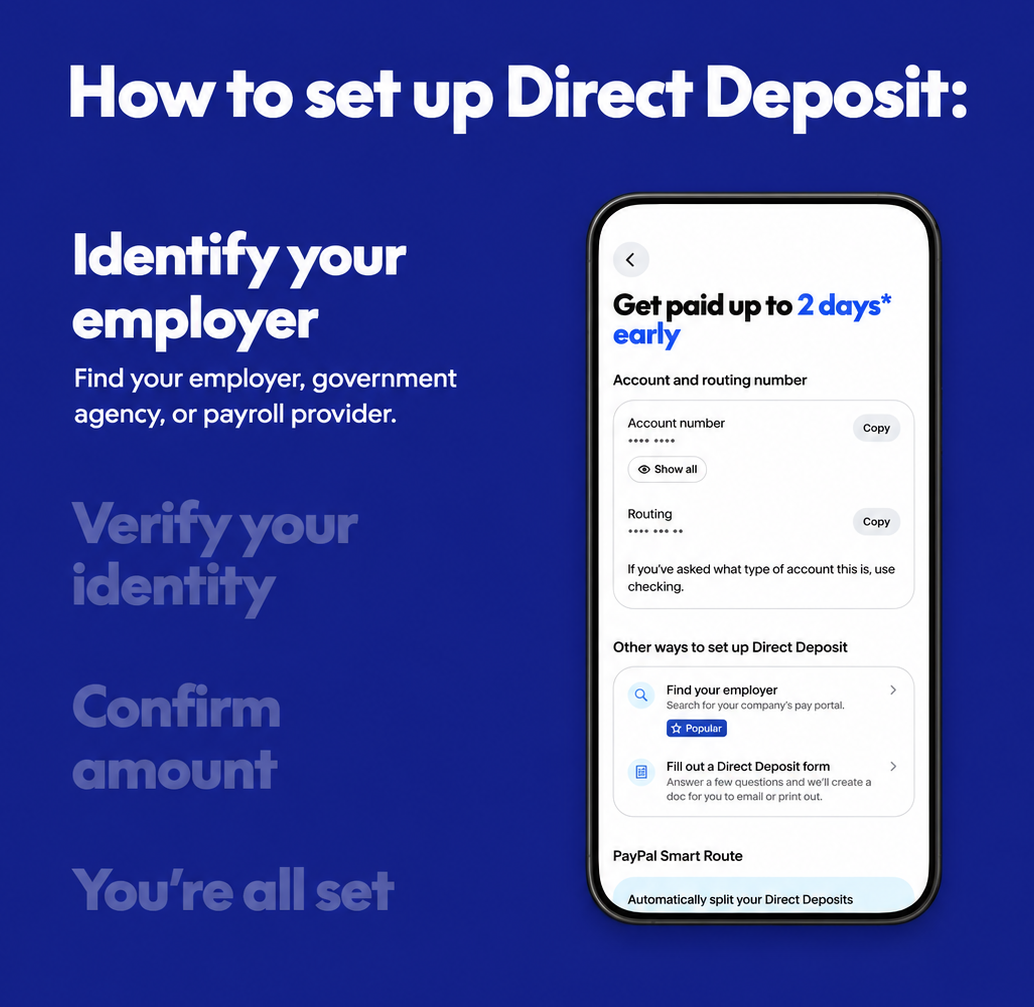
PayPal’s official Direct Deposit setup instructions explain both the employer-search and manual enrollment methods.
Set up Direct Deposit on the PayPal website
You can also access your Direct Deposit details from a desktop browser.
- Sign in to your account at PayPal.com.
- Click the Settings icon.
- Select View your Direct Deposit info.
- Click Find your employer.
- Search for your employer, government agency, or payroll provider.
- Follow the instructions to verify your identity and provide the required Direct Deposit information.
If your payer is unavailable through the search tool, copy the Direct Deposit account and routing numbers displayed in your account and provide them through your employer’s approved payroll process.
Enrollment may not affect your next paycheck immediately. PayPal says it can take up to two pay cycles for the new instructions to become effective, depending on the payer.
Where to find your PayPal Direct Deposit routing and account numbers
Your PayPal Direct Deposit routing and account numbers are available in the Direct Deposit section of your account. These are the details your employer or other supported payer uses to send money electronically to your PayPal Balance.
- Log in to PayPal using the app or website.
- Open Direct Deposit from your balance or account settings.
- View your assigned routing number and account number.
- Use the available copy option to transfer the complete numbers accurately into your employer’s secure payroll form.
The routing number identifies the financial institution responsible for routing the electronic payment, while the account number identifies the specific destination assigned to you.
Do not use a routing number copied from an unrelated website or an old payroll form. Always use the current Direct Deposit information displayed in your own PayPal account.

What bank does PayPal Direct Deposit use?
Under PayPal’s U.S. Balance Terms and Conditions, Direct Deposit account and routing numbers are issued by The Bancorp Bank, N.A. PayPal itself is a financial technology company, not a bank.
If your payroll form asks for a bank name, use the institution associated with your current assigned Direct Deposit details. Check the information presented by PayPal rather than assuming that a bank name found in a general online guide will always match your account.
The bank issuing your account and routing numbers should also not be confused with the separate Program Banks where PayPal may hold certain eligible balance funds under its pass-through deposit insurance arrangements.
What account type should you select?
When using PayPal Direct Deposit for an IRS tax refund, PayPal specifically instructs customers to select Checking as the account type on the tax return.
For employer payroll forms, use the account classification required by the payer and confirmed through the relevant PayPal instructions. PayPal Balance is not a conventional checking account opened directly with PayPal as a bank.
How to give your PayPal Direct Deposit details to an employer
If your employer is not available through PayPal’s automatic enrollment service, you can usually arrange Direct Deposit through your company’s payroll department or employee self-service portal.
Employers and payroll providers commonly request the following information:
| Information | Where to find it |
|---|---|
| Employee name | Your employer’s payroll records |
| Bank name | Bank associated with your PayPal Direct Deposit details |
| Routing number | PayPal Direct Deposit section |
| Account number | PayPal Direct Deposit section |
| Account type | Applicable PayPal and payer instructions |
| Deposit amount or percentage | Your chosen payroll allocation, where supported |
Enter your account details through the payroll system your employer uses or submit its official Direct Deposit authorization form. Verify all digits before submitting. The number on your PayPal Debit Card is not a substitute for your Direct Deposit account number.
Some payroll systems allow you to deposit a fixed dollar amount into PayPal while sending the remainder of your paycheck elsewhere. Others allow percentage-based allocations or require the entire paycheck to go to one destination. Those options depend on the payroll provider.
Use your employer’s secure portal or another approved method for submitting financial details. Avoid sending complete account and routing numbers through unsolicited messages or to people who cannot verify their connection to your payroll provider.
Who is eligible for PayPal Direct Deposit?
PayPal Direct Deposit is available to eligible U.S. PayPal Balance account holders. It is not available automatically to everyone with a PayPal login.
Under the PayPal Balance Terms and Conditions, opening a U.S. Balance account requires an eligible personal account in good standing and verification of identifying information. Account holders must satisfy applicable U.S. residency and age requirements.
Your employer, government agency, or payroll provider must also support the relevant deposit arrangement and be located in the United States. PayPal states that Direct Deposit transactions originating outside the U.S. will fail.
Can you use Direct Deposit with a PayPal Business account?
PayPal’s personal Direct Deposit program is available for PayPal Balance accounts and is not currently offered in the same way for Business accounts.
However, PayPal separately allows certain Business accounts to obtain account and routing numbers issued by The Bancorp Bank, N.A. These numbers can be used to receive qualifying business or commercial funds.
This business feature should not be mistaken for enrollment in the consumer payroll Direct Deposit program. Business account eligibility and transaction rules are different.
See PayPal’s business account and routing number guidance for the applicable details.
Do you need a PayPal Debit Card?
No. An eligible PayPal Balance account can use Direct Deposit without requiring a PayPal Debit Card.
However, customers approved for a PayPal Debit Mastercard are automatically provided with Direct Deposit account and routing numbers. Eligible cardholders can use those details or the Direct Deposit form supplied with the card to arrange payments with their employer.
The card provides another way to access funds after they reach PayPal Balance, but it is not a universal prerequisite for receiving Direct Deposit.
How long does PayPal Direct Deposit take?
There are two separate timing considerations: how long it takes to activate Direct Deposit and how long each payment takes to appear after enrollment.
| Stage | Expected timing |
|---|---|
| Initial payroll enrollment | Usually within two pay cycles, depending on the payer |
| Regular Direct Deposit | Generally available when the funds are applied to PayPal Balance |
| Eligible early access | Up to two days before the scheduled payment date |
| Federal or bank holiday delays | May delay the deposit by several days |
| Direct Deposit cancellation or payroll change | May require up to two pay cycles to take effect |
Why your first Direct Deposit may take two pay cycles
PayPal states that employer and payroll provider Direct Deposit enrollment can take up to two pay cycles. The delay is largely caused by payroll processing schedules and cutoff dates.
For example, if your employer has already prepared the next payroll run before receiving your updated details, that paycheck may still be sent using your previous payment arrangement.
Until the change becomes effective, you may continue receiving wages through your previous bank account or another payment method used by your employer.
Confirm the effective pay date with your payroll department rather than assuming the first deposit will arrive immediately after completing PayPal enrollment.
What time does PayPal Direct Deposit hit?
There is no guaranteed posting hour that applies to every PayPal Direct Deposit. The time depends on when the payer submits and funds the payment, the payment’s scheduled date, and the processing arrangements.
PayPal’s U.S. Help Center states that customers who are not currently eligible for two-day early access should receive their money no later than 8:00 p.m. Eastern Standard Time on their scheduled payment day under normal processing circumstances.
This does not mean every deposit arrives at 8:00 p.m., nor does it guarantee that funding problems or banking holidays cannot cause delays.
Once PayPal applies a Direct Deposit payment, the money is generally available in your balance that day. The transfer is not instantaneous from the moment the employer initiates it.
Can you get paid two days early with PayPal?
Yes. PayPal offers eligible customers access to Direct Deposit funds up to two days before the scheduled payday.
Early access depends on when PayPal receives payment instructions from the employer, government agency, or payroll provider. It also depends on the availability of the feature for the customer and payer.
For example, an employee scheduled to be paid on Friday may receive an eligible deposit as early as Wednesday if PayPal receives the necessary instructions in time. Another employee with the same payday might not receive funds until Friday.
Early access is not a loan or a guarantee that every paycheck will arrive two days ahead of schedule. It is an earlier release of eligible incoming funds when PayPal’s conditions are met.

See PayPal’s Direct Deposit timing guidance for details about payroll cutoffs, early access, and delays.
Can you receive government benefits and tax refunds through PayPal?
Eligible users can receive certain government payments through PayPal Direct Deposit, provided the responsible agency supports the payment arrangement.
PayPal lists Social Security, unemployment benefits, and federal or state tax refunds among the types of government payments that may be received through Direct Deposit.
Availability depends on the payer and the specific program. The timing of government payments is controlled partly by the issuing agency, so PayPal’s early-pay feature should not be interpreted as a guaranteed change to an agency’s payment schedule.
How to receive an IRS tax refund with PayPal
To receive an eligible federal tax refund into your PayPal Balance account, you need an assigned Direct Deposit account and routing number.
- Confirm that you have an eligible PayPal Balance account.
- Open Direct Deposit in PayPal and copy your current routing and account numbers.
- When preparing your tax return, enter the numbers in the designated direct deposit fields.
- Select Checking as the account type, as specified by PayPal.
- Verify the account details and submit your tax return through the applicable filing process.
PayPal’s Balance Terms require the name and Social Security number associated with the tax refund to match the PayPal account information. For a joint tax return, PayPal specifies that the first person’s name and Social Security number on the return must correspond to the PayPal account holder.
The IRS also requires accurate account and routing information. Incorrect details may result in a rejected deposit, a request to update your information, or another refund-processing issue.
You can check the status of your federal refund through the IRS refund service. The IRS generally advises that most electronically filed refunds are processed within approximately three weeks, although some returns take longer.
That timeframe concerns IRS processing, not a separate three-week PayPal deposit delay. After the IRS issues an eligible direct deposit, the receiving service still depends on the payment information and processing status.
PayPal’s tax refund setup instructions explain the required account information. State tax refunds may also be eligible when the state supports the arrangement.
Is PayPal Direct Deposit free?
PayPal does not charge a fee to set up or maintain Direct Deposit. Its published guidance also does not specify a general minimum deposit requirement for the feature.
However, your employer, government agency, or payroll provider may have its own guidelines about deposit amounts and account allocation. PayPal also reserves the right to accept, reject, or limit Direct Deposit transfers under its account terms.
Receiving a Direct Deposit should not be confused with other activities that may involve charges. For example, PayPal may charge for Instant Transfers out of your balance, certain ATM withdrawals, or other optional services.
A standard transfer from an eligible U.S. PayPal Balance account to a linked bank account is generally free when no currency conversion is involved.
For the current Direct Deposit fee information, see PayPal’s minimum deposit and fee guidance.
Why is my PayPal Direct Deposit late or missing?
A missing Direct Deposit does not necessarily mean PayPal has lost the payment. The issue may involve an employer’s payroll cutoff, incorrect account numbers, an incomplete setup, or a delay in sending the funds.
Start by checking whether the payer has actually sent the deposit, then review the information used for the payment.
| Possible issue | What to do |
|---|---|
| Direct Deposit was recently activated | Ask the employer when the updated instructions will take effect; setup may require up to two pay cycles. |
| Payday has arrived but no deposit appears | Confirm the scheduled payment date and whether the payer submitted the deposit. |
| Incorrect routing or account number | Compare the submitted information with your current PayPal Direct Deposit details and correct it with the payer. |
| Outdated routing number | Provide the payer with the current number displayed in PayPal. |
| Bank or federal holiday | Check whether the payroll schedule or ACH processing was affected by the holiday. |
| Deposit rejected | Ask the payer whether the payment was returned and what corrected information is required. |
| Automated employer enrollment failed | Use the manual Direct Deposit form or contact the payroll department. |
Check whether PayPal received the deposit
PayPal sends an email when a Direct Deposit payment is received. You can also check your transaction history and periodic statements.
- Sign in to PayPal and open Activity.
- Look for the expected Direct Deposit transaction.
- Use the available search or filters to narrow down payments by date, status, or type.
- Check your PayPal email notifications for confirmation that the money arrived.
If the payment is absent, contact your employer or payroll provider first to confirm the amount, date, routing number, and account number used.
After confirming that the payer submitted the correct details, contact PayPal Customer Support for assistance with the missing deposit.
PayPal generally cannot release an incoming Direct Deposit payment before it receives the relevant payment information and funds.
What are ACCTVERIFY micro-deposits?
When you enroll in Direct Deposit, your payer’s financial institution may first verify the assigned account using small ACH entries.
You may see two small credits, typically less than $1 each, followed by an offsetting debit. PayPal explains that these entries may appear with an ACCTVERIFY description in your transaction history.
Your payroll provider may ask you to enter the two deposit amounts in its verification system. Follow the instructions supplied by your legitimate payer.
These entries are account verification transactions, not your paycheck. They should not be confused with the separate small-deposit procedure used to confirm an external bank account linked to PayPal.
See PayPal’s explanation of Direct Deposit and ACH verification.
Why did your PayPal routing number change?
PayPal changed Direct Deposit routing numbers for affected accounts in 2025. Its official notice stated that Direct Deposit payments processed using the affected old routing numbers after February 17, 2025, would be rejected.
For the accounts covered by that change, PayPal said the account number remained the same while the routing number changed.
If your employer still uses outdated instructions, future payroll payments may be rejected even when earlier deposits worked successfully.
To correct the information:
- Open the Direct Deposit section of your PayPal account.
- Copy the currently displayed routing and account numbers.
- Contact your employer, payroll provider, or other payer.
- Update the stored Direct Deposit information through its approved procedure.
- Confirm when the correction will become effective, particularly if the next payroll cutoff is approaching.
Not every PayPal customer was necessarily affected. The safest method is to use the current numbers displayed in your own account rather than relying on previously saved instructions.
Read PayPal’s official routing number change notice for the details of the 2025 transition.
How to change or cancel PayPal Direct Deposit
Changing an employer, adjusting your payroll allocation, or stopping Direct Deposit requires updating the payment instructions held by the payer.
To cancel PayPal Direct Deposit, notify your employer, government agency, or payroll provider directly. PayPal states that cancellation may take up to two pay cycles after the payer receives and processes the request.
This applies even when you originally enrolled through PayPal’s automated employer-search feature. Disabling an option in PayPal does not automatically replace the payroll instructions held by the employer.
When switching employers, set up Direct Deposit with the new payer using your current PayPal details. When changing the amount allocated to PayPal, use the employer’s supported payroll allocation options.
PayPal provides the relevant cancellation conditions in its Direct Deposit cancellation guidance.
Is money received through PayPal Direct Deposit FDIC-insured?
PayPal is not a bank and is not itself FDIC-insured. However, enrolling in Direct Deposit is one of the qualifying arrangements under which PayPal places eligible U.S. dollar balance funds at participating Program Banks.
Those funds may qualify for pass-through FDIC insurance, subject to applicable conditions and coverage limits. The standard FDIC insurance limit is generally $250,000 per depositor, per insured bank, per ownership category, taking into account other eligible deposits the customer may hold at the same institution.
Coverage protects against the failure of a participating insured bank, not the failure of PayPal itself. Eligibility depends on required records and regulatory conditions, and funds given immediate or early credit may not yet be held in an insured custodial account during the processing interval.
For the applicable details, review the PayPal Balance Terms and Conditions and the Program Banks disclosure.
Frequently asked questions
Can you deposit only part of your paycheck into PayPal?
Yes, PayPal supports receiving all or part of a paycheck through Direct Deposit. Whether you can choose a fixed amount, a percentage, or multiple deposit destinations depends on your employer’s payroll system and supported allocation options.
Is there a minimum amount for PayPal Direct Deposit?
PayPal does not list a general minimum amount for its personal Direct Deposit feature. However, employers and payroll providers may impose their own deposit requirements, and PayPal retains authority to accept, reject, or limit transfers under the applicable terms.
Can an international employer send money through PayPal Direct Deposit?
PayPal’s U.S. Direct Deposit setup instructions specify that the payer must be located in the United States. Payments originating outside the U.S. using this service will fail. International payments may require another supported payment method.
Is Direct Deposit the same as Direct Debit?
No. Direct Deposit is used to receive eligible payments into PayPal Balance. Direct Debit allows a merchant or service provider to collect authorized one-time or recurring payments from the balance using applicable account and routing number arrangements.
PayPal’s Direct Debit guidance explains that the two services serve different purposes. Disabling Direct Debit does not disable incoming Direct Deposit.
Can you transfer Direct Deposit money from PayPal to another bank?
Yes. Once the deposit is available in PayPal Balance, you can use an eligible linked bank account to transfer the funds out. Standard withdrawals are generally free when no currency conversion applies, while eligible Instant Transfers have separate fees.
Getting PayPal Direct Deposit set up correctly
PayPal Direct Deposit can be a convenient way for eligible U.S. users to receive paychecks and supported government payments directly into their PayPal Balance account. The essential steps are to activate Direct Deposit, obtain the current account and routing numbers, and ensure the payer has accepted the correct instructions.
Plan for enrollment to take up to two pay cycles, and treat early access as conditional rather than guaranteed. If a payment does not arrive, confirm the payer’s submission details and payroll schedule before asking PayPal to investigate.
For additional information, consult PayPal’s setup instructions, deposit timing guidance, and Balance Terms and Conditions.