
Published: November 14, 2026. Last updated: November 22, 2026.
PayPal Pay in 4 and Pay Monthly are two buy now, pay later options that let eligible US shoppers divide purchases into installments. Pay in 4 splits a qualifying purchase into four interest-free payments over approximately six weeks. Pay Monthly spreads larger purchases over 3, 6, 12, or 24 months, usually with interest.
The biggest difference is cost and repayment time. PayPal Pay in 4 charges 0% interest, with the first payment due at checkout. Pay Monthly generally offers $0 down and smaller monthly installments over a longer period, but its fixed annual percentage rate (APR) can increase the total amount you repay.
Both products require approval, have eligibility restrictions, and create repayment obligations. This US guide explains the payment schedules, interest, credit checks, application process, refunds, and important differences to consider before choosing a plan.
PayPal Pay in 4 vs Pay Monthly: Key Differences
PayPal offers the two financing options under its Pay Later services, but they are designed for different purchase amounts and repayment periods.
| Feature | Pay in 4 | Pay Monthly |
|---|---|---|
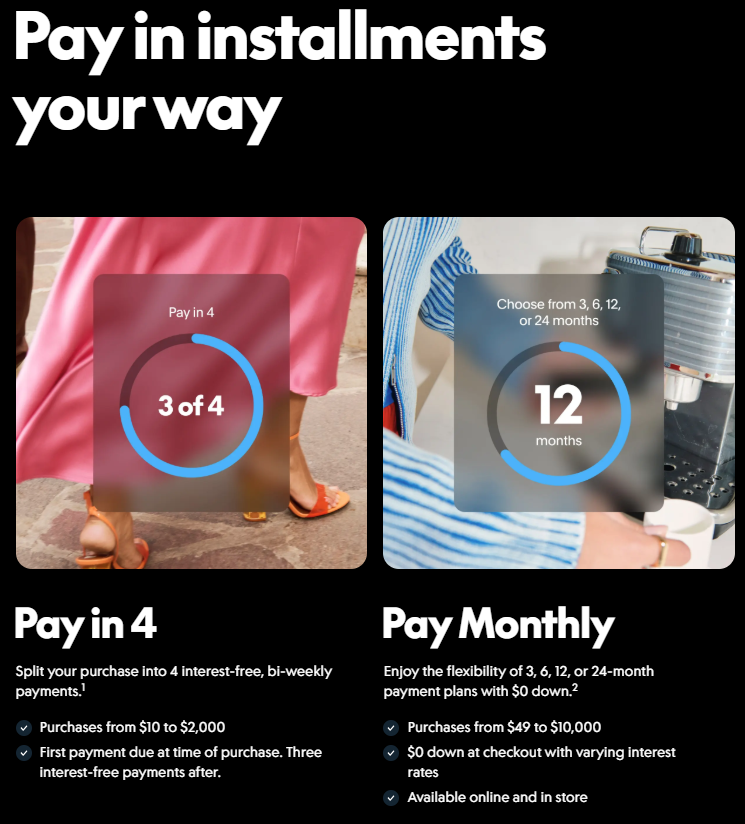
| Purchase amount | $10–$2,000 | $49–$10,000 |
| Payments | Four installments | 3, 6, 12, or 24 monthly installments |
| Payment schedule | First payment at checkout, then every two weeks | Monthly payments, generally starting one month after the order is processed |
| Down payment | 25% at purchase | Generally $0 |
| Interest | 0% APR | Generally 9.99%–35.99% fixed APR; promotional offers may be lower |
| PayPal late fees | None | None |
| Credit impact when applying | No credit score impact | No credit score impact |
| Credit reporting | Application does not affect credit score; check loan terms for other reporting implications | Approved and used loans may be reported to credit bureaus |
| Automatic payments | Required for scheduled repayments | Optional |
| Shopping availability | Eligible online purchases | Eligible online and in-store purchases |
| Early repayment | Allowed without penalty | Allowed without penalty |
These are PayPal’s published US product terms. The plans shown to an individual shopper depend on the merchant, purchase, state, account eligibility, and credit decision. Select merchants may offer different promotional financing terms.
See PayPal’s official Pay Later comparison for the applicable product disclosures.
How Does PayPal Pay in 4 Work?
PayPal Pay in 4 is a short-term, interest-free installment loan available for eligible purchases between $10 and $2,000.
Instead of paying the complete purchase price at once, you make four payments:
- The first payment is due at checkout.
- The second payment is due approximately two weeks later.
- The third payment is due approximately four weeks after purchase.
- The fourth payment is due approximately six weeks after purchase.
PayPal automatically collects the three remaining installments from your confirmed repayment method. Your complete schedule appears in the loan agreement and in the Pay Later section of your account.
Pay in 4 example: A $200 purchase
Suppose you purchase an eligible $200 item using Pay in 4.
| Installment | Approximate due date | Amount |
|---|---|---|
| First | At checkout | $50 |
| Second | Two weeks later | $50 |
| Third | Four weeks later | $50 |
| Fourth | Six weeks later | $50 |
| Total | Approximately six weeks | $200 |
Because Pay in 4 charges no interest or PayPal installment fees, the four payments total the original $200 purchase amount in this example.
PayPal also does not charge an application fee, sign-up fee, late fee, or insufficient-funds fee for Pay in 4. However, your bank or card issuer may charge a fee if a repayment fails, and currency conversion charges can apply to qualifying foreign-currency purchases.
The loan still has to be repaid on schedule. Interest-free financing does not mean payments are optional or that an overdue balance has no consequences.
Read PayPal’s Pay in 4 explanation for eligibility, payment timing, and product restrictions.
How Does PayPal Pay Monthly Work?
PayPal Pay Monthly is an installment loan for eligible purchases generally ranging from $49 to $10,000. Instead of making four biweekly payments, approved customers can repay over 3, 6, 12, or 24 months, depending on the offer.
Pay Monthly loans are issued by PayPal’s bank partner, WebBank. PayPal services the loans on the lender’s behalf.
Pay Monthly generally requires no down payment at checkout. Your first monthly installment is due one month after the merchant processes the order, and subsequent payments follow the loan schedule.
Unlike Pay in 4, Pay Monthly typically charges interest. PayPal publishes fixed APRs of 9.99% to 35.99%, based on factors such as creditworthiness and purchase details. Eligible promotional offers may provide a lower rate, including 0% APR in some circumstances.
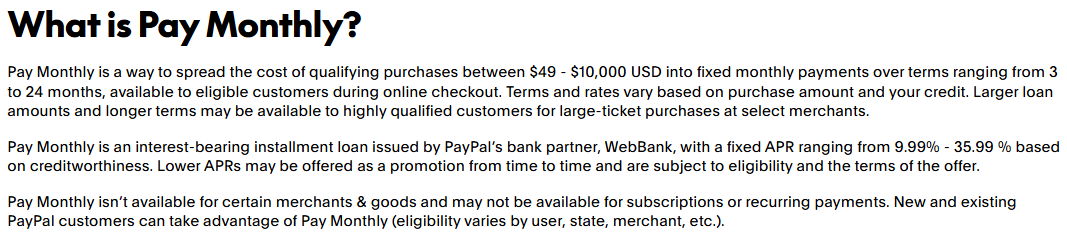
Not everyone receives the lowest rate, and not every repayment term is necessarily available for every purchase. The actual APR, monthly payment, total interest, and payment schedule appear in the WebBank Truth in Lending disclosure and loan agreement before you accept the financing.
You must apply for a new Pay Monthly loan for each qualifying purchase. It is not a reusable credit line that automatically finances future purchases.
See PayPal’s Pay Monthly product information for the current terms.
How Much Interest Does PayPal Pay Monthly Cost?
The total cost of Pay Monthly depends on the amount borrowed, the fixed APR, and the repayment term. A longer term may reduce each monthly installment while increasing the total interest you pay.
For example, PayPal provides the following illustrative figures for a $600 purchase financed at 26% fixed APR:
| Payment term | Monthly payment | Total interest | Total payments |
|---|---|---|---|
| 6 months | $107.76 | $46.57 | $646.57 |
| 12 months | $57.33 | $88.01 | $688.01 |
In this illustration, choosing 12 months instead of six months lowers the stated monthly payment by $50.43 but increases the total interest by $41.44. The monthly payments shown are rounded; the lender’s actual schedule and final amounts are controlled by the loan disclosures.
These are PayPal’s published representative financing examples, not personalized loan offers. Your approved rate, payment schedule, taxes, shipping costs, and any purchase adjustments can change the amounts.
Although PayPal does not impose a separate Pay Monthly sign-up or late fee, interest is still a financing cost when your approved APR is greater than zero.
If you qualify for a promotional 0% APR offer, review its actual terms rather than assuming the promotion applies to every purchase or merchant.
How to Use PayPal Pay in 4 or Pay Monthly at Checkout
Both financing products are available during eligible online PayPal checkout transactions. You will only see the options available for your purchase and account.
- Shop at a participating merchant. Add the items you want to purchase to your cart and proceed to checkout.
- Choose PayPal. Select PayPal as your payment method and sign in to your account.
- Review Pay Later options. If eligible, you may see Pay in 4, Pay Monthly, or both.
- Select a plan. Choose the financing product that matches your intended repayment period and review the available terms.
- Complete the application. Provide or confirm the information PayPal requests. Pay Monthly applications may require additional personal and financial details.
- Review the decision and disclosures. If approved, examine the APR, payment amount, schedule, total cost, and loan agreement before proceeding.
- Confirm your purchase. Complete checkout using the approved financing option.
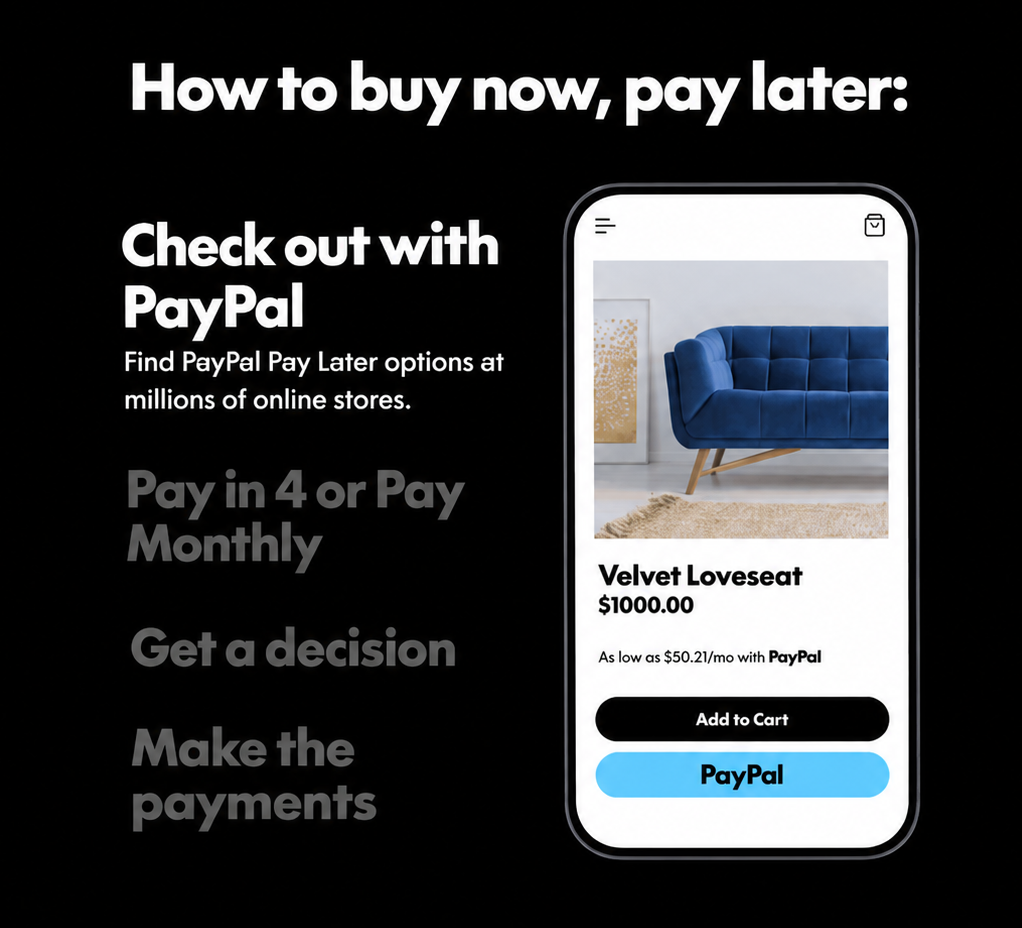
PayPal generally provides a lending decision within seconds, although not every application is approved. If you are approved for only one product, the other may remain unavailable.
You can view an active plan under Pay Later in your PayPal account, including the remaining amount, scheduled payments, and loan details.
Can you use Pay Monthly in physical stores?
Yes. PayPal offers an in-store Pay Monthly option for eligible US shoppers through a single-use virtual card.
The process works as follows:
- Open the PayPal app on a supported Android phone or iPhone.
- Access the available Pay Monthly in-store financing option.
- Enter the expected purchase amount and complete the loan application.
- If approved, choose from the offered monthly repayment terms and review the loan disclosures.
- Add the issued single-use virtual card to Apple Wallet or Google Wallet.
- Use the card at an eligible store that accepts the supported Mastercard contactless payment method.
The single-use virtual card is valid for one purchase and must be used within 24 hours of approval. It can also be used for eligible online transactions by entering its card details, subject to PayPal’s restrictions.
Restrictions apply to certain merchants and transaction types, including some travel and gas station purchases. A single-use card is not a reusable revolving credit line, and any unused approved amount cannot simply be spent on another purchase.
For details, see Pay Monthly in-store instructions and PayPal’s single-use card guidance.
Standard Pay in 4 is offered for eligible online purchases and should not be assumed to support the same in-store virtual card process.
Who Qualifies for PayPal Pay Later?
PayPal Pay in 4 and Pay Monthly require separate lending approval. Having a PayPal account does not guarantee eligibility, even if you have used either product successfully before.
Applicants generally need to meet these conditions:
- Age: You must be at least 18, or meet the applicable age-of-majority requirement.
- Location: You must meet the relevant US residency and state availability requirements.
- PayPal account: You need an eligible account in good standing or must establish one during the application.
- Purchase eligibility: Your shopping cart must fall within the product’s allowed purchase amounts, and the merchant and goods must qualify.
- Credit assessment: PayPal evaluates relevant application information, account history, and potentially credit bureau information.
- Repayment method: You must have access to a supported way to make the required payments.
PayPal may also consider existing installment loans, repayment history, and the information available about your financial circumstances.
What information does Pay Monthly require?
A Pay Monthly application can require your US residential address, phone number, date of birth, Social Security Number (SSN) or Individual Taxpayer Identification Number (ITIN), and annual income after taxes.
These details help verify identity and assess credit eligibility. PayPal does not publish a universal minimum credit score that guarantees approval.
Read PayPal’s Pay Monthly application requirements for more information.
Does Pay in 4 spending power guarantee approval?
No. PayPal may show an estimated Pay in 4 spending power amount, but this is not an approved credit line or a guarantee that a specific purchase will be financed.
You still need to apply at checkout, and the decision can change based on your account, repayment history, merchant, or transaction details. A preapproved offer can also be declined if the lending criteria are not met when you apply.
See PayPal’s Pay in 4 application guidance.
Does PayPal Pay in 4 or Pay Monthly Affect Your Credit?
Credit checks and credit reporting are separate parts of the lending process. A financing application may have no immediate effect on your credit score, while an approved loan can have different reporting consequences after it is used.
Pay in 4 credit checks
PayPal states that applying for Pay in 4 does not affect your credit score. A soft credit inquiry may be used to evaluate the application, along with PayPal account history and other relevant information.
In some cases, PayPal may request additional financial information, including bank transaction history, with the applicant’s consent.
The absence of a score impact from applying should not be confused with guaranteed credit improvement from repayments. Do not assume Pay in 4 builds credit simply because you make installments on time. Missed repayments can affect your future Pay Later eligibility.
Pay Monthly credit checks and reporting
Applying for Pay Monthly also does not affect your credit score. However, PayPal states that when an approved Pay Monthly loan is used, it may report the loan amount and payment history to credit reporting agencies.
This reporting can affect your credit score. Depending on the credit report, the loan may appear under WEBBANK/PAYPAL or WEB/PAYPAL.
Pay Monthly borrowers should therefore consider the possible credit consequences of missed payments, not just the monthly payment amount.
See PayPal’s credit reporting information for the current disclosure.
How to Make Pay in 4 and Pay Monthly Repayments
Both products are managed through the Pay Later section of your PayPal account, but they have different rules for automatic payments and accepted funding methods.
Pay in 4 repayment methods
Pay in 4 automatically collects the three remaining installments every two weeks from the confirmed repayment method selected when you apply.
Supported repayment methods include eligible bank accounts, debit cards, and credit cards. However, PayPal specifically excludes certain credit cards issued by Capital One, Citibank, and Chase from BNPL repayments, and other issuer restrictions may apply.
PayPal Balance can be used for eligible one-time manual repayments but not automatic Pay in 4 payments.
You can make extra payments or pay off the entire remaining balance early without a prepayment penalty. Pay in 4 repayments cannot be paused, skipped, or suspended after the loan begins.
Pay Monthly repayment methods
Pay Monthly allows manual repayments or optional automatic payments using an eligible confirmed bank account or debit card.
PayPal Balance can be used for manual repayments, but not autopay. Credit cards and prepaid cards are not accepted for Pay Monthly repayments.
You can turn Pay Monthly autopay on or off in the plan settings, but this does not cancel the loan or change your payment due dates. Each Pay Monthly loan must be paid individually.
Early repayment is allowed without a penalty, and paying off an interest-bearing loan sooner may lower the total interest paid.
How to check your remaining balance or make an extra payment
- Sign in to your PayPal account through the website or app.
- Open the Pay Later section.
- Select the specific Pay in 4 or Pay Monthly plan.
- Review Remaining, You’ve Paid, or See Payment Schedule, as available.
- Select Make a Payment to submit an eligible one-time or extra repayment.
If you make an extra payment close to an automatic repayment date, both payments could process. PayPal specifies a cutoff of 11:59 p.m. Eastern Time on the day before a scheduled due date for extra payments to prevent the corresponding autopay from processing.
For current payment management rules, read Pay in 4 repayments and Pay Monthly repayments.
What Happens if You Miss a PayPal Pay Later Payment?
PayPal does not charge late fees for Pay in 4 or Pay Monthly. However, that does not mean missing an installment has no consequences.
For Pay in 4, a failed scheduled repayment can make the plan past due. PayPal may send reminders, and missed payments can reduce eligibility for future Pay Later offers.
For Pay Monthly, an overdue amount may be added to the next monthly installment. PayPal states that missed payments may be reported to credit reporting agencies and could affect your credit score.
Your bank or card issuer may also charge insufficient-funds or returned-payment fees even when PayPal itself does not impose a late fee.
If a scheduled payment fails, check the plan details, confirm your funding method, and make the required repayment through PayPal. PayPal may retry an unsuccessful payment.
For longer-term financial difficulty with Pay Monthly, PayPal states that eligible borrowers may be able to request a Payment Arrangement Program through its official support service.
How Do Refunds and Returns Work With PayPal Pay Later?
Returning a purchase financed through PayPal Pay Later does not automatically cancel the remaining loan installments. The merchant must process the refund, and PayPal must apply it to the relevant financing plan.
Continue making scheduled repayments while waiting for a refund or dispute resolution. PayPal instructs borrowers to keep their loans current until the refund is processed and applied.
Pay in 4 refunds
When a merchant issues an eligible full or partial refund for a Pay in 4 purchase, PayPal attempts to apply it to the corresponding loan.
A full refund that satisfies the remaining loan balance removes further repayment obligations after it has been applied. A partial refund may reduce the remaining number of installments or the final installment amount.
If the refund exceeds what you still owe, the overpayment is generally returned to your PayPal Balance. Processing can take additional time when existing repayments are still pending.
Check that the Pay in 4 plan actually reflects the refund. In some cases, a merchant refund may not be correctly matched to the original loan, requiring you to address the remaining balance separately.
See PayPal’s Pay in 4 refund guidance.
Pay Monthly refunds
When a merchant processes a Pay Monthly refund, PayPal applies the refunded amount toward the outstanding installment loan balance.
If the refund exceeds the remaining loan balance, the excess is credited to your PayPal Balance. PayPal sends notifications when the refund has been processed and applied.
The payment schedule remains important while the merchant processes the return. A pending refund is not permission to stop making installments.
Read PayPal’s Pay Monthly refund instructions.
What if the merchant only gives you store credit?
A gift card, store credit, or cash refund delivered directly by a merchant does not necessarily reduce your PayPal installment loan. PayPal originally financed the merchant’s purchase payment, so you may still owe the remaining loan balance.
If there is a problem with the product or service and you need to open a dispute, use the original merchant purchase in PayPal’s Resolution Center—not an individual installment repayment. Eligible purchases may qualify for PayPal Purchase Protection, subject to its rules and exclusions.
Why Is PayPal Pay in 4 or Pay Monthly Not Showing Up?
Pay Later options are not available for every transaction or account. Even if you have used Pay in 4 before, a new purchase may not qualify.
Common reasons include:
- Purchase amount: The cart total falls outside the applicable financing range.
- Merchant restrictions: The seller or checkout arrangement does not offer the relevant plan.
- Product restrictions: Certain goods, services, or recurring subscriptions are ineligible.
- State availability: The product is not offered to residents of every US state.
- Account or credit eligibility: Your account status, credit information, repayment history, or existing loans may affect approval.
- Checkout session changes: A previously approved Pay in 4 offer may no longer apply if you change payment methods or the original checkout session expires.
There is also a difference between an offer not appearing and an application being declined. If PayPal declines your application, check the secure PayPal Message Center for the decision explanation.
PayPal’s customer service team cannot review or overturn individual lending decisions through the normal support process. If financing is unavailable, you can choose another eligible PayPal funding method or reconsider the purchase.
Which Is Better: PayPal Pay in 4 or Pay Monthly?
Neither plan is the best choice for every purchase. The relevant decision is whether the repayment schedule, total cost, and financial obligation fit your circumstances.
Consider Pay in 4 for shorter, qualifying purchases
Pay in 4 may be more suitable if your purchase falls within the eligible range, you can afford the initial 25% payment, and you can reliably make the other three payments within approximately six weeks.
Its main advantage is the absence of interest. However, the compressed schedule means you need money available every two weeks, not merely once a month.
Consider Pay Monthly for longer repayment needs
Pay Monthly may be appropriate for a larger eligible purchase when you need a longer repayment period and have reviewed the total cost of the loan.
Monthly installments may be smaller, but interest can make the purchase more expensive. You should compare the actual APR, total of payments, and repayment duration rather than choosing a plan simply because the monthly amount looks manageable.
If you can pay in full, compare the value of borrowing
Using installment financing is not automatically beneficial just because it is available. If you can pay for the purchase without compromising essential expenses, paying in full avoids creating an additional repayment obligation.
If you already have other installment plans, consider their combined due dates and total monthly obligations before adding another loan.
The Consumer Financial Protection Bureau’s explanation of BNPL loans provides additional context on how installment borrowing works.
Frequently Asked Questions
Can you have more than one PayPal Pay Later loan?
Yes, PayPal can approve multiple eligible installment loans, but each application is evaluated separately. Existing loans and repayment history may influence whether another purchase qualifies. Pay Monthly loans must be repaid individually.
Is PayPal Credit the same as Pay Monthly?
No. PayPal Pay Monthly is a purchase-specific installment loan issued by WebBank. PayPal Credit is a separate credit product offering a reusable credit line or associated card financing under different terms, issued by Synchrony Bank. Their interest rules, credit reporting, and repayment arrangements should not be treated as interchangeable.
Can you change Pay Monthly due dates?
No. PayPal states that Pay Monthly payment due dates cannot be changed. You can manage eligible payment methods, optional autopay, and extra payments, but switching off autopay does not remove the scheduled repayment obligation.
Is PayPal Pay Later available in every US state?
No. Product availability varies by state and by financing option. PayPal publishes state-specific restrictions in its US Pay Later disclosures. A product may also be unavailable because of merchant, purchase, or individual eligibility conditions.
The Bottom Line
PayPal Pay in 4 is designed for qualifying purchases that can be repaid in four interest-free installments over approximately six weeks. Pay Monthly offers longer repayment periods and generally no down payment, but an interest-bearing loan can increase the total purchase cost.
Before accepting either product, review the loan agreement, payment schedule, funding method, credit implications, and total amount due. For Pay Monthly, pay particular attention to the fixed APR and total interest. For Pay in 4, make sure the biweekly repayments fit your available cash flow.
The right option is one whose entire repayment obligation you can meet comfortably—not simply the plan offering the smallest payment today.