
Published: October 21, 2026. Last updated: November 22, 2026.
PayPal currency conversion changes the cost of a foreign-currency purchase or transfer. When PayPal converts money, its exchange rate includes a conversion spread. Compare the transaction quote and any additional fees before choosing how to pay.
Scope: U.S. consumer PayPal accounts. Rates, features, and withdrawal rules can differ elsewhere.
How to check your PayPal exchange rate
On the PayPal website:
- Sign in and open Wallet.
- Select Currency calculator.
- Choose the currency you are converting from and the currency you want to receive.
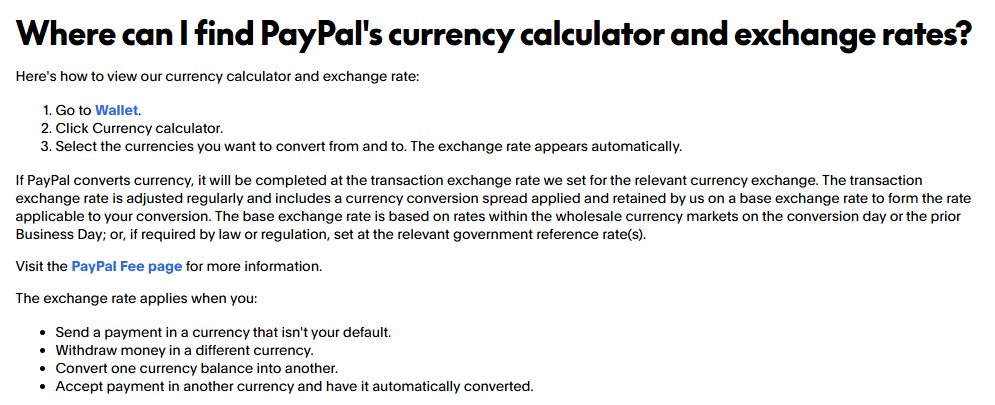
These are PayPal’s documented web steps. Viewing the calculator does not convert money. Use the website if your app does not show these controls.
Then review the quote for the operation you actually intend to make. A purchase, a personal payment, and a balance conversion can fall into different pricing categories. Note the currencies, amount, funding method, and any separate charges before proceeding.
For a personal transfer, check both what leaves your account and what the recipient receives. For a purchase, keep the seller’s price and currency unchanged when comparing payment options.
How PayPal’s conversion rate and fees work
PayPal builds its transaction exchange rate from a base rate plus its conversion spread. Its exchange-rate explanation says the base uses wholesale-market rates from the conversion day or previous business day, or an applicable government reference rate.
A mid-market rate from Google or another service gives you a benchmark for comparison. PayPal’s offer can use a different basis and timing, so subtracting a headline percentage will not reliably reproduce its quote.
Why you may see both 3% and 4%
For common U.S. consumer scenarios, PayPal’s consumer fee schedule lists the following conversion spreads when PayPal performs the exchange:
| Conversion scenario | Published spread |
|---|---|
| You pay for goods or services using a currency different from the seller’s listed currency. | 4.00% |
| You send a personal payment and the recipient receives a different currency from the one you pay in. | 4.00% |
| Other conversion transactions, such as converting an existing currency balance. | 3.00% |
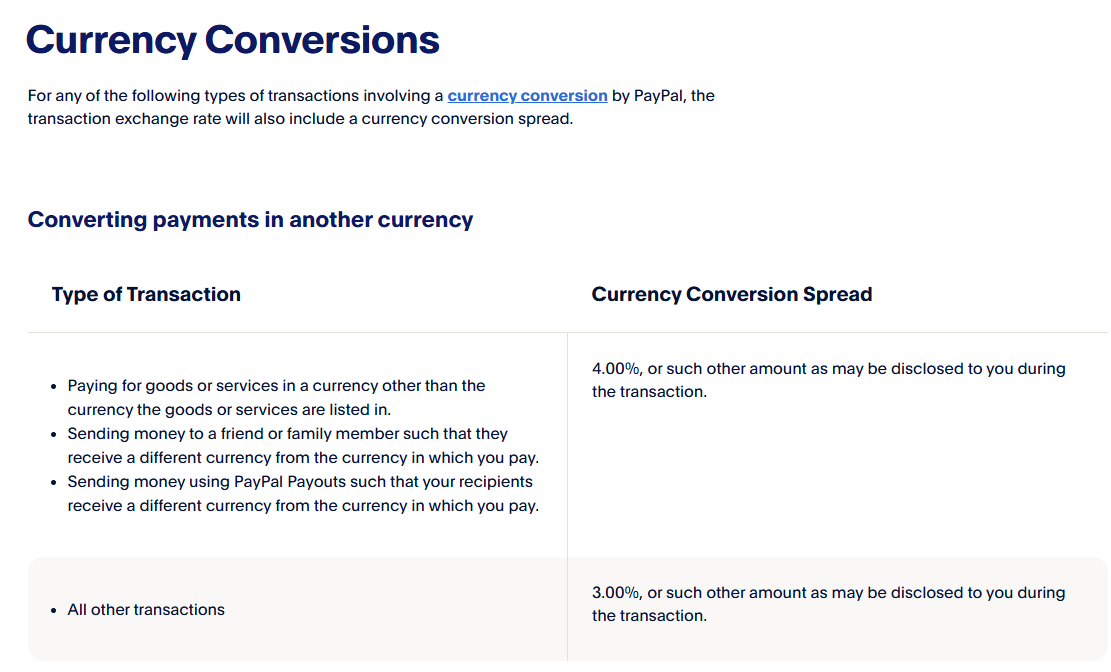
Each category allows a different amount to be disclosed during the transaction. These percentages describe the spread included in the transaction exchange rate; they are not a complete quote for every charge associated with the payment.
Do not add the spread twice. If PayPal already shows the converted amount using its transaction exchange rate, applying another 3% or 4% would count that conversion cost again.
Which charges can be separate?
International personal-transfer, card-funding, and withdrawal fees are separate categories in the U.S. fee schedule. Check which apply; purchase pricing and personal-transfer pricing differ.
Your card issuer may charge a foreign-transaction fee separately. PayPal’s guide to conversion and foreign-transaction fees explains that these charges can coexist and that an issuer fee can apply even when you pay in your home currency. Check your card’s terms for each conversion option.
An international payment does not automatically require a currency exchange: the payment can cross borders while staying in the same currency. Conversely, converting a balance can incur a conversion cost without sending money to another country.
Should PayPal or your card issuer convert the payment?
Compare the total cost in your card’s billing currency. PayPal’s displayed converted amount is one starting point; the issuer’s applicable rate and any separate charges are the other. A card with no foreign-transaction fee can still involve currency conversion, so check the rate as well.
Card fees vary by product. Chase’s explanation of foreign-transaction fees confirms that some issuers charge them and others do not. Use the agreement for your actual card rather than assuming every card from a bank has the same pricing.
How to choose card-issuer conversion when it is offered
- Select the card you intend to use for the payment.
- At payment review, look for Convert currency with PayPal.
- If the option is available, change it to Convert with card issuer.
- Recheck the charge currency and payment details before authorizing.
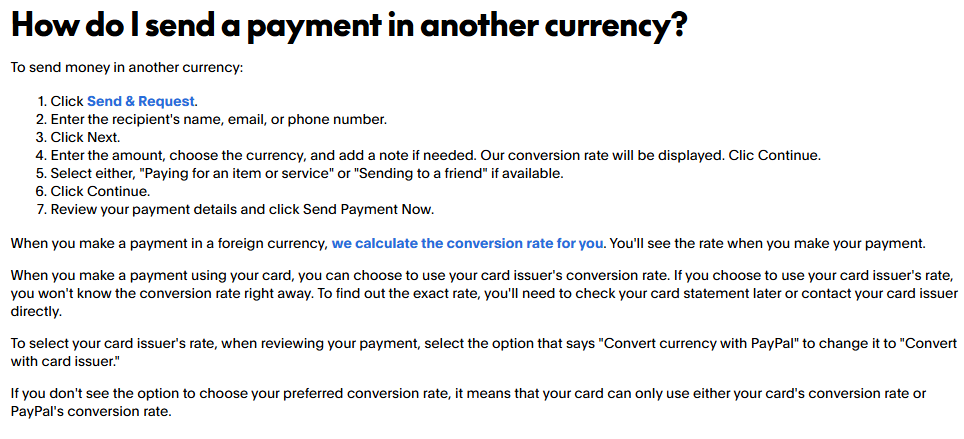
These are the options described in PayPal’s payment-currency instructions. When the issuer converts, the exact rate may only be available later from the issuer or your statement. Treat an advance cost calculation as an estimate.
If the choice is missing, PayPal says that the card may support only one conversion route. Review the displayed conversion information for the selected card; ask PayPal or the issuer if you cannot determine how the payment will be processed.
When conversion is required for a payment funded directly from your PayPal balance or linked bank account, PayPal performs it. Its U.S. agreement also allows conversion preferences to vary by card and automatic-payment agreement. A checkout selection is not a universal switch for every future payment.
Example: compare the same €100 purchase
Hypothetical example: A merchant charges €100, and your card bills in U.S. dollars. Assume PayPal quotes $114.40 with its conversion spread already included. For the alternative, assume an estimated issuer rate of 1 EUR = 1.10 USD and a separate fee of 2% of the converted purchase amount.
| Cost component | PayPal converts | Card issuer converts |
|---|---|---|
| Converted purchase amount | $114.40 | €100 × $1.10 per €1 = $110.00 |
| Separate issuer fee assumed in this example | $0.00 | $110.00 × 2% = $2.20 |
| Total in USD | $114.40 | $112.20 estimated |
Under these assumptions, the issuer route costs $2.20 less. The example assumes no additional charges on either route. It illustrates the comparison method, not a live exchange rate, a typical card fee, or guaranteed savings.
In your own calculation, add any issuer fee that applies to the PayPal-converted payment too. Do not add PayPal’s spread again to its quoted $114.40. The card result remains an estimate until its applicable rate and charges are known.
Pay attention to rate direction: multiply €100 by a rate expressed in dollars per euro. If a calculator gives euros per dollar instead, divide the euro amount by that rate. Keep extra decimal places during calculation and round the final currency amount.
Comparing a money transfer instead of a purchase
Choose one consistent target: either the same total amount paid by the sender or the same net amount received. Compare the same currencies, funding method, and delivery method, using quotes obtained close together. Record whether each fee is added to the sender’s payment or deducted before the recipient is paid.
A lower stated transfer fee does not establish a lower overall cost if the exchange rate delivers less money. Likewise, a card-funded personal transfer should not be priced using the purchase example above.
How to convert an existing PayPal balance
To exchange money already held in an eligible balance, follow PayPal’s documented web instructions:
- Open Wallet.
- Use the More icon beside the currency you want to exchange, then select Convert currency.
- Choose the destination currency and enter the amount.
- Review the displayed exchange rate, then select Next.
- Check the details and select Convert Now only when you want to complete the exchange.
The final confirmation converts the funds. This is a separate operation from looking up a rate or changing an account preference. Before converting in advance of a purchase, compare the full sequence of charges; an earlier conversion is not automatically a saving.
Holding a currency and changing your primary currency
PayPal lets eligible accounts manage currency balances in Wallet. To add one, use Add a currency; to change the primary currency, open the currency’s menu and choose Make Primary. These are separate actions in PayPal’s currency-management instructions.
Making a currency primary does not itself exchange an existing balance or establish that every later payment will avoid conversion. Check which currency is actually being used to fund the next transaction.
Receiving another currency may create a balance in that currency, depending on settings and eligibility. Some currencies must be converted to one PayPal allows you to hold. Review the receiving settings and the PayPal Balance terms before assuming that a payment will remain in its original currency.
Can you withdraw a foreign-currency balance unchanged?
For U.S. accounts, PayPal’s withdrawal rules require withdrawals in U.S. dollars. A balance held in another currency must be converted before withdrawal or when it is withdrawn.
The no-fee standard-withdrawal entry applies when no conversion is involved. Choosing a standard withdrawal does not remove a necessary currency conversion.
Questions about unexpected conversion costs
Why did a subscription’s dollar amount change?
When PayPal converts a recurring payment, it uses the transaction rate applicable when that payment is processed, under its automatic-payment terms. Compare the seller’s original-currency charge too: a fixed foreign-currency price does not lock the dollar amount for later payments.
Why can a refund return a different amount?
If PayPal handled the original conversion, its U.S. refund terms distinguish refunds issued within one day of the original payment from those issued later: the former use the original transaction rate; the latter use the refund-date rate.
That can change the amount returned in your currency, as PayPal’s refund guidance explains. The one-day distinction determines the exchange rate; it is not a deadline for requesting a refund. If your card issuer performed the original conversion, check its refund terms instead.
How can you check a suspected double conversion?
Compare the merchant receipt, PayPal transaction details, and card statement. Write down the currency and amount at each stage. A separately itemized issuer fee is different from a second exchange between currencies. Ask the provider responsible for the unexplained stage to identify the rate and charge applied.
Before you confirm
- Match the transaction: confirm the purchase or transfer amount and currencies.
- Check the funding source: make sure the intended card, bank account, or balance is selected.
- Identify the converter: read whether PayPal or the card issuer will exchange the money.
- Compare the complete cost: use the quoted converted amount plus any applicable separate charges.
- Check the recipient’s amount: for a transfer, confirm what arrives after relevant deductions.
- Review the final screen: authorize only when the amount, currency, and available conversion choice match what you intend.