
Published: November 18, 2026. Last updated: November 22, 2026.
PayPal sending and transfer limits depend on your account verification status, the type of transaction, and where the money is going. In the United States, an unverified PayPal account may send a one-time payment of up to $4,000, while a verified account may send up to $60,000 per transaction. PayPal can restrict individual payments to $10,000 or impose additional account-specific limits.
Moving money from PayPal to a bank account or debit card follows different rules. For example, an eligible Instant Transfer to a bank can be up to $25,000 per transaction, while personal-account withdrawals to eligible debit cards have lower limits. Business-account debit card withdrawal limits can be substantially higher.
This US guide explains the published PayPal transfer limits, how verification affects your account, the differences between Standard and Instant Transfers, and how to check the amount you can actually send or withdraw.
PayPal Sending and Transfer Limits at a Glance
There is no single PayPal transfer limit that applies to every transaction. Sending money to another user, withdrawing your balance, and adding funds to PayPal are separate activities.
| Transaction type | Published US limit | Important condition |
|---|---|---|
| Sending from an unverified account | Up to $4,000 for a one-time payment | A cumulative sending limit also applies |
| Sending from a verified account | Up to $60,000 per payment | PayPal may restrict a transaction to $10,000 |
| Instant Transfer to a bank | Up to $25,000 per transaction | Eligible linked bank account required |
| Personal account transfer to a debit card | Up to $5,000 per transaction and $15,000 per month | Daily and weekly limits also apply |
| Business account transfer to a debit card | Up to $50,000 per transaction and $500,000 per month | Higher daily and weekly limits also apply |
| Standard Transfer to a bank | No single universal maximum specified in the published fee schedule | Account-specific restrictions apply |
| Adding money from an eligible debit card | Up to $5,000 daily, $10,000 weekly, and $20,000 monthly | Transfers money into PayPal Balance |
These are published maximums, not guaranteed transaction allowances. Your actual limit can be lower because of account status, payment method eligibility, available funds, currency, or security checks.
The figures come from PayPal’s US sending limits guidance, Consumer Fees, and Merchant Fees.
How Much Money Can You Send With PayPal?
PayPal’s sending limit determines how much you can pay another person or merchant through its payment service. It is different from withdrawing your existing PayPal balance to a bank or debit card.
Unverified PayPal account sending limit
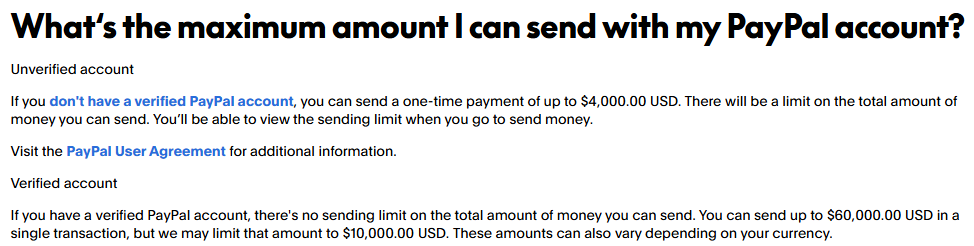
According to PayPal’s US Help Center, an unverified account can send a one-time payment of up to $4,000.
However, PayPal also applies a limit to the total amount an unverified account can send. The remaining allowance depends on the account and appears when you attempt to send money.
The $4,000 figure does not mean you can repeatedly make $4,000 transfers without restrictions. You could reach your cumulative sending limit before completing another payment, even when the individual amount is below $4,000.
Verified PayPal account sending limit
PayPal states that verified accounts do not have a fixed cumulative limit on the total amount they can send. However, individual transactions still have maximums.
A verified account may send up to $60,000 in one transaction, but PayPal can reduce that maximum to $10,000. Limits may also vary by currency.
For example, if you need to send a $15,000 payment, a verified account may qualify for that amount under the general published maximum. But if PayPal applies a $10,000 transaction restriction to your payment, you cannot complete the full $15,000 as one transaction through that option.
The absence of a cumulative sending cap does not guarantee unlimited access. PayPal can review or restrict payments based on account activity, funding methods, security requirements, and other applicable conditions.
Check PayPal’s maximum sending amount guidance for the published rules.
PayPal Transfer Limits to a Bank Account
When you transfer money from PayPal Balance to your own linked bank account, you are making a withdrawal rather than sending a PayPal payment to another user.
PayPal offers Standard Transfers and Instant Transfers to eligible bank accounts. Their fees, processing times, and published limits differ.
Instant bank transfer limit
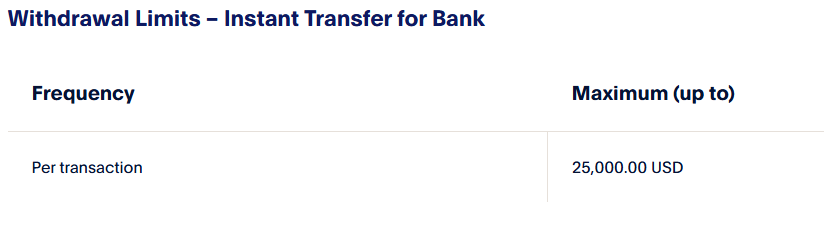
PayPal’s published US maximum for an eligible Instant Transfer to a bank account is $25,000 per transaction.
This maximum applies to moving available PayPal funds into an eligible linked bank account using the Instant Transfer service. It is not the maximum for sending money to another PayPal user.
Not every bank account supports Instant Transfer. When you begin a withdrawal, PayPal displays the eligible bank accounts and cards associated with your account.
A transfer can also be restricted below the published maximum because of account eligibility, available funds, or security reviews.
Standard bank transfer limit
PayPal does not specify one universal maximum for Standard Transfers to linked US bank accounts in its published consumer fee schedule.
That does not mean Standard Transfers are unlimited. The amount you can withdraw depends on your available PayPal funds, account status, and any applicable withdrawal restrictions.
PayPal’s general withdrawal guidance states that limits can vary according to account type, withdrawal method, and currency conversion.
Standard bank withdrawals generally take 1–3 business days and have no PayPal withdrawal fee when no currency conversion is involved.
You can review the bank transfer options in PayPal’s withdrawal instructions.
PayPal Transfer Limits to a Debit Card
PayPal allows eligible customers to transfer money to a linked debit card. The funds are sent to the financial account associated with the selected card.
Unlike the general sending limits, debit card withdrawals have specific maximums per transaction and over daily, weekly, and monthly periods.
Personal account debit card limits
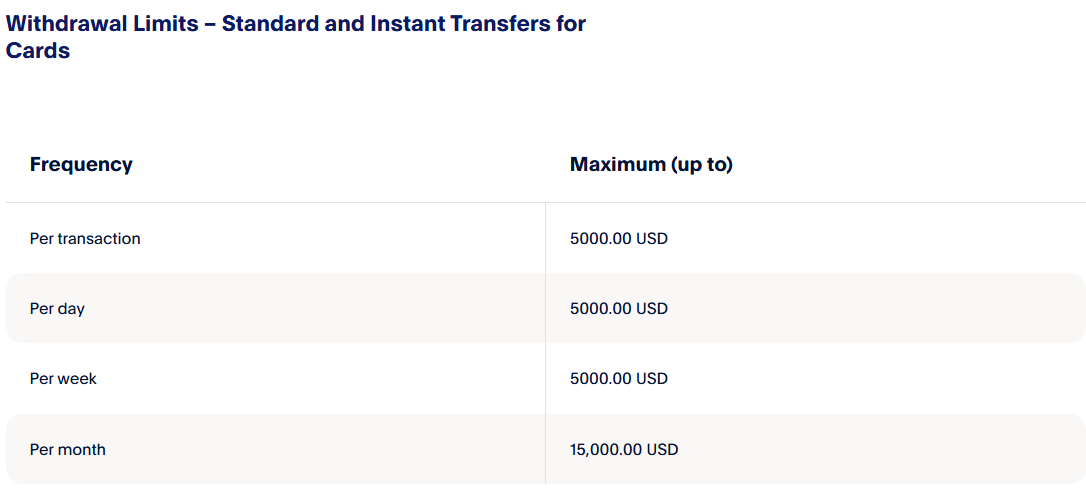
For US PayPal Personal accounts, the published limits for Standard and Instant Transfers to eligible cards are:
| Limit period | Maximum amount |
|---|---|
| Per transaction | $5,000 |
| Per day | $5,000 |
| Per week | $5,000 |
| Per month | $15,000 |
The minimum for an eligible Instant Transfer to a debit card is $1.
These maximums operate together. For example, if you transfer $3,000 to your debit card and have no other withdrawals counted within the applicable weekly period, only $2,000 would remain under the published $5,000 weekly maximum.
Waiting until the following day does not necessarily restore the full allowance because the weekly restriction still applies. The actual remaining amount depends on your recent transfer history and PayPal’s applicable limit period.
Business account debit card limits
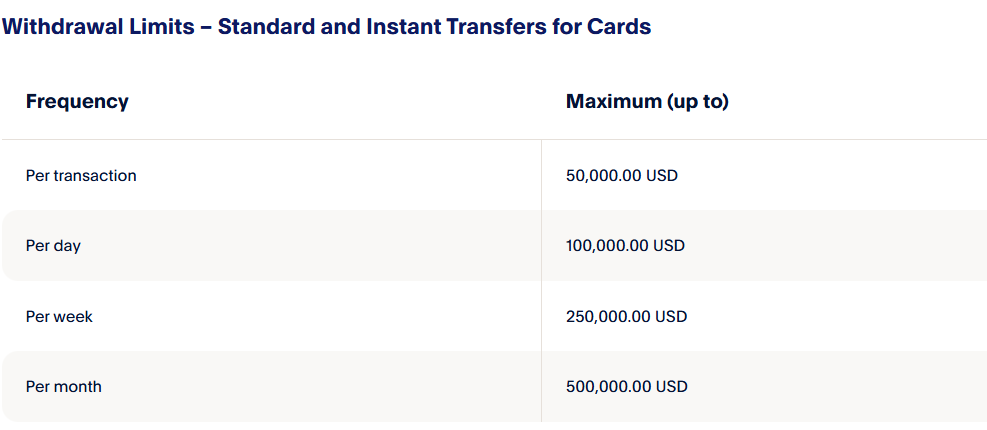
PayPal’s US Merchant Fees schedule publishes substantially higher card withdrawal limits for eligible Business accounts.
| Limit period | Published business maximum |
|---|---|
| Per transaction | $50,000 |
| Per day | $100,000 |
| Per week | $250,000 |
| Per month | $500,000 |
These limits apply to the Standard and Instant card withdrawal categories described in the merchant fee schedule. They do not automatically apply to every Business account, debit card, payment integration, or other PayPal product.
Some older PayPal business guides describe lower debit card limits. For current US merchant withdrawals, use the applicable PayPal Merchant Fees schedule and the limits shown in your own account.
Standard vs Instant debit card transfers
PayPal offers Instant Transfers to eligible Visa, Mastercard, and Discover debit cards. They typically complete in about 30 minutes, although some banks may take 1–3 business days for final settlement.
Standard Transfers to debit cards are available only for eligible Visa debit cards and typically complete within approximately 48 hours.
Standard card transfers generally have no PayPal withdrawal fee when no currency conversion is involved. Instant Transfers incur a fee based on the applicable account type.
See PayPal’s debit card transfer guidance for card eligibility and processing details.
Does PayPal Have a Daily, Weekly, or Monthly Transfer Limit?
Yes, but the answer depends on which type of transaction you are making.
PayPal publishes daily, weekly, and monthly withdrawal maximums for eligible debit card transfers. It also publishes period-based limits for adding money to PayPal Balance from a debit card.
However, PayPal does not publish one universal daily sending limit that applies to every verified account. Its general sending guidance focuses on individual transaction maximums and cumulative restrictions on unverified accounts.
Similarly, the published $25,000 maximum for an Instant Transfer to a bank is a per-transaction maximum. It should not automatically be interpreted as a universal daily or monthly bank transfer limit.
When a payment or withdrawal is refused, identify the type of transaction and the specific restriction shown rather than applying a limit from a different PayPal feature.
How Much Money Can You Add to PayPal Balance?
Adding money to PayPal Balance is different from sending money to someone or withdrawing funds from PayPal.
For eligible US customers adding funds from a Visa or Mastercard debit card, PayPal publishes the following maximums:
| Period | Maximum debit card addition |
|---|---|
| Daily | $5,000 |
| Weekly | $10,000 |
| Monthly | $20,000 |
These limits apply when moving funds into PayPal Balance from an eligible debit card. They are not the same as the limits for transferring money out of PayPal to a card.
Adding money from a confirmed bank account may involve separate daily, weekly, and monthly restrictions. PayPal does not publish one universal set of bank addition limits applicable to every account.
Bank-funded balance additions generally take up to five business days, while eligible debit card additions can complete much faster. The available methods appear when you initiate the transfer.
For current requirements, see PayPal’s instructions for adding money to your balance.
Verified vs Unverified PayPal Accounts: What Changes?
Verification affects how much money you may be able to send, but PayPal uses different types of account checks for different purposes.
PayPal’s US Help Center currently describes account verification through:
- Adding and confirming an eligible bank account.
- Applying for and being approved for an eligible PayPal Credit product.
Applying for credit is a separate financial decision with its own eligibility requirements and terms. It is not necessary simply to create a PayPal account or make every ordinary PayPal payment.
Account verification is not the same as confirming your email address or merely linking a debit or credit card. Those actions may satisfy other PayPal requirements without automatically granting Verified status or removing every transaction restriction.
There is also a distinction between account verification and identity verification for PayPal Balance. If you want to hold and use money in a US PayPal Balance account, PayPal must confirm the relevant identifying information.
Even after your account is verified, individual transaction maximums, card withdrawal caps, payment method restrictions, and security reviews may still apply.
Review PayPal’s account verification instructions and its PayPal Balance identity requirements.
How to Check Your Actual PayPal Sending or Transfer Limit
Published maximums are useful reference points, but your own PayPal account determines the amount you can actually send or withdraw.
Check a sending limit
- Sign in directly to your PayPal account.
- Open Send & Request.
- Enter the intended recipient’s information and proceed to the payment amount.
- Review any sending-limit information or restrictions displayed during the payment process.
- Check the available funding methods and payment details before deciding whether to continue.
You do not need to confirm and submit a payment simply to review the information shown in the sending workflow.
If your account is unverified, PayPal states that your available cumulative sending limit can be viewed when you go to send money.
Check a bank or debit card withdrawal limit
On the PayPal website:
- Sign in and open Wallet.
- Click Transfer Money.
- Select Transfer to your bank.
- Choose an eligible linked bank account or debit card and review the available Standard or Instant Transfer options.
- Enter the intended amount and review any displayed restrictions or fees before final confirmation.
In the PayPal app, you can access withdrawal options from your PayPal balance by selecting Transfer and following the available transfer-to-bank instructions.
Interface labels may vary by account and app version. PayPal does not guarantee that every account has a permanent View Limits menu showing all possible sending and withdrawal maximums together.
If the transfer screen does not explain the restriction, check your account notifications and the Resolution Center for any account limitations.
Can You Increase Your PayPal Transfer Limit?
Some PayPal account restrictions can be reduced or removed after completing verification or resolving an account issue. However, fixed limits associated with a particular transfer service cannot necessarily be increased.
If PayPal indicates that your account needs additional verification, complete the steps requested within your official account.
- Complete account verification: Confirm the required account and financial information using PayPal’s supported process.
- Confirm your withdrawal destination: Check that your linked bank account or debit card is eligible and has accurate details.
- Resolve account limitations: Open the Resolution Center or PayPal account notifications to find required actions.
- Provide requested documents: Submit identity or business documents through PayPal’s secure account interface when required.
- Check the applicable product maximum: Determine whether you are facing an account-specific restriction or a fixed limit for the selected service.
For example, verifying your account may improve your available sending allowance, but it does not guarantee that you can exceed the published maximum for an Instant Transfer to a bank or a debit card.
Do not attempt to bypass security restrictions or account limitations by using incorrect identifying information or another person’s account.
PayPal explains how to address restrictions in its account limitation removal guide.
PayPal Standard vs Instant Transfer Fees and Timing
Transfer speed and cost are separate from the amount PayPal allows you to withdraw. Paying an Instant Transfer fee does not remove the applicable transfer limit.
PayPal’s US Consumer and Merchant fee schedules list different Instant Transfer rates for Personal and Business accounts.
| Transfer type | Personal account fee | Business account fee |
|---|---|---|
| Standard Transfer to eligible bank | No fee without currency conversion | No fee without currency conversion |
| Standard Transfer to eligible debit card | No fee without currency conversion | No fee without currency conversion |
| Instant Transfer to eligible bank | 1.75% | 1.50% |
| Instant Transfer to eligible debit card | 1.75% | 1.50% |
For US-dollar Instant Transfers from a Personal account, PayPal publishes a $0.25 minimum fee and $25 maximum fee.
For Business account Instant Transfers, the published minimum US-dollar fee is $0.50. PayPal’s current US Merchant Fees table does not state the same $25 maximum fee applicable to Personal accounts.
For example, an eligible $1,000 Instant Transfer would have a PayPal fee of $17.50 on a Personal account or $15.00 on a Business account under those published rates, assuming no other applicable charges.
Standard bank transfers generally take 1–3 business days, while Standard Transfers to eligible debit cards typically complete within 48 hours. Instant Transfers usually complete within minutes, although bank settlement, holidays, and transaction reviews can cause delays.
For current rates and any additional conditions, see the official PayPal Consumer Fees and PayPal Merchant Fees schedules.
Why Does PayPal Say Your Transfer Exceeds the Limit?
PayPal may reject a transfer because the amount exceeds a published maximum, a cumulative allowance has been used, or a different account restriction prevents the transaction.
The error message can help identify the next step.
“You’re transferring more than your weekly limit allows”
This message indicates that the requested withdrawal exceeds the weekly allowance applicable to the transfer.
For example, a US Personal account withdrawing to a debit card has a published weekly maximum of $5,000. If that allowance has already been used, a new withdrawal may be rejected even if the amount is below the per-transaction maximum.
Review the recent withdrawals and the limits for your account. Avoid assuming that a new calendar day automatically resets a weekly or monthly allowance.
“We can’t complete this transaction right now”
PayPal identifies several possible causes for a general transfer failure:
- The PayPal account has an active limitation.
- The selected bank or card is not eligible for Instant Transfer.
- The linked financial account details do not match the bank’s records.
- The available balance is insufficient.
- The transfer is subject to a security or account review.
Check the actual error and account notifications before attempting another transfer. If the selected bank or card is ineligible, review the alternative transfer methods PayPal offers.
If the problem is an account limitation, completing the required verification or documentation process may restore access after review.
See PayPal’s transfer error explanations for additional guidance.
Can PayPal Hold or Delay a Transfer That Is Within the Limit?
Yes. A transfer can be within the published limit and still undergo a security review.
PayPal reviews withdrawals to help identify unusual activity, potential account issues, and errors in the destination information. Some withdrawals may be held for up to 72 hours for additional review.
A higher-than-usual payment, an unfamiliar device or network, incomplete verification, or inconsistent bank details can contribute to a review.
If your withdrawal shows as Pending, open the transaction in Activity and check any messages from PayPal. When the review is completed, the normal transfer processing timeframe applies.
PayPal’s withdrawal review guidance explains the reasons for additional checks and what to expect.
Are PayPal Business and Personal Transfer Limits Different?
Yes, particularly for card withdrawals. While PayPal’s general sending guidance describes limits for verified and unverified accounts, the US Consumer and Merchant fee schedules publish different debit card withdrawal maximums.
Business accounts have higher published card withdrawal allowances than Personal accounts, but they still have fixed transaction and periodic maximums. In contrast, both US fee schedules publish an Instant Transfer-to-bank maximum of $25,000 per transaction.
Business owners should also distinguish ordinary PayPal withdrawals from specialized products such as merchant payment APIs, PayPal Payouts, and other business payment services. Those products may have separate eligibility, operational, and transaction limits.
Receiving a large commercial payment does not automatically mean the entire amount is immediately withdrawable. Funds may be unavailable because of payment holds, reserves, account limitations, or other applicable requirements.
Do International PayPal Transfers Have Different Limits?
International PayPal payments can have additional restrictions based on currency, the recipient’s country, and the services available to each account.
PayPal’s general US sending guidance expressly notes that maximum transaction amounts may vary depending on currency.
Some countries also restrict which PayPal services are available, including receiving money, holding a balance, or withdrawing funds to local financial accounts.
International transaction fees and currency conversion costs may apply, but those costs are separate from the amount you are permitted to send.
PayPal also offers international transfers through Xoom, which is a separate service with its own destination options, funding methods, fees, and transaction rules. Do not assume PayPal-to-PayPal sending maximums automatically apply to Xoom transfers.
Is a PayPal Debit Card ATM Limit the Same as a Transfer Limit?
No. Withdrawing money at an ATM using a PayPal Debit Card is different from transferring PayPal funds to an externally linked debit card.
PayPal’s standard US personal Debit Card limits include:
- $400 per day for ATM withdrawals.
- $5,000 per day for eligible over-the-counter cash withdrawals.
- $3,000 per day for ordinary card purchases, subject to applicable terms and exceptions.
These card-use limits do not replace the separate sending and external withdrawal limits discussed above. Your actual card privileges and applicable fees are governed by the relevant card agreement.
See PayPal Debit Card daily limits.
Frequently Asked Questions
Can I send $10,000 through PayPal?
Possibly. PayPal’s published US guidance permits verified accounts to send up to $60,000 per transaction, but PayPal may restrict a particular payment to $10,000 or another applicable amount. Your funding method, currency, and account status also matter. Check the allowed amount in your sending workflow before confirming the payment.
Can I send $60,000 in one PayPal transaction?
A verified US PayPal account may qualify for a single payment of up to $60,000. However, PayPal does not guarantee this maximum for every account or payment and may apply a lower limit, including $10,000. The applicable maximum can also vary by currency.
Can I withdraw more than $5,000 from PayPal?
Yes, depending on the withdrawal method and account type. The $5,000 per-transaction debit card maximum applies to US Personal accounts. Eligible Business accounts have higher published card withdrawal limits, while eligible Instant Transfers to banks have a published maximum of $25,000 per transaction. Standard bank withdrawals may have account-specific restrictions.
Does verifying PayPal remove all transfer limits?
No. Verification can remove certain cumulative sending restrictions, but transaction maximums, debit card withdrawal caps, account-specific reviews, and financial institution requirements can still apply.
Does paying an Instant Transfer fee increase the maximum?
No. Instant Transfer fees pay for the expedited withdrawal service. They do not remove the transfer maximum or guarantee that the transaction will avoid security review.
The Bottom Line
The PayPal transfer limit depends on whether you are sending money to another PayPal user, withdrawing to a bank, withdrawing to a debit card, or adding money to your balance.
For US sending payments, PayPal publishes an unverified one-time maximum of $4,000 and a verified single-transaction maximum of up to $60,000, sometimes restricted to $10,000. For withdrawals, separate bank and card limits apply, with substantial differences between Personal and Business card transfers.
Before making a large payment or withdrawal, check the transaction type, available funds, verified status, eligible destination, and any limit displayed in your own PayPal account. Use the applicable official US fee schedule to confirm costs and restrictions before proceeding.