
Published: October 20, 2026. Last updated: November 22, 2026.
A PayPal refund can reach your PayPal balance the same day, while bank-account and debit-card refunds usually take up to 5 business days. Some bank or debit-card refunds take up to 30 days. Credit-card refunds can take 1–2 billing cycles to appear on your statement. The relevant timeline depends on how you paid and whether the refund has actually been issued.
This guide uses PayPal’s U.S. guidance for standard online purchase refunds. Check the guidance for your account’s country and any separate financing product you used.
PayPal refund times by payment method
| Original payment method | Usual refund destination | Published timeframe |
|---|---|---|
| PayPal balance | PayPal balance | Same day. |
| Debit card | Original card | Generally up to 5 business days; sometimes up to 30 days, depending on the issuer. |
| Bank account | Original bank account | Usually up to 5 business days after issue; sometimes up to 30 days, depending on the payment’s status. |
| Credit card | Original card account | 1–2 billing cycles to appear on the statement. |
| PayPal balance plus credit card | Both original sources | Balance portion: same day. Card portion: 1–2 billing cycles. |
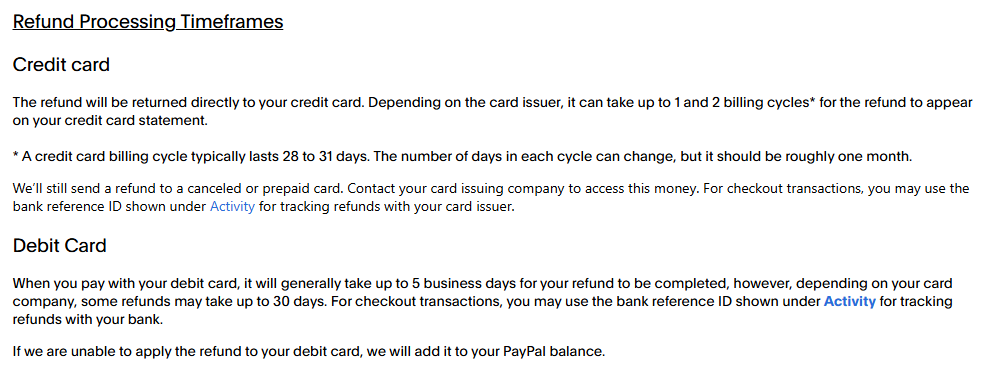
Use the row matching the way you funded the purchase—not simply the fact that you checked out with PayPal. A card-funded purchase and a balance-funded purchase do not have the same refund timeline.
Business days are not calendar days
Do not count Saturday, Sunday, or holidays toward a business-day clearing period. PayPal makes this distinction in its bank-funded eCheck guidance. Equally, do not turn a window stated as “30 days” into “30 business days.” Preserve the unit attached to your refund’s estimate.
A billing cycle is different again. Chase’s explanation of credit-card refunds distinguishes a credit appearing in online account activity from its appearance on a monthly statement. Check both rather than assuming you must wait for another statement before looking for the refund. A billing-cycle estimate is not a guaranteed arrival date.
When does the refund waiting period start?
A refund request is not the same as an issued refund. Returning an item, receiving a return authorization, or getting a message promising reimbursement does not establish that the seller has submitted the refund.
PayPal’s refund instructions for sellers require them to select the original payment, enter the refund amount, and confirm issuance. For you as the buyer, the practical starting point is to establish whether that action has happened and obtain the issue date—not count automatically from the purchase or return date.
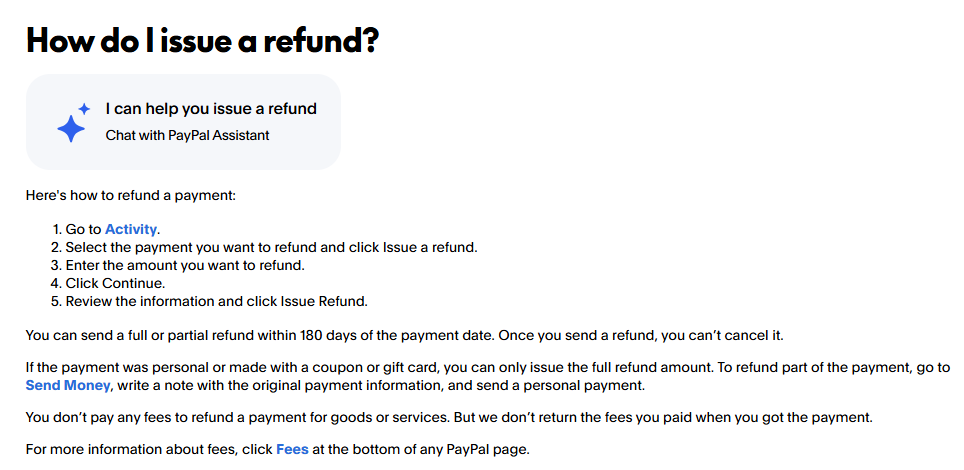
Keep your return request, the seller’s confirmation, and the refund transaction together. If the dates differ, ask which date represents actual issuance. Do not add several published processing windows together to manufacture an arrival date; first identify the stage your refund has reached.
How to check your PayPal refund status
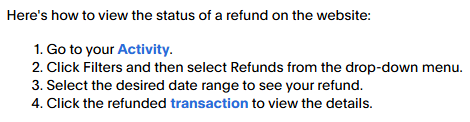
On PayPal’s website, open Activity → Filters → Refunds, choose the relevant date range, and select the transaction. Refund Tracker covers full, unsplit checkout refunds funded by a bank or card.
Read the surrounding explanation, especially when you see “Pending.” A refund-status label and a Refund Tracker stage can describe different parts of the process.
| Status or stage | Meaning and next step |
|---|---|
| Pending refund | Seller’s bank funds have not cleared. Contact the seller after 5 business days. |
| Temporary hold | Your original payment is still clearing. Review that payment’s details. |
| Refunded / Partially Refunded | The refund amount was sent back. Check its amount and destination. |
| Refund Sent / Refund Pending in Refund Tracker | The bank or card issuer still has processing to complete. |
| Completed / Refund Completed | The refund is finished; the money should have arrived. Investigate if missing. |
| Canceled | The refund could not be processed. Contact the seller. |
Make sure you are inspecting the refund, not just the original purchase. Save the full status wording rather than reporting only that the transaction is “pending” or “completed.” That gives support a clearer description of what you are seeing.
PayPal says completed, but you have not received the money
For a missing completed bank or card refund, PayPal directs you to the financial institution. Provide the bank reference ID when available, or the original transaction details.
Check for a credit, not only a cash deposit. A credit-card refund can reduce the amount you owe. If the card was already paid off, it can create a negative balance instead. These are ways a refund can appear on the card account, as explained in Chase’s refund guide; they do not necessarily create a deposit in your checking account.
- Prepare one clear record. Include the purchase reference, refund date, amount, currency, original payment method, displayed status, and any bank reference ID provided.
- Ask a specific question. Ask the bank or card issuer whether it can locate that refund and whether it needs additional information. Record its response and any case reference.
- Resolve conflicting information with PayPal. If the institution cannot locate the refund, take its response to PayPal’s official support and ask PayPal to check the destination and reference details.
Share transaction information only through verified support channels. Do not publish full card numbers, passwords, or one-time security codes in a forum, social-media post, or screenshot.
What if the seller has not issued the refund?
That is a different problem from waiting for an issued refund to reach your bank. PayPal’s instructions for requesting a refund direct buyers to contact the seller. You can find the seller’s contact information by opening the payment in Activity.
Ask the seller to confirm whether the refund was submitted, its amount, and the issuance date. A useful follow-up is more specific than “Where is my money?”: explain that you cannot locate the refund against the original payment and ask the seller to verify its submission.
If the seller does not resolve the purchase problem, review the options in PayPal’s Resolution Center. Do not assume that the longest refund-processing estimate gives you extra time to raise a dispute.
Protect dispute deadlines while you follow up
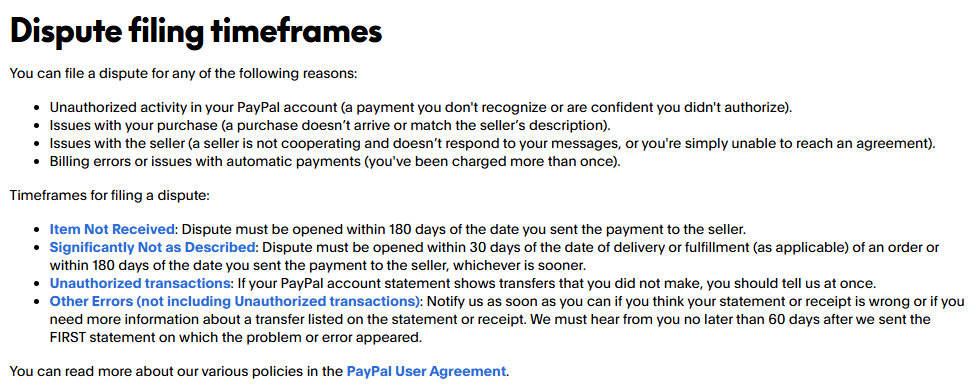
Under PayPal’s U.S. dispute-filing guidance, an Item Not Received dispute must be opened within 180 days of payment. A Significantly Not as Described dispute has a different deadline: within 30 days of delivery or fulfillment, or within 180 days of payment, whichever comes first. Other issue types have their own requirements.
If you already have an unresolved dispute, PayPal says it automatically closes after 20 days unless escalated to a claim. Do not wait until that period has ended to escalate. Its claim-resolution guidance says decisions usually take 14 days, but some take 30 days or longer. That is a case-decision timeline—not the time for an issued refund to appear.
For a credit-card purchase, ask the issuer promptly about any separate dispute or billing-error requirements. The Consumer Financial Protection Bureau’s credit-card refund guidance explains that card disputes are a separate route with their own conditions. Do not treat a PayPal estimate as an extension of an issuer’s deadline.
Other questions that can affect your refund
Can I receive the refund in my PayPal balance instead?
Do not assume every refund can be redirected. PayPal’s U.S. user agreement generally routes online-purchase refunds to the original payment method. For some personal-account purchases funded by a linked bank account, PayPal may offer a balance destination; it also describes fallback arrangements when a bank refund cannot be completed. Use the options actually offered for your transaction rather than assuming you can choose any card or account.
What happens if my card is canceled or expired?
PayPal still sends refunds to canceled cards and advises contacting the issuer to access them. For an expired or replaced card, ask the issuer how to locate the refund against the original card account; do not assume that adding a new card to PayPal redirects an existing refund.
Does the same timeline apply to Pay in 4?
Pay in 4 has separate loan-refund rules. According to PayPal’s U.S. Pay in 4 guidance, a merchant refund is applied to the loan. An amount exceeding the outstanding loan balance goes to your PayPal balance; that excess refund may take up to 7 days if repayments are still processing.
Continue scheduled repayments while you are expecting a refund, and check how the refund was applied to your plan. Do not stop payments merely because you returned an item or received a seller’s promise.
Can I make a PayPal refund arrive faster?
Following up can help identify a missing submission or an unlocated credit, but it is not a guaranteed way to accelerate processing. Focus on the next verifiable step: confirmation from the seller, clarification of the refund status, or a trace by the bank or card issuer. Ask what remains outstanding rather than accepting an unexplained instruction to keep waiting.
This is an independent guide, not PayPal customer support. Only the seller, PayPal, or the relevant financial institution can investigate the account-specific details of your refund.