
Published: October 31, 2026. Last updated: November 22, 2026.
To send money on PayPal, sign in to your account, select Send & Request, enter the recipient’s email address, phone number, or PayPal username, and choose the amount. Then select the payment type and funding method, review the details, and confirm the transfer.
You can send money through the PayPal website or mobile app using an eligible bank account, debit card, credit card, or PayPal Balance. The steps are straightforward, but the payment type you select and how you fund the transfer can affect fees and purchase protection.
Here’s how to send a payment, choose the appropriate option, check the cost, and handle common problems.
How to Send Money on PayPal Using the Website
You can send money directly from a computer without installing the PayPal app. You’ll need a PayPal account, the recipient’s information, and an eligible payment method.
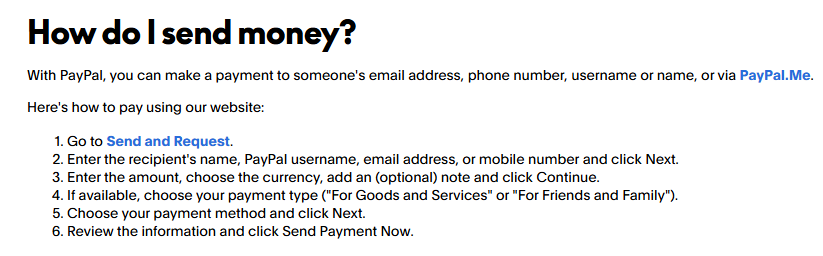
- Sign in to PayPal. Visit PayPal’s official website and log in to your account.
- Open Send & Request. Select this option from your account navigation to start a new payment.
- Enter the recipient’s information. Search by name, PayPal username, email address, or mobile number. Select the correct recipient and click Next.
- Enter the amount. Type the amount you want to send, choose the currency, and add an optional message. Click Continue.
- Choose the payment type. If offered, select For Friends and Family for an eligible personal transfer or For Goods and Services when paying for a purchase.
- Select your payment method. Choose an eligible bank account, debit card, credit card, or PayPal Balance and click Next.
- Review the payment. Confirm the recipient, amount, currency, payment type, funding source, and any applicable fees or exchange rate.
- Send the money. Click Send Payment Now to submit the transaction.
PayPal normally notifies the recipient after you send a payment. You can also open your account’s Activity section to view the transaction and its status.
Before confirming: Verify the recipient’s identity using information you already trust. Selecting a similar-looking name or mistyping an email address can send money to the wrong person. Completed payments generally cannot be canceled directly.
These steps follow PayPal’s official sending instructions.
How to Send Money on the PayPal App
The PayPal mobile app lets you send payments from an Android phone or iPhone. The basic process is similar to the website, although some navigation labels may vary by app version.
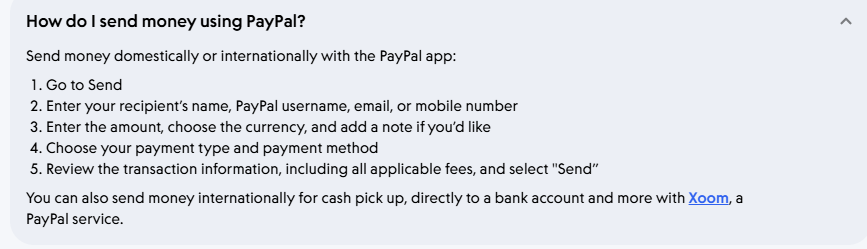
- Open the PayPal app and sign in.
- Tap Send or Send/Request.
- Enter the recipient’s name, PayPal username, email address, or mobile number. You may also be able to select someone from your contacts.
- Enter the amount you want to send, select the currency if necessary, and add an optional note.
- Select the appropriate payment type when PayPal offers a choice between personal and commercial payments.
- Choose an available funding method, such as a linked bank account, eligible card, or PayPal Balance.
- Review the recipient’s information, payment amount, and any displayed fees.
- Tap Send or the final payment confirmation button displayed in the app.
After submitting the transaction, you can check its progress in the app’s Activity section. If PayPal requires identity confirmation or another security check, follow the instructions shown in your account.
For a payment to a new recipient, double-check the account identifier before sending. A familiar display name alone is not enough to confirm that you have selected the intended person.
Friends and Family vs. Goods and Services: Which Should You Choose?
One of the most important decisions when sending money with PayPal is choosing the correct payment type. The two options are designed for different transactions and offer different protections.
| Feature | Friends and Family | Goods and Services |
|---|---|---|
| Purpose | Personal transfers, gifts, and shared expenses | Purchasing products or services |
| Typical example | Repaying a friend for dinner | Paying a seller for an item |
| PayPal Purchase Protection | Not available | Available for eligible purchases |
| Fees | Sender fees depend on funding method and destination | Commercial receiving fees generally apply to the seller |
| Use for business purchases? | No | Yes |
When to use Friends and Family
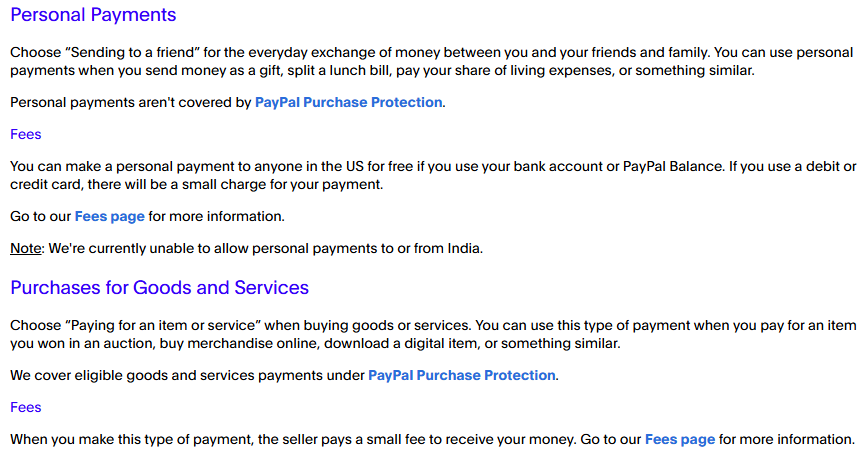
Select Friends and Family when transferring money for personal reasons, such as sending a birthday gift, splitting household expenses, or reimbursing someone you know.
For example, if a friend paid for both of your movie tickets, you could use a personal payment to reimburse your share.
These transfers are not covered by PayPal Purchase Protection. If you pay a stranger for merchandise using Friends and Family and the merchandise never arrives, you generally cannot use PayPal’s purchase-protection process for that payment.
When to use Goods and Services
Choose Goods and Services when purchasing something from a seller or paying for a service.
Examples include buying a secondhand item from an online seller, paying a graphic designer, or purchasing a digital product.
Eligible Goods and Services purchases may qualify for PayPal Purchase Protection, subject to the program’s conditions, exclusions, documentation requirements, and deadlines. Coverage is not automatic for every transaction, and a refund is not guaranteed.
Do not choose Friends and Family merely because a seller wants to avoid commercial payment fees. When purchasing goods or services, use the appropriate commercial payment option.
PayPal also explains that a payment identified as a purchase generally cannot simply be recategorized after it has been sent. Review the selection carefully before completing your transaction.
See PayPal’s payment-type guidance for further details.
How Much Does PayPal Charge to Send Money?
PayPal sending fees depend on whether the transfer is personal or commercial, how you fund it, and whether the recipient is in another country.
For US consumer accounts, PayPal’s published fee schedule lists the following rates for personal transfers:
| Payment | Funding method | PayPal sender fee |
|---|---|---|
| Domestic personal transfer | PayPal Balance or linked bank account | No fee |
| Domestic personal transfer | Debit or credit card | 2.90% plus a fixed fee |
| International personal transfer | PayPal Balance or bank account | 5.00%, with a $0.99 minimum and $4.99 maximum international fee |
| International personal transfer | Debit or credit card | Domestic card-funded fee plus the applicable international fee |
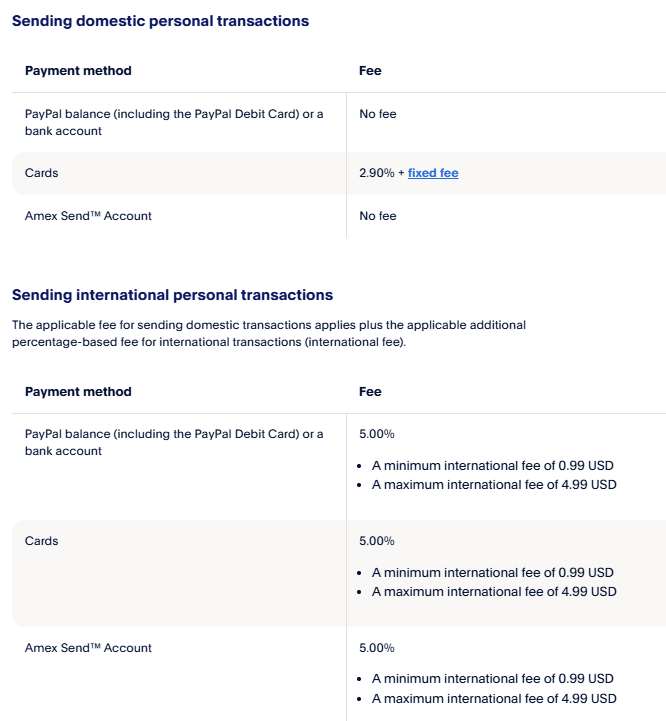
For a US-dollar domestic personal payment funded by a card, the fixed fee is $0.30. The applicable international percentage-based fee is 5.00%, subject to the published minimum and maximum. Currency conversion costs may also apply.
For example, sending a hypothetical $100 domestic personal payment funded by a card would incur a PayPal fee of $3.20 under the published 2.90% plus $0.30 rate, excluding any separate charges imposed by a card issuer.
When paying for Goods and Services, PayPal generally does not charge the US buyer a separate purchase fee if no currency conversion is involved. Commercial transaction fees typically apply to the seller receiving the payment.
Important: The fee schedule is different for certain products, transactions, and account markets. Banks and card issuers may also impose their own charges. Always review the final payment breakdown before confirming.
These rates are based on PayPal’s US Consumer Fees schedule, last updated May 19, 2026.
What Payment Methods Can You Use to Send Money?
PayPal supports several funding sources for eligible transactions. The options available to you appear during the sending process.
- Linked bank account: You can fund eligible payments directly from a connected bank account. Domestic personal transfers funded this way generally have no PayPal sending fee.
- Debit card: An eligible debit card can fund payments without using your PayPal Balance. Card-funded personal payment fees may apply.
- Credit card: You can send eligible payments using a supported credit card. PayPal fees and possible card issuer charges may apply.
- PayPal Balance: If you have an eligible PayPal Balance account and available funds, you can use that balance for supported transfers.
You do not need to load money into PayPal Balance before making every payment. If a linked card or bank account is eligible, PayPal can fund the payment through that source.
However, spending money held in PayPal Balance requires an eligible Balance account. PayPal may require identity verification before allowing you to use your balance to send payments.
PayPal explains these conditions in its PayPal Balance payment guidance.
How to Send Money Internationally With PayPal
You can send money to an eligible PayPal account in another country, subject to the services and restrictions that apply to both accounts.
The general sending process is similar to a domestic payment:
- Sign in to PayPal and open Send & Request.
- Enter the recipient’s PayPal information and select the correct account.
- Enter the amount and choose the payment currency.
- Select the appropriate payment type and available funding method.
- Review any international payment fees, currency conversion rate, and the amount the recipient will receive.
- Confirm the payment after checking all details.
If the transfer involves a currency conversion, PayPal may calculate the exchange rate. For eligible card-funded transactions, you may have the option to choose your card issuer’s conversion rate instead. When that option is available, the card issuer’s final rate may not be known until the transaction appears on your statement.
A lower visible transfer fee does not necessarily mean a lower overall cost when currency conversion is involved. Compare the amount charged to you with the amount the recipient will receive.
PayPal also offers international money transfers through Xoom, which supports additional delivery methods in eligible locations, such as bank deposits, mobile wallets, and cash pickup. Xoom is a separate transfer service with its own available destinations, exchange rates, fees, and requirements.
For currency-specific instructions, see PayPal’s foreign-currency payment guide.
Can You Send Money to Someone Without a PayPal Account?
Yes, you can initiate a PayPal transfer to an eligible recipient’s email address or mobile number even if that person does not yet have a PayPal account.
PayPal will provide instructions for the recipient to register. To claim the payment, the recipient must open an eligible PayPal account, confirm the relevant email address, and complete any required identity checks.
Until the recipient meets the necessary requirements and accepts the money, the payment may remain unclaimed.
Unclaimed payments are generally canceled automatically after 30 days, with the funds returned to the original payment method. A recipient who already has PayPal but uses a different email address or phone number may also need to confirm the correct account details.
If you want to send money to someone without asking them to create a PayPal account, an eligible Xoom transfer may offer a different delivery method depending on the recipient’s country.
Other Ways to Send Money: PayPal.Me and Payment Links
Besides entering a recipient’s information manually, PayPal provides link-based payment options.
Send money using PayPal.Me
If someone shares their PayPal.Me link with you, open it in your browser, select Send, enter the payment amount, and choose the appropriate payment type and funding method. Review the details before confirming the transfer.
PayPal.Me is particularly useful when the recipient wants to share a payment link instead of asking you to type their email address or username.
Send money using a PayPal payment link
PayPal also supports one-time sending links that you can create and share through messages, email, or other apps.
- Open the PayPal app and select Send/Request.
- Choose Send and request money with a link.
- Enter the amount and optionally choose a currency or add a note.
- Select Send and choose the appropriate payment type and funding method.
- Review the details and select Create PayPal Link.
- Share the link directly with the intended recipient.
PayPal sending links expire after 10 days if they have not been accepted or canceled. You can cancel an unclaimed link, but not a payment that has already been accepted by the recipient.
Keep sending links private. Anyone who obtains a valid sending link may be able to claim it. Share it only through a trusted conversation with the intended recipient.
See PayPal’s payment-link instructions for details.
How Long Does It Take to Send Money Through PayPal?
Many PayPal-to-PayPal transfers complete quickly, but the time depends on the payment method, recipient account, transaction status, and security checks.
Payments funded by a bank account may sometimes be processed as an eCheck. PayPal states that an eCheck usually takes 4–7 business days to clear, although processing can take longer.
Transfers may also remain pending when the recipient has not confirmed an email address, has not registered for PayPal, or has not accepted the payment.
To check your payment:
- Sign in to PayPal.
- Open Activity.
- Find the transaction using the recipient, date, or available filters.
- Open the payment to review its status and available details.
Common payment statuses include:
| Status | What it means |
|---|---|
| Completed | The transaction has successfully reached the recipient’s account. |
| Pending | The transaction is still awaiting processing, review, or another required action. |
| Unclaimed | The recipient has not accepted or received the payment. |
| Refunded | Funds have been refunded, although they may take additional time to appear in your funding account. |
| Returned | The payment has been sent back, such as when a recipient did not claim it. |
| Denied | The recipient did not accept the payment, and the funds are being returned. |
The Activity page is the most useful place to check whether a payment has actually completed. If a transfer is pending, avoid sending a duplicate payment before understanding why it has not finished.
For delayed bank-funded payments, consult PayPal’s eCheck guidance.
Can You Cancel a PayPal Payment After Sending It?
Whether you can cancel a payment depends on its current status. Completed PayPal payments generally cannot be canceled directly by the sender.
Cancel an unclaimed payment
If your payment is still unclaimed and PayPal provides a cancellation option, you can cancel it from your Activity page.
- Open Activity in PayPal.
- Find the payment you want to cancel.
- Select Cancel if the option appears.
- Follow the instructions to complete the cancellation.
Some pending payments cannot be canceled by the sender because the recipient must accept or decline them. PayPal generally cancels payments that remain unclaimed after 30 days and returns the funds to the original payment method.
Refunds to bank accounts may take up to five business days, while refunds to debit or credit cards may take up to 30 days, according to PayPal’s published guidance.
What if you sent money to the wrong person?
If the transaction is completed, open it in Activity and contact the recipient to request a refund. PayPal may display contact information or a chat option within the transaction.
For an eligible Goods and Services purchase, you may be able to open a dispute through the Resolution Center if there is a qualifying transaction problem and you are within the applicable filing deadline.
Friends and Family transfers do not qualify for Purchase Protection. If you sent a personal payment to the wrong recipient, obtaining a refund generally depends on the recipient returning the money.
If a payment was made without your authorization, use PayPal’s process for reporting unauthorized activity rather than treating it as an ordinary mistaken payment.
Read PayPal’s instructions for payments sent to the wrong person.
Why Won’t PayPal Let You Send Money?
If your PayPal payment is declined or cannot be completed, the problem may involve your funding method, account verification, or the recipient’s details.
Here are common reasons and the actions you can take:
- Bank or card declined: Check whether your payment method is active and has sufficient available funds or credit. Contact your bank or card issuer if the rejection continues.
- Outdated card information: Review the expiration date and billing address associated with your card.
- Unconfirmed funding method: Complete any bank or card confirmation that PayPal requests.
- Unconfirmed email address: Confirm the email address connected to your PayPal account.
- Account limitation: Open your PayPal account notifications or Resolution Center and follow the instructions to resolve the restriction.
- Security verification: Complete any identity or security check requested by PayPal.
- Recipient information: Confirm that the email address, phone number, or username belongs to the intended recipient and that their PayPal account can accept the payment.
- Sending limit: Check whether the transaction exceeds a limit applying to your account or payment method.
If a payment method is unavailable for a particular transaction, PayPal may let you choose a different eligible funding source. This does not guarantee approval, especially if your account is restricted or an additional verification step is required.
For more troubleshooting information, see PayPal’s declined-payment guide.
Frequently Asked Questions About Sending Money on PayPal
What information do you need to send someone money on PayPal?
You can generally find a recipient using their email address, mobile number, PayPal username, or name. You also need an eligible funding method and must meet any applicable account requirements. Confirm the recipient’s account details before sending.
Can you send money on PayPal without a bank account?
Yes. You can send eligible payments using a supported debit card, credit card, or available PayPal Balance without linking a bank account directly. Card-funded personal payments may incur fees, while using PayPal Balance requires an eligible Balance account.
Is there a limit on how much money you can send?
Yes. PayPal’s published US guidance states that an unverified account may send a one-time payment of up to $4,000, subject to an overall sending limit. Verified accounts can send up to $60,000 in a single transaction, although PayPal may restrict individual transfers to $10,000 or another applicable amount. Limits can vary by currency and account conditions, and your available sending limit appears during the payment process.
Can you send money to someone using only their email address?
Yes. Enter the email address in PayPal’s Send & Request feature. If the person does not yet have an eligible PayPal account, they will need to register and complete the required confirmation steps to claim the payment.
Is sending money with PayPal always free?
No. Eligible domestic personal payments funded by a linked bank account or PayPal Balance have no PayPal sending fee. Card-funded personal payments, international transfers, and currency conversions can involve additional costs. Check the payment breakdown before confirming.
Final Tips for Sending Money Safely
Sending money through PayPal usually requires only a few steps, whether you’re using a computer or the mobile app. The most important part is checking the payment details before submitting the transaction.
For personal transfers, choose Friends and Family when appropriate. For purchases, use Goods and Services so eligible transactions can receive the protections available under PayPal’s terms. Always confirm the recipient, funding method, amount, and fees before selecting the final Send button.
After sending, check your transaction in PayPal Activity. If a payment remains pending, is declined, or was sent in error, use the available transaction options and official PayPal support process rather than sending another payment without confirming what happened to the first one.