
Published: November 2, 2026. Last updated: November 22, 2026.
To request money on PayPal, sign in to your account, select Send & Request, open the Request tab, and enter the recipient’s name, email address, or phone number. Choose the amount and currency, add an optional note, and select Request Now. You can also send a PayPal payment request through the mobile app.
PayPal sends the recipient a notification with your request. They can review it and choose whether to pay. Sending a request does not automatically charge the other person or guarantee that you’ll receive the money.
How to Request Money on PayPal Using the Website
You can send a money request directly from PayPal.com without sharing your bank account or card details with the recipient.
- Visit PayPal.com and sign in to your account.
- Click Send & Request near the top of the page.
- Select the Request tab.
- Enter the recipient’s name, email address, or mobile number, then click Next.
- Enter the amount you want to receive and select the currency.
- Choose the request type shown by PayPal and add an optional note explaining the payment.
- Review the recipient, amount, and other details carefully.
- Click Request Now to submit your request.
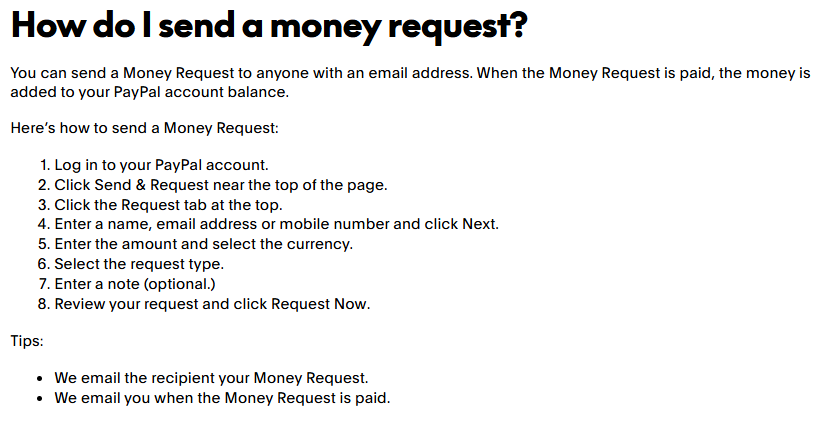
PayPal emails the recipient your request and notifies you by email when it has been paid. These steps follow PayPal’s official money-request instructions.
Some PayPal website layouts provide a Request option directly rather than requiring you to open Send & Request first. The remaining process is similar: choose the recipient, enter the amount, review the details, and submit.
How to Request Money on the PayPal App
You can request money using the PayPal mobile app on a supported Android or iOS device. Before starting, make sure you’re signed in to a PayPal account with a confirmed email address.
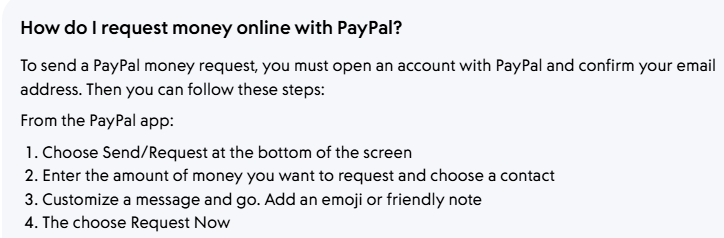
- Open the PayPal app.
- Tap Send/Request near the bottom of the screen, or open the available Request option.
- Select Request if prompted, then enter the amount you want to receive and choose the intended contact. The order of these fields may vary by app version.
- Add a short message explaining what the payment is for, if you wish.
- Review the recipient and payment details.
- Tap Request Now to send your request.
For example, if a friend owes you $35 for their share of dinner, you can request $35 and add a note such as “Dinner split.” This makes the request easier to recognize without requiring a separate explanation.
PayPal also supports other ways to request money from the app, including shareable links. See its request and receive money guide for the available options.
How to Send a PayPal Payment Request Link
If you would rather share a payment request through a text message, email, or messaging app, PayPal offers single-use request links. This can be useful when you’re already communicating with someone outside PayPal.
To create a request link in the PayPal app:
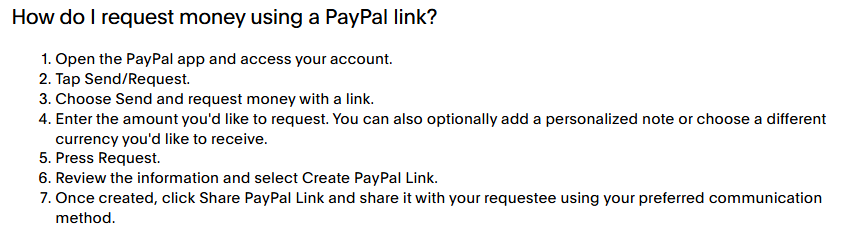
- Open the PayPal app and sign in.
- Tap Send/Request.
- Select Send and request money with a link.
- Enter the requested amount, choose a currency, and add an optional message.
- Tap Request.
- Review the details and select Create PayPal Link.
- Tap Share PayPal Link and send it directly to the intended person.
PayPal states that these links can be paid only once and automatically expire after 10 days if they remain unpaid. The payer must sign in to a PayPal account to complete the request. You can cancel an unpaid link before it is used.
Anyone who has access to a request link may be able to use it, so share it privately with the person you intend to charge. PayPal provides further details in its official PayPal links guide.
PayPal Request Links vs. PayPal.Me
A single-use PayPal request link is different from a PayPal.Me link. A request link is created for an individual payment and expires if it is not paid within 10 days. A PayPal.Me link is associated with your PayPal profile and does not expire automatically. You can reuse it to receive payments from different people.
If you frequently receive payments, a PayPal.Me link may be more convenient. If you need a specific person to pay a particular amount, a standard money request or single-use request link may be more appropriate. Learn more from the official PayPal.Me FAQ.
What Happens After You Send a PayPal Money Request?
When you submit a request, PayPal sends a notification to the recipient. For a conventional money request, PayPal emails the person you selected.
The recipient can review the amount and decide whether to send payment. On the PayPal website, someone paying a money request can open it from their Dashboard or Activity, select Send Payment, review the information, and click Send.
You can find the recipient’s procedure in PayPal’s payment-request instructions.
Once the request has been paid successfully, PayPal notifies you by email and records the payment in your account. Depending on your account and the transaction, the funds may be available immediately or subject to a payment hold or other review.
How to Check the Status of a PayPal Payment Request
To check whether someone has paid, sign in to PayPal, open Activity, and locate the request you sent. Select it to review its available details and current status.
| Request status | What it means |
|---|---|
| Pending | The recipient has not paid the money request. |
| Completed | The requested payment was successful and the money has reached your PayPal account. |

A pending money request is different from a pending payment transaction. A request marked Pending has not been paid; a payment marked Pending may already have been initiated but still requires processing or review. PayPal explains these distinctions in its payment and money-request status guide.
How to Remind Someone to Pay a PayPal Request
If your money request remains unpaid, you may be able to send a reminder directly from PayPal instead of creating another request.
- Sign in to your PayPal account.
- Open Activity and find the request you sent.
- Select the unpaid request.
- Click Remind if the option is available.
- Select Send a reminder and include an optional message if PayPal provides that feature.
These controls are described in PayPal’s reminder instructions. Availability may vary by country, request type, and account interface.
Before sending a reminder, check whether the recipient has already paid by another method. If the request is no longer needed, canceling it may be more appropriate than sending additional reminders.
How to Cancel a PayPal Money Request
If you sent a request to the wrong person, entered an incorrect amount, or no longer need to collect the payment, check whether PayPal allows you to cancel it while it remains unpaid.
- Sign in to PayPal and open Activity.
- Locate the unpaid request you sent.
- Open its details and look for an available Cancel option.
- If cancellation is offered, follow the confirmation steps shown by PayPal.
For a single-use PayPal link, you can cancel the link through the app before the recipient pays it. An unpaid link also expires automatically after 10 days.
Canceling a request is not the same as refunding a completed payment. If the recipient has already paid, you need to follow the appropriate refund or payment-resolution process rather than simply canceling the original request.
Does PayPal Charge a Fee to Request Money?
PayPal does not list a separate processing charge just for creating a standard money request. It also explicitly states that creating a PayPal link is free. However, transaction fees may apply when the recipient sends money and you receive the payment.
The applicable charges depend on the payment type, country, funding method, and whether currency conversion is involved.
- Domestic personal payments: For US accounts, personal payments funded by a PayPal balance or linked bank account generally have no PayPal sending fee when no currency conversion is involved. Other funding methods may incur fees.
- Commercial payments: Receiving payment for goods or services generally involves merchant payment-processing fees, which depend on the applicable PayPal product and transaction type.
- International payments: Additional cross-border charges or currency conversion costs may apply.
For current rates, consult PayPal’s US Consumer Fees and US Merchant Fees. Other countries have separate fee schedules.
Friends and Family vs. Goods and Services
When a payment is classified as personal, it is intended for everyday transfers between friends and family, such as repaying someone for dinner or sharing household expenses. Goods and Services payments are intended for purchases and commercial transactions.
Do not use Friends and Family to collect payments for products or services simply to avoid merchant fees. Personal payments are not covered by PayPal Purchase Protection, while eligible commercial purchases may receive protection under the applicable terms.
PayPal explains these categories in its personal vs. Goods and Services payments guide.
PayPal Money Request vs. PayPal Invoice
A standard money request is useful when you need someone to pay a particular amount. A PayPal invoice is designed for more detailed business billing, particularly when clients need an itemized description of the products or services provided.
| Feature | Money Request | PayPal Invoice |
|---|---|---|
| Typical use | Repayments, shared expenses, or simple payment requests | Business and client billing |
| Payment details | Amount, currency, and optional note | Itemized charges, descriptions, and supported billing details |
| Tracking | Request and payment status | Invoice status and additional billing management features |
| Payment without a PayPal account | Not generally available for a standard request | Eligible customers can pay invoices without a PayPal account |
For freelance work, consulting, or selling products, an invoice can provide a clearer payment record. PayPal Invoicing also supports features such as payment terms, itemized charges, and reminders. Guest card checkout may be available to eligible customers depending on the country and payment setup.
You can learn more in PayPal’s invoice creation guide and official invoicing overview.
Why Is My PayPal Payment Request Not Working?
If you cannot send a request or the recipient cannot complete the payment, start by identifying where the process stopped.
- The recipient never received the request: Check the email address or phone number you entered. Ask the recipient to check their email and PayPal account directly. If the details are wrong, cancel the unpaid request where possible and send a new one.
- The request is still pending: This means the recipient has not paid it. Check Activity for the status and send a reminder if the option is available.
- The recipient cannot pay: Ask them to check the message PayPal displays. Payment failures may involve an unavailable funding method, account limitations, or additional verification requirements.
- The Request feature is missing: Check the Send/Request section or the app’s Request area. Availability and navigation can differ by country, account type, and app version.
- The payment was made but the money is unavailable: Check the transaction in Activity for a payment hold or review. A completed request and unrestricted access to the funds are not always the same thing.
- A payment link is no longer working: Single-use PayPal links stop working after payment, cancellation, or expiration. Create a new link if another payment is needed.
When a problem involves account-specific restrictions, review the information in PayPal’s Help Center or contact PayPal through your signed-in account.
How to Avoid PayPal Money Request Scams
Money requests are also used in scams. A request that appears inside PayPal does not automatically mean the person requesting money has a legitimate reason to receive it.
Be cautious of unexpected requests involving unfamiliar purchases, urgent warnings, or instructions to call a phone number in the request note. Open PayPal directly rather than following suspicious email links or calling numbers supplied in a questionable message.
If you receive an unfamiliar request, do not pay it. PayPal allows users to report suspicious money requests through Activity and, in supported app interfaces, decline them. See its guide to reporting suspicious requests.
Frequently Asked Questions
Can I Request Money From Someone Without a PayPal Account?
You can send a standard money request to someone using their email address, even if they are not already a PayPal user. However, completing a regular PayPal money request generally requires the recipient to sign in or create an eligible PayPal account. For a business payment, a PayPal invoice may offer eligible customers the option to pay by card without creating an account.
Can I Request Money Internationally?
Yes, where PayPal supports the relevant countries, accounts, and payment types. International fees and currency conversion costs may apply. Some countries have restrictions on receiving payments, so check the applicable rules before sending a request abroad.
Does a PayPal Money Request Automatically Charge Someone?
No. Sending a request notifies the recipient that you are asking for payment. They must take action to authorize and complete it. A pending request does not mean the requested funds have been transferred.
Does a PayPal Money Request Expire?
Expiration depends on the type of request. PayPal’s single-use payment-request links expire after 10 days if they remain unpaid. That deadline should not be assumed to apply to ordinary money requests or permanent PayPal.Me links. Check the details of your particular request for its available status and options.
Can Someone Decline My PayPal Payment Request?
Yes. A recipient is not automatically obligated to pay merely because you sent a request. They can choose not to complete it, and PayPal provides options for declining or canceling certain requests depending on the interface and request type.