
Published: November 11, 2026. Last updated: November 22, 2026.
To get a refund on PayPal, sign in to your account, open Activity, select the payment, and use the seller’s contact information to request your money back. If the seller does not resolve an eligible purchase problem, you can open a dispute through the PayPal Resolution Center and, if necessary, escalate it to a claim for PayPal to review.
A refund is not automatic. For a completed payment, the seller normally initiates the refund. PayPal may intervene when a purchase qualifies for its Purchase Protection program and the buyer follows the required dispute process.
This guide explains how to request a refund, what to do if a seller refuses, which deadlines apply, and how to track the money back to your bank account, payment card, or PayPal balance. The procedures and policies are based on PayPal’s U.S. documentation.
How to request a refund on PayPal
For a completed PayPal payment, the first step is to contact the seller. You can find their details directly from the transaction in your PayPal account.
Request a refund on the PayPal website
- Sign in to PayPal. Open the official PayPal website and access your account.
- Open Activity. Find the payment you want refunded.
- Select the transaction. Open its details to review the amount, date, and recipient.
- Find the seller’s contact information. Use the details provided on the transaction page to contact the seller.
- Request your refund. Explain the problem and ask the seller to return the appropriate amount through the original PayPal transaction.
- Check the payment status. If the seller issues a refund, you can follow its progress in PayPal Activity.
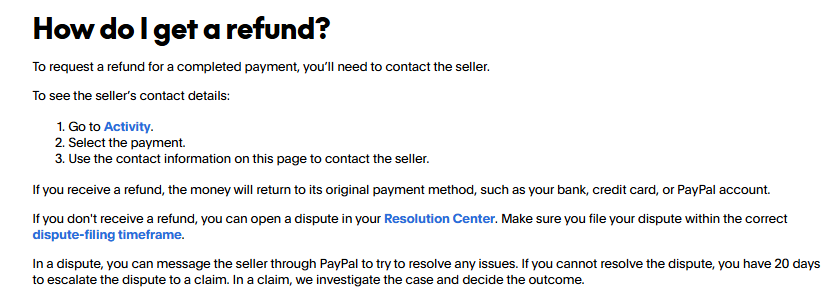
Include the transaction date, order number where available, amount paid, and a concise explanation of why you are requesting a refund. For a damaged or incorrectly described product, keep relevant photographs and order records.
The seller can issue a refund from the transaction details in their own PayPal account. You cannot force a refund simply by selecting a completed payment in your buyer account.
These steps follow PayPal’s official refund instructions.
Request a PayPal refund using the mobile app
You can also find the payment and contact the seller using the PayPal mobile app.
- Open the official PayPal app and sign in.
- Go to Activity.
- Select the payment you want refunded.
- Review the transaction details and available seller contact options.
- Contact the seller to request a refund.
If the seller does not cooperate, you can use the transaction’s Report a Problem option where available, or open the Resolution Center through your phone’s browser.
What if the seller refuses to refund you?
If the seller does not respond, refuses to refund an eligible purchase, or cannot resolve your problem, you may be able to open a dispute through PayPal.
A dispute allows you and the seller to communicate through PayPal about the payment. It does not automatically return your money. If the disagreement remains unresolved, you can request PayPal’s intervention by escalating the dispute to a claim.
How to open a PayPal dispute
- Sign in to PayPal and open the Resolution Center.
- Click Report a Problem.
- Select the payment you want to dispute and click Continue.
- Choose the reason that accurately describes your problem, such as an item that never arrived or a product that differs significantly from its description.
- Follow the prompts to provide the relevant details and submit your dispute.
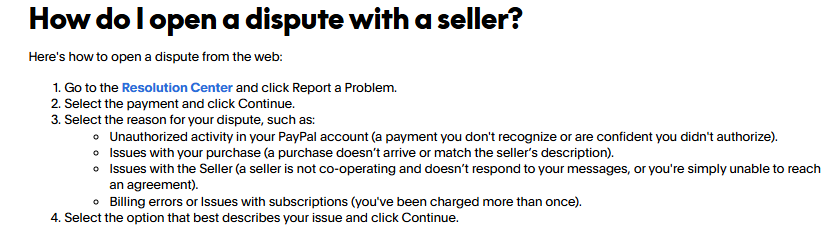
On the mobile app, you may be able to open the transaction in Activity, scroll to Report a Problem, and submit the issue there. If the option is unavailable, use the Resolution Center through a browser.
PayPal provides these procedures in its guide to opening a dispute.
During the dispute, you can exchange messages with the seller and attempt to agree on a refund or another resolution. Keep order confirmations, tracking information, photographs, and relevant communication available in case PayPal requests documentation.
How to escalate a PayPal dispute to a claim
If the seller does not resolve the issue, you can escalate an eligible Purchase Protection dispute to a claim. This asks PayPal to investigate and determine the outcome.
- Open your Resolution Center.
- Select the dispute you want to escalate.
- Click Need Help?
- Select Review my case.
- Provide any relevant additional information and complete the escalation process.
Important: A PayPal dispute automatically closes after 20 days unless it has been escalated to a claim. Once closed this way, it cannot be reopened or escalated.
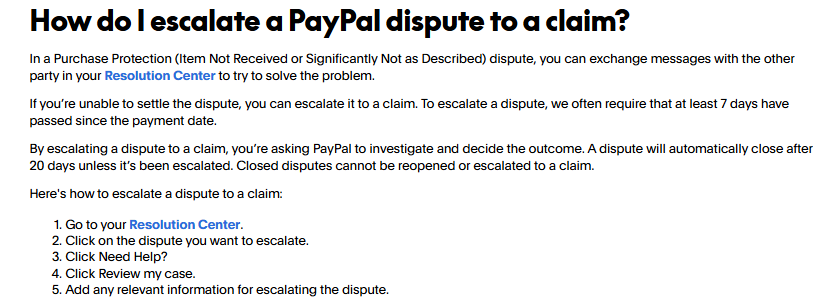
PayPal may also require at least seven days to have passed since the payment date before allowing escalation. Do not confuse that waiting period with the 20-day deadline measured from when you opened the dispute.
According to PayPal’s escalation instructions, claims are usually decided within 14 days, but some investigations can take 30 days or longer. The actual outcome and timing depend on the evidence and circumstances.
When does PayPal Purchase Protection cover a refund?
PayPal’s Purchase Protection program can provide reimbursement for eligible purchases when an item does not arrive or is significantly different from what the seller described.
When a claim qualifies, protection may cover the full purchase price plus the original shipping costs. However, PayPal evaluates eligibility based on the payment, the item, the evidence, and compliance with the dispute process.
| Purchase problem | Potential protection | Important condition |
|---|---|---|
| Item never arrived | Item Not Received | Eligible purchase, timely dispute, and review of delivery evidence |
| Wrong or materially different product | Significantly Not as Described | Material difference from the original description |
| Item arrived damaged | Potentially Significantly Not as Described | Damage and circumstances must meet the policy requirements |
| Buyer simply changed their mind | Not automatically covered | Generally depends on the seller’s return policy or another applicable right |
| Friends and Family transfer | Not covered by ordinary Purchase Protection | Personal payments are excluded |
| Payment made without authorization | Separate reporting process | Unauthorized transaction protections and procedures apply |
Item Not Received
An Item Not Received claim concerns an eligible purchase that was paid for but never delivered.
PayPal reviews the circumstances and the seller’s shipment or delivery evidence. Under its U.S. Purchase Protection terms, a buyer may not qualify for reimbursement if the seller provides proof of shipment or delivery meeting the applicable requirements.
A missing package therefore does not guarantee that PayPal will decide the claim in the buyer’s favor.
Significantly Not as Described
A Significantly Not as Described claim may apply when the received item materially differs from the seller’s description.
Examples include receiving a completely different item, discovering that an item described as new was actually used, receiving a counterfeit item advertised as authentic, or finding that essential parts were missing without disclosure.
A minor disappointment or a change of mind does not automatically meet this standard.
PayPal may require the buyer to return an item to the seller or another specified destination and provide proof of delivery. The buyer may have to pay return shipping costs, which are not guaranteed to be reimbursed under the program.
PayPal also excludes certain purchases and payment categories, including personal transfers, gift cards, financial investments, some in-person transactions, and items intended for resale. The complete requirements appear in PayPal’s U.S. Purchase Protection Program, last updated January 26, 2026.
PayPal refund and dispute deadlines
The deadline depends on why you want your money back. A seller’s ability to issue a refund, a buyer’s eligibility to open a dispute, and the deadline to escalate a dispute are separate rules.
| Action or problem | Applicable timeframe |
|---|---|
| Open an Item Not Received dispute | Within 180 days of sending the payment |
| Open a Significantly Not as Described dispute | Within 30 days of delivery or fulfillment, or within 180 days of payment, whichever is sooner |
| Escalate an open dispute to a claim | Within 20 days after opening the dispute |
| Seller issues a standard full or partial refund through PayPal | Within 180 days of the payment date |
| Report an unauthorized payment | Immediately; separate User Agreement notification provisions apply |

For example, if a product arrives 170 days after payment and is significantly different from its description, the 180-day payment deadline may expire before the full 30-day period following delivery. The earlier deadline controls.
The seller’s 180-day refund window does not extend the buyer’s Purchase Protection deadline. Likewise, the 20-day escalation window starts when the dispute opens, not when the original payment was made.
Review PayPal’s official dispute filing timeframes and the applicable Purchase Protection terms before a deadline expires.
Where does PayPal send your refund?
PayPal generally returns refunded money to the original payment method. The destination depends on how you paid, rather than which payment method is currently set as your preferred option.
If a purchase was funded partly by your PayPal balance and partly by a card, the corresponding refunded amounts generally return to those original funding sources.
In certain situations, PayPal may place the refund in your PayPal balance if the original method cannot be credited or an eligible balance destination is selected.
How long does a PayPal refund take?
Refund processing times vary by payment method. The following estimates apply after the seller has issued the refund or the refund has otherwise been initiated; they do not include the time required to negotiate with a seller or resolve a dispute.
| Original payment method | Typical refund timing |
|---|---|
| PayPal balance | Same day |
| Bank account | Usually up to 5 business days; some refunds take up to 30 days |
| Debit card | Usually up to 5 business days; some card issuers take up to 30 days |
| Credit card | Up to 1–2 billing cycles |
| PayPal balance plus credit card | Balance portion on the same day; card portion up to 1–2 billing cycles |
| Refund funded by seller’s eCheck | Usually up to 5 business days for the eCheck to clear, sometimes longer |
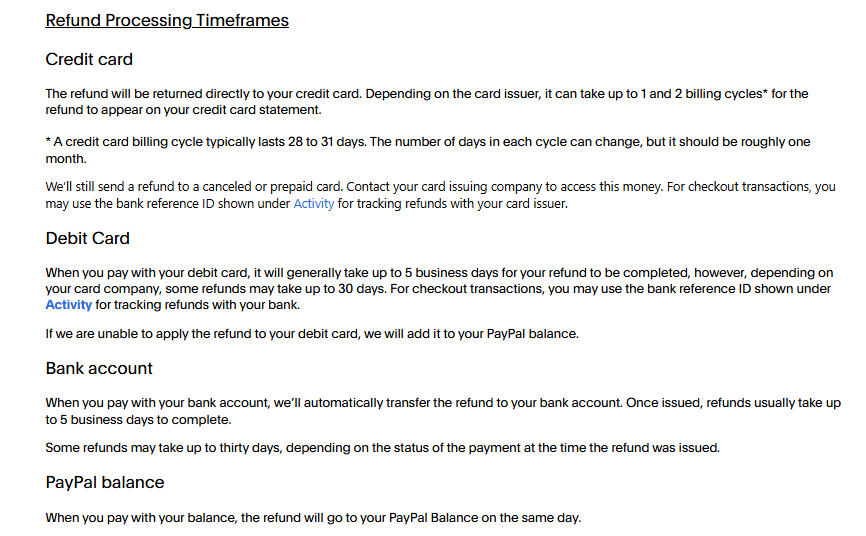
A credit card billing cycle is generally about one month, so a credit card refund may take considerably longer to appear on your statement than a PayPal balance refund.
Weekends and bank holidays do not count as business days. Additional processing by the bank or card issuer can also affect when the money becomes visible.
These timeframes come from PayPal’s official refund tracking guidance.
How to track a PayPal refund
You can check whether a seller has issued a refund and follow its status through your PayPal Activity.
- Sign in to PayPal and open Activity.
- Click Filters and choose Refunds.
- Select the relevant date range.
- Click the refunded transaction to view its details and available tracking information.
In the mobile app, open Activity and select the relevant transaction to review the information available for that refund.
Understanding the PayPal Refund Tracker
PayPal provides a three-stage Refund Tracker for qualifying full-amount checkout refunds funded by a bank account or payment card, where the payment was not split between funding methods.
The tracker can show these stages:
- Refund Initiated: PayPal has started processing the refund.
- Refund Processing: PayPal is processing the amount for return to the original payment method.
- Refund Sent: PayPal has sent the money to the bank or card issuer, which may still be processing it.
- Refund Pending: The bank or card issuer is completing the remaining processing.
- Refund Completed: The funds should have reached the receiving payment method.
The Refund Tracker is not available for every refund. If it does not appear, you can still review the refund’s transaction status in Activity.
Why is my PayPal refund pending?
A refund showing as Pending may mean the seller has issued it but the money has not yet cleared the seller’s bank. PayPal says this process usually takes up to five business days.
If the refund remains pending beyond that period, contact the seller to ask about its status.
A Temporary Hold may appear when the seller refunds the payment before the original bank-funded payment has cleared. The refund can complete after the original payment clears.
If the status says Refunded or Partially Refunded, PayPal has sent the relevant amount back toward the original payment method. The receiving financial institution may still need time to make it available.
Refund says completed, but the money is missing
If PayPal shows the refund as completed but you cannot see the money, check the original funding method rather than only your PayPal balance.
For a card or bank refund, review recent transactions and statements. For qualifying checkout refunds, PayPal may provide a bank reference ID in Activity that can help your financial institution trace the payment.
Contact the receiving bank or card issuer when the expected processing period has passed. If the refund status is Canceled, PayPal was unable to process it; contact the seller for more information.
Can PayPal refund an expired or canceled card?
Yes. PayPal generally sends a card-funded refund back to the original card even if the card has expired, been canceled, or been replaced.
If the card is no longer active, contact the card issuer to find out how the refund will be handled. The issuer may be able to associate it with your current account, but the process depends on the financial institution.
Do not assume that adding a new card to PayPal redirects an already issued refund. If PayPal cannot return money to an eligible debit card, it may instead credit the PayPal balance.
Full refunds and partial refunds on PayPal
A full refund returns the entire eligible transaction amount. A partial refund returns only part of it, which may be appropriate when the buyer and seller agree on compensation for a specific problem.
PayPal allows sellers to issue a full or partial refund through the standard transaction refund feature within 180 days of receiving the payment. For certain personal payments and payments involving coupons or gift cards, only a full refund is available through that feature.
When a seller offers a partial refund during an open dispute, the buyer can respond through the Resolution Center.
- Open the Resolution Center.
- Click Respond next to the relevant case.
- Accept the partial refund offer or suggest a different amount.
- Click Submit.
PayPal gives buyers 10 days to accept or deny a partial refund offer made during a dispute before the offer expires.
Accepting a partial refund offer closes the dispute. Consider whether the amount adequately resolves your problem before accepting it. PayPal also closes a dispute when the seller issues a full refund through the dispute process.
For more information, see PayPal’s partial refund instructions.
Can you get a refund on a PayPal Friends and Family payment?
Friends and Family payments are intended for personal transfers rather than commercial purchases. They are excluded from PayPal’s ordinary Purchase Protection Program.
If you sent a completed Friends and Family payment and want the money returned, contact the recipient and request repayment.
PayPal does not provide the same purchase-dispute route for these personal payments. A payment you knowingly authorized does not automatically become an Unauthorized Transaction because the recipient refuses to return it.
If someone accessed your account and sent money without your permission, that is a different situation. Report genuinely unauthorized activity to PayPal immediately using the appropriate reporting procedure.
What if you sent money to the wrong person?
The options depend on whether the recipient has accepted the payment.
If the payment is Unclaimed and a cancellation option is available, open Activity, find the payment, and select Cancel. PayPal ordinarily cancels unclaimed payments automatically after 30 days.
If the payment is Completed, the recipient already has the money. You generally cannot cancel it directly. Open the transaction, use the available contact information or chat option, and ask the recipient to return the payment.
For a completed Goods and Services payment, an appropriate dispute may be available if the transaction meets the applicable requirements. Friends and Family transfers do not receive ordinary Purchase Protection.
PayPal explains these distinctions in its wrong-recipient payment guidance.
How refunds work with PayPal Pay in 4
PayPal Pay in 4 refunds work differently from refunds on ordinary single-payment purchases because PayPal has paid the merchant while the buyer repays the amount through installments.
When the merchant sends a full or partial refund linked to the purchase, PayPal generally attempts to apply that amount to the corresponding Pay in 4 loan.
- Full refund: If the refund covers the entire outstanding loan balance, no further repayments are due. Check that the loan is marked Completed.
- Partial refund: The refund reduces the outstanding balance and may reduce the number of remaining installments or the final installment amount.
- Overpayment: If the refund exceeds the remaining loan balance, the resulting credit can move to your PayPal balance. This may take up to seven days when repayments are still processing.
- Refund paid directly by the merchant: If the merchant gives you cash, a gift card, or store credit, your Pay in 4 loan may still need to be repaid.
If PayPal cannot identify the related Pay in 4 plan from the merchant’s refund information, the amount may instead be credited to your PayPal account without reducing the loan balance automatically.
Review your repayment schedule and loan status rather than assuming that a merchant’s refund has canceled every remaining installment.
See PayPal’s Pay in 4 refund guidance for the applicable process.
What if PayPal denies your refund claim?
If PayPal decides that a purchase does not qualify for reimbursement, review the reason for the decision and any evidence recorded in your case.
PayPal’s decisions are generally final, but an appeal may be considered if there is new or compelling information that was not available during the original review or if an error occurred in the decision-making process.
For buyers, PayPal recommends contacting customer support to discuss appeal options. Simply disagreeing with the result is generally not sufficient.
You can review the case in the Resolution Center under Closed Cases, including the stated outcome and any relevant information.
If you funded the purchase with a debit or credit card, your card issuer may have separate dispute rights. Under PayPal’s U.S. Purchase Protection rules, you must choose whether to pursue the purchase dispute with PayPal or with the card issuer rather than pursuing both simultaneously or obtaining duplicate recovery.
If you first pursued a claim through PayPal and PayPal decided against you, you may still be able to pursue a card issuer dispute, subject to the issuer’s rules and deadlines. If you initially pursue the dispute with your card issuer, PayPal does not allow you to bring the same Purchase Protection dispute afterward.
Review PayPal’s appeal guidance and the relevant card issuer requirements before choosing your next action.
Frequently asked questions
Can PayPal force a seller to refund me?
PayPal can decide a claim and provide reimbursement under its Purchase Protection Program when the purchase and dispute meet the applicable conditions. However, opening a dispute does not guarantee a refund, and PayPal does not automatically reimburse every disagreement with a seller.
Can you get a PayPal refund after 180 days?
PayPal’s standard transaction refund feature allows sellers to issue refunds within 180 days of the payment date. After that period, a seller may need to arrange repayment using another available method. This does not extend Purchase Protection deadlines or guarantee that PayPal can recover the payment for the buyer.
Are PayPal refunds free?
PayPal does not charge sellers an additional fee to issue a refund for a Goods and Services payment. However, it does not return the original payment-processing fees collected from the seller. Currency conversion may also affect the amount received when the original purchase involved different currencies.
Why is my PayPal refund amount different from what I paid?
If the original purchase involved currency conversion, PayPal may apply the exchange rate in effect when the refund is processed. Exchange-rate movements can cause the converted refund amount to differ from the amount initially charged. A partial refund will also be smaller than the original payment by agreement or by the seller’s issued amount.
Can I get a PayPal refund if I was scammed?
Recovery depends on the type of payment and the circumstances. An eligible Goods and Services purchase may qualify for Purchase Protection, while a voluntary Friends and Family transfer is excluded from ordinary purchase coverage. If someone sent a payment from your account without authorization, report it through PayPal’s separate unauthorized activity process immediately.
Getting your money back through PayPal
For a completed PayPal payment, start by contacting the seller through the transaction details in Activity. If the seller agrees to refund you, the money generally returns to the original payment method, although bank and card processing times vary.
If the seller does not resolve an eligible purchase problem, open a dispute before the applicable filing deadline. When necessary, escalate it to a claim within 20 days of opening the dispute so that PayPal can review the case.
You can follow refund progress through Activity and monitor disputes in the Resolution Center. For applicable conditions and procedures, consult PayPal’s refund instructions, Purchase Protection terms, and refund tracking guidance.
This independent guide is not affiliated with or endorsed by PayPal. Refund eligibility and dispute outcomes depend on the payment circumstances and applicable PayPal terms.