
Published: November 11, 2026. Last updated: November 22, 2026.
PayPal vs Square comes down to how your business accepts payments and what tools you need beyond checkout. PayPal offers lower published US card-present processing rates, straightforward online payment options, and broader international payment capabilities. Square provides a more extensive point-of-sale (POS) and business management system, with features for inventory, restaurants, appointments, employees, and multiple locations.
For a small business that primarily accepts in-person card payments, PayPal may cost less in processing fees. For a retailer, restaurant, or growing service business that needs integrated operational tools, Square may be the more practical choice. For online sellers, the answer depends on the checkout product, transaction sizes, and payment methods customers use.
This comparison examines US pricing, hardware, ecommerce, invoicing, transfers, and business features to help you choose based on your actual requirements.
PayPal vs Square: Key Differences at a Glance
| Feature | PayPal | Square |
|---|---|---|
| Main focus | Online payments, digital wallets, invoicing, and POS | Payments, POS, and integrated business management |
| Basic POS software | No monthly subscription | Square Free at $0/month |
| In-person card fee | 2.29% + $0.09 | 2.6% + $0.15 on Square Free |
| Online card processing | Varies by checkout product | Varies by plan and integration |
| Physical hardware | Card Reader and Terminal | Readers, Terminal, Stand, Handheld, and Register |
| Online checkout | PayPal Checkout and Expanded Checkout | Square Online, payment links, and payment APIs |
| Invoicing | Invoices, reminders, recurring billing, and payment options | Invoices, estimates, deposits, and payment schedules |
| Advanced operations | Core POS inventory, reporting, and integrations | Broader industry-specific POS and staff tools |
| International capabilities | Broader global payment ecosystem | Supported merchant countries with international card acceptance |
Both providers offer more than one payment product. A meaningful comparison must consider the specific service being used rather than treating every PayPal or Square transaction as having the same processing rate.
Square vs PayPal Fees: Which Costs Less?
Processing fees are often the deciding factor for small businesses. Both providers commonly charge a percentage of the payment plus a fixed fee, but the rates depend on how the customer pays and which product or subscription the merchant uses.
The following published US rates come from the official PayPal business pricing, PayPal Merchant Fees, and Square processing fee schedule.
In-person payment fees
| Provider or plan | Card-present rate | Monthly POS plan cost |
|---|---|---|
| PayPal Point of Sale | 2.29% + $0.09 | $0 |
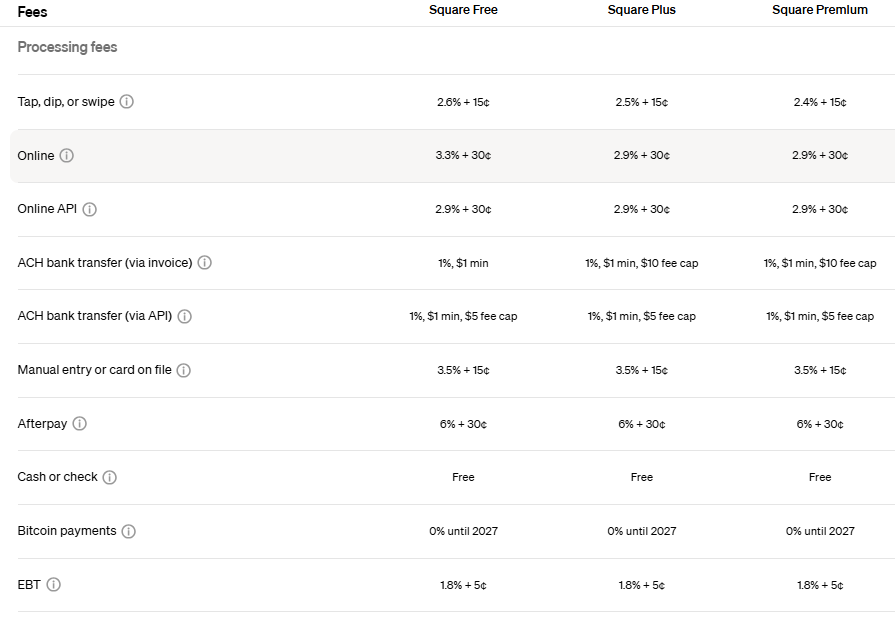
| Square Free | 2.6% + $0.15 | $0 |
| Square Plus | 2.5% + $0.15 | $49 per location |
| Square Premium | 2.4% + $0.15 | $149 per location |
PayPal’s published standard card-present rate is lower than the corresponding rates on all three Square plans. This difference can be meaningful for sellers processing many low-value transactions because PayPal also has a smaller fixed fee.
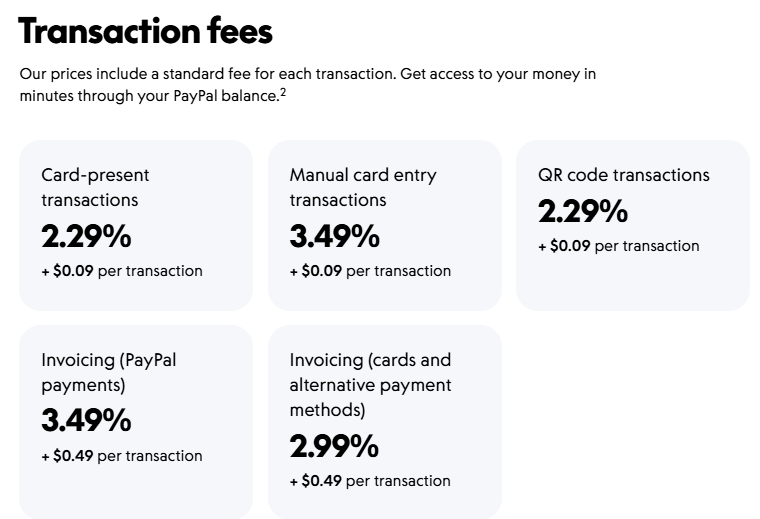
However, Square’s paid plans include additional business software features. The right comparison is therefore not just the payment fee, but the total cost of processing payments and operating the business.
Online payment fees
Online pricing is more complicated because PayPal offers different checkout products, while Square has different rates for standard online transactions and payment processing through its APIs.
| Online payment method | Published US rate |
|---|---|
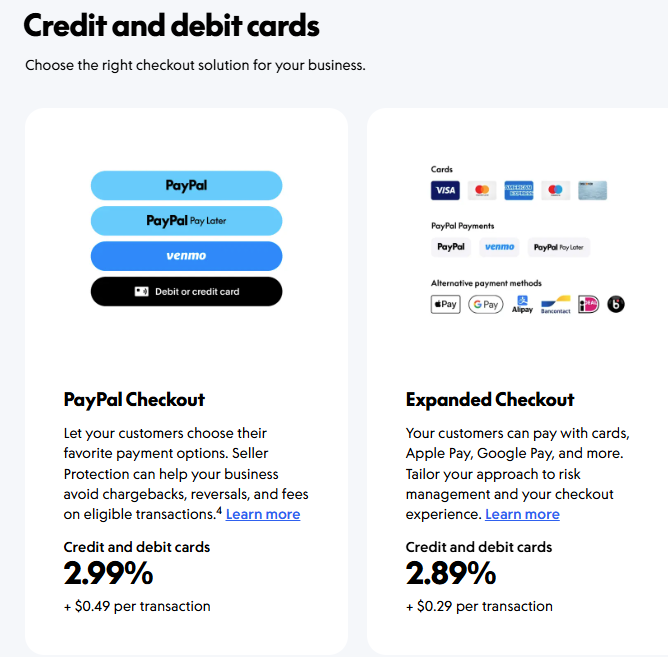
| PayPal Checkout — cards | 2.99% + $0.49 |
| PayPal Expanded Checkout — cards | 2.89% + $0.29 |
| PayPal-branded checkout payments | 3.49% + $0.49 |
| Square Free — standard online payments | 3.3% + $0.30 |
| Square Plus or Premium — standard online payments | 2.9% + $0.30 |
| Square Online API — all three plans | 2.9% + $0.30 |
These rates apply to the payment categories shown, not every transaction handled by each company. PayPal’s Expanded Checkout is a different integration from its hosted checkout offering. Similarly, Square’s API pricing should not be substituted for its standard online checkout or invoice rates.
PayPal-branded checkout transactions also differ from ordinary card payments. A merchant accepting both wallet payments and direct card payments should calculate costs using the actual mix of payment methods.
Manually entered card payments
For card details entered manually into their respective POS systems, PayPal publishes a rate of 3.49% + $0.09, while Square lists 3.5% + $0.15 for manual entry or card-on-file payments under its current plans.
PayPal also offers a browser-based Virtual Terminal with separate published pricing of 3.39% + $0.29. Do not confuse a POS manually entered payment with a Virtual Terminal transaction; they are different processing products.
PayPal vs Square Fee Examples for Realistic Business Scenarios
Comparing fees using identical transaction amounts makes the cost differences easier to understand. The following examples use hypothetical US businesses and standard published rates, excluding taxes on equipment, optional add-ons, custom merchant agreements, cross-border fees, and other unrelated charges.
Example 1: A small business accepting $5,000 per month in person
Suppose a market vendor processes 200 card-present transactions per month, averaging $25 each.
That produces $5,000 in monthly card sales.
| Provider | Monthly processing fees | Total including plan |
|---|---|---|
| PayPal POS | $132.50 | $132.50 |
| Square Free | $160.00 | $160.00 |
| Square Plus | $155.00 | $204.00 |
| Square Premium | $150.00 | $299.00 |
In this example, PayPal POS costs $27.50 less per month than Square Free in processing fees. The difference becomes larger when comparing total monthly expenses against Square’s paid plans.
For a vendor who only needs to accept payments, track basic sales, and manage a modest product list, PayPal’s lower processing cost may be appealing. A business that needs Square’s additional operational features may still find the software worth paying for.
Example 2: An online business processing $10,000 per month
Consider an online business processing 100 domestic card transactions averaging $100 each, with no international fees or optional services.
| Checkout product | Monthly processing fees |
|---|---|
| PayPal Checkout — cards | $348.00 |
| PayPal Expanded Checkout — cards | $318.00 |
| Square Free — standard online payments | $360.00 |
| Square Online API | $320.00 |
The difference changes depending on the checkout implementation. PayPal Expanded Checkout and Square’s Online API produce similar processing costs in this example, while standard hosted checkout categories have different fees.
The calculation does not include website subscriptions, optional security services, developer costs, or other software. Those expenses can matter more than a small difference in payment processing rates.
Example 3: When does Square Plus justify its subscription through lower online fees?
Square Free charges 3.3% + $0.30 for standard online card payments, while Square Plus charges 2.9% + $0.30 for the same category. That represents a 0.4 percentage-point saving on the processed amount.
For one location paying $49 per month for Square Plus, approximately $12,250 in monthly standard online card sales would generate $49 in percentage-fee savings, assuming the transaction mix and fixed per-transaction charges stay the same.
At that volume, the processing savings alone would offset the $49 plan subscription. Below it, Square Plus may still be worthwhile if its additional inventory, marketing, staff, or business features provide enough value.
This break-even calculation applies only to the stated online payment category. It should not be applied to Square’s Online API, which has the same published rate across the three plans.
Square Subscription Plans vs PayPal’s Pricing Model
The two companies approach business software pricing differently.
PayPal Point of Sale provides its core POS software without a monthly subscription. Merchants pay applicable processing fees and any equipment or optional service costs. Online checkout, invoicing, and other PayPal products have their own pricing arrangements.
Square offers an integrated plan structure with three main tiers:
- Square Free — $0/month: Includes basic POS, inventory, online selling, invoices, customer management, and reporting features.
- Square Plus — $49/month per location: Adds advanced industry-specific features, lower standard payment processing rates, and more business management functionality.
- Square Premium — $149/month per location: Adds more advanced reporting, expanded support, additional marketing allowances, and other capabilities for more complex operations.
Square’s subscription prices apply per location for its paid plans. Optional features, hardware, and certain industry-specific services can add further costs.
Some existing Square merchants may still use legacy pricing or plans. Published rates for new plans should not be assumed to replace an individual merchant’s existing agreement automatically.
Compare current plan benefits and charges using Square’s official pricing page.
PayPal POS vs Square POS: Which Is Better for In-Person Sales?
Both providers allow merchants to accept physical card payments and contactless transactions. The main difference is the breadth of the software and hardware ecosystem surrounding those payments.
PayPal Point of Sale
PayPal Point of Sale, previously known as PayPal Zettle, combines a free POS application with card readers and portable terminals.
Its features include product management, basic inventory tracking, low-stock notifications, discounts, staff management, and sales reporting. Merchants can also use supported accounting and ecommerce integrations.
For businesses with relatively straightforward operations, these capabilities may be sufficient without paying for an additional POS subscription.
PayPal also supports Tap to Pay on compatible smartphones, allowing eligible merchants to accept contactless payments without purchasing a separate card reader.
Details are available on the PayPal Point of Sale product page.
Square Point of Sale
Square offers a broader set of tools for businesses that need payment acceptance and day-to-day operations in one system.
Depending on the plan and business type, Square supports inventory management, purchase orders, barcode workflows, restaurant order management, staff scheduling, appointments, customer records, loyalty programs, and multi-location reporting.
These capabilities can reduce the need to manage separate software systems for different parts of a business. However, some advanced features require Square Plus, Premium, or additional paid services.
Square’s industry-focused software is particularly relevant to businesses with complex checkout, inventory, scheduling, or employee requirements.
Explore Square Point of Sale for the available business configurations.
Hardware Comparison: PayPal vs Square Card Readers and Terminals
Hardware cost matters if you operate a physical storefront, sell at markets, or need portable payment devices. Both providers offer mobile payment acceptance without requiring a separate reader on compatible phones, but their dedicated hardware options differ.
| Device | Published US price | Typical use |
|---|---|---|
| PayPal Card Reader | $29 first-reader offer; $79 additional | Card payments paired with a mobile device |
| PayPal Terminal | $199 | Portable all-in-one checkout |
| PayPal Terminal with scanner | $239 | Portable checkout with barcode scanning |
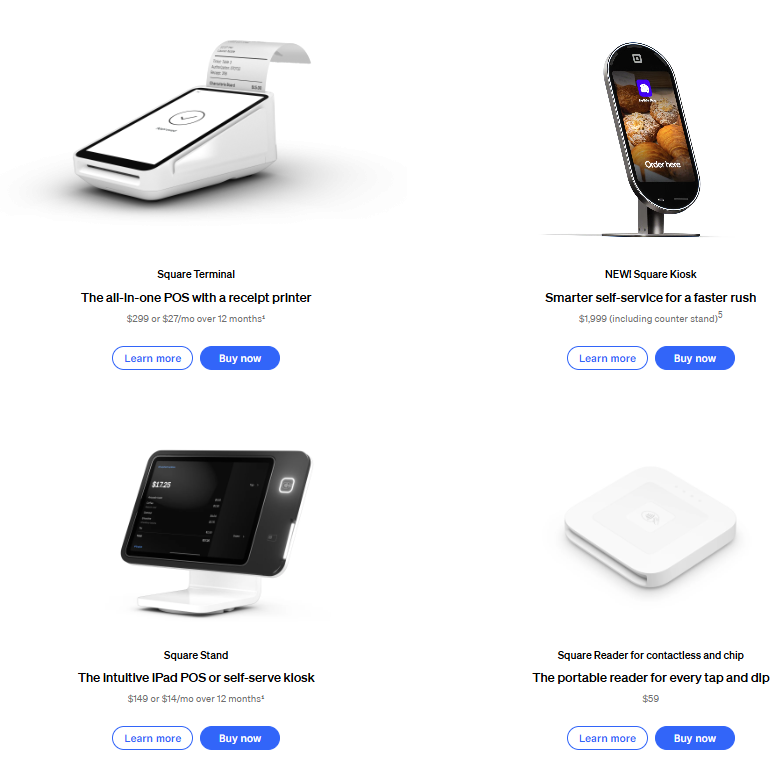
| Square Reader for contactless and chip | $59 | Mobile tap and chip payments |
| Square Stand | $149 | iPad-based countertop checkout |
| Square Terminal | $299 | Compact checkout with built-in receipt printer |
| Square Handheld | $399 | Portable POS with barcode scanning |
| Square Register | $899 | Dual-screen countertop POS |
PayPal’s $29 first-reader price is a promotional offer for eligible new business users, subject to availability and offer terms. Its standard additional reader price is $79.
Square offers a wider selection of integrated hardware, including devices suited to fixed counters, portable service, and customer-facing checkout displays. Square Terminal also includes a built-in receipt printer, which should be considered when comparing its price with PayPal’s Terminal.
The right hardware choice depends on the entire setup: printers, cash drawers, scanners, tablets, accessories, and any required software. Hardware prices above exclude applicable taxes, optional accessories, and financing costs.
See the official PayPal POS pricing and Square hardware catalog for current offers.
PayPal vs Square for Online Stores and Ecommerce
For online merchants, the decision involves more than payment processing fees. You also need to consider how customers check out, which payment methods are supported, and whether you already operate an ecommerce website.
PayPal for online checkout
PayPal’s online payment solutions are designed to work with ecommerce websites, shopping carts, and custom integrations.
PayPal Checkout provides hosted payment experiences supporting PayPal and eligible credit or debit card payments. Expanded Checkout offers more customization and payment options, including supported digital wallets.
Merchants can also offer eligible PayPal-branded options such as Venmo and Pay Later, subject to product and customer eligibility.
This can be useful for an existing online store that wants to add recognizable payment methods or offer PayPal alongside direct card payments.
PayPal Checkout is a payment solution, not a complete replacement for a full ecommerce website builder, storefront management system, or inventory platform.
Review PayPal’s online checkout solutions for integration options.
Square for online selling
Square provides online store and website tools alongside payment processing. Businesses can manage a product catalog, take online payments, offer pickup or shipping options, and connect online activity with in-person operations.
Square’s supported online payment methods include major cards and eligible digital wallets such as Apple Pay and Google Pay, along with other payment options depending on the product.
For a business that wants an online store tied directly to its POS system, Square’s integrated approach may simplify inventory updates, order management, and reporting.
Square also provides payment links and APIs for businesses that need to accept online payments without building their entire website using Square.
If accepting payments through PayPal-branded checkout is essential, verify the compatibility of your particular ecommerce platform or integration rather than assuming it is included in Square’s native checkout options.
Square vs PayPal for Invoicing and Freelancers
Both services support digital invoicing, but their additional workflow features and payment fees differ.
PayPal Invoicing
PayPal allows businesses to create and send invoices, share payment links, schedule recurring invoices, track payment status, and send automatic reminders.
Customers can pay through eligible PayPal, Venmo, card, and other supported payment methods, even when they do not have a PayPal account.
Creating and sending invoices is included with the account. Processing fees apply when customers pay.
For US invoices, PayPal publishes the following rates for selected payment methods:
- PayPal and Venmo payments: 3.49% + $0.49.
- Eligible debit cards, credit cards, and Apple Pay: 2.99% + $0.49.
- Pay by Bank (ACH): 1%, with a $10 fee cap.
PayPal Invoicing can work well for a freelancer or small service business that primarily needs to bill clients and collect payments without subscribing to a broader operations platform.
See PayPal Invoicing for current features and conditions.
Square Invoices
Square Invoices supports one-time and recurring invoices, estimates, deposits, automatic reminders, and payment schedules. It also connects with other Square business tools.
For standard online invoice card payments, Square Free charges 3.3% + $0.30, while Square Plus and Premium charge 2.9% + $0.30.
ACH invoice payments have a published rate of 1%, with a $1 minimum. Square Plus and Premium apply a $10 fee cap to this category, while Square Free’s published standard invoice ACH rate does not list that cap. Special terms can apply when funds are deposited into Square Checking.
Square may be a better operational fit for contractors or service businesses that want to manage estimates, deposits, appointments, customer records, and payments within the same ecosystem.
Compare capabilities through Square Invoices.
Which Platform Is Better for Retail, Restaurants, and Service Businesses?
The strongest differentiator between PayPal and Square is often the operational software rather than payment acceptance itself.
Retail stores
Square offers an integrated set of retail management features, including inventory tracking, purchase orders, barcode-related workflows, customer records, and multi-location reporting, with advanced features depending on the plan.
PayPal POS also includes basic inventory tracking, product management, stock alerts, and reporting. For a small shop with straightforward inventory needs, that may be enough.
As product catalogs, locations, and staff responsibilities become more complex, Square’s broader retail tools may offer practical advantages.
Restaurants and food businesses
Restaurants often need specialized tools for menus, order management, tipping, kitchen workflows, and table service.
Square provides dedicated restaurant-oriented capabilities, including table and order management, with additional functionality available through its paid plans and optional services.
A food truck or small vendor with simple checkout requirements may prefer PayPal’s lower card-present processing fee. A full-service restaurant needing integrated operations is more likely to benefit from Square’s specialized software.
Appointment-based businesses
Square offers appointment scheduling, staff calendars, booking tools, and customer management capabilities as part of its services ecosystem.
These features can be valuable for salons, personal services, and other businesses where appointments and employee availability affect daily operations.
PayPal can handle payment collection and invoicing, but businesses requiring a comprehensive booking workflow may need additional scheduling software or integrations.
International Payments: Is PayPal or Square Better?
PayPal has a broader international payment ecosystem, but the comparison requires separating international customer acceptance from merchant account availability.
PayPal supports online payments across numerous international markets and currencies, although services and account eligibility vary by country. Its global reach can be valuable for businesses selling to overseas customers.
Under PayPal’s US merchant fee schedule, receiving an international commercial payment generally adds a 1.50% cross-border fee to the applicable domestic rate. Currency conversion can involve an additional exchange-rate spread.
Square’s card-processing service operates in a more limited set of supported countries, including the United States, Canada, Australia, Japan, the United Kingdom, Ireland, France, and Spain.
However, Square can accept many internationally issued cards, including through eligible online and invoice payments. Its US fee schedule adds a 1.5% international card transaction fee for cards issued outside the merchant’s account country.
Square POS transactions must be processed in the currency associated with the merchant’s account country. Customers may face currency conversion charges from their card issuer.
For a US merchant selling internationally, Square should not be ruled out simply because the customer has a foreign card. The decision depends on the customer’s payment method, settlement currency, fees, and checkout experience.
See Square’s international card guidance and PayPal’s merchant fee schedule for the applicable conditions.
Payouts and Transfers: How Quickly Can You Access Your Money?
Payment processing and access to funds are separate stages. Even when a customer’s payment is successful, transfers can be affected by account eligibility, processing schedules, bank availability, and security reviews.
PayPal transfers
Eligible PayPal merchants can transfer available funds to a linked bank account or supported card.
Standard transfers generally have no PayPal withdrawal fee when no currency conversion is involved. PayPal’s published US business instant-transfer fee is 1.50% of the amount transferred, subject to the applicable minimum fee and limits.
Funds may become available in the PayPal business balance before they arrive in an external bank account. Transactions can also be held or reviewed.
Square transfers
Square offers free standard transfers to linked external bank accounts, with funds commonly available as soon as the next business day.
For eligible merchants, Square also offers Instant Transfers and Same-Day Transfers at a published fee of 1.95% of the transfer amount.
Square Checking can provide quicker access to eligible payment proceeds within a linked Square business banking setup, subject to its account and fund-availability conditions.
See Square’s transfer options for current details.
Refunds, Chargebacks, and Payment Protection
Refund and dispute rules can affect the true cost of accepting payments, especially for businesses handling returns or higher-risk transactions.
Both PayPal and Square generally retain the original processing fee when a merchant refunds a standard commercial card payment.
For eligible standard PayPal payments, refunds through the original transaction are generally supported within 180 days. Square supports eligible payment refunds within one year of the original transaction.
Square states that it does not charge separate chargeback or dispute management fees under its standard published pricing. PayPal may apply dispute or chargeback fees depending on how the payment was processed and the applicable terms.
PayPal also offers Seller Protection for eligible transactions involving certain unauthorized payment or item-not-received claims. Eligibility depends on transaction details, compliance with the program requirements, and supporting evidence.
Neither provider guarantees that a disputed payment will be resolved in the merchant’s favor.
For the applicable details, review PayPal Seller Protection, Square refund policies, and each provider’s merchant fee schedule.
PayPal vs Square: Which Is Better for Your Type of Business?
The better choice depends on your transaction mix, required software, and how your business operates.
| Business type | More suitable starting point | Main reason |
|---|---|---|
| Solo market vendor | PayPal POS | Lower published in-person processing fees |
| Small online store using PayPal wallets | PayPal Checkout | Direct PayPal and eligible Venmo payment options |
| Retailer managing complex inventory | Square | More extensive retail management tools |
| Full-service restaurant | Square | Specialized restaurant workflows and hardware |
| Appointment-based service business | Square | Integrated scheduling and customer management |
| Freelancer sending simple invoices | Either | Compare client payment methods and invoice fees |
| Merchant with international customers | PayPal, depending on checkout needs | Broader international payment capabilities |
| Business with multiple physical locations | Square | Multi-location operations and staff features |
These recommendations assume standard US services and published prices. They are starting points rather than universal rules. A business that primarily accepts small in-person transactions may prefer PayPal even if it needs basic inventory management. A business with several employees may prefer Square despite paying a higher processing rate.
Can You Use PayPal and Square Together?
Yes. A business can use PayPal for certain online or invoice payments while using Square for its physical POS and operational management, provided each service and integration is supported.
For example, an established online business could retain PayPal Checkout for customers who prefer PayPal while using Square POS for in-store sales.
This arrangement can provide payment flexibility, but it also creates separate transaction records, payout processes, and reconciliation requirements. Merchants must ensure sales and refunds are recorded correctly across both systems.
Using both platforms makes the most sense when the added payment or software functionality justifies the extra administrative work.
How to Choose Between PayPal and Square
Before selecting a provider, evaluate your business using a few specific measures rather than choosing solely from headline processing rates.
- Identify your payment mix. Determine how much revenue comes from in-person cards, online cards, invoices, digital wallets, and international customers.
- Calculate processing costs. Apply the correct percentage and fixed fee to the expected number and value of transactions.
- Add software expenses. Include subscriptions, paid integrations, employee features, and other tools your business actually requires.
- Evaluate hardware. Decide whether a phone-based checkout, card reader, portable terminal, or full register is appropriate.
- Check operational requirements. Consider inventory, staff, appointments, online selling, reporting, and multi-location management.
- Review access to funds. Compare standard transfers, instant transfer fees, account eligibility, and possible payment holds.
- Confirm integrations and support. Make sure the provider connects with the software you already use and provides suitable support for your plan.
Businesses with substantial processing volume should also investigate custom pricing. Both providers may offer different arrangements for eligible larger merchants, and these can change the outcome of a comparison based only on public flat rates.
Frequently Asked Questions
Is Square cheaper than PayPal?
Not always. PayPal has a lower published card-present rate than Square’s current standard plans. For online transactions, the result depends on the PayPal checkout product, Square plan, payment method, and average transaction size. A paid Square subscription can also affect total costs.
Does PayPal charge a monthly business fee?
PayPal’s basic Point of Sale application has no monthly subscription fee, and businesses can create and send PayPal invoices without paying a monthly invoicing subscription. Processing fees and charges for optional products or services may still apply.
Can Square accept payments from international customers?
Yes. Square accepts many internationally issued payment cards in supported merchant markets, including eligible online and invoice payments. International card fees and local currency processing restrictions apply. The merchant must operate within Square’s supported account-country requirements.
Does Square require you to buy a card reader?
No. Eligible merchants can accept payments through invoices, payment links, online checkout, and Tap to Pay on compatible smartphones without purchasing a separate card reader. Hardware is needed when a business chooses a payment workflow that requires a dedicated device.
Is PayPal Zettle different from PayPal Point of Sale?
PayPal Zettle was renamed PayPal Point of Sale. The current product branding is PayPal Point of Sale, and PayPal states that the name change does not itself alter existing accounts.
Final Verdict: PayPal or Square?
Choose PayPal when your priorities are lower published in-person processing fees, straightforward payment collection, PayPal-branded online checkout, or broader international payment options.
Choose Square when your business needs an integrated system for payments, inventory, employees, appointments, restaurant operations, or multiple locations. Its paid plans can make sense when the operational features provide enough value to justify their subscription costs.
For businesses focused on online payments, compare the exact checkout implementations rather than assuming either company is always cheaper. For physical retailers, calculate payment fees alongside hardware and business software costs.
The most cost-effective platform is the one that meets your actual operational needs at the lowest suitable total cost—not necessarily the one advertising the lowest individual transaction rate.