
Published: November 10, 2026. Last updated: November 22, 2026.
PayPal vs Venmo: PayPal is generally better suited to international payments, online shopping, and businesses that need invoicing or broader checkout options. Venmo is particularly convenient for everyday payments between people in the United States, such as splitting bills, paying friends, or collecting money through a social payment app.
Both services are part of PayPal, Inc., but they have different fees, payment features, business tools, and privacy settings. They also now support direct payments between eligible PayPal and Venmo users, including certain international transfers introduced in 2026.
Here’s how PayPal and Venmo compare, what each service costs, and which one makes more sense for different payment situations.
PayPal vs Venmo at a Glance
The biggest difference is their primary purpose. PayPal offers an extensive payment platform for individuals and businesses across multiple markets. Venmo focuses on a simpler, social payment experience for US users while also supporting shopping and authorized business payments.
| Feature | PayPal | Venmo |
|---|---|---|
| Primary use | Personal payments, online shopping, and business payments | Everyday personal payments, shopping, and US business payments |
| Account availability | Available in many countries, with regional restrictions | US-based service with US account requirements |
| Domestic personal payments | Free with eligible balance or bank funding | Free with eligible balance, bank, or debit card funding |
| International payments | Supported in eligible countries | Eligible users can pay PayPal recipients in supported countries |
| Direct PayPal–Venmo payments | Supported for eligible users | Supported for eligible users |
| Online shopping | Broad merchant checkout features | Available with participating merchants |
| Business tools | Checkout, invoicing, and merchant payment solutions | Business profiles, QR payments, and Tap to Pay |
| Purchase protection | Available for eligible commercial purchases | Available for eligible purchases |
| Social payment feed | No Venmo-style social payment feed | Social feed with privacy controls |
Both services support payments funded by linked financial accounts, but the amount you pay can depend on the funding method, payment type, and destination.
PayPal vs Venmo Fees: Which Costs Less?
Neither service charges a monthly fee for maintaining a standard personal account. Both allow eligible domestic personal payments without a fee, but important differences appear when you use cards or receive commercial payments.
Personal Payment Fees
For personal payments between US users, the published fee schedules show the following:
| Transaction | PayPal | Venmo |
|---|---|---|
| Send using account balance | No fee | No fee |
| Send using linked bank account | No fee | No fee |
| Send using debit card | Generally 2.90% + fixed fee; PayPal Debit Card balance funding is exempt | No fee |
| Send using credit card | 2.90% + fixed fee | 3.00% |
| Standard eligible bank withdrawal | No PayPal fee | No Venmo fee |
| Instant eligible withdrawal | 1.75%; $0.25 minimum, $25 maximum | 1.75%; $0.25 minimum, $25 maximum |
For US-dollar personal payments funded by an ordinary card, PayPal’s fixed fee is $0.30. That means sending $100 using an eligible credit card would typically cost $3.20 through PayPal compared with $3.00 through Venmo. Both are free for eligible domestic personal transfers funded by a linked bank account or account balance.
Venmo has an additional advantage for domestic personal debit-card payments: eligible linked debit cards do not carry the standard 3% credit-card fee. PayPal’s ordinary card-funded personal payments have a different fee structure, although its own PayPal Debit Card is treated as balance funding.
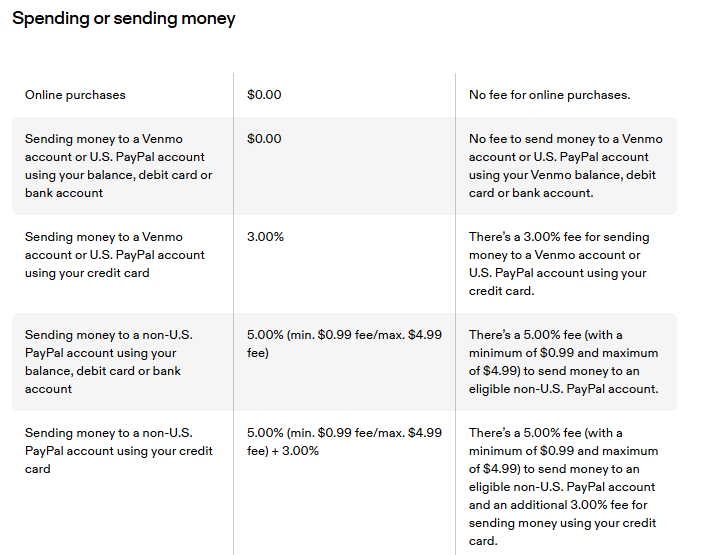
These rates are based on the PayPal US Consumer Fees and Venmo’s official fee schedule. Rates apply to the specified US transactions and may change.
Standard vs Instant Bank Transfers
Both PayPal and Venmo provide eligible standard transfers without a withdrawal fee when no currency conversion is involved. Standard bank transfers generally take one to three business days.
If you want the money sooner, both charge 1.75% for eligible instant transfers from personal accounts, subject to a $0.25 minimum and $25 maximum for US-dollar withdrawals.
For example, transferring $500 instantly would incur an $8.75 withdrawal fee on either service, leaving approximately $491.25. These transfers typically arrive within minutes, although security reviews, bank processing, and account restrictions can cause delays.
Instant transfers require an eligible linked bank account or debit card. Published limits and account-specific restrictions can affect how much you can withdraw.
Can You Send Money Between PayPal and Venmo?
Yes. Eligible PayPal and Venmo users can now send money directly to one another. In March 2026, PayPal announced expanded interoperability between the two services, enabling cross-platform personal payments in the United States and supported international markets.
Previously, users commonly needed an indirect method, such as transferring money through a linked bank account, when moving funds between the platforms. The newer capability allows users to send personal payments directly to an eligible recipient on the other service.
How to Send Money From Venmo to PayPal
To pay an eligible PayPal user through Venmo:
- Open the Venmo app and start a payment.
- Search for the recipient using the full phone number associated with their PayPal account.
- Select the correct recipient when their account appears.
- Enter the amount and review any displayed fees or currency conversion details.
- Confirm the recipient and submit the payment.
To send money in the opposite direction, PayPal users can search for an eligible Venmo recipient using the phone number associated with that person’s Venmo account.
If the recipient does not appear, double-check their phone number, confirm that cross-platform payments are supported for the relevant accounts, and ask the recipient to review their search-visibility settings.
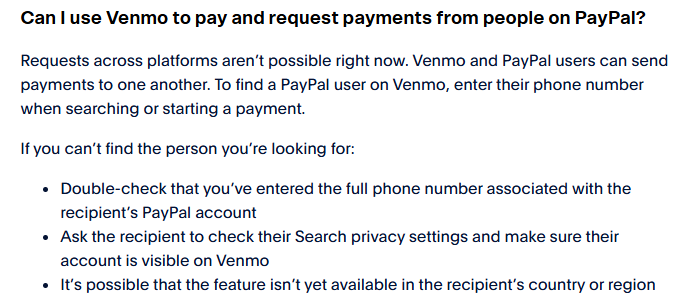
PayPal and Venmo support cross-platform sending, but you cannot currently send payment requests between the two platforms. They also remain separate accounts: interoperability does not mean you can merge your balances or directly link the accounts as one wallet.
For eligibility, fees, and current procedures, see PayPal’s cross-platform payment guide and Venmo’s corresponding instructions.
International Payments: PayPal vs Venmo
PayPal has broader international account availability. People in numerous supported countries can use PayPal for eligible personal and commercial payments, although available features, currencies, and receiving capabilities vary by location.
Venmo has different account requirements. To use a standard Venmo account, users generally must be physically located in the United States, have an eligible US-based mobile number, and meet the applicable age requirements.
However, this does not mean Venmo payments are limited to US recipients. Through its connection with PayPal, eligible US Venmo users can now send personal payments to PayPal users in supported international markets.
For US senders, Venmo’s published fee for sending money to an eligible non-US PayPal account is 5%, subject to a $0.99 minimum and $4.99 maximum international fee. Credit-card-funded international transfers also have an additional 3% fee. Currency conversion rates may include a spread.
PayPal’s US international personal payment schedule likewise specifies a 5% international fee with a $0.99 minimum and $4.99 maximum, in addition to applicable domestic funding charges and currency conversion costs.
In its March 2026 interoperability announcement, Venmo offered a temporary international-fee waiver through August 24, 2026. That promotional waiver should not be mistaken for a permanent fee-free international service.
If you frequently send money internationally, PayPal may be the more practical account to maintain because of its wider range of country-specific services. For a US Venmo user sending a personal payment to an eligible PayPal recipient abroad, the newer interoperability feature may be sufficient. Always review the exchange rate, recipient currency, and total fee before confirming.
PayPal vs Venmo for Online Shopping
PayPal offers a broad online checkout experience. Buyers can pay eligible merchants using supported PayPal funding methods, including linked bank accounts, cards, and available PayPal balance.
Venmo also supports shopping at participating merchants, including eligible mobile apps, websites, and in-person businesses. Merchants using supported PayPal Checkout integrations can offer Venmo as a payment option to eligible US customers.
However, Venmo is not automatically available at every store that accepts PayPal. Whether you can use it depends on the merchant’s checkout integration, your device, and your eligibility.
PayPal’s broader merchant ecosystem makes it a useful option for people who shop across different websites and countries. Venmo can be convenient when an eligible merchant explicitly offers it and you already use the app for personal payments.
Which Has Better Buyer Protection: PayPal or Venmo?
Both services offer purchase protection for eligible transactions. Neither protects every payment automatically, and both apply eligibility requirements, excluded purchase categories, and dispute procedures.
PayPal Purchase Protection
PayPal Purchase Protection may reimburse qualifying purchases when an eligible item does not arrive or is significantly different from the seller’s description.
Eligible Goods & Services payments can qualify, while Friends & Family personal payments are excluded. Buyers must follow the applicable dispute deadlines and provide information PayPal requests. See the official US Purchase Protection terms for the full eligibility rules.
Venmo Purchase Protection
Venmo also provides Purchase Protection for eligible purchases, including authorized merchant payments, qualifying payments to business profiles, and certain payments to personal profiles that are properly identified as purchases.
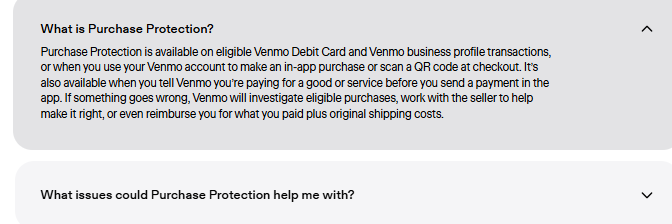
Eligible purchases may receive reimbursement if a product never arrives or is significantly different from what was described. Ordinary personal transfers are not automatically protected. You can review the conditions in Venmo’s Purchase Protection program.
For online shopping, the deciding factor is not simply which app you use, but whether the specific payment qualifies for protection. Never send a commercial payment as a personal transfer merely to avoid transaction fees.
Privacy and Security: Is PayPal or Venmo Safer?
Both services provide account-security and fraud-related tools, but they offer different experiences when it comes to payment visibility.
Venmo’s Social Payment Feed
Venmo has a social feed where certain payment activities can be shared with other users. Its payment privacy settings include:
- Public: Payment activity can be visible to anyone.
- Friends: Payment activity is shared with the participants’ Venmo friends.
- Private: Payment details remain visible to the participants instead of being shared through the wider social feed.
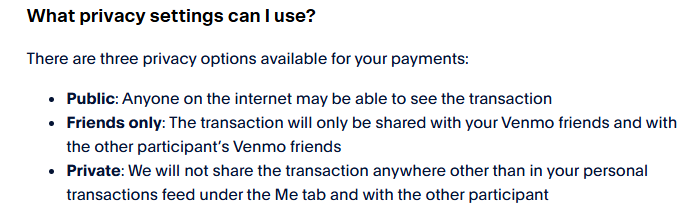
Venmo hides transaction amounts from the social feed. However, participant names, payment notes, and timestamps may be visible depending on the selected privacy settings. The payment participants can still see the transaction amount.
You can change these options through the app’s Privacy settings. Venmo also provides a Find Me setting that controls whether eligible PayPal users can find your Venmo account through cross-platform searches. See Venmo’s privacy settings instructions.
PayPal Privacy Controls
PayPal does not have the same social payment feed. However, your account may still be discoverable through search features when another user has identifying information such as your phone number or email address.
PayPal allows users to manage how they appear in search results, including visibility to eligible Venmo users. Adjusting those preferences can limit the identifying information displayed when someone searches for your account. See PayPal’s search privacy guidance.
PayPal may suit users who prefer not to participate in a social transaction feed. Venmo can still be used privately when its settings are configured appropriately. On either service, verify recipients carefully, secure your account, and avoid sending personal payments to strangers for purchases.
PayPal vs Venmo for Business
Both services support authorized commercial payments, but their business products are designed around different needs.
PayPal for Online Businesses and Freelancers
PayPal offers business tools for accepting customer payments online, creating invoices, integrating checkout into websites, and supporting eligible international transactions.
For a freelancer billing clients across countries or an online store serving a wider customer base, these features can make PayPal a practical option.
PayPal’s US merchant fee schedule lists 2.99% for Send/Receive Money for Goods and Services and 3.49% plus a fixed fee for standard PayPal Checkout transactions. The fixed fee for transactions received in US dollars is $0.49.
These rates apply to different payment products. International charges and other transaction-specific fees can increase the total. Review the official PayPal merchant fees for the service your business uses.
Venmo for US Small Businesses
Venmo business profiles allow eligible US businesses to accept customer payments, display a business profile, share a QR code, and use supported contactless payment features.
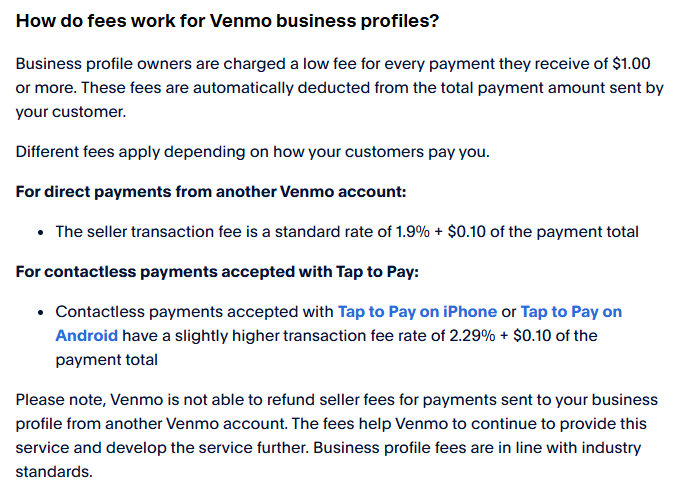
According to Venmo’s fee schedule, direct payments to a business profile generally cost the seller 1.9% plus $0.10. Payments to a personal profile that the buyer tags as a goods-and-services purchase instead have a 2.99% seller fee.
Venmo’s Tap to Pay feature uses a separate fee schedule. The official Venmo materials display differing Tap to Pay figures, so businesses should check the applicable rate shown for their payment method before accepting transactions.
For websites using PayPal’s merchant checkout system, Pay with Venmo is a separate integration. PayPal’s published US merchant rate for that checkout option is 3.49% plus the applicable fixed fee. It should not be confused with a direct payment to a Venmo business profile.
Businesses can review Venmo business profiles and Pay with Venmo through PayPal Checkout to understand which option fits their sales process.
Which Should You Choose: PayPal or Venmo?
The most suitable service depends on the type of payment, the recipient, and the features you need.
- Splitting bills with friends: Venmo is convenient for US users who want quick payments, payment requests, and shared expense tracking. PayPal is also suitable if your contacts already use it.
- Sending domestic payments by debit card: Venmo can be less expensive because eligible personal debit-card payments have no Venmo sending fee, while PayPal generally charges for ordinary card-funded personal payments.
- Shopping online: PayPal is useful when purchasing from a wide variety of merchants. Venmo works well when a participating store offers it at checkout.
- Sending money internationally: PayPal offers broader international account availability. Eligible Venmo users can also send personal payments to supported international PayPal recipients.
- Accepting local customer payments: Venmo business profiles are worth considering for US businesses that rely on direct payments, QR codes, or mobile payment acceptance.
- Running an online business: PayPal provides an extensive merchant payment system with checkout integrations and invoicing tools.
- Prioritizing payment privacy: PayPal avoids Venmo’s social-feed experience. If you prefer Venmo, configure payment visibility and search settings to suit your preferences.
- Paying someone who uses the other app: Direct cross-platform payments are now possible for eligible users, so having different apps no longer always prevents a payment.
You do not necessarily need to choose only one. Maintaining both can make sense if you use Venmo for everyday US payments and PayPal for online purchases, invoicing, or eligible international transactions.
Frequently Asked Questions
Is Venmo Owned by PayPal?
Yes. Venmo is part of PayPal, Inc. The two services operate as distinct payment products, with separate accounts, app experiences, fee schedules, and features.
Can I Link My PayPal and Venmo Accounts?
PayPal and Venmo do not offer a general feature that merges the two accounts or their balances. Eligible users can send personal payments between the services using the cross-platform payment network, but this is different from linking accounts into one wallet.
Can I Use Both PayPal and Venmo?
Yes, provided you meet the respective account requirements. You can maintain separate accounts and use each service for different payment needs. Cross-platform payments do not require you to merge those accounts.
Can You Use Venmo on a Computer?
Venmo supports certain payment and account functions through its website, including sending and requesting money. However, some features are designed for or require the Venmo mobile app. PayPal offers extensive website and mobile account functionality.