
Published: November 7, 2026. Last updated: November 22, 2026.
If you receive an unexpected PayPal invoice or money request, don’t pay it, call any phone number in the message, or click suspicious links. Instead, open PayPal’s official website or app directly, sign in, and check your Activity for the request or an actual payment.
A PayPal invoice scam may involve a fake email that impersonates PayPal or a genuine PayPal-generated invoice created by a scammer. In either case, the goal is often to trick you into sending money, calling fake customer support, or revealing sensitive information.
Receiving an invoice does not automatically mean you’ve been charged. An invoice is a request for payment, not proof that a payment has been completed. You can verify suspicious activity, report an unwanted invoice, and decline a request without paying it.
How to Check if a PayPal Invoice Is a Scam
The safest way to verify a suspicious PayPal invoice is to check your account independently rather than using the links or contact information supplied in the message.
- Open PayPal directly. Type paypal.com into your browser or launch the official PayPal app. Do not use a login link from the suspicious email or text.
- Sign in and open Activity. Look for the invoice, money request, or completed transaction mentioned in the message.
- Check the transaction status. Determine whether the item is simply an unpaid request or whether money has actually been sent.
- Examine the sender and payment description. Look at the business or individual requesting payment, the amount, and the product or service listed.
- Compare it with your records. Check whether you ordered the product, subscribed to the service, or expected a bill from the requester.
- Verify the merchant independently. If the invoice might relate to a legitimate purchase, contact the business using contact details from its official website or your existing records, not the invoice itself.
Finding an invoice inside your real PayPal account confirms that a payment request exists. It does not prove that the person requesting payment is legitimate or that you owe the amount.
If the email describes an unfamiliar charge but no matching payment appears in PayPal Activity, the email may be a fake payment notification. Check the relevant bank or card account directly if you are concerned that an actual charge occurred.
PayPal’s official invoice scam guidance recommends verifying account activity through PayPal itself and avoiding phone numbers or links included in suspicious requests.
How to Report a Fake PayPal Invoice or Money Request
If you find an invoice or money request that you don’t recognize, you can report it directly through PayPal. You do not need to pay the request before reporting it.
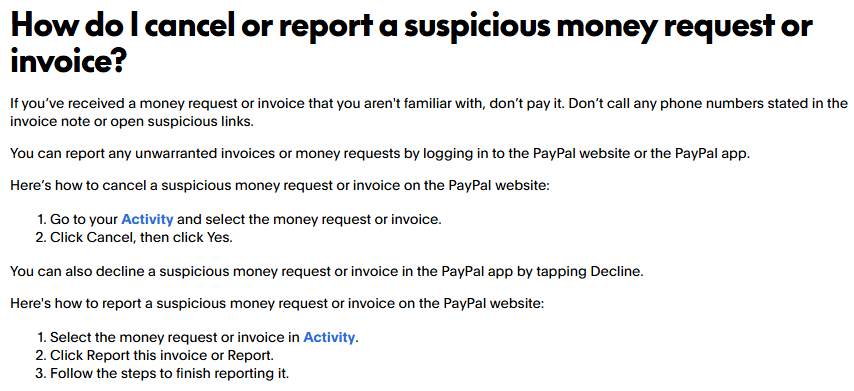
Report a suspicious invoice on the PayPal website
- Sign in to your PayPal account through the official website.
- Open Activity.
- Find and select the suspicious invoice or money request.
- Click Report this invoice or Report, depending on the type of request.
- Follow the instructions displayed by PayPal to complete the report.
Reporting helps PayPal review the suspicious request. If you also want to remove or decline the unpaid request, use the appropriate cancellation option when available.
Cancel or decline an unfamiliar invoice
PayPal provides a separate way to cancel an unwanted invoice or money request from its website:
- Open Activity and select the suspicious request.
- Click Cancel.
- Click Yes to confirm.
In the PayPal mobile app, you can decline a suspicious invoice or money request by selecting Decline when the option is available.
Canceling or declining an unpaid request is different from reversing a completed payment. If you’ve already sent money, review the transaction and use the appropriate payment dispute or fraud-reporting process instead.
See PayPal’s instructions for reporting and canceling suspicious requests.
Report a fake PayPal invoice email
If the suspicious invoice arrived by email, PayPal asks users to forward the entire email to [email protected].
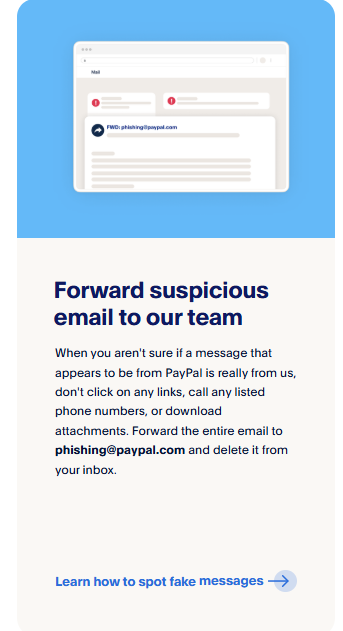
- Open the suspicious message in your email app without following its links or downloading attachments.
- Forward the entire email to [email protected].
- Delete the suspicious message after forwarding it.
PayPal also accepts reports of suspicious text messages through the same address. Its suspicious-message reporting page explains how to forward an SMS from supported devices.
Do not send your PayPal password, one-time security codes, full card details, or identity documents to the phishing reporting address.
What Are the Warning Signs of a PayPal Invoice Scam?
A fake PayPal invoice may look professionally designed, contain accurate branding, or even originate from PayPal’s genuine invoicing system. The circumstances of the request are often more revealing than its appearance.
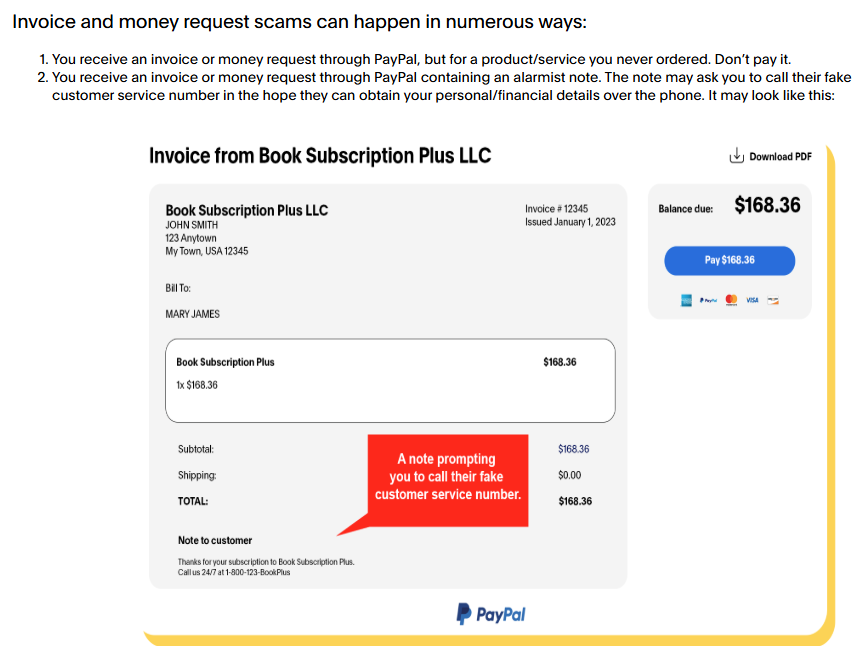
- An unfamiliar purchase: The invoice lists an item, subscription, software product, or service you never ordered.
- An unexpected sender: You have no established business relationship with the person or company requesting payment.
- An urgent support instruction: The message pressures you to call a phone number immediately to cancel a supposed charge.
- Threatening language: It claims you’ll face an immediate financial penalty or account restriction unless you act.
- Requests for sensitive information: Someone asks for your PayPal password, verification code, bank details, or complete payment card information.
- Unusual payment instructions: The sender wants you to transfer money, buy gift cards, or send cryptocurrency to prevent a supposed charge.
- Suspicious links or attachments: The message directs you to an unfamiliar website or asks you to download a document or software.
- Remote access requests: Someone claiming to represent PayPal wants to control your computer or phone to resolve a billing problem.
Grammar mistakes, generic greetings, and unusual formatting can also be warning signs. However, scammers can produce polished messages, so a well-written email is not proof of authenticity.
If a message asks you to take action urgently, verify the alleged charge in PayPal Activity before doing anything else.
How PayPal Invoice and Money Request Scams Work
Scammers can misuse several different payment and messaging features. Understanding the differences helps you identify the appropriate response.
A fraudulent invoice created through PayPal
A scammer can use PayPal’s actual invoicing functionality to request payment for a product or service you never purchased.
Because the request is generated through PayPal, you may receive a genuine notification and find the unpaid invoice inside your account. The fraudulent element is the requester’s claim that you owe money.
For example, an unexpected invoice might describe an unfamiliar software subscription. That description alone does not establish that you subscribed, were charged, or have any obligation to pay.
A completely fake PayPal invoice email
Another scam involves an email that impersonates PayPal without creating any actual invoice in your account.
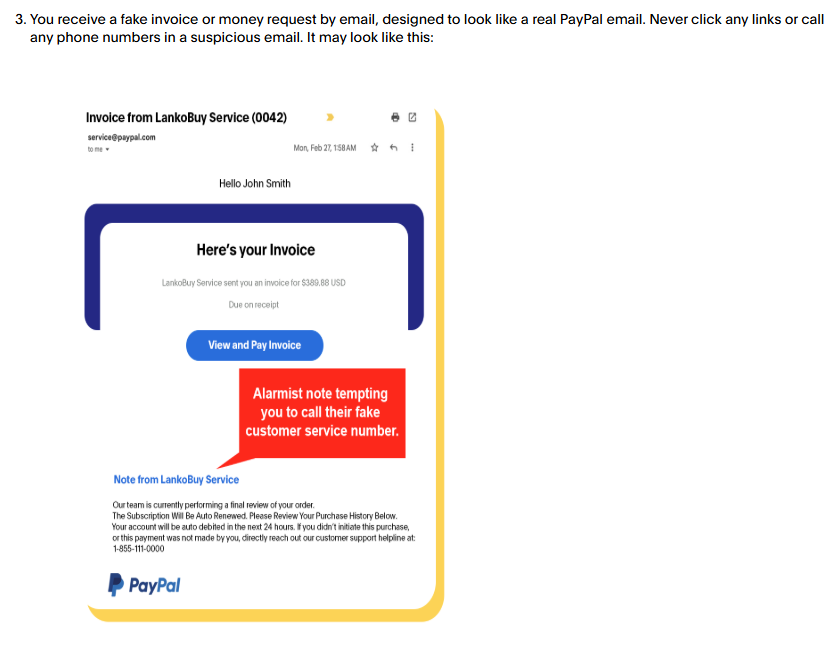
The email may claim that an expensive item has been purchased or that a subscription has renewed. Its purpose may be to direct you to a fraudulent website or convince you to call fake support.
If the alleged transaction is missing from PayPal Activity, do not treat the email as evidence of a completed payment. Check your bank and card activity separately if necessary.
A fraudulent PayPal money request
A PayPal money request scam uses the request-payment feature rather than a formal invoice. The scammer may ask for money directly or include a note about a supposed charge that requires urgent attention.
Like an unpaid invoice, receiving a money request does not automatically transfer funds from your account.
PayPal documents these patterns in its invoice and money request scam guidance.
Can an Official PayPal Email Still Be Part of a Scam?
Yes. A legitimate PayPal notification can contain an invoice or money request created by a dishonest sender.
This happens because the legitimacy of the notification and the legitimacy of the requested payment are two separate questions.
A message may genuinely originate from PayPal’s system, but the invoice could still describe a purchase you never made. An invoice note could also contain a fraudulent phone number or other misleading instructions supplied by the requester.
That’s why checking the email sender, PayPal logo, or message formatting is not enough to determine whether you should pay.
The important question is whether you recognize the transaction and independently know that the person or business has a legitimate reason to request payment.
The University of Michigan’s invoice scam security guidance also describes how fraudulent payment requests can be delivered through legitimate services.
Why Do Fake PayPal Invoices Include Customer Support Phone Numbers?
A common invoice scam attempts to make you believe that a large payment has been made or will be processed unless you call a support number immediately.
The number may connect you to someone impersonating PayPal customer service. Instead of helping you cancel a charge, the person may try to obtain your payment details, security codes, or access to your device.
Some fake support interactions involve requests to install remote access software. Once someone has control of your device, they may be able to view sensitive information or interfere with financial accounts.
You do not need to call an invoice sender’s phone number to verify or cancel an unpaid PayPal request. Use the official PayPal website, app, or Security Center to find trusted support options.
What to Do if You Already Paid a Fake PayPal Invoice
If you’ve already paid a suspicious invoice, take action promptly. The available recovery process depends on how the payment was made and what actually happened.
- Check the payment in PayPal Activity. Open the transaction and confirm its status, amount, recipient, and payment type.
- Report the suspected fraud to PayPal. Use the official fraud reporting page or Resolution Center and describe what happened accurately.
- Review the applicable dispute options. A payment for eligible goods or services may qualify for a dispute under PayPal’s Purchase Protection rules, depending on the circumstances.
- Contact your bank or card issuer when appropriate. If the payment was funded by a bank account or card, explain that you believe the transaction involved a scam and ask what recovery options are available.
- Keep evidence. Save the transaction ID, invoice information, relevant emails, and records of any communication with the suspected scammer.
- Report the scam to the FTC. You can submit a US consumer fraud report at ReportFraud.ftc.gov.
If you approved the payment after being deceived
If a scammer persuaded you to make a payment and you personally authorized it, explain that situation accurately when reporting the scam.
A payment you authorized because you were deceived is not automatically classified as an unauthorized transaction under PayPal’s account security procedures.
PayPal’s Purchase Protection program may cover eligible purchases involving items that never arrive or are significantly different from their descriptions. Eligibility, exclusions, evidence requirements, and filing deadlines apply. A fraudulent invoice payment is not automatically covered, and recovery is not guaranteed.
For eligible purchase disputes, PayPal provides a process through the Resolution Center. If you also have potential rights through your card issuer, review the available options and their requirements before pursuing overlapping disputes.
If someone made a payment without your permission
If you discover an actual PayPal transaction that you did not make or authorize, report it promptly as unauthorized activity.
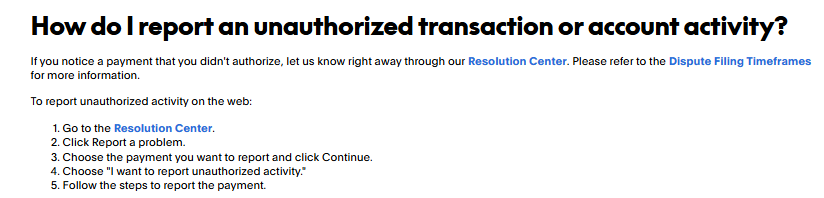
- Sign in to PayPal through its official website.
- Open the Resolution Center.
- Click Report a problem.
- Select the payment and click Continue.
- Choose I want to report unauthorized activity.
- Follow the remaining instructions to submit the report.
Before filing, check whether the transaction might be an authorized automatic payment or a payment made by someone with permission to use the account.
PayPal explains this procedure in its unauthorized transaction reporting guide.
What if You Clicked a Fake PayPal Invoice Link?
The appropriate response depends on whether you only opened a page or also shared information, downloaded software, or allowed someone to access your device.
You clicked a link but entered no information
Close the suspicious page and avoid interacting with it further. Check whether your browser initiated a download, displayed a security warning, or asked for permissions.
Merely opening a suspicious page does not prove that your PayPal account has been compromised. However, if you downloaded or ran an unfamiliar file, check your device using trusted security software.
You entered your PayPal password
Open PayPal directly, change your password immediately, and review your account activity and security settings. If you used the same password on other websites, change it there too.
Enable two-step verification if you have not already done so. On the PayPal website, you can access Settings → Security → 2-step verification and follow the available setup instructions.
If you cannot access your account, use PayPal’s official account recovery and support options.
You shared a verification code or financial details
If you shared a one-time PayPal security code, secure your account and contact PayPal through verified channels. A legitimate PayPal support representative will not ask you to disclose your password or one-time login code over the phone, email, or text.
If you shared card details or banking information, contact the affected financial institution using its official app, website, or a trusted number from your card. Explain what was disclosed and ask about account protection, monitoring, and replacement options.
You installed remote access software or allowed device control
End the remote session and disconnect the affected device from the internet. Remove any unauthorized remote access software and run an updated scan with trusted security tools.
Use a different, trusted device to change passwords for sensitive accounts and enable two-factor authentication. Check your financial accounts for suspicious transactions.
If you cannot confidently remove the software or determine what was accessed, seek help from a reputable device support provider.
The Federal Trade Commission’s recovery guidance provides additional steps for people who have disclosed personal information, paid scammers, or granted access to their devices.
What Should You Do in Each PayPal Invoice Scam Situation?
The correct response depends on whether you have only received a request or have already lost money or shared information.
| Situation | What to do |
|---|---|
| Unexpected unpaid invoice in PayPal | Do not pay. Check the requester, report the invoice, and cancel it if appropriate. |
| Suspicious email with no matching PayPal activity | Do not follow its links. Forward the email to [email protected] and delete it. |
| Unfamiliar money request with a support number | Do not call the number. Report or decline the request through PayPal. |
| Invoice already paid | Report the suspected scam to PayPal and investigate the applicable payment dispute and financial institution options. |
| Actual payment made without authorization | Report unauthorized activity through PayPal’s Resolution Center promptly. |
| Password or verification code disclosed | Secure your account immediately and contact PayPal through verified channels. |
| Remote access granted to a stranger | End access, secure the device, scan for threats, and change sensitive passwords from a trusted device. |
How to Protect Yourself From Future PayPal Invoice Scams
Most suspicious invoice situations become easier to evaluate when you verify account activity independently and avoid reacting to urgent instructions.
- Open PayPal directly through its official website or app when checking unexpected payment messages.
- Check the transaction status before assuming money has been charged.
- Verify unfamiliar merchants using independently obtained contact information.
- Never share passwords, one-time security codes, or full financial details with someone contacting you unexpectedly.
- Do not install remote access software at the request of a stranger claiming to offer billing support.
- Use a unique PayPal password and enable two-step verification.
- Report fraudulent invoices and phishing messages using PayPal’s official reporting procedures.
You can review additional security measures in PayPal’s account protection guide.
Frequently Asked Questions
Can someone take money from my PayPal account just by sending an invoice?
Receiving an invoice or money request does not, by itself, authorize a payment or give the sender access to your PayPal account. The greater risks arise when someone is tricked into paying, sharing account credentials, or granting access to a device.
What happens if I ignore a fake PayPal invoice?
An unsolicited invoice is a request, not proof of a debt or completed payment. You do not need to pay a request simply because it appears in PayPal. Reporting the suspicious invoice and declining or canceling it when appropriate helps you address the unwanted request.
Can I receive a PayPal invoice without having a PayPal account?
Yes. PayPal supports invoicing customers by email, including payment options for eligible recipients who do not have PayPal accounts. However, receiving an invoice email does not mean you have an account, have paid anything, or owe the sender money. Verify the underlying purchase independently before taking action.
Can PayPal guarantee a refund if I paid a scam invoice?
No. Whether money can be recovered depends on the circumstances, funding method, payment type, applicable protections, and dispute requirements. Report suspected fraud promptly and provide accurate transaction details. A report does not guarantee reimbursement.
The Bottom Line
A suspicious PayPal invoice does not necessarily mean a fraudulent charge has occurred. The request could be a genuine invoice generated by a dishonest sender, a fraudulent money request, or an entirely fake notification.
The safest first step is to check your PayPal Activity directly, without using links or phone numbers from the suspicious message. If the invoice is unfamiliar, don’t pay it. Report it through PayPal and decline or cancel it when appropriate.
If you have already sent money or disclosed sensitive information, use the appropriate payment reporting and account security procedures promptly. For US consumers, the FTC fraud reporting service also provides a way to report suspected scams, while IdentityTheft.gov offers recovery guidance when personal identity information has been compromised.