
Published: October 31, 2026. Last updated: November 22, 2026.
To transfer money from PayPal to a bank account, log in to PayPal, open Wallet, select Transfer Money, and choose Transfer to your bank. Select an eligible linked bank account, choose a standard or instant transfer, review the details, and confirm the withdrawal.
For U.S. PayPal accounts, standard bank transfers are generally free and take 1–3 business days. Instant Transfers usually arrive within minutes but have a fee. You can withdraw money from PayPal through either the website or the mobile app.
This guide covers both methods, how to link a bank account, the applicable U.S. transfer fees, and what to do when your money is delayed or a withdrawal fails. PayPal’s official U.S. instructions and fee schedules are linked below.
How to transfer money from PayPal to a bank on the website
You can transfer your available PayPal balance directly to an eligible linked bank account using a desktop or mobile web browser.
- Log in to PayPal. Visit PayPal and sign in to your account.
- Open Wallet. Select Wallet to access your balance and linked payment methods.
- Select Transfer Money. Click Transfer Money, then choose Transfer to your bank.
- Choose your transfer method. Select Standard Transfer for a regular bank withdrawal or Instant Transfer if your bank is eligible and you want faster access to the funds.
- Complete the transfer. Follow PayPal’s on-screen instructions to choose the destination, enter the amount, review any fees, and submit your withdrawal.
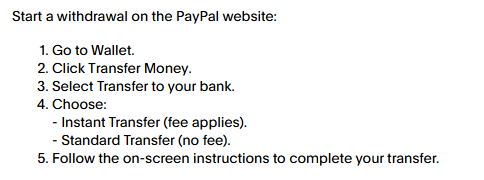
Review the destination bank account and withdrawal amount carefully before confirming. Once a withdrawal has been initiated, PayPal does not allow you to cancel it.
If you have not connected a bank account yet, you must first link an eligible bank account to PayPal.
How to transfer PayPal money to your bank using the app
The PayPal mobile app also lets you withdraw money from your available balance without opening the desktop website.
- Open the PayPal app. Sign in to your account on your phone.
- Tap your PayPal balance. Open the balance section to access withdrawal options.
- Tap Transfer. Select Transfer, then tap Transfer to bank near the bottom of the screen.
- Choose the transfer speed. Select the option to receive your money in minutes, if eligible, or in 1–3 days for a standard bank transfer.
- Confirm the withdrawal. Follow the prompts to select your destination, confirm the amount, review any applicable fee, and tap Transfer Now.
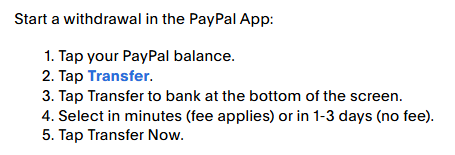
PayPal’s official withdrawal instructions describe these steps for the U.S. app. Available transfer methods depend on your account and linked bank or card.
How to link a bank account to PayPal before withdrawing
If your bank account does not appear when you try to transfer money, you may need to link it first. For a U.S. PayPal account, the bank account generally must be held with a U.S. bank, and the account holder’s name must match the name on PayPal.
Link your bank account on the PayPal website
- Log in to PayPal and open Wallet.
- Click Link a card or bank.
- Select Link a bank account.
- Search for your bank or select it from the available list.
- Follow the instructions to connect your bank instantly, if supported, or enter your bank details manually and select Agree and Link.
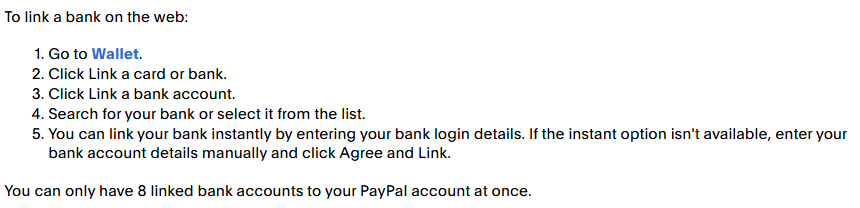
For instant bank linking, PayPal uses a third-party provider to verify your account details. You can alternatively choose manual linking if that option is available and you prefer not to enter your bank login credentials.
How to confirm a bank account with two small deposits
When you link a bank manually, PayPal may require confirmation using two small deposits. These deposits typically arrive within three business days, and each amount is between $0.01 and $0.99.
- Check your bank account for the two small PayPal deposits.
- Log in to PayPal and open Wallet.
- Select the bank account awaiting confirmation.
- Enter the exact amounts of both deposits.
- Click Submit to complete the confirmation.
PayPal later removes the temporary deposits from your bank account. If the deposits do not appear, you can check whether PayPal offers the option to resend them. If your bank combines the deposits into one amount, contact PayPal for help or try instant confirmation.
See PayPal’s bank confirmation instructions for the verification process.
What if PayPal will not let you link your bank?
PayPal may reject a bank account when the account holder’s name does not match, the bank is unsupported, the account has been linked too many times, or incorrect confirmation amounts have been entered.
U.S. PayPal accounts can have up to eight linked bank accounts at once. PayPal also restricts how many PayPal accounts a particular bank account can be linked to over its lifetime.
Check your details against your bank statement and review PayPal’s bank-linking troubleshooting guidance before attempting to add the account again.
Standard Transfer vs. Instant Transfer: Which should you choose?
PayPal offers two main ways to withdraw money to eligible U.S. bank accounts. A Standard Transfer is generally the better choice if you can wait and want to avoid a PayPal withdrawal fee. Instant Transfer is intended for users who need their available balance sooner and have an eligible destination.
| Feature | Standard Transfer | Instant Transfer |
|---|---|---|
| Typical arrival time | 1–3 business days | Usually within minutes, potentially up to 30 minutes |
| U.S. personal account fee | Free without currency conversion | 1.75%; $0.25 minimum and $25 maximum |
| U.S. business account fee | Free without currency conversion | 1.50%; $0.50 minimum for USD withdrawals |
| Bank eligibility | Eligible linked bank account | Eligible bank account supporting Instant Transfer |
| Best suited for | Transfers that are not urgent | Faster access to available funds |
The rates above are published in PayPal’s U.S. Consumer Fees and U.S. Merchant Fees. The consumer schedule was last updated on May 19, 2026, and the merchant schedule on November 4, 2026.
Instant Transfer is not available for every bank account, and transaction limits apply. PayPal displays the available withdrawal options and applicable fee before you confirm the transfer.
How much does PayPal charge to transfer $100 instantly?
For an eligible $100 Instant Transfer from a U.S. personal account, PayPal’s 1.75% fee is $1.75. With the fee deducted from the withdrawal amount, the remaining amount is $98.25.
For a U.S. business account, the published Instant Transfer rate is 1.50%, producing a $1.50 fee on the same $100 withdrawal and leaving $98.50.
Personal account Instant Transfer fees in USD have a $0.25 minimum and $25 maximum. For instance, the usual 1.75% calculation on a $2,000 personal withdrawal would be $35, but the $25 fee cap applies, assuming the transaction is otherwise eligible.
PayPal’s business fee schedule has a different structure, with a $0.50 minimum fee for USD Instant Transfers. Do not apply the personal account’s $25 maximum fee automatically to business withdrawals.
How long does it take to transfer money from PayPal to a bank?
For U.S. accounts, standard withdrawals to a linked bank typically complete within one business day but may take up to three business days, depending on the receiving bank’s processing procedures.
Instant Transfers usually complete within minutes. However, PayPal notes that the bank’s processing system can take up to approximately 30 minutes, and additional review or processing issues can affect the expected arrival time.
Standard transfers initiated after 7:00 p.m. Eastern Time, or on weekends and holidays, may take an additional business day to arrive. Business days do not normally include weekends or banking holidays.
A transfer marked Completed in PayPal does not necessarily mean the receiving bank has already credited your account. It means PayPal has processed and sent the withdrawal. The bank may still need time to complete its part of the transaction.
How to check the status of a PayPal bank transfer
If you have requested a withdrawal but the money has not appeared in your bank account, check the transaction status before trying to transfer the amount again.
- Log in to your PayPal account.
- Go to Activity.
- Find and select the bank withdrawal.
- Review the status and any related notifications.
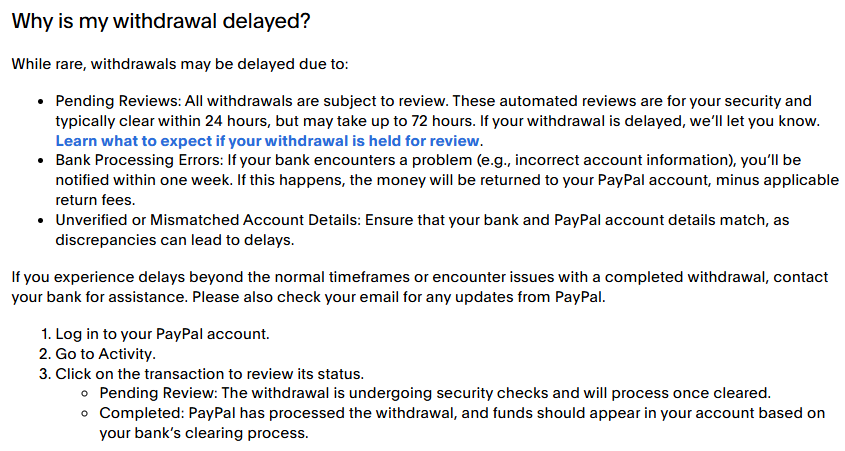
A Pending Review status means PayPal is performing checks before processing the withdrawal. These reviews normally clear within 24 hours but can take up to 72 hours.
A Completed status means PayPal has processed the transaction. If the expected arrival period has passed and your bank still does not show the funds, contact your bank and check your email for any PayPal notifications.
PayPal explains these statuses in its withdrawal tracking help page.
Why can’t I transfer money from PayPal to my bank?
A PayPal withdrawal may be unavailable, declined or delayed for several reasons. The most useful next step depends on whether PayPal refuses to start the transfer or the transfer has already been submitted.
Your funds are pending or unavailable
Money that is pending or held may not be available for withdrawal. Check your PayPal balance and the relevant payment details to see whether the funds are available or still subject to a hold.
You generally need enough available funds to cover the withdrawal and any applicable fee. Wait until the funds become available or follow PayPal’s instructions for resolving the underlying hold.
Your linked bank details do not match
PayPal may reject or delay a withdrawal when your bank details are incorrect or the bank account holder’s name differs from the name registered with PayPal.
Check the account information against your bank records. If the linked information is incorrect, PayPal recommends removing the bank account and linking it again with the correct details.
Your bank does not support Instant Transfer
Not all linked bank accounts are eligible for Instant Transfer. If the instant option is unavailable, you may still be able to select Standard Transfer to the same bank.
Another option is to link an eligible debit card and check whether that card supports the withdrawal method you need.
Your PayPal account has a limitation
PayPal can temporarily restrict certain account functions, including withdrawals, when it needs additional information or identifies activity requiring review.
Visit the PayPal Resolution Center or check your account notifications for details. Complete any verification steps that PayPal requests through your account.
Do not try to bypass an account limitation by using another person’s account or bank details. PayPal provides additional guidance on account limitations and how to resolve them.
Your withdrawal exceeds a transfer limit
PayPal applies withdrawal limits based on the account, transfer method and other eligibility factors. Its published U.S. schedules list a maximum of up to $25,000 per transaction for an Instant Transfer to a bank account.
Other transfer methods have their own limits. If PayPal indicates that the requested amount exceeds your permitted limit, review the amount and the limits displayed in your account before trying again.
Your bank returned or rejected the transfer
A receiving bank may reject a withdrawal because of incomplete or incorrect account details or another bank processing issue.
PayPal states that failed withdrawals caused by incorrect or incomplete information should generally be returned to the PayPal balance within one week. Any applicable charges depend on the relevant fee terms.
If you receive an error message, follow the instructions in PayPal’s transfer error guide. If the withdrawal is already marked completed and the expected bank processing time has passed, contact the receiving bank for assistance.
Can you cancel a PayPal transfer to your bank?
No. PayPal states that a withdrawal cannot be canceled once it has been initiated. Its automated system begins processing withdrawal requests immediately.
If you selected the wrong amount or bank account, check the withdrawal’s status and consider contacting your bank to ask whether any assistance is possible. A bank reversal is not guaranteed.
If the transfer completes successfully but you need the money back in PayPal, you may be able to add money from your linked bank using the available funding options. If the transfer fails, the funds may instead be returned to your PayPal balance.
PayPal explains the available options in its withdrawal cancellation policy.
Can you cash out PayPal without a bank account?
You may be able to access your PayPal funds without transferring them directly to a linked bank account. Available alternatives depend on your U.S. account, eligibility and the withdrawal services PayPal offers you.
Transfer money to an eligible debit card
PayPal supports withdrawals to certain linked Visa, Mastercard and Discover debit cards. Depending on eligibility, you may be offered an Instant Transfer or a Standard Transfer.
Instant debit card transfers generally arrive within minutes, although some banks can take longer to settle them. Standard transfers to eligible debit cards typically take approximately 48 hours and are listed as free when no currency conversion is involved.
The instant withdrawal fees for eligible U.S. personal debit card transfers follow the same published percentage, minimum and maximum fee structure as personal Instant Transfers to bank accounts. Business debit card withdrawal fees follow the applicable merchant fee schedule.
See PayPal’s debit card withdrawal instructions for supported cards, timing and limits.
Request a check from PayPal
Eligible U.S. users can request a paper check instead of an electronic withdrawal. PayPal generally delivers checks within 5–10 business days, and the minimum check withdrawal amount is $1.51.
PayPal lists a $1.50 check withdrawal fee for personal accounts without a linked PayPal Balance account. Check withdrawals also have address and eligibility requirements, and checks cannot be mailed to P.O. boxes.
For users who frequently need access to their available PayPal balance, an eligible PayPal Debit Card may offer another option, subject to the card’s terms, fees and withdrawal limits.
Frequently asked questions
Can I transfer my entire PayPal balance to my bank?
You can generally withdraw your available balance up to the applicable transfer limits, provided the withdrawal destination is eligible. Pending or held funds may not be withdrawable, and an Instant Transfer fee can reduce the amount delivered to your bank.
Can I transfer PayPal money to someone else’s bank account?
For a U.S. PayPal account, the linked bank account must generally be in the same name as the PayPal account holder. If you want to pay another person, use an appropriate PayPal payment method rather than attempting to withdraw your balance to a bank account held in someone else’s name.
Why is Instant Transfer not showing in PayPal?
Your bank account or debit card may not support PayPal Instant Transfer, or the option may be unavailable because of account restrictions or eligibility requirements. Check whether Standard Transfer is offered or whether another eligible linked destination is available.
Are PayPal bank transfer fees the same in every country?
No. PayPal withdrawal methods, fees, processing times and eligibility rules depend on the country where the account is registered. The fee figures in this guide apply to U.S. PayPal accounts. Users elsewhere should consult their country’s official PayPal withdrawal instructions and fee schedules.
Choosing the best way to withdraw your PayPal balance
For an eligible U.S. bank account, Standard Transfer is usually the simplest way to move money from PayPal without paying a withdrawal fee. It generally takes 1–3 business days and is a practical option when you do not need immediate access to the funds.
Instant Transfer is useful when speed matters and your bank supports it, but the withdrawal fee and transfer limit should be reviewed before confirmation. For personal accounts, the published fee is 1.75%, subject to the USD minimum and maximum; business accounts have a separate 1.50% rate and minimum fee.
Before submitting any withdrawal, confirm that the money is available, the receiving account is correct, and the transfer method matches your needs. If the money does not arrive as expected, review the transaction in PayPal Activity and follow the guidance for its status.
Official references: PayPal withdrawal instructions, U.S. Consumer Fees, U.S. Merchant Fees, and withdrawal status guidance.