
Published: October 27, 2026. Last updated: November 22, 2026.
Yes, you can use PayPal without a bank account. In the United States, you can create a PayPal account, make payments with an eligible debit or credit card, and receive money without linking an external bank account. You may also be able to hold and spend money through PayPal Balance after completing identity verification.
However, not every PayPal feature works without a bank account or another eligible payment method. Paying for purchases, receiving money, adding cash, and withdrawing funds have different requirements.
Whether you prefer not to connect your bank account or do not have one at all, here is what you can do with PayPal, how to get started, and which restrictions matter.
What Can You Do With PayPal Without a Bank Account?
A linked bank account is not mandatory for every PayPal transaction. What matters is whether you have an accepted payment method, access to eligible funds, and the account verification required for the service you want to use.
| PayPal activity | Possible without a linked bank? | Requirements |
|---|---|---|
| Create a PayPal account | Yes | Meet registration and eligibility requirements |
| Shop online | Yes | Eligible debit or credit card, or usable PayPal Balance |
| Send money | Yes | Accepted funding method and any required verification |
| Receive payments | Generally, yes | PayPal account, confirmed email, and applicable identity checks |
| Hold received funds | Yes, if eligible | PayPal Balance account and identity verification |
| Add cash at stores | Yes, if eligible | PayPal Balance and applicable verification requirements |
| Withdraw cash at an ATM | Yes, if eligible | Activated PayPal Debit Card and available balance |
| Transfer money to a debit card | Yes, if eligible | Supported linked debit card and receiving financial account |
The main distinction is between not linking a bank account and not having a bank account or payment card at all. Someone with a credit card can usually make eligible PayPal purchases more easily than someone with no external funding method.
How to Set Up PayPal Without Linking a Bank Account
If you have an eligible debit or credit card, you can generally use it for PayPal payments without connecting your bank account directly.
1. Create a PayPal account
- Visit the official PayPal website.
- Select the option to sign up for a new account.
- Choose a Personal account for ordinary personal payments and shopping.
- Provide your required personal and contact information.
- Confirm your email address and complete any requested security checks.
US personal account holders generally must be at least 18 years old, or the age of majority in their state of residence, and meet PayPal’s residency and other eligibility requirements.
You do not have to link a bank account merely to register. However, PayPal may request additional information before allowing certain transactions or account features.
2. Link a debit or credit card
You can add an eligible payment card instead of linking your bank account.
- Sign in to PayPal.
- Open Wallet.
- Select Link a debit or credit card.
- Enter the requested card details.
- Complete any additional confirmation steps displayed by PayPal.
PayPal supports major card networks, including Visa, Mastercard, American Express, and Discover. Certain prepaid cards may also work, although acceptance depends on the card issuer and PayPal’s checks.
Linking a debit or credit card provides a potential payment method, but it does not necessarily satisfy every separate PayPal account-verification requirement.
3. Pay through PayPal
At an online store that accepts PayPal, select PayPal at checkout, sign in, and choose your eligible linked card or another available funding method.
You can also send money to another person through PayPal’s Send and Request feature. Enter the recipient’s details, choose the appropriate payment type, review the payment method and any applicable fee, and confirm the transaction.
You do not need to add money to PayPal Balance before every card-funded purchase. PayPal can charge your selected eligible card directly, subject to authorization and account requirements.
Can You Receive Money on PayPal Without a Bank Account?
Yes. Someone can generally send money to the email address or mobile number associated with your US PayPal account even if you have not connected a bank account.
To accept a payment, you need a PayPal account and a confirmed email address. PayPal may also require additional identity checks, especially for new accounts or particular transactions.
After receiving money, you can review the payment in your account. Your options for keeping, spending, or withdrawing it depend on your account status and available services.
PayPal explains the receiving process in its official receiving-money guide.
How to keep received money in PayPal Balance
US personal accounts can access a separate PayPal Balance account after meeting the applicable requirements. This allows eligible users to hold money received through PayPal and use it for supported purchases and transfers.
When you receive a payment without an existing PayPal Balance account, PayPal may provide an option to accept the funds and keep them in PayPal.
- Open the payment notification in your PayPal account.
- Select Accept the Money if prompted.
- Choose Keep it in PayPal when available.
- Review the applicable agreements and disclosures.
- Provide the information required for identity verification.
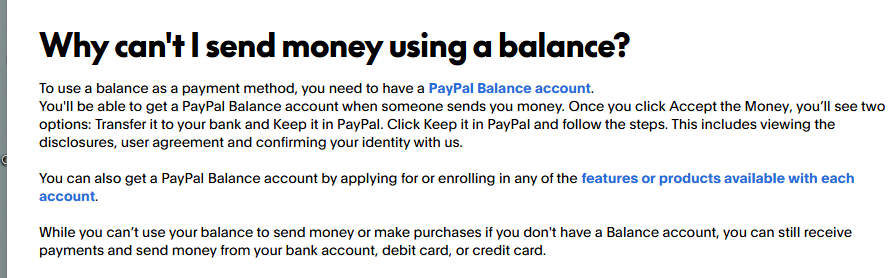
To establish a US PayPal Balance account, PayPal must verify identifying information that includes your name, physical address, date of birth, and taxpayer identification number. Additional documents or verification steps may be requested.
If PayPal cannot verify your identity, you may still be able to send payments using an eligible debit or credit card, but you cannot use an unverified balance as a payment method.
These requirements are explained in the PayPal Balance Terms and Conditions.
Can You Use PayPal Without a Bank Account or Debit Card?
Yes, but your options become more limited if you have neither an external bank account nor a debit card.
You may still be able to open a PayPal account and receive money. If you meet the requirements for PayPal Balance, you can potentially hold and spend eligible funds without connecting an external payment card.
However, an empty PayPal account does not provide money for purchases. Without a linked funding method or usable PayPal Balance, you generally cannot fund a normal PayPal payment.
If you have a credit card but no bank account or debit card, you may be able to use that credit card for eligible PayPal payments instead.
Prepaid cards are another possibility, but compatibility is not guaranteed. Cards issued on supported payment networks may be accepted, while some prepaid or gift cards have restrictions that prevent PayPal transactions.
For someone without any external payment method, the most important first step is confirming eligibility for PayPal Balance and understanding how received funds can eventually be accessed.
How to Add Money to PayPal Without a Bank Account
Eligible US PayPal Balance customers have several ways to receive or add funds without linking a conventional bank account.
Add cash at participating stores
PayPal allows eligible customers to add physical cash to their PayPal Balance accounts at participating retail locations, including selected Walmart, CVS, Walgreens, 7-Eleven, and Dollar General stores.
To add cash using the PayPal app:
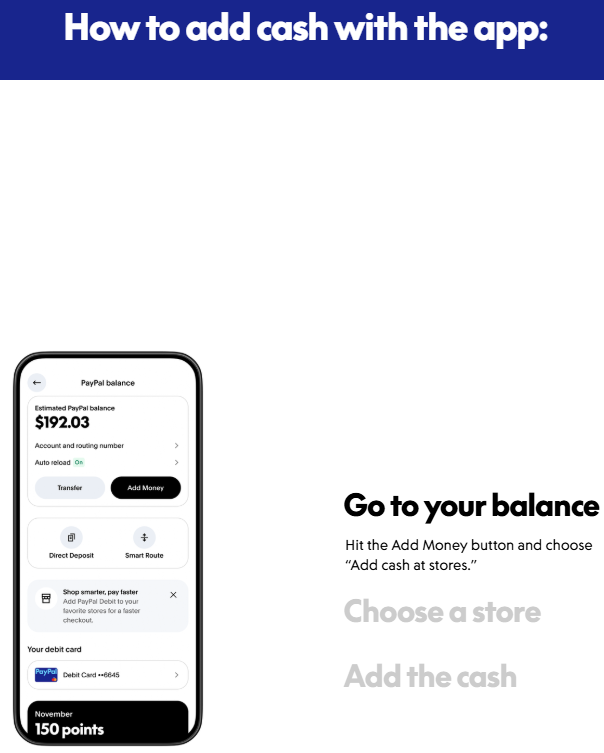
- Open the PayPal app and select PayPal balance.
- Choose Add Cash at Stores.
- Select a participating retailer.
- Generate the barcode when you are at the store.
- Show the barcode to the cashier and provide the cash.
- Keep your receipt and confirm that the money appears in your balance.
PayPal states that the barcode expires after 15 minutes. Eligible customers can also add cash by swiping a PayPal-branded Debit Card at participating stores.
The published retail cash addition range is $20 to $500 per transaction, with a fee of up to $3.95, depending on the retailer. Other daily, monthly, and transaction-count limits apply.
You need a PayPal Balance account, and the feature is subject to account verification requirements. PayPal’s troubleshooting guidance specifies that your account must have Verified status. Having a Balance account alone does not guarantee access to retail cash loading.
See PayPal’s Add Cash at Stores instructions for supported locations, limits, and fees.
Receive payments from other PayPal users
Receiving an eligible payment is another way to get money into PayPal without making a bank transfer.
Once the payment is accepted and available, eligible PayPal Balance customers can use the funds for supported transactions. Payments for goods or services may be subject to merchant fees, holds, and additional account requirements.
Use PayPal Direct Deposit
Eligible US PayPal Balance customers can receive supported paychecks and qualifying payments through Direct Deposit without linking a separate personal bank account.
To set it up, open your PayPal balance in the app, select Direct Deposit, choose Set Up Direct Deposit, and follow the instructions. PayPal may let you find your employer or obtain the account and routing numbers needed by the payer.
Direct Deposit is available for eligible PayPal Balance accounts, not PayPal Business accounts. The payer must be located in the United States and support the deposit arrangement.
PayPal provides additional information in its Direct Deposit setup guide.
Add funds using an eligible debit card
If you have a supported debit card, PayPal may allow you to add funds directly from the card to your PayPal Balance account without separately connecting the associated bank account.
On the PayPal website, open Wallet, select Transfer Money, and choose the option to add money from a bank or debit card. Available transfer methods depend on your card and account eligibility.
This method avoids linking a bank account directly to PayPal, but the debit card still needs an underlying source of funds.
How to Withdraw Money From PayPal Without a Bank Account
You do not always need to transfer PayPal funds to a traditional bank account before accessing them. However, each withdrawal method has its own eligibility requirements.
Withdraw cash with a PayPal Debit Card
The PayPal Debit Card allows eligible US users to spend money from PayPal Balance and withdraw cash at compatible ATMs.
To make an ATM withdrawal, you need an activated physical PayPal Debit Card, its PIN, and sufficient available funds.
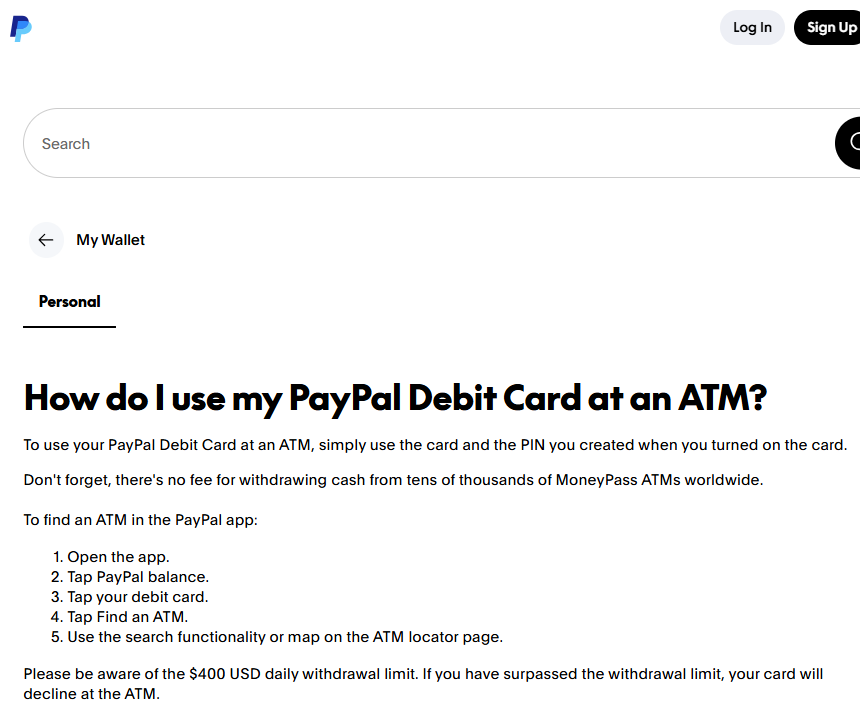
PayPal’s published ATM withdrawal limit is $400 per day. Withdrawals at participating MoneyPass ATMs in the United States have no PayPal ATM withdrawal fee. Withdrawals at non-MoneyPass ATMs are subject to a $2.50 PayPal fee, and ATM operators may charge additional fees.
You can find participating ATMs in the PayPal app by opening your balance, selecting your debit card, and choosing the ATM locator.
Read the official PayPal Debit Card ATM guidance for the applicable limits and conditions.
Transfer money to an eligible debit card
PayPal also supports withdrawals to certain linked debit cards. This can be useful if you have an eligible card but prefer not to connect its associated bank account directly to PayPal.
Depending on eligibility, PayPal offers Instant Transfers and Standard Transfers. Instant Transfers usually complete within minutes and incur a fee. Standard Transfers to eligible debit cards generally take approximately 48 hours.
Not every debit card supports incoming transfers. The eligible destinations appear when you initiate a withdrawal.
A transfer to a debit card also sends money to the financial account associated with that card. It is therefore different from withdrawing money without any external financial account.
Request a check by mail
Eligible US PayPal customers can request a withdrawal by mailed check through the Transfer Money options.
PayPal’s withdrawal requirements specify that a verified linked debit card, credit card, or bank account with matching billing and mailing information is needed. Checks cannot be mailed to P.O. boxes.
Check withdrawals generally take several business days, and a fee may apply. You must also have a way to cash or deposit the check after receiving it. Check-cashing services may impose their own identification requirements and fees.
For the full requirements, review PayPal’s withdrawal options and withdrawal processing guidance.
Do You Need to Verify PayPal Without a Bank Account?
PayPal may require different types of verification depending on the activities you want to complete.
- Email confirmation: Confirms access to the email address associated with your PayPal account. It is important for accepting payments but does not unlock every PayPal feature.
- Card confirmation: Helps establish ownership or authorization of a linked payment card.
- Identity verification: Requires PayPal to verify personal identifying information, including information needed to establish a PayPal Balance account.
- Account Verified status: A separate account status that can affect limits and access to certain services.
In its US account-verification guidance, PayPal lists adding and confirming a bank account or applying for and being approved for a qualifying PayPal Credit product as verification methods. Merely adding a debit or credit card should not be assumed to satisfy those requirements.
Applying for credit is a separate financial commitment with its own eligibility requirements and should not be treated as a routine requirement for opening or using a basic PayPal account.
You can review the distinction in PayPal’s account-verification guidance.
Limitations of Using PayPal Without a Bank Account
Although PayPal can work without a linked bank account, several restrictions may affect how you use it.
- Payment funding: Without an eligible card or usable PayPal Balance, you may not have a way to fund a transaction.
- Account verification: Some features require additional identity checks, financial information, or Verified status.
- Withdrawal options: ATM cash withdrawals require an eligible PayPal Debit Card, while external transfers require a supported destination.
- Fees: Cash reloads, certain card-funded transfers, Instant Transfers, and some ATM withdrawals may involve fees.
- Transaction limits: Limits depend on the account, payment method, and service being used.
- Payment reviews: Transactions may be delayed, held, or restricted while PayPal performs security and compliance checks.
PayPal is not a traditional bank, and a PayPal Balance account does not automatically provide the same features or protections as a checking account. Certain balances may qualify for pass-through FDIC insurance under specific conditions, but PayPal itself is not an FDIC-insured bank.
If you plan to receive money for essential expenses, make sure you have an eligible withdrawal or spending method before depending on PayPal as your primary way to access funds.
Which PayPal Option Works for Your Situation?
The most suitable arrangement depends on whether you already have a card, can complete identity verification, and need to spend or withdraw money.
| Your situation | Practical option |
|---|---|
| You have a bank account but do not want to link it | Use an eligible debit or credit card for supported PayPal payments. |
| You have no bank account but can verify your identity | Check your eligibility for PayPal Balance and the PayPal Debit Card. |
| You have neither a bank account nor a payment card | Review whether you qualify to receive and hold money through PayPal Balance, and confirm how you can access it. |
| You have received money and need cash | Check PayPal Debit Card eligibility, supported debit-card transfers, or check withdrawal requirements. |
There is no single arrangement that works for every PayPal user. Checking both payment eligibility and withdrawal access before receiving funds can help you avoid unnecessary delays.
Can You Use PayPal Without a Bank Account Outside the US?
PayPal’s requirements vary by country. The account features described in this guide primarily apply to customers registered in the United States.
Some countries have different rules for receiving payments, linking cards, verifying accounts, and withdrawing funds. Features such as PayPal Balance, US Direct Deposit, retail cash loading, and the US PayPal Debit Card may be unavailable elsewhere.
If your PayPal account is registered in another country, use the official PayPal Help Center and account agreements for that location to confirm which services are supported.
The Bottom Line
You do not need a linked bank account for every PayPal activity. In the United States, you can use an eligible card to make payments, receive money, and potentially hold or spend funds through PayPal Balance after meeting the necessary requirements.
If your goal is online shopping, an eligible credit or debit card may be sufficient. If you want to receive and use money without a traditional bank account, PayPal Balance and the PayPal Debit Card may provide additional options. Before relying on either service, confirm your eligibility, applicable fees, and access to withdrawals.